Desktop studio monitor speakers are built for near-field listening — sitting two to four feet away — which makes them a very different purchase than regular bookshelf or computer speakers. My top overall pick is the PreSonus Eris 3.5, a powered pair that balances accurate mids, useful rear tuning controls and a compact footprint at a sensible price. If you want a step up in low-end authority and detail, the JBL 305P MkII (sold individually) is the strongest performer here, while the Edifier MR4 offers the best sound-per-dollar for buyers who mostly want great music playback with flat-monitor honesty. The main tradeoffs you’ll face are woofer size versus desk space, single-speaker pro monitors versus convenient powered pairs, and accuracy versus the warmer, bass-boosted character of multimedia speakers. Continue reading for the full breakdown of all 14 options and which one fits your room, desk and budget.

Get audio and creator gear delivered free — and shop member deals
- Fast, free delivery on millions of items
- Access to Prime Big Deal Days deals on October 6–7
- Prime Video, Amazon Music and more included
Complete the kit


Key Takeaways
- The PreSonus Eris 3.5 earns best overall because it’s the only budget pair that combines acoustic tuning controls, front-panel volume and genuinely flat response — most rivals at this size force you to accept the sound as-is.
- A clear divide emerged between true studio monitors (Eris, MR4, MR3, JBL 305P MkII) and multimedia speakers dressed as monitors (Edifier R1280T, Sanyun SW208, generic desktop pairs) — only the former are suitable for mixing decisions.
- The JBL 305P MkII is sold as a single speaker, so buyers comparing it against pairs need to double the cost; even so, its 5-inch woofer and waveguide deliver the most detailed imaging in this lineup.
- Several products appear in multiple colorways (Ortizan C7 in black and white, Edifier MR3 in white and black) with identical acoustics — the choice is purely aesthetic, not performance-based.
- Bluetooth-only convenience models like the Sanyun SW208 and Bluetooth-equipped Ortizan C7 trade accuracy for ease of use; they suit content consumption, not production work where you need to hear flaws.
| PreSonus Eris 3.5 Powered Studio Monitors (Pair) |  | Best Overall | Type: Powered studio monitors | Quantity: Pair | Amplification: 50 watts | VIEW LATEST PRICE | See Our Full Breakdown |
| White Powered Desktop Speakers, Pair |  | Best for Simple Wireless Desktop Listening | Audio output: Stereo | Driver size: 3 inches | Enclosure material: Wood | VIEW LATEST PRICE | See Our Full Breakdown |
| Powered Computer Speakers, Black Pair |  | Best for Compact Multi-Source Playback | Power: 60W | Driver size: 3 inches | Enclosure material: Wood | VIEW LATEST PRICE | See Our Full Breakdown |
| Ortizan C7 Powered Studio Monitors, Pair, Black |  | Best for Flexible Studio Connectivity | Model: C7 | Quantity: Pair | Color: Black | VIEW LATEST PRICE | See Our Full Breakdown |
| Mackie CR3.5 Studio Monitors, Pair, 3.5-Inch Woofers, Tone Knob, Black |  | Best for Placement and Tone Adjustment | Brand: Mackie | Model: CR3.5 | Type: Studio monitors | VIEW LATEST PRICE | See Our Full Breakdown |
| Edifier MR4 4-Inch Active Studio Monitor Speakers |  | Best Dual-Mode Pick | Speaker type: Active near-field studio monitors | Tweeters: 1-inch silk dome | Woofers: 4-inch composite | VIEW LATEST PRICE | See Our Full Breakdown |
| JBL 305P MkII 5-Inch Powered Studio Monitor Speaker, Single, Black |  | Best Pro-Grade Single Monitor | Speaker configuration: Single monitor | Woofer diameter: 5 inches | Amplifier power: 82 watts | VIEW LATEST PRICE | See Our Full Breakdown |
| M-Audio BX3 3.5-Inch Wired Studio Monitor Speakers (Pair) |  | Best for Beginners | Speaker configuration: One active speaker and one passive speaker | Power: 120W | Woofer size: 3.5 inches | VIEW LATEST PRICE | See Our Full Breakdown |
| JBL 305P MkII 5-Inch 2-Way Powered Studio Monitor Speakers (Pair) | | Best Overall Studio Pair | Quantity: 2 monitors (pair) | Woofer: 5 inches | Tweeter: 1 inch | VIEW LATEST PRICE | See Our Full Breakdown |
| Ortizan C7 Powered Studio Monitor Speakers, Pair, Bluetooth 5.3, White |  | Best Hybrid Desk Speaker | Speaker type: Powered studio monitors | Quantity: Pair | Color: White | VIEW LATEST PRICE | See Our Full Breakdown |
| Edifier R1280T Powered Bookshelf Speakers |  | Best Budget Desktop Pair | Speaker type: Powered bookshelf speakers | Configuration: 2.0 stereo pair | Tweeter: 13mm silk dome | VIEW LATEST PRICE | See Our Full Breakdown |
| Edifier MR3 Powered Studio Monitor Speakers, White |  | Best Hybrid for Mixing and Everyday Listening | Type: Powered 2.0 studio monitor speakers | Frequency response: 52 Hz–40 kHz | RMS output: 18 W × 2 | VIEW LATEST PRICE | See Our Full Breakdown |
| Edifier MR3 Powered Studio Monitor Speakers |  | Best App-Controlled Compact Monitor | Frequency response: 52 Hz–40 kHz | RMS output: 18 W × 2 | Peak SPL: 92.5 dB | VIEW LATEST PRICE | See Our Full Breakdown |
| Sanyun SW208 3-Inch Active Bluetooth 5.0 Bookshelf Speakers with 24-Bit DAC | 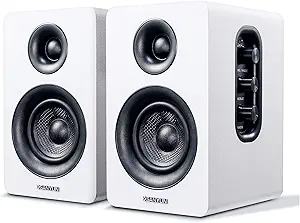 | Best Compact USB Option | Model: SW208 | Speaker type: Active bookshelf speakers | Driver size: 3 inches, carbon fiber | VIEW LATEST PRICE | See Our Full Breakdown |
| desktop studio monitor speaker | Inputs |
|---|---|
| PreSonus Eris 3.5 Powered Stud | Balanced TRS, RCA, and front-panel aux |
| White Powered Desktop Speakers | — |
| Powered Computer Speakers | — |
| Ortizan C7 Powered Studio Moni | USB, RCA, 3.5 mm AUX, 6.35 mm balanced TRS |
| Mackie CR3.5 Studio Monitors | — |
| Edifier MR4 4-Inch Active Stud | 1/4-inch balanced TRS, RCA, AUX |
| JBL 305P MkII 5-Inch Powered S | Balanced XLR and 1/4-inch TRS |
| M-Audio BX3 3.5-Inch Wired Stu | 1/4-inch, 1/8-inch, and RCA |
| JBL 305P MkII 5-Inch 2-Way Pow | Balanced XLR and 1/4-inch TRS |
| Ortizan C7 Powered Studio Moni | USB, RCA, 3.5 mm AUX, 6.35 mm TRS |
| Edifier R1280T Powered Bookshe | 2 AUX inputs (3.5mm or dual RCA) |
| Edifier MR3 Powered Studio Mon | Balanced TRS, RCA, AUX, Bluetooth 5.4 |
| Edifier MR3 Powered Studio Mon | TRS, RCA, AUX, Bluetooth |
| Sanyun SW208 3-Inch Active Blu | — |
More Details on Our Top Picks
PreSonus Eris 3.5 Powered Studio Monitors (Pair)
The PreSonus Eris 3.5 is my most balanced pick for a desktop setup that needs to handle production and everyday listening. Its balanced TRS inputs, RCA, and front aux make it easier to connect studio equipment and casual sources than the cable-focused Mackie CR3.5. High- and low-frequency tuning controls also give me a way to adapt the sound to a desk or room, while the front headphone jack is handy for late sessions. The 3.5-inch woofers and 80 Hz lower frequency limit suit nearfield use, though they cannot deliver the deepest bass or fill a large room. Compared with the more connection-flexible Ortizan C7, the Eris has fewer listed digital and wireless options, but its clearly stated power and frequency range make its capabilities easier to judge.
Pros:- Complete powered stereo pair
- Balanced TRS, RCA, and front aux inputs accommodate studio and everyday sources
- High- and low-frequency controls help adapt playback to the listening space
- Front headphone jack supports private listening
Cons:- 3.5-inch woofers and an 80 Hz lower limit constrain deep bass
- No Bluetooth or USB audio input is listed
Best for: Home producers and desktop listeners who want a stereo pair with room tuning, balanced inputs, and a headphone jack
Not ideal for: Buyers who need strong deep bass, large-room output, or built-in Bluetooth and USB audio
- Type:Powered studio monitors
- Quantity:Pair
- Amplification:50 watts
- Woofer:3.5-inch woven-composite
- Tweeter:1-inch silk-dome
- Frequency range:80 Hz–20 kHz
- Inputs:Balanced TRS, RCA, and front-panel aux
- Headphone jack:Front panel
- Acoustic controls:High- and low-frequency tuning
Our verdict“Choose the Eris 3.5 for a versatile desktop studio pair with useful tuning and clearly specified performance.”
White Powered Desktop Speakers, Pair
This white pair is best treated as a compact desktop listening option, rather than a studio monitor with documented mixing tools. Bluetooth 5.3 makes casual playback from a phone straightforward, and the included USB-C, RCA, and 3.5 mm AUX cables give a computer several wired connection paths. A front dial keeps power and volume within reach. Against the PreSonus Eris 3.5, however, this model lists no balanced input, room-tuning controls, headphone output, power rating, or frequency range, so it offers less information for setting up a production desk. Its 3-inch drivers and tabletop format favor a compact nearfield arrangement; buyers seeking a sound reference for mix decisions should look to the Eris or Mackie CR3.5 instead.
Pros:- Bluetooth 5.3 and multiple wired connection options
- Compact tabletop format
- Front-panel power and volume dial
- USB-C, RCA, and 3.5 mm AUX cables are included
Cons:- No balanced input or room-tuning controls are listed
- No power output or frequency response specifications are provided
Best for: Desktop listeners who want a compact white speaker pair for Bluetooth playback and wired computer connections
Not ideal for: Home producers who need balanced studio inputs, room adjustment, or published performance specifications
- Audio output:Stereo
- Driver size:3 inches
- Enclosure material:Wood
- Connectivity:Bluetooth 5.3, RCA, USB-C, 3.5 mm AUX
- Bluetooth range:33 feet
- Mounting type:Tabletop
- Water resistance:Not water resistant
- Color:White
Our verdict“Pick this pair for convenient desktop playback, but choose the Eris 3.5 or CR3.5 for a more studio-focused setup.”
Powered Computer Speakers, Black Pair
These black powered speakers suit a desktop where compact size and easy source switching matter more than studio setup features. Bluetooth 5.3, USB-C, RCA, and 3.5 mm AUX cover common devices, and the front dial combines power and volume control. The listed 60W output gives buyers a power figure that the white desktop pair does not provide, though the product data gives no frequency response or balanced input for judging monitoring performance. Compared with the Ortizan C7, this pair has smaller 3-inch drivers and no listed 24-bit DAC or balanced TRS connection; compared with the PreSonus Eris 3.5, it offers Bluetooth but lacks stated room tuning. The Bluetooth range is inconsistent across the supplied data, so I would not use that figure to plan placement.
Pros:- Bluetooth 5.3 plus USB-C, RCA, and 3.5 mm AUX connections
- Listed 60W power output
- Front-panel power and volume dial
- Wood enclosure in a tabletop design
Cons:- Bluetooth range is listed as both 33 feet and 100 feet
- No balanced input or frequency response is specified
- 3-inch drivers provide less driver area than the Eris 3.5 and Ortizan C7
Best for: Desktop users who want a small black stereo pair for switching among Bluetooth, USB-C, RCA, and AUX sources
Not ideal for: Mix engineers needing balanced studio connections, room tuning, or dependable published frequency and wireless-range data
- Power:60W
- Driver size:3 inches
- Enclosure material:Wood
- Audio output:Stereo
- Connectivity:Bluetooth 5.3, RCA, USB-C, 3.5 mm AUX
- Bluetooth range:Up to 33 feet in description; 100 feet in product information
- Dimensions:6 x 9 x 6 inches
- Weight:6.6 pounds
- Color:Black
Our verdict“Choose this pair for compact, multi-source desktop playback if its inconsistent Bluetooth range is not a deciding factor.”
Ortizan C7 Powered Studio Monitors, Pair, Black
The Ortizan C7 stands out for connecting modern computer audio and studio gear to one desktop pair. Its built-in 24-bit DAC accepts USB audio, while balanced 6.35 mm TRS, RCA, AUX, and Bluetooth 5.3 cover a broader mix of sources than the Mackie CR3.5’s listed connections. A front headphone output adds a useful monitoring path without reaching behind the speakers. The 3.5-inch carbon-fiber mid-bass driver is larger than the 3-inch drivers in the black computer speakers, but the supplied data gives no power or frequency-response figures, making performance harder to compare with the specified PreSonus Eris 3.5. I’d favor the C7 for input flexibility; buyers who prioritize documented output and range have clearer evidence with the Eris.
Pros:- USB audio through a built-in 24-bit DAC
- Balanced 6.35 mm TRS input alongside RCA and AUX
- Bluetooth 5.3 adds a wireless playback option
- Front headphone output supports private monitoring
Cons:- Power output and frequency response are not specified
- No supporting measurements are provided for the sound-quality claims
Best for: Desktop producers and computer users who need USB audio, balanced TRS, Bluetooth, and a front headphone output in one pair
Not ideal for: Buyers who need published power and frequency-response figures to compare monitor performance
- Model:C7
- Quantity:Pair
- Color:Black
- Bluetooth:Version 5.3
- DAC:Built-in 24-bit
- Mid-bass driver:3.5-inch carbon fiber
- Tweeter:0.75-inch silk dome
- Inputs:USB, RCA, 3.5 mm AUX, 6.35 mm balanced TRS
- Output:Front-panel headphone output
Our verdict“Choose the C7 when input flexibility and USB audio matter more than having published performance figures.”
Mackie CR3.5 Studio Monitors, Pair, 3.5-Inch Woofers, Tone Knob, Black
The Mackie CR3.5 makes placement adjustment its clearest advantage: a location switch changes the bass response for speakers near a wall or in free space, and the tone knob offers quick voicing changes without menu diving. That gives it a more direct fit for desks with limited placement options than the PreSonus Eris 3.5, whose high- and low-frequency controls provide a different way to tune the sound. Mackie also includes isolation pads and cables, reducing the extra setup pieces a small studio may need. Its 3.5-inch woofers are still a constraint for deep bass and larger rooms, and the supplied specifications do not list power, frequency range, or input types. Compared with the Ortizan C7, the CR3.5 emphasizes physical placement controls over a broad documented set of digital and balanced connections.
Pros:- Location switch adjusts for wall-adjacent or free-space placement
- Tone knob provides direct voicing adjustment
- Isolation pads and cables are included
- Sold as a stereo pair
Cons:- 3.5-inch woofers limit deep bass and larger-room use
- Power output and frequency range are not specified
- Input types are not listed in the supplied product data
Best for: Desktop producers whose speakers must sit near a wall or move between wall-adjacent and open placements
Not ideal for: Listeners seeking deep bass, large-room playback, or detailed published power and frequency-response specifications
- Brand:Mackie
- Model:CR3.5
- Type:Studio monitors
- Quantity:Pair
- Woofer size:3.5 inches
- Color:Black
- Controls:Tone knob; location switch
- Included accessories:Isolation pads and cables
Our verdict“Pick the CR3.5 if placement adjustment is your priority and its compact woofers suit your room.”
Edifier MR4 4-Inch Active Studio Monitor Speakers
What sets the Edifier MR4 apart from everything else in this lineup is its two-mode design: a near-flat monitor mode for mixing and a music mode that adds warmth for casual listening. Compared with the M-Audio BX3, the MR4’s 4-inch woofers reach deeper into the low end, and its balanced TRS input makes it a more serious tool for a small home studio. The front headphone output and high/low frequency trim give it desktop-friendly flexibility that the JBL 305P MkII can’t match at arm’s length. The tradeoff: there’s no wireless connectivity, so anyone hoping to stream from a phone should look at the Ortizan C7 instead.
Pros:- Near-flat response curve suited to honest mixing decisions
- Monitor and music modes cover work and casual listening
- Balanced TRS plus RCA and AUX inputs fit interfaces and consumer gear
- Front headphone output and tone controls within easy reach
Cons:- No wireless connectivity for streaming devices
- 4-inch woofers still can’t reproduce true sub-bass frequencies
Best for: Producers and desk listeners who want one pair of speakers that switches between honest mixing and enjoyable playback
Not ideal for: Buyers who want Bluetooth streaming from phones or tablets — these are wired-only monitors
- Speaker type:Active near-field studio monitors
- Tweeters:1-inch silk dome
- Woofers:4-inch composite
- Enclosure:MDF
- Inputs:1/4-inch balanced TRS, RCA, AUX
- Outputs:Front headphone output
- Listening modes:Monitor mode and music mode
- Controls:High- and low-frequency adjustment, volume, sound modes
Our verdict“This pick makes the most sense for small-studio producers who also want speakers they can enjoy music on after the session ends.”
JBL 305P MkII 5-Inch Powered Studio Monitor Speaker, Single, Black
This single JBL 305P MkII is built like proper studio infrastructure rather than a desktop accessory. With 82 watts of Class-D amplification, balanced XLR/TRS inputs, and JBL’s Image Control Waveguide, it outclasses the smaller desktop pairs like the Edifier MR4 in output, imaging precision, and dynamic headroom. The Boundary EQ is a genuinely useful studio feature — it tames bass buildup when the speaker sits near a wall or console, something none of the compact 3.5-inch options address. The obvious catch is that it’s sold individually, so a stereo pair doubles the cost. It’s the right building block for someone assembling a serious setup piece by piece, but overkill for a desk used mostly for Spotify.
Pros:- 82-watt amplification delivers high output and dynamic range
- Balanced XLR and TRS inputs for professional interfaces and consoles
- Boundary EQ adapts low-frequency response to wall and desk placement
- Image Control Waveguide creates a wide, detailed listening area
Cons:- Sold individually, so a stereo pair requires two purchases
- No aux or headphone connections for casual desktop use
Best for: Home studio owners building a professional monitoring setup gradually, one speaker at a time
Not ideal for: Casual desktop listeners — buying two units for stereo makes it expensive and unnecessarily powerful
- Speaker configuration:Single monitor
- Woofer diameter:5 inches
- Amplifier power:82 watts
- Inputs:Balanced XLR and 1/4-inch TRS
- Input sensitivity:+4 dBu / -10 dBV switch
- Controls:Adjustable volume; high-frequency trim
- Features:Boundary EQ; Slip Stream low-frequency port; Image Control Waveguide
- Dimensions:9.9 x 7.3 x 11.75 inches
- Warranty:5 years
Our verdict“Choose this if you’re assembling a pro-level mixing rig and value headroom and room-correction over desktop convenience.”
M-Audio BX3 3.5-Inch Wired Studio Monitor Speakers (Pair)
The M-Audio BX3 pair is the most approachable entry point here for someone starting their first home studio. The Kevlar woofers and silk dome tweeters deliver a sound character that’s more revealing than typical multimedia speakers, while front-panel aux and headphone jacks keep the desktop workflow simple — the JBL 305P MkII has nothing comparable for quick device swapping. Bundled MPC Beats software sweetens the deal for new producers who don’t yet own a DAW. Be realistic about the limits, though: the 3.5-inch woofers roll off early in the bass, so pairing with a subwoofer or upgrading to something like the Edifier MR4 becomes likely as skills grow. Also note only one speaker is powered, with the passive unit tethered to it.
Pros:- Kevlar woofers and silk dome tweeters punch above typical desktop-speaker quality
- Front-panel aux input and headphone output simplify desktop routing
- Adjustable high and low EQ controls for basic room matching
- Includes MPC Beats software and connection accessories
Cons:- Wired-only design with no Bluetooth option
- 3.5-inch woofers limit low-frequency output for serious mixing
Best for: First-time producers and content creators who need an affordable, wired starter pair with beginner software included
Not ideal for: Producers mixing bass-heavy genres — the compact woofers can’t represent low frequencies accurately
- Speaker configuration:One active speaker and one passive speaker
- Power:120W
- Woofer size:3.5 inches
- Woofer material:Black Kevlar
- Tweeter type:Natural silk dome
- Cabinet material:MDF
- Inputs:1/4-inch, 1/8-inch, and RCA
- Front connections:1/8-inch aux input and headphone output
- Included software:MPC Beats
Our verdict“This option stands out for beginners who want a true studio-speaker experience on a starter budget, with the understanding they may outgrow it.”
JBL 305P MkII 5-Inch 2-Way Powered Studio Monitor Speakers (Pair)
If the goal is a dedicated mixing environment, this pair of JBL 305P MkII monitors is the strongest all-around choice in this roundup. The Image Control Waveguide produces a wide sweet spot and precise stereo imaging that smaller options like the M-Audio BX3 simply can’t match, and Boundary EQ plus HF Trim let you dial the speakers into an imperfect room — the feature gap over the Edifier MR4 is real once placement gets tricky. Each cabinet is independently powered, unlike master/passive designs, which keeps left/right levels matched. The compromises are predictably desktop-related: no Bluetooth, no aux jack, and no stands included, so factor in isolation pads and cabling. This is a monitoring tool first and a listening speaker second.
Pros:- Image Control Waveguide delivers precise imaging and a wide sweet spot
- Boundary EQ and HF Trim tailor the response to room placement
- Balanced XLR and TRS inputs fit professional audio chains
- Both monitors are powered, keeping channels matched
Cons:- No Bluetooth or consumer-friendly aux input
- Stands, pads, and cables are not included
Best for: Home studio producers and mix engineers who want accurate, room-adaptable stereo monitoring as a long-term centerpiece
Not ideal for: Desk setups built around phone streaming and casual listening — the connections are all professional and wired
- Quantity:2 monitors (pair)
- Woofer:5 inches
- Tweeter:1 inch
- Amplifiers:Dual 41-watt Class-D
- Inputs:Balanced XLR and 1/4-inch TRS
- Controls:Boundary EQ and HF Trim
- Peak SPL:108 dB
- Enclosure:15 mm MDF with ABS baffle
Our verdict“For a serious home studio, this pair offers the best balance of accuracy, imaging, and room control in the lineup — provided everything stays wired.”
Ortizan C7 Powered Studio Monitor Speakers, Pair, Bluetooth 5.3, White
The Ortizan C7 pair answers the question most desktop buyers actually have: can one set of speakers serve both a studio desk and everyday life? With Bluetooth 5.3, USB, RCA, AUX, and a balanced TRS input, it connects to everything from a phone to an audio interface — far more flexible than the wired-only JBL 305P MkII pair. The built-in 24-bit DAC means a clean digital path from a computer without an external interface, a convenience the Edifier MR4 lacks. The honest tradeoff is credibility as a monitoring tool: the 3.5-inch woofers and 0.75-inch tweeters are compact, and Ortizan publishes no power or frequency-response figures, so anyone mixing seriously is better served by JBL or Edifier. Think of it as a lifestyle-hybrid that flirts with studio duty.
Pros:- Bluetooth 5.3 plus USB, RCA, AUX, and balanced TRS cover every common source
- Built-in 24-bit DAC enables clean computer playback without an interface
- Front-panel headphone output for private monitoring
- Two-way powered design in an attractive white finish
Cons:- No published power output or frequency-response specifications
- Small 3.5-inch woofers limit serious low-end monitoring
Best for: Desktop users and hobbyist producers who want Bluetooth convenience plus a wired DAC path for light music work
Not ideal for: Engineers who need trustworthy reference monitoring — specs and driver size fall short of dedicated studio monitors
- Speaker type:Powered studio monitors
- Quantity:Pair
- Color:White
- Bluetooth:Version 5.3
- Inputs:USB, RCA, 3.5 mm AUX, 6.35 mm TRS
- Woofer diameter:3.5 inches
- Tweeter diameter:0.75 inches
- DAC:24-bit
- Headphone output:Front panel
Our verdict“Buy this if your desk doubles as a listening station and studio work is occasional — skip it if mixing accuracy is the priority.”
Edifier R1280T Powered Bookshelf Speakers
Not everyone mixing at a desk needs studio-flat tuning, and that’s exactly where the R1280T finds its niche. Unlike the Edifier MR3, which is tuned for honest monitoring, this pair leans warm and musical, making it a pleasure for casual listening rather than critical mixing. Silk dome tweeters and tone knobs on the side panel let you shape bass and treble by hand — a feature the pricier JBL 305P MkII doesn’t offer at all. The dual AUX inputs are handy for keeping a laptop and interface plugged in at once. The tradeoff is clear: no Bluetooth, no balanced inputs, and no subwoofer path, so anyone building a serious monitoring chain should look elsewhere. This option makes the most sense for listeners who want full, pleasant sound from a computer without studio pretensions.
Pros:- Dual AUX inputs let you keep two sources connected at once
- Physical bass and treble knobs for quick tone shaping
- Included remote for volume control from across the room
- Classic wood-effect finish suits home offices and living spaces
Cons:- No Bluetooth, so wireless streaming from phones isn’t possible
- Warm, colored tuning hides mixing flaws rather than revealing them
- No line-out or subwoofer connection to expand the system later
Best for: Casual desktop listeners and gamers who want warm, adjustable sound from a laptop or interface on a tight budget
Not ideal for: Producers who need flat, honest monitoring — the colored tuning and lack of balanced inputs make precise mixing guesswork
- Speaker type:Powered bookshelf speakers
- Configuration:2.0 stereo pair
- Tweeter:13mm silk dome
- Driver:4-inch full-range unit
- Inputs:2 AUX inputs (3.5mm or dual RCA)
- Controls:Remote volume; side-panel bass and treble knobs
- Finish:Wood-effect vinyl on MDF
Our verdict“A great pick if you want pleasant, tweakable desktop sound for listening — skip it if your goal is accurate mix translation.”
Edifier MR3 Powered Studio Monitor Speakers, White
The white MR3 occupies a smart middle ground: more monitor-honest than the R1280T, yet far more connected than the single-purpose JBL 305P MkII, which offers no Bluetooth at all. Its Hi-Res certified 52 Hz–40 kHz response from a 3.5-inch driver is genuinely wide for this size, and the switchable Music and Monitor modes mean one pair can serve a bedroom studio by day and a living-room playlist by night. Compared with the Edifier MR4, the smaller driver gives up some low-end authority — 18W per side won’t shake a room — but that’s the price of a compact, desk-friendly cabinet. App-based EQ through EDIFIER ConneX adds flexibility the Mackie CR3.5‘s simple tone knob can’t match. The white finish also blends into bright workspaces where black boxes stand out.
Pros:- Hi-Res Audio certified with an unusually wide 52 Hz–40 kHz response
- Balanced TRS inputs plus multipoint Bluetooth 5.4 in one unit
- Selectable Music, Monitor, and Custom modes switch character on demand
- Headphone output on the speaker for private checking
Cons:- 18W per channel limits volume and bass punch in larger rooms
- EQ tuning lives in an app, which adds friction to quick adjustments
- White finish shows scuffs and dust more than black alternatives
Best for: Home producers and content creators who want one pair that handles both casual Bluetooth listening and serious monitoring
Not ideal for: Producers mixing bass-heavy genres — the modest 18W output and 3.5-inch drivers lack the low-end headroom of 5-inch monitors
- Type:Powered 2.0 studio monitor speakers
- Frequency response:52 Hz–40 kHz
- RMS output:18 W × 2
- Peak SPL:92.5 dB
- Drivers:3.5-inch mid-low drivers and 1-inch tweeters
- Inputs:Balanced TRS, RCA, AUX, Bluetooth 5.4
- Sound modes:Music, Monitor, Custom
- Cabinet material:MDF
- Color:White
Our verdict“If you refuse to choose between a studio tool and a daily listening speaker, this dual-personality pair solves that problem.”
Edifier MR3 Powered Studio Monitor Speakers
Functionally the black MR3 mirrors its white sibling, but the role here is different: this is the pick for buyers who want deep EQ customization from the desk chair. The EDIFIER ConneX app enables custom curves beyond what the Mackie CR3.5‘s single tone knob or the R1280T‘s analog dials can achieve, which matters when you’re correcting for an untreated room. Like the M-Audio BX3, it’s built around compact drivers suited to nearfield work, but the MR3 adds multipoint Bluetooth that the BX3 lacks entirely. The MDF cabinet keeps resonance in check for a speaker this size. What you give up is raw output: against the Edifier MR4‘s larger 4-inch platform, the 3.5-inch drivers and 92.5dB peak mean nearfield intimacy rather than room-filling level. Black is also the safer choice for studio aesthetics that hide wear.
Pros:- Full wired suite: TRS, RCA, AUX, and a dedicated headphone output
- Multipoint Bluetooth keeps a phone and computer connected simultaneously
- Custom EQ and listening modes via the EDIFIER ConneX app
- Solid MDF cabinet minimizes cabinet resonance at this price
Cons:- Low maximum output compared with 4- and 5-inch monitors
- App dependency frustrates users who prefer hardware controls
- Only 3.5-inch drivers, so sub-bass relies on trust more than hearing
Best for: Desktop producers in untreated rooms who want app-based EQ correction and a stealth black look
Not ideal for: Anyone wanting big, loud playback for parties or larger rooms — the compact drivers run out of steam fast
- Frequency response:52 Hz–40 kHz
- RMS output:18 W × 2
- Peak SPL:92.5 dB
- Drivers:3.5-inch mid-low drivers and 1-inch tweeters
- Inputs:TRS, RCA, AUX, Bluetooth
- Bluetooth:Multipoint connection
- Listening modes:Music, Monitor, Custom
- Cabinet material:MDF
Our verdict“The strongest choice among compact monitors if software-based tuning matters more to you than raw volume.”
Sanyun SW208 3-Inch Active Bluetooth 5.0 Bookshelf Speakers with 24-Bit DAC
The SW208 solves a problem most entries here ignore: getting clean audio from a computer without a separate interface. Its built-in 24-bit DAC over USB bypasses mediocre laptop sound cards entirely — something neither the Edifier R1280T nor the M-Audio BX3 can do, as both rely on your source’s analog output. Carbon fiber 3-inch drivers keep the sound tight if slightly polite, and the wood enclosure reads warmer than plastic competitors. Physical treble and bass controls on the main speaker make quick fixes simple, though there’s no remote like the R1280T provides. With 30W per side it plays louder than the Edifier MR3’s 18W, but the smaller drivers mean less low-end detail. Compared with the Sanyun’s rivals, its footprint is genuinely tiny, which is the whole point for cramped desks. Just don’t expect monitoring-grade neutrality — this is a listening speaker first.
Pros:- Built-in 24-bit DAC delivers clean USB audio straight from a computer
- Bluetooth 5.0 plus USB covers both wireless and wired sources
- Physical bass and treble controls on the main speaker
- Very small footprint fits desks where 4- and 5-inch monitors won’t
Cons:- 3-inch drivers can’t reproduce true low bass without strain
- No balanced inputs for audio interfaces or pro gear
- Bluetooth-only beyond USB, with no analog AUX or RCA fallback
Best for: Students and home-office users with small desks who want better-than-laptop sound over USB or Bluetooth without buying an interface
Not ideal for: Anyone doing mixing or mastering — the tuned, friendly sound signature hides rather than reveals problems in a mix
- Model:SW208
- Speaker type:Active bookshelf speakers
- Driver size:3 inches, carbon fiber
- Output power:30 W × 2
- Bluetooth:5.0
- DAC:Built-in 24-bit DAC
- Connections:Bluetooth and USB
- Controls:Volume, treble, and bass adjustment
- Enclosure:Wood structure and finish
Our verdict“The easiest upgrade from built-in laptop speakers for tight spaces — just don’t mistake it for a studio tool.”

How We Picked
I evaluated each model against what actually matters at a desk: sonic accuracy (how honestly the speaker reveals flaws in a mix), low-end extension (whether a 3-inch woofer is enough without a subwoofer), connectivity flexibility (balanced TRS/XLR versus RCA and Bluetooth only), and physical practicality — depth, weight, and whether volume and headphone output sit on the front where a desk user can reach them. I also weighed tuning controls, because a speaker you can adapt to a corner placement outperforms a more accurate one fighting the room.
Ranking logic follows buyer outcomes rather than raw specs. Pairs that deliver professional-grade honesty at desk-friendly prices rank highest, because that’s the core promise of desktop studio monitor speakers. Single pro monitors rank by performance but get flagged for hidden cost and setup friction. Multimedia-style speakers rank lower for mixing use even when they sound pleasant, because the category demands truthfulness over enjoyment — and each entry explains exactly who should still buy it anyway.
Factors to Consider When Choosing Desktop Studio Monitor Speakers
Before picking a specific model, it helps to understand what actually separates a useful desktop monitor from a pleasant-sounding speaker. These are the factors that shaped my rankings and the ones most buyers get wrong.Woofer Size and Your Actual Desk
The most common mistake is buying more woofer than your listening distance supports. A 5-inch monitor like the JBL 305P MkII is designed to be heard from three to six feet away; at arm’s length on a small desk, that low end can overwhelm everything and force you to turn bass-heavy music down. Conversely, 3-inch models run out of steam below roughly 70 Hz, which means kick drums lose weight — fine for podcast editing and vocal work, frustrating for electronic music. Measure your listening distance first: under three feet favors 3–4 inch woofers, three to five feet suits 5-inch models. Also check cabinet depth, because rear-ported monitors shoved against a wall will boom unpredictably regardless of size. If your desk is against a wall, front-ported or sealed designs behave far more predictably.
Singles Versus Pairs — The Hidden Cost Trap
Professional monitors are often sold individually while consumer-oriented models come as pairs, and listings don’t always make this obvious. The JBL 305P MkII is a single unit; you need two for stereo, two sets of cables, and ideally an audio interface with balanced outputs to feed them. That’s the right approach for someone building a real production rig, but it’s overkill for a buyer who just wants honest sound while editing video. Powered pairs with built-in volume control and a single cable to your computer are dramatically simpler to live with day to day. My advice: decide whether you’re building a studio incrementally or buying a complete desktop solution in one purchase. The single-speaker route offers better long-term upgrade paths; the pair route offers immediate usability.
Flat Response — When You Need It and When You Don’t
Studio monitors are tuned to sound neutral, which often means they sound less exciting than regular speakers — no scooped mids, no boosted bass. If you mix music, master podcasts or color-grade video with sound design, that flatness is the entire point: you hear problems before your audience does. But if you’re buying speakers for music, gaming and movies at your desk, a flat monitor can feel clinical and dry, and a warmer multimedia speaker like the Edifier R1280T may genuinely make you happier. Be honest about which buyer you are, because paying for accuracy you’ll never use is wasted money, and buying a flattering speaker for mixing work is worse — it teaches you wrong decisions. A middle path exists: the Edifier MR4 includes a monitor/entertainment switch so one pair serves both jobs.
Connectivity and Room Tuning Controls
Inputs determine what you can plug in today, and tuning controls determine how well the speaker survives your room tomorrow. Balanced TRS/XLR inputs reject electrical noise — worth having if you use an audio interface or live near lots of interference. RCA and 3.5mm inputs are fine for direct computer connections. Bluetooth is convenient but lossy, and every Bluetooth model in this roundup should be treated as a playback convenience, never a monitoring path. Meanwhile, high/low trim switches (found on the Eris and JBL models) let you cut bass when the speakers sit near a wall or boost treble in a dead, carpeted room. Without them, you’re stuck correcting problems in software, which is clunkier and easy to forget. Buyers in acoustically awkward spaces should treat tuning controls as non-negotiable.
Build Quality, Amplification and Longevity
Active monitors carry their amplifiers inside the cabinet, which means build quality affects reliability, not just feel. Heavier cabinets made of MDF resist vibration better than thin plastic housings, and vibration resistance translates directly into clearer midrange at volume. Look at the cabinet material, the weight relative to size, and whether the tweeter is a proper dome or a cheap full-range driver doing two jobs badly. Also consider servicing: established brands like PreSonus, Mackie, JBL, M-Audio and Edifier have parts ecosystems and consistent quality control, while unbranded listings can vary unit to unit. A monitor is a five-to-ten-year purchase, so spending modestly more on a known design usually costs less per year of ownership than replacing a disappointing budget set twice.
Placement Realities Most Buyers Ignore
Even the best monitor in this roundup will sound mediocre if the tweeters sit at chest height, angled randomly, with one speaker two feet from a wall and the other next to a window. At near-field distances, small placement changes produce bigger audible differences than upgrading the speakers themselves. Aim tweeters at ear level, keep the pair symmetric relative to your seating position, and use foam pads or stands to decouple them from a hollow desk — desk resonance is the most common cause of muddy bass complaints that get blamed on the speakers. Before assuming you bought the wrong model, spend twenty minutes on placement and decoupling. In my rankings, speakers that tolerate imperfect placement (front-ported, tuning-equipped) earn credit precisely because most desks are imperfect.
Frequently Asked Questions
Can I use just one JBL 305P MkII, or do I need to buy two?
For any stereo content — which is nearly everything — you need two, and the listing price covers a single speaker. One 305P MkII alone works only for mono referencing or as a center channel in a surround setup, neither of which describes typical desktop use. Budget for two speakers, plus balanced TRS or XLR cables and ideally an audio interface, since the JBL’s best inputs are balanced and plugging a phone or laptop headphone jack into it wastes its potential. That hidden cost is why I rank complete pairs above it for beginners even though the JBL sounds better per speaker. If you’re building a system gradually, buying one now and the second next month is a legitimate path — just know mono monitoring teaches you little about stereo panning and width.
Are 3.5-inch monitors like the PreSonus Eris 3.5 or Mackie CR3.5 enough for mixing music?
They’re enough for mixing mids and vocals, not enough for judging bass, and understanding that split is the key to using them well. A 3.5-inch woofer rolls off around 60–70 Hz, so sub-bass content in hip-hop, EDM and cinematic mixes is partially inaudible — you can easily add too much low end because you can’t hear what’s already there. Producers on small monitors solve this with headphones that extend lower, periodic car or home-stereo reference checks, or a small subwoofer later. For podcast editing, voiceover, streaming and general desktop production, 3.5-inch monitors are honestly all most people need, and their compact size encourages better placement. Choose them knowingly rather than by budget default.
Is Bluetooth a dealbreaker for studio monitoring?
For critical mixing decisions, yes — Bluetooth’s compression alters the very details you’re monitoring, so a flaw you hear over Bluetooth might be the codec, not your mix. The right workflow is wired connections for work and Bluetooth as a convenience for phone playback, which is exactly how models like the Ortizan C7 and Sanyun SW208 position themselves. If a monitor offers both wired and Bluetooth inputs, you lose nothing by having the wireless option. The real trap is a speaker that’s primarily a Bluetooth device with a token AUX cable, because those are usually tuned for casual enjoyment rather than honesty. Check whether the manufacturer publishes a frequency response curve and offers tuning controls — those two signs separate monitors with Bluetooth from Bluetooth speakers wearing a monitor badge.
What’s the practical difference between the Edifier MR4 and the cheaper Edifier R1280T?
The MR4 is a genuine two-way studio monitor with a flat tuning, front-mounted controls and a switch that lets you choose between accurate and entertaining sound signatures. The R1280T is a bookshelf speaker tuned to flatter music — warmer bass, softer treble — and it’s a lovely listening experience that will quietly mislead you during mixing. Bass levels that sound perfect on the R1280T may be several dB hotter than intended, and mixes translated from a flattering speaker often sound thin on neutral systems. If your desk is for music enjoyment, the R1280T is arguably the more enjoyable purchase. If any portion of your work involves judging audio, the MR4’s honesty pays for the difference immediately, and its dual-mode switch means you don’t sacrifice casual listening either.
Do I need an audio interface, or can I plug monitors straight into my computer?
For most of the pairs in this roundup — the Eris 3.5, Mackie CR3.5, Edifier models and the multimedia options — no interface is needed; they accept 3.5mm or RCA directly from your computer’s headphone output and sound perfectly good that way. An interface becomes worthwhile in three situations: your monitors have only balanced TRS/XLR inputs (like the JBL 305P MkII), you need low-latency recording while monitoring yourself, or your computer’s onboard audio hisses or hums audibly. A modest interface also gives you a proper physical volume knob and cleaner signal path, which improves day-to-day usability more than raw sound quality. Start without one, and add it when a specific limitation actually appears — buying an interface preemptively is one of the most common unnecessary purchases in desktop audio.
Conclusion
The right desktop studio monitor depends less on specs and more on what you actually do at your desk. Best overall goes to the PreSonus Eris 3.5 — it hits the sweet spot of honest tuning, desk-friendly size, room-adjustment controls and front-panel convenience that suits the widest range of buyers. Best premium is the JBL 305P MkII pair: louder, deeper and more revealing than anything else here, and worth the extra cost and cabling if production is more than a hobby. Best value belongs to the Edifier MR4, whose monitor/entertainment switch makes it two speakers in one, while the Mackie CR3.5 and M-Audio BX3 are close alternatives depending on which controls you value. Best for beginners is the Edifier MR3 — genuinely flat, simple to set up, forgiving of imperfect placement. For specific needs: podcasters and streamers should look at the Ortizan C7 with Bluetooth for effortless source switching, casual listeners who never mix should simply enjoy the Edifier R1280T, and ultra-tight desks can turn to the Sanyun SW208 as a compact, DAC-equipped compromise. Whatever you pick, spend twenty minutes on placement and decoupling — it will improve any of these speakers more than moving up a price tier.
Fall Picks
fall essentials
As an affiliate, we earn on qualifying purchases.