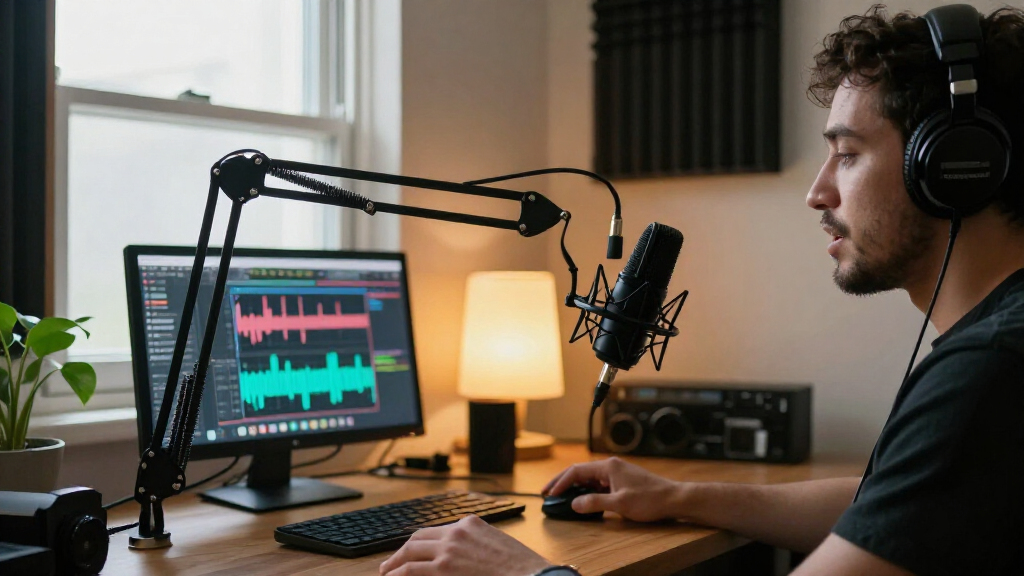
For most podcasters, I’d start with the Samson Q2U USB/XLR Podcasting Pack: its dynamic design and dual connection options suit a range of recording spaces and future setups. The FIFINE T669 is a standout if you want a condenser microphone and boom arm in one kit, while the FIFINE AmpliTank K688CT offers another USB/XLR dynamic route with an arm included. The main tradeoff is between a dynamic mic that can be easier to manage in an untreated room and a condenser kit that may capture more room sound but often includes a fuller desktop setup. Controls, bundled accessories, and whether you need one or two microphones also change which kit makes sense. Read on for a comparison of all 14 options and guidance for matching one to your podcast.

Get audio and creator gear delivered free with Prime
- Fast, free delivery on millions of items
- Prime Video, Amazon Music and more included
- Member-only deals all year
Complete the kit


Key Takeaways
- The Samson Q2U kits lead on flexibility: both pair a dynamic microphone with USB and XLR connections, while the recording pack and podcasting pack differ in their stated USB connector and included accessories.
- Dynamic USB/XLR models are the strongest fit for upgrade-minded podcasters: the Q2U, FIFINE AM8 and K688CT let buyers start with USB while retaining an XLR path for a later mixer or interface.
- The T669 stands out for a ready-to-position condenser setup: its boom-arm bundle is a more complete fit for a fixed desk than buying a mic alone, but condenser pickup may make room noise more noticeable.
- Gaming extras are not the same as podcast essentials: RGB lighting and voice controls on several AmpliGame kits add personalization, while the microphone type, connection options and arm setup matter more for recorded speech.
- Two-person bundles solve a different problem: the mixer bundle is built around recording two people, so solo podcasters may be better served by a simpler single-mic kit with less gear to manage.
| Samson Q2U USB/XLR Dynamic Microphone Podcasting Pack with Pop Filter and Microphone Arm |  | Best Overall | Microphone type: Dynamic | Connectivity: USB and XLR | Pickup pattern: Unidirectional | VIEW LATEST PRICE | See Our Full Breakdown |
| FIFINE T669 USB Condenser Microphone Kit with Adjustable Boom Arm |  | Best Value Boom-Arm Kit | Microphone type: USB condenser | Connectivity: USB-B to USB-A/C cable | Pickup pattern: Unidirectional cardioid | VIEW LATEST PRICE | See Our Full Breakdown |
| FIFINE AmpliGame AM8PROT Dynamic Gaming Microphone Kit with Boom Arm |  | Best for Hands-On USB Controls | Microphone type: Dynamic | Connectivity: USB and XLR | Pickup pattern: Unidirectional cardioid | VIEW LATEST PRICE | See Our Full Breakdown |
| ZealSound K66 USB Condenser Microphone with Noise Reduction, Gain and Volume Controls, Mute Button, and Headphone Monitoring |  | Best for Mobile-Friendly Recording | Microphone type: USB condenser | Pickup pattern: Cardioid | Frequency response: 40 Hz–18 kHz | VIEW LATEST PRICE | See Our Full Breakdown |
| FIFINE AmpliGame AM8 USB/XLR Dynamic Microphone |  | Best Compact Dynamic Mic | Microphone type: Dynamic | Connectivity: USB and XLR | Pickup pattern: Unidirectional cardioid | VIEW LATEST PRICE | See Our Full Breakdown |
| MAONO PD200XS USB/XLR Dynamic Microphone Kit with RGB Lighting and Boom Arm |  | Best for a Flexible USB-to-XLR Upgrade | Microphone type: Dynamic | Connectivity: USB, USB-C, XLR | Polar pattern: Cardioid (unidirectional) | VIEW LATEST PRICE | See Our Full Breakdown |
| Podcast Equipment Bundle for Two with Audio Mixer, Voice Changer, and Condenser Microphones |  | Best for Two-Person Shows and Effects | Included microphones: 2 condenser microphones | Mixer channels: 2 | Connectivity: Bluetooth, USB | VIEW LATEST PRICE | See Our Full Breakdown |
| FIFINE T669 USB Condenser Microphone Kit with Boom Arm, Blue |  | Best for Simple Condenser Recording | Microphone type: Condenser | Connectivity: USB Type-C | Polar pattern: Unidirectional cardioid | VIEW LATEST PRICE | See Our Full Breakdown |
| FIFINE AmpliTank K688CT USB/XLR Dynamic Podcast Microphone Kit with Boom Arm | 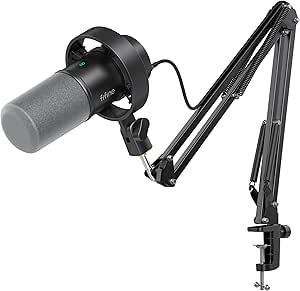 | Best for Close-Mic Podcasting | Microphone type: Dynamic | Connectivity: USB, XLR | Polar pattern: Unidirectional cardioid | VIEW LATEST PRICE | See Our Full Breakdown |
| FIFINE AmpliGame A6T USB Condenser Gaming Microphone Kit |  | Best for RGB-Focused Podcast Desks | Microphone type: Condenser | Connectivity: USB | Polar pattern: Cardioid (unidirectional) | VIEW LATEST PRICE | See Our Full Breakdown |
| Samson Q2U USB-C/XLR Dynamic Microphone Recording and Podcasting Pack | 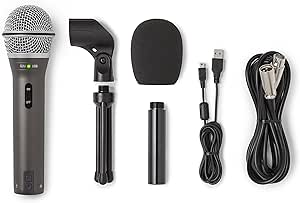 | Best for a USB-to-XLR Upgrade Path | Microphone type: Dynamic, handheld | Connectivity: USB-C and XLR | Polar pattern: Unidirectional | VIEW LATEST PRICE | See Our Full Breakdown |
| FIFINE AmpliGame AM8T XLR/USB Dynamic Gaming Microphone Kit with RGB Lighting and Boom Arm |  | Best for On-Desk Controls and Boom-Arm Positioning | Microphone type: Dynamic | Connectivity: USB and XLR | Polar pattern: Unidirectional (cardioid) | VIEW LATEST PRICE | See Our Full Breakdown |
| MAONO AU-A04H USB Condenser Microphone Kit with Headphones |  | Best Complete USB Starter Bundle | Microphone type: USB condenser | Capsule size: 16 mm | Polar pattern: Unidirectional (cardioid) | VIEW LATEST PRICE | See Our Full Breakdown |
| MAONO A04 USB Condenser Microphone Kit |  | Best for a Fixed Desk Studio Setup | Microphone type: Large-diaphragm condenser | Capsule size: 16 mm | Polar pattern: Cardioid | VIEW LATEST PRICE | See Our Full Breakdown |
| USB microphone kits for podcasting | Microphone type | Included accessories | Connectivity | Signal-to-noise ratio |
|---|---|---|---|---|
| Samson Q2U USB/XLR Dynamic Mic | Dynamic | Desktop tripod with extension piece, mic clip, USB cable, XLR cable, microphone arm, pop filter, microfiber cloth | USB and XLR | — |
| FIFINE T669 USB Condenser Micr | USB condenser | Boom arm stand, shock mount, double pop filter, USB cable | USB-B to USB-A/C cable | 78 dB |
| FIFINE AmpliGame AM8PROT Dynam | Dynamic | Boom arm, foam windscreen, USB cable | USB and XLR | — |
| ZealSound K66 USB Condenser Mi | USB condenser | — | — | — |
| FIFINE AmpliGame AM8 USB/XLR D | Dynamic | — | USB and XLR | 80 dB |
| MAONO PD200XS USB/XLR Dynamic | Dynamic | Adjustable boom arm, shock mount, USB-C cable, 5/8-inch to 3/8-inch adapter | USB, USB-C, XLR | — |
| Podcast Equipment Bundle for T | — | 2 boom arms, 2 shock holders, 2 pop filters, 2 foam covers, 2 XLR cables, USB cable, 2 audio cables, earphone | Bluetooth, USB | 78 dB |
| FIFINE T669 USB Condenser Micr | Condenser | Metal boom arm, pop filter, shock mount, detachable USB-C cable | USB Type-C | 78 dB |
| FIFINE AmpliTank K688CT USB/XL | Dynamic | Metal boom arm, shock mount, windscreen | USB, XLR | 80 dB |
| FIFINE AmpliGame A6T USB Conde | Condenser | Metal boom arm, shock mount, pop filter, C-clamp, USB-C to USB-A/C cable | USB | >70 dB |
| Samson Q2U USB-C/XLR Dynamic M | Dynamic, handheld | Desktop tripod stand, tripod extension, mic clip, windscreen, USB-C cable, XLR cable | USB-C and XLR | 70 dB |
| FIFINE AmpliGame AM8T XLR/USB | Dynamic | Boom arm stand, C-clamp, 8.2 ft USB-to-USB-C cable, user manual | USB and XLR | 80 dB |
| MAONO AU-A04H USB Condenser Mi | USB condenser | Headphones, microphone stand, metal shock mount, pop filter, foam windscreen, table clamp, USB cable | — | 96 dB |
| MAONO A04 USB Condenser Microp | Large-diaphragm condenser | Adjustable scissor arm stand, metal shock mount, pop filter, foam windscreen, boom arm base, USB-A/USB-C to USB-B cable | — | 70 dB |
More Details on Our Top Picks
Samson Q2U USB/XLR Dynamic Microphone Podcasting Pack with Pop Filter and Microphone Arm
The Samson Q2U is my strongest all-around pick for a podcast that may grow beyond a single computer. Its USB and XLR outputs let a beginner record directly to a computer now and connect to a mixer or other XLR gear later, while zero-latency headphone monitoring helps with live recording decisions. The bundle covers more setup needs than the FIFINE AmpliGame AM8, including a desktop tripod, microphone arm, pop filter, and both USB and XLR cables. Its dynamic, unidirectional design suits a close-mic speaking setup, but it is less flexible for capturing several people around one mic. The pack also takes up more room than a simple desktop kit, and buyers seeking onboard RGB or extensive USB controls should look at the AM8 instead.
Pros:- USB and XLR connections support both direct computer recording and later mixer or PA use
- Zero-latency headphone monitoring has a dedicated level control
- Bundle includes a microphone arm, desktop tripod, pop filter, and USB and XLR cables
- Plug-and-play computer connection requires no driver installation
Cons:- Unidirectional pickup is best suited to one speaker positioned in front of the mic
- The included accessories make the bundle relatively bulky to store or move
- Lacks the USB-mode mix and RGB controls found on the FIFINE AmpliGame AM8
Best for: First-time podcasters who want a dynamic mic, a ready-to-use accessory bundle, and the option to add XLR equipment later
Not ideal for: Hosts recording several people around one microphone, or buyers who want compact desktop-only equipment and built-in lighting
- Microphone type:Dynamic
- Connectivity:USB and XLR
- Pickup pattern:Unidirectional
- Headphone output:1/8-inch stereo with level control
- Monitoring:Zero-latency
- Construction:Die-cast body with heavy-gauge mesh grille
- Included accessories:Desktop tripod with extension piece, mic clip, USB cable, XLR cable, microphone arm, pop filter, microfiber cloth
- Warranty:2-year manufacturer warranty
Our verdict“Choose the Q2U if you want a versatile USB/XLR podcast starter pack with the accessories to record at a desk from day one.”
FIFINE T669 USB Condenser Microphone Kit with Adjustable Boom Arm
The FIFINE T669 suits a computer-based podcast setup where a boom arm and basic vocal accessories matter more than XLR expansion. Its cardioid condenser capsule focuses on the speaker in front, and the included shock mount and double-layer pop filter help tame desk vibration and plosive sounds without adding separate purchases. Compared with the dynamic Samson Q2U, the T669 is a straightforward USB-only choice: it gives up mixer-ready XLR connectivity and the Q2U’s headphone monitoring, but its 30-inch steel arm offers flexible positioning for a fixed desk. The long cable and USB-A/C connector options widen computer compatibility, though this remains a wired setup and it is not compatible with Xbox. Buyers who want to move among devices or build an XLR chain should choose a different kit.
Pros:- USB plug-and-play connection works with compatible computers
- Steel boom arm reaches up to 30 inches and adjusts for desk positioning
- Includes a shock mount and double-layer pop filter
- USB-B to USB-A/C cable supports compatible computer ports
Cons:- USB-only connection does not support an XLR mixer or audio interface
- No headphone output or onboard monitoring is specified
- Not compatible with Xbox
Best for: Solo podcasters recording at a laptop or desktop who want an adjustable arm, shock mount, and pop filter in one USB kit
Not ideal for: Podcasters planning to use an XLR mixer, needing headphone monitoring from the mic, or recording on Xbox
- Microphone type:USB condenser
- Connectivity:USB-B to USB-A/C cable
- Pickup pattern:Unidirectional cardioid
- Frequency response:20 Hz–20 kHz
- Signal-to-noise ratio:78 dB
- Cable length:8.2 ft
- Boom arm:Steel; up to 30 in reach
- Included accessories:Boom arm stand, shock mount, double pop filter, USB cable
Our verdict“Pick the T669 for a desk-based, computer-only podcast when a flexible arm and included pop-filter setup matter more than XLR or mic-side monitoring.”
FIFINE AmpliGame AM8PROT Dynamic Gaming Microphone Kit with Boom Arm
The FIFINE AmpliGame AM8PROT is aimed at podcasters who want frequent adjustments within reach rather than a stripped-back recording mic. In USB mode, its mix, gain, and headphone-volume controls, tap-to-mute, and live monitoring make solo recording and streaming easier to manage without opening software menus. Like the Samson Q2U, it offers USB and XLR, but the AM8PROT adds a 30-inch boom arm and customizable RGB while restricting its mix and lighting features to USB mode. Its dynamic cardioid pattern is a sensible fit for close speech, and the included foam windscreen helps control breath noise. The feature set leans gaming-oriented, so podcast hosts who want a simpler, more understated setup may prefer the Q2U; the arm’s reach may also crowd a small desk.
Pros:- USB and XLR connectivity support computer recording and XLR setups
- USB mode provides tap-to-mute, mix, gain, and headphone-volume controls
- Real-time headphone monitoring supports immediate recording checks
- Includes a boom arm, foam windscreen, and 8.2-foot USB cable
Cons:- Mix, gain, headphone-volume, and RGB functions are limited to USB mode
- Gaming-style RGB may not suit a restrained podcast studio
- Boom arm extends up to 30 inches and may be oversized for some desks
Best for: Solo podcasters and streamers who want a dynamic USB/XLR mic with mute, monitoring, and level controls at the desk
Not ideal for: Hosts seeking a minimal, non-gaming look, or anyone who expects the USB controls and RGB to work through an XLR connection
- Microphone type:Dynamic
- Connectivity:USB and XLR
- Pickup pattern:Unidirectional cardioid
- Audio resolution:48 kHz/24-bit
- Maximum SPL:115 dB
- Frequency response:20 Hz–20 kHz
- USB cable length:8.2 ft
- Included accessories:Boom arm, foam windscreen, USB cable
Our verdict“Choose the AM8PROT if you want more at-hand USB controls than the Samson Q2U offers and can accept that those features do not carry over to XLR mode.”
ZealSound K66 USB Condenser Microphone with Noise Reduction, Gain and Volume Controls, Mute Button, and Headphone Monitoring
The ZealSound K66 stands apart from the other kits here by pairing a USB condenser mic with adapters for USB-C and Lightning devices. That makes it a practical fit for podcasters who record on a phone or tablet as well as a computer, while its physical gain, monitoring, echo, and mute controls keep common adjustments close at hand. The K66 also has zero-latency headphone monitoring, a feature the USB-only FIFINE T669 does not list. In exchange, it lacks the XLR growth path offered by the Samson Q2U and the T669’s included boom arm, so it is less suited to a permanent, highly adjustable desk installation. The selectable noise-reduction mode may help with background sound, but it is not a substitute for a quiet recording space; the echo control may also be undesirable for natural-sounding podcast voices.
Pros:- USB-C and Lightning adapters support compatible mobile devices as well as computers
- Zero-latency headphone monitoring uses a 3.5 mm jack
- Physical controls cover mic level, monitoring level, echo, and mute
- Selectable noise-reduction mode offers an adjustment for background sound
Cons:- USB-only connectivity does not provide an XLR upgrade path like the Samson Q2U
- Noise reduction may reduce background sound but does not eliminate it
- Echo adjustment may be unsuitable for clean, natural podcast vocals
Best for: Mobile podcasters and interviewers who want to record on compatible phones or tablets as well as a computer
Not ideal for: Hosts building an XLR studio chain, wanting a boom-arm bundle, or seeking an unprocessed voice without echo effects
- Microphone type:USB condenser
- Pickup pattern:Cardioid
- Frequency response:40 Hz–18 kHz
- Sampling rate:46 kHz
- Sensitivity:−45 dB ±3 dB
- Monitoring:Zero-latency via 3.5 mm headphone jack
- Controls:Microphone volume/gain, monitoring volume, echo, mute
- Connectivity and compatibility:USB with USB-C and Lightning adapters; Windows PC, Mac, PS4, PS5, iPhone, iPad, and compatible USB-C devices
Our verdict“Choose the K66 if phone and tablet compatibility is a priority; choose the Samson Q2U instead if XLR expansion matters more.”
FIFINE AmpliGame AM8 USB/XLR Dynamic Microphone
The FIFINE AmpliGame AM8 is a capable choice for a solo podcaster who wants a compact dynamic mic with both USB convenience and an XLR route for later. USB mode adds tap-to-mute, headphone monitoring, and gain and volume controls, while standard 3/8-inch and 5/8-inch threads simplify mounting on common stands. Compared with the more accessory-rich Samson Q2U pack, the AM8 is a more focused microphone purchase: the supplied windscreen helps with unwanted noise, but an XLR cable is not included and the product data does not list a boom arm. The USB controls and RGB lighting also stop working in XLR mode, making it less useful if those controls are central to the planned setup. A close recording position of 2–6 inches favors hosts willing to stay near the mic.
Pros:- USB and XLR connections support computer recording and later audio-interface use
- USB mode includes tap-to-mute, headphone monitoring, and gain and volume controls
- Cardioid pickup and included windscreen support close-voice recording
- 3/8-inch and 5/8-inch threads fit many common microphone stands
Cons:- XLR cable is not included
- RGB lighting and onboard controls are unavailable in XLR mode
- Suggested recording distance of 2–6 inches may not suit hosts who prefer to sit farther from the mic
Best for: Solo podcasters who want a USB-first dynamic mic with an XLR upgrade path and already have a stand or mounting setup
Not ideal for: Buyers who need a complete arm-and-cable bundle, want to record at a distance, or rely on onboard controls in XLR mode
- Microphone type:Dynamic
- Connectivity:USB and XLR
- Pickup pattern:Unidirectional cardioid
- Frequency response:50 Hz–16 kHz
- Signal-to-noise ratio:80 dB
- Stand threads:3/8 in and 5/8 in
- USB-mode features:Tap-to-mute, headphone monitoring, monitoring volume, gain control, RGB lighting and control
- Included accessory:Windscreen
Our verdict“Pick the AM8 for a compact USB/XLR dynamic mic if you already have a stand and can work close to the capsule; choose the Samson Q2U for a fuller accessory bundle.”
MAONO PD200XS USB/XLR Dynamic Microphone Kit with RGB Lighting and Boom Arm
The PD200XS suits podcasters who want a simple USB setup now and the option to move to an audio interface later. Its dynamic capsule and cardioid pattern are a sensible fit for voice recording in a shared or untreated room, while on-mic gain, headphone-volume, mute, and monitoring controls make basic adjustments easy to reach. Compared with the FIFINE AmpliTank K688CT, it adds RGB lighting and MAONO Link controls in USB mode; both provide USB/XLR flexibility and a boom arm. The tradeoff is that the software features do not carry over to XLR, and you must supply your own XLR cable for an interface setup. The included arm, shock mount, and USB cable make it a more complete first setup than a bare microphone, though the lighting is a visual extra rather than a podcasting necessity.
Pros:- USB and XLR connections support both direct computer recording and a later interface setup.
- Dynamic cardioid design is suited to focusing on close-up speech in less-than-quiet rooms.
- Includes an adjustable boom arm, shock mount, and USB cable.
- On-mic gain, headphone-volume, mute, and monitoring controls simplify recording adjustments.
Cons:- An XLR cable is not included.
- MAONO Link software features are available only over USB.
- RGB lighting adds visual customization but does not improve the recorded voice.
Best for: Solo podcasters who want a dynamic USB mic with a boom arm today and an XLR upgrade path for a future interface.
Not ideal for: Buyers who plan to record through XLR immediately and want every included cable, or podcasters who prefer a software-free setup with no lighting features.
- Microphone type:Dynamic
- Connectivity:USB, USB-C, XLR
- Polar pattern:Cardioid (unidirectional)
- Frequency response:40 Hz–16 kHz
- Controls:Mic gain, headphone volume, mute
- Monitoring:3.5 mm headphone jack
- Included accessories:Adjustable boom arm, shock mount, USB-C cable, 5/8-inch to 3/8-inch adapter
- Software and lighting:MAONO Link in USB mode; RGB with 9 color options
Our verdict“Choose the PD200XS if you want a dynamic podcast mic with a practical USB start and an XLR upgrade path, and can supply an XLR cable later.”
Podcast Equipment Bundle for Two with Audio Mixer, Voice Changer, and Condenser Microphones
This bundle is the lineup’s clearest choice for a two-person podcast recorded through a shared mixer: it supplies two condenser microphones, two boom arms, and two XLR cables, along with an audio mixer. The mixer adds noise reduction, sound effects, voice variations, and an instrument input, giving casual shows more live options than the single-mic MAONO PD200XS. That breadth comes with a more involved setup, and the listed frequency response is only “20 Hz,” which is too incomplete to judge the microphones’ full vocal range. The microphones are described as handheld, even though the package includes boom arms and shock holders, so buyers should check that form factor against their intended recording style. It also requires charging before first use or after extended storage. I’d choose it for co-hosts who value the bundled mixer and effects over a clearly specified, straightforward solo-mic setup.
Pros:- Includes two microphones, boom arms, shock holders, pop filters, foam covers, and XLR cables.
- Two-channel mixer provides noise reduction, sound effects, voice variations, and instrument input.
- Supports use with compatible computers, smartphones, and gaming consoles.
- Metal mixer enclosure is suited to a more complete shared recording setup.
Cons:- The listed frequency response is incomplete, making the microphones’ vocal range difficult to evaluate.
- A mixer and two-microphone setup take more space and setup effort than the solo USB kits.
- The bundle requires charging before first use or after extended storage.
Best for: Co-hosts starting a two-person show who want two microphones, matching mounting accessories, and a mixer with built-in effects.
Not ideal for: Solo podcasters seeking a simple desktop USB mic, or audio-focused buyers who need a clearly stated microphone frequency range.
- Included microphones:2 condenser microphones
- Mixer channels:2
- Connectivity:Bluetooth, USB
- Microphone connection:XLR
- Microphone polar pattern:Unidirectional
- Mixer features:Noise reduction, 10 sound effects, 4 voice variations, instrument input
- Included accessories:2 boom arms, 2 shock holders, 2 pop filters, 2 foam covers, 2 XLR cables, USB cable, 2 audio cables, earphone
- Signal-to-noise ratio:78 dB
Our verdict“Pick this bundle for a two-host show that needs microphones and mixer effects together, but skip it if clear microphone specifications or a simple solo setup matter more.”
FIFINE T669 USB Condenser Microphone Kit with Boom Arm, Blue
The FIFINE T669 is a straightforward pick for a podcaster who wants a USB condenser and a desk-mounted recording position without adding an audio interface. Its cardioid pattern, gain control, pop filter, and shock mount address common home-recording needs: keeping the mic aimed at the speaker and helping limit plosive bursts and handling noise. The 26-inch arm reach and 360-degree horizontal rotation offer more positioning flexibility than the fixed desktop approach of many entry-level setups. Unlike the FIFINE AmpliGame A6T, this model is not presented with RGB lighting or a stated high sampling-rate specification; its appeal is a simpler, speech-focused kit. The tradeoff is that it is a condenser rather than a dynamic mic, and it connects by USB only, so it is less suited to buyers planning an XLR interface upgrade. The desk clamp also needs a suitable edge to attach to.
Pros:- USB connection supports plug-and-play recording without an audio interface or phantom power.
- Includes a metal boom arm, pop filter, and shock mount for a ready-to-position setup.
- 26-inch arm reach and 360-degree horizontal rotation give flexible placement.
- On-mic gain control allows direct input adjustment.
Cons:- USB-only connectivity does not provide an XLR path for an audio-interface upgrade.
- Condenser design may be less forgiving than the dynamic options for noisy recording spaces.
- The boom arm must be clamped to a desk.
Best for: New podcasters recording at a desk who want a plug-and-play condenser with a long-reach arm and included pop-filter and shock-mount accessories.
Not ideal for: Podcasters who need XLR connectivity, record in a noisy shared room and prefer a dynamic mic, or cannot clamp an arm to their desk.
- Microphone type:Condenser
- Connectivity:USB Type-C
- Polar pattern:Unidirectional cardioid
- Frequency response:20 Hz–20 kHz
- Signal-to-noise ratio:78 dB
- Maximum SPL:130 dB
- Boom arm:26-inch reach; 360° horizontal rotation
- Included accessories:Metal boom arm, pop filter, shock mount, detachable USB-C cable
Our verdict“Choose the T669 for uncomplicated USB condenser recording at a desk, but pick a dynamic USB/XLR model if room noise or future interface use is a priority.”
FIFINE AmpliTank K688CT USB/XLR Dynamic Podcast Microphone Kit with Boom Arm
The K688CT makes the most sense for podcasters who can keep the microphone close and want a dynamic capsule with both USB and XLR connections. Its cardioid pattern and 120 dB maximum SPL suit speech recording, while USB mode supplies tap-to-mute, gain, headphone-volume, and monitoring controls without requiring an interface. Compared with the MAONO PD200XS, it takes a more restrained approach: the listed kit focuses on the recording essentials rather than RGB lighting and software controls. Both include a boom arm and support an XLR upgrade, so desk fit and mic placement may be stronger deciding factors than connectivity. The K688CT’s clamp is specified for desks under two inches thick, and best input volume calls for a close 2–6-inch position. Its controls are unavailable over XLR, so the interface setup gives up the convenient on-mic adjustments.
Pros:- USB and XLR connectivity support direct computer recording and interface-based setups.
- Dynamic cardioid design is suited to close-mic speech recording.
- USB mode includes mute, gain, headphone-volume, and monitoring controls.
- Metal boom arm, shock mount, and windscreen are included.
Cons:- Microphone controls are unavailable when connected via XLR.
- The desk clamp fits desks under two inches thick.
- Best input volume calls for positioning the microphone 2–6 inches away.
Best for: Solo podcasters who record close to the mic and want a dynamic USB setup now with XLR compatibility for an audio interface.
Not ideal for: People who need to sit farther from the microphone, have a desk two inches thick or more, or want on-mic controls to work over XLR.
- Microphone type:Dynamic
- Connectivity:USB, XLR
- Polar pattern:Unidirectional cardioid
- Frequency response:50 Hz–16 kHz
- Maximum SPL:120 dB
- Signal-to-noise ratio:80 dB
- USB-mode controls:Tap-to-mute, gain, headphone volume
- Included accessories:Metal boom arm, shock mount, windscreen
Our verdict“Pick the K688CT if you want a close-positioned dynamic mic with USB convenience and an XLR path, provided your desk fits the clamp.”
FIFINE AmpliGame A6T USB Condenser Gaming Microphone Kit
The AmpliGame A6T is the USB-only pick for podcasters who share a recording desk with a gaming or streaming setup and want visible controls and lighting. Its touch mute, gain control, and RGB lighting make quick adjustments accessible on the mic, while the included boom arm, shock mount, and pop filter provide a full desktop mounting kit. The stated 24-bit depth and 192 kHz sampling rate are generous recording specifications, but they do not change the central tradeoff: this is a condenser microphone with USB connectivity, not a dynamic USB/XLR model like the FIFINE AmpliTank K688CT. That makes the A6T easier to connect directly to a computer or PS4/PS5, but it offers no interface upgrade path and still needs a wired USB connection. Its clamp also fits desks only up to two inches thick. I’d favor it when desk controls and RGB matter more than XLR flexibility.
Pros:- Plug-and-play USB connection works with compatible computers, Macs, and PS4/PS5 consoles.
- Touch mute, gain control, and RGB lighting offer accessible desk-side operation.
- Includes a metal boom arm, shock mount, pop filter, and desk clamp.
- Lists 24-bit depth and a 192 kHz sampling rate.
Cons:- USB-only connectivity provides no XLR route for an audio-interface setup.
- Requires a wired USB connection.
- Desk clamp fits desks only up to two inches thick.
Best for: Gaming podcasters and streamers who record on a computer or PS4/PS5 and want a USB mic with touch mute, RGB, and an included arm.
Not ideal for: Podcasters planning to add an XLR interface, recording away from a wired USB connection, or using a desk thicker than two inches.
- Microphone type:Condenser
- Connectivity:USB
- Polar pattern:Cardioid (unidirectional)
- Sampling rate and bit depth:192 kHz, 24 bit
- Frequency range:60 Hz–18 kHz
- Signal-to-noise ratio:>70 dB
- Controls and lighting:Touch mute, gain control, RGB lighting
- Included accessories:Metal boom arm, shock mount, pop filter, C-clamp, USB-C to USB-A/C cable
Our verdict“Choose the A6T for a gaming-oriented USB podcast desk with RGB and quick mute, but choose the K688CT if you need XLR flexibility or a dynamic mic.”
Samson Q2U USB-C/XLR Dynamic Microphone Recording and Podcasting Pack
I’d pick the Samson Q2U for a podcaster who wants a straightforward USB setup now and the option to move to an XLR mixer or interface later. Its dynamic, unidirectional design is a practical fit for close-mic speech, while the included tripod, extension, windscreen, and both USB-C and XLR cables make the kit ready for a basic desk setup. Compared with the MAONO AU-A04H, the Q2U gives up condenser-style specs and bundled headphones, but offers XLR connectivity and a metal body. The tradeoff is a simple handheld format: it lacks the boom arm and onboard headphone-monitoring controls found on the FIFINE AmpliGame AM8T. I’d choose it for flexibility and skip it if a fully equipped, adjustable desktop rig is the priority.
Pros:- USB-C and XLR connections support both computer recording and later use with compatible audio equipment.
- Dynamic, unidirectional pickup suits close-up spoken-word recording.
- Includes a desktop tripod, extension, windscreen, mic clip, and both connection cables.
- Metal enclosure offers a sturdy handheld construction.
Cons:- Desktop tripod offers less flexible positioning than the boom arm included with the FIFINE AmpliGame AM8T.
- No headphone jack or onboard monitoring controls are listed.
- Single-channel configuration is limited to a one-microphone recording path.
Best for: New podcasters who want to record over USB now and retain the option to connect the microphone to XLR equipment later.
Not ideal for: Buyers who want a boom arm, bundled headphones, or onboard headphone monitoring in the kit.
- Microphone type:Dynamic, handheld
- Connectivity:USB-C and XLR
- Polar pattern:Unidirectional
- Frequency range:50 Hz–15 kHz
- Signal-to-noise ratio:70 dB
- Included accessories:Desktop tripod stand, tripod extension, mic clip, windscreen, USB-C cable, XLR cable
- Weight:11.2 ounces
- Warranty:2 years
Our verdict“Choose the Q2U if you want a practical podcast starter kit with both USB-C and XLR, rather than a boom-arm setup with built-in monitoring.”
FIFINE AmpliGame AM8T XLR/USB Dynamic Gaming Microphone Kit with RGB Lighting and Boom Arm
The FIFINE AmpliGame AM8T suits podcasters who want a dynamic mic positioned on a boom arm, with key controls close at hand. Its USB and XLR connections allow direct computer use or connection to compatible audio gear, while the mute button, gain knob, and headphone monitoring jack make adjustments easier during a recording session. Compared with the desktop-tripod Samson Q2U, this kit offers more flexible placement and built-in monitoring, but it does not include an XLR cable. Its RGB lighting is an aesthetic extra rather than a podcasting advantage, though it can be turned off. The clamp also only fits desks under two inches thick, so buyers should check their desk before choosing it. I’d favor this kit for a single-host desk setup, not a minimalist kit with fewer accessories to install.
Pros:- USB and XLR connectivity cover computer recording and compatible mixer or interface setups.
- Included adjustable boom arm and desk clamp allow flexible microphone placement.
- Onboard mute, gain, headphone jack, and headphone volume controls support hands-on recording adjustments.
- RGB lighting can be switched off.
Cons:- XLR cable is not included, adding a separate item for an XLR setup.
- Desk clamp is specified for desks less than two inches thick.
- Boom arm and lighting make this a more involved desk setup than the tripod-based Samson Q2U.
Best for: Solo podcasters with a compatible desk who want a boom arm, quick mute and gain controls, and headphone monitoring.
Not ideal for: Podcasters with desks two inches thick or more, or anyone needing an included XLR cable for immediate mixer use.
- Microphone type:Dynamic
- Connectivity:USB and XLR
- Polar pattern:Unidirectional (cardioid)
- Frequency range:50 Hz–16 kHz
- Signal-to-noise ratio:80 dB
- Controls and features:RGB lighting, mute button, gain knob, headphone jack, headphone volume control
- Included accessories:Boom arm stand, C-clamp, 8.2 ft USB-to-USB-C cable, user manual
- Desk clamp fit:Desks less than 2 inches thick
- XLR cable:Not included
Our verdict“Pick the AM8T for boom-arm positioning and onboard monitoring, provided your desk fits the clamp and you have or plan to get an XLR cable.”
MAONO AU-A04H USB Condenser Microphone Kit with Headphones
The MAONO AU-A04H is the most self-contained choice here for a beginner who wants a USB condenser microphone and listening gear in one bundle. It pairs a 16 mm cardioid capsule with a shock mount, pop filter, windscreen, stand, and foldable headphones, so there’s less need to source basic recording accessories separately. Its stated 192 kHz/24-bit sampling gives buyers a high-resolution recording specification, though that alone does not determine how a voice will sound in a room. Unlike the dynamic Samson Q2U, this is a USB-only condenser setup, with no XLR path for adding a mixer-based workflow. The headphones support monitoring through a 3.5 mm connection, but the microphone’s included connection is USB. I’d choose it for an all-in-one computer setup, not for future XLR expansion.
Pros:- Bundle includes headphones, stand, shock mount, pop filter, windscreen, table clamp, and USB cable.
- USB plug-and-play connection is designed for use without additional driver software or an external sound card.
- 16 mm cardioid condenser capsule is suited to close spoken-word recording.
- Foldable headphones with swiveling earcups support one-ear monitoring and compact storage.
Cons:- USB-only microphone connectivity does not offer the XLR upgrade path available with the Samson Q2U.
- The listed frequency response is 30 Hz–16 kHz.
- Compatibility and connection requirements may vary across the listed computers, consoles, and mobile devices.
Best for: First-time computer podcasters who want a USB condenser microphone, basic voice accessories, and headphones in one package.
Not ideal for: Creators planning to connect their microphone through XLR equipment or who need a dynamic mic setup.
- Microphone type:USB condenser
- Capsule size:16 mm
- Polar pattern:Unidirectional (cardioid)
- Sampling rate and bit depth:192 kHz/24-bit
- Frequency response:30 Hz–16 kHz
- Signal-to-noise ratio:96 dB
- Headphone drivers and connector:50 mm drivers; 3.5 mm connector
- Included accessories:Headphones, microphone stand, metal shock mount, pop filter, foam windscreen, table clamp, USB cable
Our verdict“Choose the AU-A04H if you want a USB podcast starter bundle that includes headphones and accessories, and do not need XLR connectivity.”
MAONO A04 USB Condenser Microphone Kit
The MAONO A04 makes the most sense for a podcaster building a fixed desk station around a USB condenser microphone. Its scissor arm, shock mount, pop filter, and windscreen provide the main pieces for positioning the mic and managing handling and plosive noise, while the 16 mm cardioid capsule is aimed at voice recording. Unlike the MAONO AU-A04H, this kit does not bundle headphones, so it is a better fit for someone who already owns monitoring gear and would rather have an arm-based setup. It also lacks the USB/XLR flexibility of the Samson Q2U. The desk clamp only fits surfaces under 2.1 inches thick, and the product is not compatible with Xbox. I’d select it for a compatible computer desk, not for a portable or console-agnostic rig.
Pros:- Includes a scissor arm stand, metal shock mount, pop filter, and foam windscreen.
- USB connection is designed for plug-and-play use without additional driver software.
- 16 mm cardioid condenser capsule is intended for voice recording and speech.
- USB-A/USB-C to USB-B cable supports the listed USB connection options.
Cons:- Not compatible with Xbox.
- Desk clamp is limited to desktops less than 2.1 inches thick.
- Does not include headphones, unlike the MAONO AU-A04H, and offers no XLR connection.
Best for: Computer-based podcasters who already have headphones and want an included scissor arm for a dedicated recording desk.
Not ideal for: Xbox users, podcasters with desks 2.1 inches thick or more, or buyers who need headphones or XLR connectivity in the kit.
- Microphone type:Large-diaphragm condenser
- Capsule size:16 mm
- Polar pattern:Cardioid
- Sampling rate and bit depth:192 kHz/24-bit
- Frequency response:30 Hz–16 kHz
- Signal-to-noise ratio:70 dB
- Included accessories:Adjustable scissor arm stand, metal shock mount, pop filter, foam windscreen, boom arm base, USB-A/USB-C to USB-B cable
- Desk clamp compatibility:Desktops less than 2.1 inches thick
- Recommended microphone distance:2–6 inches
Our verdict“Choose the MAONO A04 if you want an arm-mounted USB condenser kit for a compatible computer desk and already have headphones.”
How We Picked
I ranked these kits by how well their stated features answer common podcast needs: clear spoken-word capture, practical USB setup, useful monitoring and controls, and accessories that help position the mic or complete a recording space. I also weighed connection flexibility, since USB is convenient for a direct computer setup while XLR can support a later interface or mixer. A bundle only earned an advantage when its included gear matched a real use case; extra lighting or voice effects did not outweigh a more useful recording path.
The order favors broadly adaptable single-host choices first, then kits aimed at particular setups such as desk-based condenser recording, gaming-style controls, or two-person shows. Models with overlapping names are separated by the listed bundle and connection details rather than treated as identical. Since the product lineup does not establish comparative sound measurements, I focus on design and feature fit, and flag room acoustics, accessories, and setup complexity as tradeoffs buyers should weigh.
| USB microphone kits for podcasting | Microphone type | Polar pattern |
|---|---|---|
| Samson Q2U USB/XLR Dynamic Mic | Dynamic | — |
| FIFINE T669 USB Condenser Micr | USB condenser | — |
| FIFINE AmpliGame AM8PROT Dynam | Dynamic | — |
| ZealSound K66 USB Condenser Mi | USB condenser | — |
| FIFINE AmpliGame AM8 USB/XLR D | Dynamic | — |
| MAONO PD200XS USB/XLR Dynamic | Dynamic | Cardioid (unidirectional) |
| Podcast Equipment Bundle for T | — | — |
| FIFINE T669 USB Condenser Micr | Condenser | Unidirectional cardioid |
| FIFINE AmpliTank K688CT USB/XL | Dynamic | Unidirectional cardioid |
| FIFINE AmpliGame A6T USB Conde | Condenser | Cardioid (unidirectional) |
| Samson Q2U USB-C/XLR Dynamic M | Dynamic, handheld | Unidirectional |
| FIFINE AmpliGame AM8T XLR/USB | Dynamic | Unidirectional (cardioid) |
| MAONO AU-A04H USB Condenser Mi | USB condenser | Unidirectional (cardioid) |
| MAONO A04 USB Condenser Microp | Large-diaphragm condenser | Cardioid |
Factors to Consider When Choosing USB Microphone Kits For Podcasting
Before choosing a kit, I’d work backward from the recording space, number of voices, and likely upgrade path. A microphone bundle can save setup effort, but a longer feature list does not automatically make a better podcast rig.
Match the microphone type to your room
Your recording room can matter as much as the microphone. A dynamic model is often a sensible starting point when you record close to the mic in a shared, reflective, or otherwise untreated space, though it will not remove background noise by itself. Condenser kits can suit a quieter room and a fixed desk setup, but may capture more surrounding sound than a new podcaster expects. Avoid choosing by sensitivity claims alone; mic distance, speaking position, and room reflections all affect the result. If you cannot change the room, try soft furnishings and a consistent close-mic position before buying acoustic treatment. A kit that supports a pop filter or a stable arm can help with positioning, but neither replaces good room habits.
Choose USB for simplicity, XLR for an upgrade path
USB microphones connect directly to a computer, keeping a basic podcast setup compact and easy to start. XLR requires an audio interface or mixer, which adds cost, cables, and setup steps but can make sense if you plan to expand or connect more microphones. A USB/XLR microphone offers a middle path: start with USB and keep the option to switch connections later. Check the exact kit details rather than assuming every model in a product family has the same ports or included cable. Also think about your recording device; connector compatibility and available ports can matter more than theoretical future flexibility. If you expect to record one voice at one desk for years, a straightforward USB setup may be all you need.
Count speakers before choosing the bundle
A solo-host kit and a two-person bundle solve different recording problems. For a remote co-host or guest, you may not need a shared mixer at all; each person can record locally, depending on your workflow. For two people in the same room, plan for separate microphones and independent control, not just a bundle with extra accessories. Check whether the included mixer supports the inputs and monitoring you need, and whether its controls are understandable for your recording routine. A one-microphone kit can be the simpler choice for a solo show, while a multi-person bundle can reduce the number of separate purchases. Avoid paying for a second mic or voice effects if they do not serve your actual format.
Treat the boom arm as a workflow tool
A boom arm can free desk space and make it easier to keep the microphone at a steady distance during recording. Its usefulness depends on clamp fit, desk thickness, reach, and whether it stays in place with the microphone attached. A bundled arm may be convenient, but it is not automatically better than a sturdy stand that suits your desk. Check where the arm will sit before ordering, especially if your desk has a lip, a shelf, or limited clearance. Pop filters and shock mounts address different issues: the former can soften plosive bursts, while the latter can reduce handling or desk-borne vibration when designed for the setup. Prioritize the accessory that solves a problem you actually face.
Prioritize monitoring and controls you will use
Headphone monitoring helps catch clipping, room noise, and connection problems while recording rather than after an episode is finished. A physical mute button can be handy for coughs or interruptions, while gain controls help adjust the input level without digging through software. These controls are useful only if their operation is clear and compatible with your recording setup. Do not confuse a headphone jack with a full mixing system; it may provide monitoring without controlling separate guests or audio sources. RGB lighting and voice effects can make a desk setup more personal, but they do not replace clean microphone placement or a reliable recording workflow. For spoken-word work, I would rank monitoring and dependable controls ahead of visual extras.
Budget for the whole recording chain
The microphone kit is only one part of a podcast setup. You may still need closed-back headphones, a compatible computer or device, recording software, and a quiet place to speak. A bundle that includes an arm or headphones can reduce extra purchases, but check whether the included items fit your desk and listening preferences. If a kit requires XLR, add an interface or mixer to your planning rather than treating the mic as a complete USB setup. Beginners often buy extra features before sorting out mic placement and monitoring; a simpler kit can leave more attention for learning those basics. Pay for expansion options when you have a realistic plan to use them, not just because they appear on a feature list.
Frequently Asked Questions
Should I choose a dynamic or condenser USB microphone for a room that is not treated?
I would usually begin with a dynamic model if the room has noticeable echo, nearby household noise, or a computer fan, because close speech recording can be easier to manage with that style. It will not erase unwanted sound, so microphone distance and room treatment still matter. A condenser kit may be a better fit in a quiet room where you want a fixed desk setup and can control reflections. The T669 and MAONO condenser kits represent that kind of bundled setup, while the Q2U, AM8, and K688CT give you dynamic alternatives. If possible, record a short sample in your actual room before settling on a microphone type.
Is USB/XLR worth choosing if I only plan to record over USB right now?
It can be worthwhile if you expect to add an interface, mixer, or more involved recording setup later. A USB/XLR model lets you start with a direct computer connection without closing off that path. The tradeoff is that you may be paying attention to a feature you never use, and the XLR connection needs extra equipment. If your show is likely to remain a simple one-mic desk setup, USB alone may be a cleaner choice. Compare the exact included accessories and connector details, especially across similarly named product versions.
Do I need a mixer bundle to record two people?
Not always; the right setup depends on whether both people are in the same room and how you plan to capture their voices. A two-person bundle with a mixer can centralize connections and controls for an in-person show, but it also adds setup and troubleshooting. Remote co-hosts may record separate tracks on their own devices instead. Before choosing a bundle, confirm how many microphone inputs it provides and whether each speaker can be monitored and adjusted independently. If you host alone, a single-microphone kit is usually a simpler starting point.
Are boom arms and pop filters worth prioritizing in a podcast kit?
They can make a noticeable difference to your recording routine, but they solve different practical problems. A boom arm helps position the mic consistently and can clear desk space, provided it fits your desk and holds the microphone securely. A pop filter can soften bursts of air from sounds such as “p” and “b,” though careful speaking angle and distance also help. Neither accessory fixes echo or background noise. If you already own a suitable stand or filter, choose the microphone and connection features first rather than buying duplicate accessories.
Which features should a beginner prioritize over RGB lighting or voice effects?
I’d put a straightforward USB connection, stable mic positioning, headphone monitoring, and usable gain or mute controls ahead of lighting and effects. Those basics help you record at an appropriate level and spot problems while you can still fix them. RGB and voice effects may suit a gaming-oriented desk, but they do not improve room acoustics or replace editing. A beginner who wants a ready desk setup may favor a kit with a boom arm, while someone planning future equipment changes may prefer USB/XLR flexibility. The best choice is the one that fits the recording space and workflow you can maintain.
Conclusion
For a broadly adaptable podcast setup, my best overall pick is the Samson Q2U USB/XLR Podcasting Pack, with its dynamic design and two connection paths. The FIFINE T669 is my best value-style fit for a ready desk bundle if you want a condenser mic and boom arm together, while the best premium direction is the FIFINE AmpliTank K688CT for buyers who want a dynamic USB/XLR microphone with an arm and room to expand their setup. For beginners who want a simple start, I’d choose the USB connection and bundled accessories that match their desk, rather than paying extra for gaming effects. The two-person mixer bundle is the most specific pick for an in-room co-host show; for a solo host in a noisy room, a dynamic USB/XLR option is the more fitting starting point. Match the kit to your space and show format, and the choice becomes much clearer.