TL;DR

Get audio and creator gear delivered free with Prime
- Fast, free delivery on millions of items
- Prime Video, Amazon Music and more included
- Member-only deals all year
Wireless microphone systems free you from tangled cables, offering mobility and clear sound. Modern digital tech reduces interference, making professional-grade audio accessible for creators of all levels. Picking the right system depends on your environment, budget, and needs.
Imagine filming your next YouTube video or streaming your live concert without tripping over messy cables. Wireless microphone systems have become a game-changer, giving creators freedom of movement and crisp sound quality. But with so many options flooding the market, how do you pick the right one?
In this guide, you’ll learn what makes a wireless mic system stand out, how recent tech advances improve reliability, and practical tips to avoid common pitfalls. Whether you’re a beginner or a seasoned pro, understanding these essentials will help you step up your audio game—no wires attached.
Choose digital wireless systems for interference-free, low-latency audio.
Match your mic range and battery life to your shooting environment for reliability.
Always scan for clear frequencies to prevent dropouts during recording.
Use compact, discreet transmitters to maintain your aesthetic and mobility.
Regularly update firmware and test your setup before important shoots.
Why Good Audio Matters More Than You Think
Clear, professional-grade sound can make or break your content. Imagine a vlogger outdoors, battling wind noise, or a streamer with laggy audio. If your audio isn’t crisp, viewers tune out faster than you can say “cut!”
Wireless systems with high signal-to-noise ratios ensure your voice sounds natural and vibrant. They also let you move freely, whether you’re dancing on stage or doing a cooking demo. The right system turns static-filled messes into smooth, engaging conversations.
Beyond clarity, good audio can elevate your production quality, making your content feel more polished and professional. Poor sound quality, on the other hand, can distract viewers and diminish your credibility. Therefore, investing in reliable wireless mics is essential for maintaining a high standard and engaging your audience effectively.
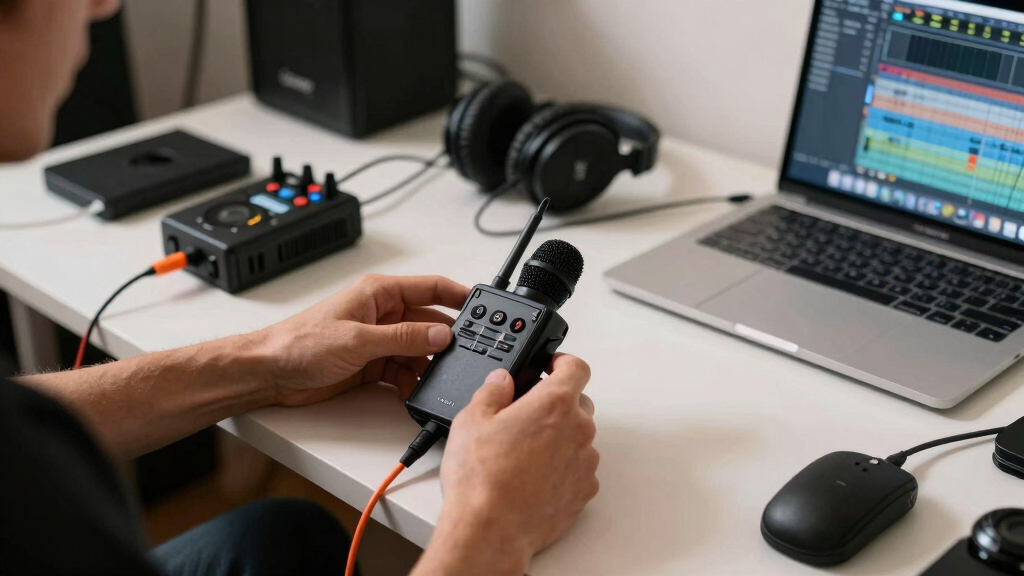
wireless microphone system for content creators
As an affiliate, we earn on qualifying purchases.
As an affiliate, we earn on qualifying purchases.
How to Pick the Best Wireless Mic System in 3 Easy Steps
- Identify your environment: Indoors, outdoors, or large venues? This affects range and interference considerations. For example, outdoor shoots might require longer range and better interference resistance, while indoor setups need to consider walls and electronic interference that can disrupt signals.
- Set your budget: Entry models start around $50, but professional setups can go beyond $1,000. The tradeoff here is between affordability and features like durability, range, and audio quality. Cheaper models might lack noise reduction or have limited range, so assess what matters most for your needs.
- Match features to needs: Consider battery life, connectivity options, and whether you’ll need multiple mics or special features like auto-sync. For instance, if you’re doing multi-person interviews, systems supporting multiple channels and easy switching save time and hassle. Prioritize features that align with your typical shooting scenarios to avoid paying for unnecessary extras or missing vital capabilities.
digital wireless microphone for outdoor filming
As an affiliate, we earn on qualifying purchases.
As an affiliate, we earn on qualifying purchases.
Wireless Tech: Digital vs. Analog — Which One Is Better?
| Feature | Analog Systems | Digital Systems |
|---|---|---|
| Interference Resistance | More prone to noise and dropout | Less interference, clearer signals |
| Latency | Usually higher, up to 20ms | Less than 1ms, near real-time |
| Price | Generally cheaper | Higher cost, but improving |
The choice between digital and analog systems impacts not just sound quality but also reliability and ease of use. Analog systems, while cheaper, are more susceptible to interference, which can cause dropouts or noise—especially in environments crowded with wireless signals or electronic devices. This can lead to frustrating interruptions during critical moments. On the other hand, digital systems encode audio more efficiently, providing clearer sound with minimal dropout, even in challenging conditions, which is crucial for professional-quality recordings. The tradeoff is usually cost; digital systems tend to be pricier but offer peace of mind and higher fidelity, essential for content where audio clarity is non-negotiable.
multi-channel wireless mic system for interviews
As an affiliate, we earn on qualifying purchases.
As an affiliate, we earn on qualifying purchases.
Latest Tech Trends Making Wireless Mics Better Than Ever
Modern systems like Rode Wireless GO II and Sennheiser XSW-D use digital transmission to cut out interference and deliver studio-quality sound. Some models now connect directly to smartphones via USB-C or Lightning, streamlining your setup.
Dual-mic systems support interviews or multi-person vlogs, while longer battery life—up to 8 hours—keeps you rolling without interruptions. Firmware updates and companion apps let you fine-tune settings on the fly, turning tech into your creative partner.
These technological advancements not only improve sound quality but also enhance usability. For example, direct smartphone connectivity reduces the need for extra adapters, making quick setups easier. Longer battery life means fewer worries about interruptions during extended shoots. Firmware updates ensure your system stays current with the latest features and fixes, and companion apps can provide real-time monitoring and adjustments, giving you greater control over your audio environment. Overall, these trends are making wireless mics more reliable, versatile, and user-friendly, empowering creators to focus more on their content than on technical issues.
compact wireless microphone transmitter
As an affiliate, we earn on qualifying purchases.
As an affiliate, we earn on qualifying purchases.
Avoid These 3 Common Mistakes When Using Wireless Mics
- Overloading frequency bands: Crowded bands cause dropouts. Always scan for clear channels before recording. Failing to do so can result in unexpected audio interruptions, which disrupt your workflow and compromise the professionalism of your content. Regularly checking for interference and switching to less congested channels helps maintain a stable connection.
- Ignoring battery life: Run out mid-shoot? Not fun. Keep spare batteries or charge stations handy. Underestimating power needs can lead to unexpected shutdowns, especially during long shoots. Investing in high-quality batteries or portable chargers ensures your system stays powered, preventing costly retakes or compromised recordings.
- Using incompatible gear: Check your camera or smartphone inputs—3.5mm, XLR, or USB—to avoid connection hiccups. Mismatched connectors can cause signal loss or poor audio quality. Using the correct adapters and verifying compatibility before recording sessions minimizes setup issues and ensures seamless integration with your existing equipment.
Practical Tips for Seamless Wireless Audio
- Test your system: Always do a quick sound check in your environment before filming. This helps identify potential interference or connectivity issues and allows you to make adjustments proactively, saving time during actual shoots.
- Keep transmitters close: For best signal, stay within 30 meters or less, especially outdoors. Obstacles like walls, trees, or other electronic devices can weaken signals, leading to dropouts or noise. Positioning transmitters within optimal range ensures reliable audio capture.
- Use proper mounting: Secure transmitters on clothing or gear to prevent noise from movement. Loose or poorly mounted transmitters can produce unwanted sounds or signal disruptions. Proper mounting not only enhances audio quality but also increases mobility and comfort during active shoots.
Frequently Asked Questions
What is the best wireless microphone system for beginners?
For beginners, systems like Rode Wireless GO II or Rode Lavalier GO offer great sound quality, ease of use, and affordability. They’re compact, reliable, and simple to set up, making them perfect for new creators.
How do I avoid interference with wireless microphones?
Always scan for open channels before filming. Use digital systems, which are less prone to interference. Keep transmitters close to receivers and avoid crowded frequency ranges, especially in urban environments.
What is the typical range of wireless microphone systems?
Most systems offer between 30 to 100 meters of reliable range. Outdoor environments can extend further, but obstacles like walls or trees may reduce signal strength.
Are wireless microphones suitable for outdoor use?
Yes. Modern digital systems are designed to handle outdoor conditions, with strong signals and interference resistance. Just be mindful of environmental noise and keep transmitters within range.
How do I connect a wireless microphone to my camera or smartphone?
Most systems come with multiple output options—3.5mm, XLR, or USB. Simply plug the receiver into your device, select the correct input, and you’re ready to record.
Conclusion
Wireless microphone systems can turn a cluttered, static-filled shoot into a seamless, professional experience. The key is understanding your environment and choosing tech that fits your needs—then practicing with it.
Next time you hit record, imagine moving freely, your voice crystal clear, no wires in sight. That’s the power of upgrading to wireless—making your content flow as smoothly as your ideas.
Halloween Picks
halloween
As an affiliate, we earn on qualifying purchases.