
Desktop audio interfaces turn microphones and instruments into a clean signal your computer can record, but the right choice depends on your inputs, workflow, and need for onboard controls. I rank the MOTU M4 as the best overall for its flexible 4-in/4-out setup and useful metering, while the Focusrite Scarlett 2i2 4th Gen is a strong fit for two-mic or instrument recording and the Elgato Wave XLR MK.2 suits creators who want DSP and software mixing. The lineup ranges from simple one-mic devices to interfaces with multiple inputs, so paying for capacity you will not use can be as wasteful as outgrowing a basic model. Other tradeoffs include physical controls, connection formats, and whether you need a conventional recording interface or a streamlined creator setup. Read on for the full comparison and a guide to choosing the right fit.

Get audio and creator gear delivered free with Prime
- Fast, free delivery on millions of items
- Prime Video, Amazon Music and more included
- Member-only deals all year
Complete the kit


Key Takeaways
- MOTU M4 leads for flexible recording: Its 4-in/4-out layout makes it a more adaptable desktop hub than the simpler one- and two-input options.
- Two inputs are the useful middle ground: The Scarlett 2i2 4th Gen and Universal Audio Volt 2 models suit many home recording setups without the extra footprint of a four-input interface.
- Creator-focused models serve a different workflow: The Elgato Wave XLR MK.2 and Shure MVX2U Gen 2 focus on XLR microphone use and software or compact creator control rather than broad studio I/O.
- Brand families can hide meaningful differences: Volt 2, Volt 2 Max, and Volt 2 Gen 2 are distinct listings; buyers should compare the specific model’s connections and included functions instead of assuming the names describe one interchangeable device.
- Basic 2×2 models trade refinement for simplicity: The M-Audio M-Track Solo and Duo, PIYONE, and JOLGOO options can suit straightforward recording, while buyers needing more monitoring flexibility or expansion may prefer higher-capacity models.
| M-Audio M-Track Duo USB Audio Interface |  | Best Value for Two-Source Recording | Inputs: 2 combo XLR/line/instrument inputs | Preamps: Crystal preamps with phantom power | Audio resolution: 48 kHz | VIEW LATEST PRICE | See Our Full Breakdown |
| Universal Audio Volt 2 USB Audio Interface |  | Best for Characterful Two-Channel Recording | Channels: 2-in/2-out | Connectivity: USB | Maximum sample rate: 192 kHz | VIEW LATEST PRICE | See Our Full Breakdown |
| Universal Audio Volt 2 Max USB Audio Interface |  | Best for Guided Recording and Onboard Control | Connectivity: USB | Listed number of channels: 10 | Maximum sample rate: 192 kHz | VIEW LATEST PRICE | See Our Full Breakdown |
| Shure MVX2U Gen 2 XLR-to-USB-C Audio Interface |  | Best Compact Single-Mic Interface | Connectivity: USB-C | Audio input: XLR | Number of channels: 1 | VIEW LATEST PRICE | See Our Full Breakdown |
| Universal Audio Volt 4 Max USB Audio Interface |  | Best for Expanded Desktop I/O | Connectivity: USB | Listed number of channels: 12 | Audio resolution: 32-bit | VIEW LATEST PRICE | See Our Full Breakdown |
| Elgato Wave XLR MK.2 USB Audio Interface and DSP Mixer |  | Best for Streamers and Voice-First Setups | Connectivity: USB | Audio input: XLR | Channels: 2 | VIEW LATEST PRICE | See Our Full Breakdown |
| iCON Pro Audio AIO2 USB Audio Interface with Touchscreen, 32-bit/384 kHz |  | Best for Touchscreen Control and Mobile Compatibility | Channels: 2-in/2-out | Audio resolution: 32-bit / up to 384 kHz | Display: 3.98-inch TFT touchscreen | VIEW LATEST PRICE | See Our Full Breakdown |
| Universal Audio Volt 2 Gen 2 USB Audio Interface |  | Best for Two-Source Recording with Guided Level Setup | Inputs: Dual microphone and instrument inputs | Channels: 2 | Audio resolution: 32-bit | VIEW LATEST PRICE | See Our Full Breakdown |
| Focusrite Scarlett Solo 3rd Gen USB-C Audio Interface |  | Best Compact Pick for Solo Recording | Connectivity: USB-C | Sample rate: Up to 24-bit/192 kHz | Inputs: 1 XLR mic preamp, 1 high-headroom instrument input | VIEW LATEST PRICE | See Our Full Breakdown |
| PIYONE 2×2 USB-C Audio Interface, 24-bit/192 kHz, Alloy Red |  | Best for Two-Mic Recording on a Simple Setup | Channels: 2 | Inputs: 2 XLR/TRS combo inputs | Audio resolution: 24-bit/192 kHz | VIEW LATEST PRICE | See Our Full Breakdown |
| JOLGOO 2×2 USB Audio Interface, 24-Bit/192kHz with 48V Phantom Power |  | Best Budget 2-Input Feature Set | Inputs: Dual XLR/line combo inputs | Channels: 4 listed | Maximum sample rate: 192 kHz | VIEW LATEST PRICE | See Our Full Breakdown |
| M-Audio M-Track Solo USB Audio Interface |  | Best for Simple Single-Mic Setups | Inputs: 1 combo XLR/line input; 1 switchable line/instrument input | Recording channels: 2 | Maximum audio resolution: 48 kHz | VIEW LATEST PRICE | See Our Full Breakdown |
| Focusrite Scarlett 2i2 4th Gen USB-C Audio Interface |  | Best Overall for Two-Source Desktop Recording | Channels: 2 | Audio inputs: 2 | Microphone preamps: 2 | VIEW LATEST PRICE | See Our Full Breakdown |
| MOTU M4 4×4 USB-C Audio Interface | 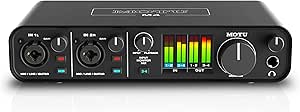 | Best for Expanded Desktop I/O | Inputs/outputs: 4-in/4-out | Microphone preamps: 2 | Connectivity: USB-C | VIEW LATEST PRICE | See Our Full Breakdown |
| desktop audio interface | Connectivity | Maximum sample rate | Weight | Channels |
|---|---|---|---|---|
| M-Audio M-Track Duo USB Audio | — | — | — | — |
| Universal Audio Volt 2 USB Aud | USB | 192 kHz | 650 g | 2-in/2-out |
| Universal Audio Volt 2 Max USB | USB | 192 kHz | 1 kg | — |
| Shure MVX2U Gen 2 XLR-to-USB-C | USB-C | 192 kHz | 100 g | — |
| Universal Audio Volt 4 Max USB | USB | 192 kHz | 1 kg | — |
| Elgato Wave XLR MK.2 USB Audio | USB | 192 kHz | 11.36 ounces | 2 |
| iCON Pro Audio AIO2 USB Audio | USB-C, UNI OTG | — | 1.7 lb | 2-in/2-out |
| Universal Audio Volt 2 Gen 2 U | USB | 192 kHz | — | 2 |
| Focusrite Scarlett Solo 3rd Ge | USB-C | — | 12.32 ounces | — |
| PIYONE 2×2 USB-C Audio Interfa | USB-C | — | 0.74 kg | 2 |
| JOLGOO 2×2 USB Audio Interface | USB; USB-C and USB-A cables included | 192 kHz | — | 4 listed |
| M-Audio M-Track Solo USB Audio | — | — | — | — |
| Focusrite Scarlett 2i2 4th Gen | USB | 192 kHz | — | 2 |
| MOTU M4 4×4 USB-C Audio Interf | USB-C | 192 kHz | — | — |
More Details on Our Top Picks
M-Audio M-Track Duo USB Audio Interface
The M-Track Duo is a straightforward desktop starting point for recording two sources at once, such as a microphone and guitar or two podcast mics. Its two combo inputs accept mic, instrument, and line-level signals, while phantom power lets you connect condenser microphones. Compared with the Shure MVX2U Gen 2, it suits a small multi-input setup rather than a single-mic chain; compared with the Universal Audio Volt 2, it keeps the workflow simpler and centers on basic recording essentials.
Zero-latency direct monitoring helps performers hear their input without distracting delay, and USB power keeps the unit easy to move between desks. The tradeoff is a listed maximum resolution of 48 kHz, below the higher-rate options in this roundup. Its 1/4-inch headphone jack may also call for an adapter, and iOS use needs a separate camera adapter.
Pros:- Two combo inputs accommodate microphones, instruments, and line-level sources.
- Phantom power supports condenser microphones.
- USB/Direct balance switch provides zero-latency input monitoring.
- Compact USB-powered design includes MPC Beats software.
Cons:- Maximum listed audio resolution is 48 kHz, lower than several alternatives here.
- The 1/4-inch headphone output may require an adapter for some headphones.
- iOS use requires an Apple Lightning to USB 3 Camera Adapter.
Best for: First-time podcasters, songwriters, and streamers who need two mic or instrument inputs and a simple USB-powered desktop setup.
Not ideal for: Mobile-first creators who want plug-and-play iOS connection, or producers who need higher sample rates and more advanced onboard processing.
- Inputs:2 combo XLR/line/instrument inputs
- Preamps:Crystal preamps with phantom power
- Audio resolution:48 kHz
- Outputs:Stereo 1/4-inch outputs
- Headphone output:1/4-inch stereo
- Monitoring:Zero-latency direct monitoring with USB/Direct balance switch
- Power:USB-powered
- Compatibility:Mac and PC
Our verdict“Choose the M-Track Duo for an affordable, uncomplicated two-input desktop setup, but pick a higher-resolution model if recording specs are a priority.”
Universal Audio Volt 2 USB Audio Interface
The Volt 2 is a capable two-in/two-out desktop interface for musicians and creators who want a little tonal shaping alongside a familiar recording workflow. Its Vintage preamp mode, inspired by UA’s 610 tube preamp, offers a way to add character without relying only on software after recording. That gives it a different appeal from the more basic M-Audio M-Track Duo, which prioritizes essential inputs and direct monitoring over preamp coloration.
Recording at up to 24-bit/192 kHz and the included DAW and UAD software bundle give this model room to support a growing production setup. It remains portable and works with computers and supported Apple mobile devices. The main limitation is that some iPad and iPhone configurations need an external Volt power supply and Lightning-to-USB camera adapter, adding pieces to a setup that the compact Shure MVX2U Gen 2 handles more directly for a single microphone.
Pros:- Vintage preamp mode provides an optional 610-inspired tonal character.
- Records at up to 24-bit/192 kHz.
- Portable 2-in/2-out design supports computer and mobile workflows.
- Includes a DAW and a suite of UAD plug-ins and instruments.
Cons:- Some iPhone and iPad setups require an external Volt power supply and Lightning-to-USB camera adapter.
- Two input channels limit simultaneous recording compared with expanded-I/O interfaces.
- The stated recording resolution is 24-bit, rather than the 32-bit format listed for the Volt 2 Max.
Best for: Home musicians and podcasters who want two recording channels, a character option for preamps, and bundled production software.
Not ideal for: Creators who need a one-cable mobile setup or more than two input channels for ensembles and multi-mic sessions.
- Channels:2-in/2-out
- Connectivity:USB
- Maximum sample rate:192 kHz
- Recording resolution:Up to 24-bit
- Preamp mode:Vintage mode inspired by UA 610 tube preamp
- Supported operating systems:Windows, macOS, iOS
- Dimensions:5.12 x 6.85 x 2.09 in
- Weight:650 g
Our verdict“Pick the Volt 2 if you want two-channel recording with optional preamp character and software tools, and can accommodate extra hardware for some mobile setups.”
Universal Audio Volt 2 Max USB Audio Interface
The Volt 2 Max is aimed at creators who want more help managing a recording session than a basic two-input interface provides. Its Auto-Gain and Clip Protection can help keep levels under control, while the built-in talkback mic and Smart Display add practical control points at the desk. That makes it more hands-on and guided than the standard Universal Audio Volt 2, whose appeal leans more on its 610-inspired Vintage preamp mode and two-channel simplicity.
Tone-shaping preamps and compressor presets for vocals, guitar, and bass give users quick starting points without requiring an immediate plug-in workflow. It also supports 32-bit audio up to 192 kHz and includes UAD plug-ins with LUNA. The tradeoff is a more involved feature set than a beginner may need, and the listed 10-channel capacity may be excessive for simple voice or solo-instrument recording. ADAT expansion also depends on compatible external equipment.
Pros:- Auto-Gain and Clip Protection support faster level setup and help manage recording peaks.
- Built-in talkback microphone and Smart Display add useful desk controls.
- Tone-shaping preamps and compressor presets cover vocals, guitar, and bass.
- Bus-powered design supports Mac, Windows, and iOS workflows.
Cons:- The listed 10-channel capacity may be more than a simple desktop recording setup needs.
- ADAT expansion requires compatible external equipment.
- Its additional controls and features can add complexity compared with the standard Volt 2.
Best for: Home producers and podcasters who record varied sources and want guided level control, talkback, and onboard processing features.
Not ideal for: Solo creators seeking the simplest two-input interface, or buyers who will not use its expanded connections and recording aids.
- Connectivity:USB
- Listed number of channels:10
- Maximum sample rate:192 kHz
- Audio format:32-bit
- Power:Bus-powered
- Connections:Microphones, instruments, MIDI, and ADAT expansion
- Built-in features:Talkback microphone, Smart Display, Auto-Gain, and Clip Protection
- Compatible systems:Mac, Windows, and iOS
- Weight:1 kg
Our verdict“Choose the Volt 2 Max if onboard recording assistance and control matter more than keeping a two-channel setup minimal.”
Shure MVX2U Gen 2 XLR-to-USB-C Audio Interface
The Shure MVX2U Gen 2 takes a different approach from conventional desktop interfaces: it connects one XLR microphone directly to a USB-C device instead of providing a bank of inputs and controls. That makes it a focused choice for a solo podcaster, streamer, or voice creator whose setup revolves around one mic. Compared with the M-Audio M-Track Duo, it gives up a second input and instrument connections in exchange for a compact mobile-friendly form and onboard voice processing.
Its 60 dB of gain and 48 V phantom power support a range of dynamic and condenser XLR microphones. Auto Level Mode, real-time denoising, and a digital pop filter can reduce the need for separate processing steps. It also reaches 192 kHz and is MFi certified. The clear compromise is its single channel: it is not suited to recording two people or mic-and-instrument combinations at once, and use depends on a USB-C connection.
Pros:- Compact XLR-to-USB-C design suits desktop and mobile recording.
- Up to 60 dB of gain and 48 V phantom power support dynamic and condenser microphones.
- Auto Level Mode, real-time denoiser, and digital pop filter provide onboard voice tools.
- MFi certified and compatible with select Android, Windows, iOS, and macOS devices.
Cons:- Single-channel design cannot record two microphones or a mic and instrument simultaneously.
- Requires a USB-C connection.
- Its focused microphone workflow is less flexible than the two-input M-Track Duo.
Best for: Solo podcasters, streamers, and voice creators who use one XLR microphone and want compact desktop or mobile recording with onboard processing.
Not ideal for: Musicians recording multiple sources, co-hosted shows needing separate mic channels, or users without a compatible USB-C device.
- Connectivity:USB-C
- Audio input:XLR
- Number of channels:1
- Maximum gain:60 dB
- Phantom power:48 V
- Maximum sample rate:192 kHz
- Weight:100 g
- Certification:MFi certified
- Compatible operating systems:Android, Windows, iOS, and macOS
Our verdict“Choose the MVX2U Gen 2 for a compact, processed single-microphone setup, not for multi-source desktop recording.”
Universal Audio Volt 4 Max USB Audio Interface
The Volt 4 Max is the lineup’s pick for a desktop studio that has outgrown a basic two-input interface. Its expanded I/O, including ADAT and MIDI, gives a producer more scope to connect external gear and add compatible equipment than the Volt 2 offers. Two Tone Shaping Preamps and Max compressor presets provide quick tonal options for vocals, guitar, and bass, while the full-color Smart Display helps make channel and level adjustments easier to follow.
It supports 32-bit/192 kHz audio and is bus-powered, so it does not need a separate power supply in a standard computer setup. The extra connections make it a stronger fit for a growing studio than the M-Track Duo, but they also bring a learning curve for new users. Its listed 12-channel capacity can be unnecessary for a solo microphone or basic streaming rig, and operation still depends on a computer or compatible device.
Pros:- Expanded I/O includes ADAT and MIDI for connecting compatible external equipment.
- Two Tone Shaping Preamps and Max compressor presets offer recording-tone options.
- 32-bit/192 kHz audio support and full-color Smart Display.
- Bus-powered design works with Mac, Windows, and iOS-compatible setups.
Cons:- Feature set can take more setup and learning than a basic two-input interface.
- ADAT expansion requires compatible external equipment.
- Bus-powered operation requires a computer or compatible device.
Best for: Home-studio producers and hardware-focused musicians who need more desktop I/O, MIDI connectivity, and room to expand beyond a two-channel interface.
Not ideal for: Beginners recording only one microphone, or anyone seeking a minimal setup without extra routing and expansion options.
- Connectivity:USB
- Listed number of channels:12
- Audio resolution:32-bit
- Maximum sample rate:192 kHz
- Power:Bus-powered
- Preamps:2 Tone Shaping Preamps
- Expanded I/O:ADAT and MIDI
- Compatibility:Mac, Windows, and iOS
- Weight:1 kg
Our verdict“Pick the Volt 4 Max when expanded connections and growth room justify more setup than a compact two-input interface requires.”
Elgato Wave XLR MK.2 USB Audio Interface and DSP Mixer
The Wave XLR MK.2 is the most specialized desktop pick here: it connects one XLR microphone and adds voice processing and routing aimed at live audio workflows. Up to 80 dB of gain can accommodate microphones that need a stronger signal, while onboard effects and Wave Link let users shape and route audio without relying only on their recording app. Compared with the Focusrite Scarlett Solo 3rd Gen, it gives streamers more built-in control and software routing, but the Solo is more versatile for recording an instrument alongside a microphone. The tradeoff is a single XLR input and a Wave Link requirement of Windows 11 or Apple Silicon Mac. This makes the Elgato a focused choice for desktop voice work, not a general-purpose two-input recording hub.
Pros:- Up to 80 dB of gain supports a broad range of XLR microphones.
- Onboard voice enhancer, compressor, and EQ can shape speech before it reaches a mix.
- Touch mute and level controls provide quick desktop adjustments with LED feedback.
- Wave Link supports audio routing, effects, and monitoring.
Cons:- The single XLR input does not support recording multiple microphones or an XLR mic and instrument simultaneously.
- Wave Link requires Windows 11 or an Apple Silicon Mac.
- Its voice-focused controls are less useful for buyers seeking a conventional multi-input recording interface.
Best for: Streamers, voice-chat hosts, and solo podcasters using one XLR microphone who want onboard processing and software-based routing.
Not ideal for: Singer-songwriters recording vocals and guitar at once, or buyers who need more than one microphone input or use an unsupported computer.
- Connectivity:USB
- Audio input:XLR
- Channels:2
- Maximum sample rate:192 kHz
- Gain:Up to 80 dB
- Monitoring resolution:24-bit, 48 kHz
- Supported software:Elgato Wave Link
- Weight:11.36 ounces
Our verdict“Choose the Wave XLR MK.2 for a one-microphone streaming or podcast desk where built-in voice tools matter more than input flexibility.”
iCON Pro Audio AIO2 USB Audio Interface with Touchscreen, 32-bit/384 kHz
The iCON AIO2 puts its controls front and center with a 3.98-inch touchscreen and precision encoder, making adjustments more visible than on the simpler hardware controls of the Focusrite Scarlett Solo 3rd Gen. Its 2-in/2-out format and USB-C plus UNI OTG connections suit buyers moving between compatible computers and mobile devices, while the included remote and cables add flexibility for a compact workstation. The listed recording ceiling of 32-bit/384 kHz is unusually high for this group, though it does not by itself guarantee a better result than a well-matched interface such as the Universal Audio Volt 2 Gen 2. The AIO2’s listed 63 dB mic gain and microphone-focused input information call for checking fit with your sources; its listed 20 kHz frequency response also leaves less detail about the full audio path than competing spec sheets.
Pros:- Touchscreen and encoder offer direct visual control of gain, volume, effects, and mixer settings.
- USB-C and UNI OTG support compatible computer and mobile workflows.
- Includes a remote control and connection cables for flexible setup.
- Records at up to 32-bit/384 kHz according to the supplied specifications.
Cons:- The listed 63 dB microphone gain may be limiting for some microphones or recording situations.
- The supplied frequency-response specification lists 20 kHz, offering limited detail about the interface’s response range.
- Its 2-in/2-out configuration is less suited to expanding recording setups than larger interfaces.
Best for: Creators who want a visually controlled 2-in/2-out desktop interface that can also connect to compatible phones and tablets.
Not ideal for: Buyers who need clearly specified instrument-input options, straightforward conventional controls, or more complete frequency-response documentation.
- Channels:2-in/2-out
- Audio resolution:32-bit / up to 384 kHz
- Display:3.98-inch TFT touchscreen
- Microphone gain:63 dB
- Dynamic range:116 dB
- Connectivity:USB-C, UNI OTG
- Compatible operating systems:Android, ChromeOS, Windows, iOS, macOS
- Weight:1.7 lb
Our verdict“Pick the AIO2 if touchscreen operation and mobile-device connections are priorities, but verify its input and response specifications against your recording sources.”
Universal Audio Volt 2 Gen 2 USB Audio Interface
The Volt 2 Gen 2 earns its place as a balanced two-input desktop interface for recording vocals and instruments together. Its dual mic and instrument inputs give it a more flexible recording role than the single-mic Elgato Wave XLR MK.2, while Auto-Gain and Clip Protection can help keep setup and level management less hands-on. The full-color Smart Display adds a clear view of channel selection and levels; the supplied UAD plug-ins and LUNA also give new sessions a defined software starting point. Compared with the Focusrite Scarlett Solo 3rd Gen, the Volt accommodates two simultaneous sources rather than a mic-plus-instrument arrangement on a compact two-input design. Its limits are equally clear: it remains a two-channel interface, and compatibility is listed for Mac, Windows, and iOS, so buyers with other devices should confirm support.
Pros:- Two microphone and instrument inputs support simultaneous recording of two sources.
- Auto-Gain and Clip Protection help manage input levels during setup and recording.
- Smart Display provides visual feedback for channel selection and levels.
- Includes UAD plug-ins and the LUNA Digital Audio Workstation.
Cons:- Two channels limit recording of multiple microphones or a larger ensemble.
- Listed operating-system support is limited to Mac, Windows, and iOS.
- The bundled software may matter less to buyers who already have an established production setup.
Best for: Singer-songwriters and home-recording creators who need two simultaneous mic or instrument inputs and want help setting recording levels.
Not ideal for: Bands recording several sources at once, or users who need more than two channels or support for operating systems outside the listed Mac, Windows, and iOS options.
- Inputs:Dual microphone and instrument inputs
- Channels:2
- Audio resolution:32-bit
- Maximum sample rate:192 kHz
- Power:Bus-powered
- Connectivity:USB
- Supported operating systems:Mac, Windows, iOS
- Included software:UAD plug-ins, LUNA Digital Audio Workstation
Our verdict“Choose the Volt 2 Gen 2 for a two-source recording desk where level-assist features and included production software are useful.”
Focusrite Scarlett Solo 3rd Gen USB-C Audio Interface
The Scarlett Solo 3rd Gen is a straightforward desktop choice for recording one vocalist or podcaster alongside a guitar or bass. Its XLR mic input and separate high-headroom instrument input make that combination practical, while switchable Air mode offers a way to add brightness to a vocal signal. Compared with the Universal Audio Volt 2 Gen 2, the Solo is the more compact, focused option for a single performer; the Volt’s two mic and instrument inputs are a better fit when two sources need to be captured at once. The Scarlett also includes several production tools, including Pro Tools Intro+, Ableton Live Lite, Cubase LE, and Hitmaker Expansion. Its tradeoffs are its limited input count, plastic chassis, and lack of MIDI connections, which matter if the desk needs to grow beyond basic mic-and-instrument recording.
Pros:- Separate XLR microphone and high-headroom instrument inputs suit solo vocal-and-instrument recording.
- Switchable Air mode can add brightness to vocal recordings.
- Compact, bus-powered design is convenient for portable setups.
- Includes Pro Tools Intro+, Ableton Live Lite, Cubase LE, and Hitmaker Expansion.
Cons:- Input count limits simultaneous recording compared with two-microphone interfaces such as the Volt 2 Gen 2.
- No MIDI inputs or outputs for connecting external MIDI hardware.
- Plastic chassis is less substantial than metal-bodied alternatives.
Best for: Solo singer-songwriters and podcasters who want a compact interface for one microphone plus a guitar or bass and appreciate bundled production software.
Not ideal for: Small bands, multi-mic podcast setups, or desktop musicians who need MIDI ports or a more expandable input configuration.
- Connectivity:USB-C
- Sample rate:Up to 24-bit/192 kHz
- Inputs:1 XLR mic preamp, 1 high-headroom instrument input
- Outputs:2 balanced outputs, 1 headphone output
- Dimensions:1.71 × 5.65 × 3.77 in
- Weight:12.32 ounces
- Compatibility:Mac OS, Windows OS, iOS
- Included software:Pro Tools Intro+, Ableton Live Lite, Cubase LE, Hitmaker Expansion
Our verdict“The Scarlett Solo 3rd Gen suits a solo performer who needs one mic input, one instrument input, and a compact desktop footprint.”
PIYONE 2×2 USB-C Audio Interface, 24-bit/192 kHz, Alloy Red
The PIYONE 2×2 offers two XLR/TRS combo inputs, giving it a useful advantage over the Focusrite Scarlett Solo 3rd Gen when a session needs two microphones or two instrument-level sources. Its 48V phantom power supports compatible condenser microphones, while Hi-Z input and direct monitoring cover common guitar-recording needs without adding much complexity. USB-C bus power and driver-free setup are appealing for a simple desktop rig, and illuminated gain controls make adjustments easy to see. The tradeoff is less certainty about platform support: the description mentions Mac and iOS, but the listed operating-system compatibility specifies Windows. Its 3.5 mm headphone output may also require an adapter or different headphones compared with interfaces using another headphone connection. Buyers should confirm their computer and monitoring setup before choosing it over more clearly documented alternatives.
Pros:- Two XLR/TRS combo inputs accommodate microphones and instruments.
- 48V phantom power and Hi-Z support cover common condenser-mic and guitar workflows.
- Direct monitoring supports low-latency listening while tracking.
- USB-C bus power and driver-free setup simplify connection.
Cons:- Operating-system information is inconsistent: Windows is listed, while the description also mentions Mac and iOS.
- The 3.5 mm headphone output may not match every headphone or monitoring setup.
- The supplied specifications provide less detail about compatibility and workflow than established alternatives.
Best for: Home recordists who need two combo inputs for microphones or instruments, direct monitoring, and a simple USB-C connection.
Not ideal for: Mac or iOS users who need clearly confirmed compatibility, and headphone users who require a connection other than 3.5 mm.
- Channels:2
- Inputs:2 XLR/TRS combo inputs
- Audio resolution:24-bit/192 kHz
- Phantom power:48V
- Connectivity:USB-C
- Monitoring:Direct monitoring; monitor mix/loopback
- Headphone output:3.5 mm
- Weight:0.74 kg
Our verdict“Consider the PIYONE for an uncomplicated two-input desktop setup if its platform support and 3.5 mm headphone connection fit your equipment.”
JOLGOO 2×2 USB Audio Interface, 24-Bit/192kHz with 48V Phantom Power
I’d shortlist the JOLGOO 2×2 for a desktop setup that needs two mic-capable inputs without stepping up to a more established model like the Focusrite Scarlett 2i2 4th Gen. Its dual combo inputs, separate gain controls, and peak indicators make it easier to track two sources and spot overloaded levels, while direct monitoring lets performers hear themselves without distracting delay. It also reaches 24-bit/192kHz and includes both USB-C and USB-A cables, giving it flexible connection options for a computer-based recording desk.
The tradeoff is that its specifications leave some questions open: the audio-input listing names XLR even though the inputs are described as combo jacks, and macOS compatibility may vary by setup. The Scarlett is the clearer choice for level-setting assistance and documented converter performance; I’d favor JOLGOO when a straightforward two-input layout and included cables matter more.
Pros:- Two combo inputs with independent gain controls support recording two sources at once.
- LED peak indicators help identify overloaded input levels.
- Direct monitoring supports delay-free listening while recording.
- USB-powered metal housing and included USB-C and USB-A cables suit a compact desk setup.
Cons:- macOS compatibility may depend on system configuration, and the listing mentions possible reformatting.
- The input specification lists XLR without fully clarifying the combo-input line options.
- Its feature set is less explicit about recording aids and performance details than the Scarlett 2i2 4th Gen.
Best for: Home recordists and podcasters who need two simultaneous mic or line sources, direct monitoring, and a USB-powered desktop unit.
Not ideal for: Buyers who want clearly documented operating-system behavior or built-in recording-level aids such as the Scarlett 2i2’s Auto Gain and Clip Safe.
- Inputs:Dual XLR/line combo inputs
- Channels:4 listed
- Maximum sample rate:192 kHz
- Bit depth:24-bit
- Phantom power:+48V
- Connectivity:USB; USB-C and USB-A cables included
- Operating systems:Windows and macOS
- Housing and weight:Metal; 0.81 kg
- Warranty:1 year
Our verdict“Choose the JOLGOO if you want two independently controlled inputs and direct monitoring in a compact desktop interface, but prefer the Scarlett 2i2 for more clearly described recording aids.”
M-Audio M-Track Solo USB Audio Interface
For a beginner recording one microphone alongside a guitar, keyboard, or other line-level source, I’d put the M-Audio M-Track Solo ahead of interfaces whose extra inputs would go unused. Its combo mic input has phantom power, and the second input switches between line and instrument levels, so a basic podcast or music setup can connect two different sources without a larger interface. USB-powered operation and included MPC Beats also make it a practical starting point at a desk.
Its main limit is the 48 kHz ceiling, well below the 192 kHz support listed for the JOLGOO 2×2 and Focusrite Scarlett 2i2. The small 1/8-inch headphone jack may also call for an adapter, and iOS use requires a separate Apple camera adapter. I’d choose this for a compact, uncomplicated setup, not for someone planning to record two microphones or expand a more demanding studio rig.
Pros:- Combo mic input with phantom power and a separate switchable line/instrument input cover common starter setups.
- USB power keeps the desktop setup simple and portable.
- Zero-latency direct monitoring offers a way to hear input without distracting delay.
- MPC Beats is included for a basic production workflow.
Cons:- Maximum listed audio resolution is 48 kHz, below the 192 kHz support of the JOLGOO and Scarlett 2i2.
- The headphone output is 1/8-inch, so some headphones need an adapter.
- Connecting to iOS requires a separate Apple Lightning to USB 3 Camera Adapter.
Best for: First-time home recordists or streamers who need one phantom-powered microphone input plus a guitar or line-level input at a desktop.
Not ideal for: Musicians recording two microphones at once, or buyers who want sample rates above 48 kHz and a standard-size headphone connection.
- Inputs:1 combo XLR/line input; 1 switchable line/instrument input
- Recording channels:2
- Maximum audio resolution:48 kHz
- Outputs:Stereo RCA outputs; 1/8-inch headphone output
- Monitoring:Zero-latency direct monitoring with USB/Direct switch
- Power:USB-powered
- Supported software:Ableton Live Lite and MPC Beats
- Operating system compatibility:Windows 7–10; macOS High Sierra–Big Sur; iOS with Apple Lightning to USB 3 Camera Adapter
Our verdict“Pick the M-Track Solo for a modest one-mic desktop setup with a second instrument input, but choose a two-mic interface if your recording plans may grow.”
Focusrite Scarlett 2i2 4th Gen USB-C Audio Interface
I’d rank the Scarlett 2i2 4th Gen first for a desktop recording setup that needs two mic preamps and helpful level controls without adding extra I/O complexity. Its Auto Gain and Clip Safe features can simplify setting levels and help manage clipping, a useful advantage over the more basic JOLGOO 2×2 and M-Audio M-Track Solo. Two inputs let a musician record a pair of microphones or combine a mic and instrument, while Air mode offers a tonal option for adding presence to a source.
The interface supports up to 192 kHz and lists a 120 dB dynamic range, but it remains a two-input, two-channel choice. The MOTU M4 offers four-in/four-out connectivity and MIDI I/O for a more expandable desktop, while the Scarlett focuses on a simpler recording path. I’d skip it if you need several simultaneous sources or hardware MIDI connections; for two-source recording, its guided level features give it a strong case.
Pros:- Two low-noise microphone preamps support recording two mic sources at once.
- Auto Gain and Clip Safe can simplify level setup and help prevent clipping.
- Air mode provides an optional presence-oriented tonal character.
- Includes recording software and plugins, with independent headphone volume control.
Cons:- Limited to two audio inputs and two channels.
- Does not offer the MOTU M4’s four-in/four-out layout or MIDI I/O.
- Buyers who only need one mic input may find its two-preamp layout unnecessary compared with the M-Track Solo.
Best for: Solo musicians, podcasters, and small home studios that record up to two sources and want assistance setting and maintaining input levels.
Not ideal for: Desktop producers who need more than two audio inputs, additional outputs, or MIDI I/O, as available on the MOTU M4.
- Channels:2
- Audio inputs:2
- Microphone preamps:2
- Maximum sample rate:192 kHz
- Dynamic range:120 dB
- Connectivity:USB
- Compatible operating systems:Mac OS, Windows OS, iOS
- Dimensions:4.61 × 7.09 × 1.87 in (D × W × H)
- Warranty:3 years
Our verdict“Choose the Scarlett 2i2 4th Gen for a polished two-source desktop recording setup with useful level assistance, but move to the MOTU M4 if you need more I/O or MIDI.”
MOTU M4 4×4 USB-C Audio Interface
The MOTU M4 earns its place for desktop users who have outgrown a basic two-input, two-output interface. Its 4-in/4-out layout gives a recording or mixing setup more routing room than the Scarlett 2i2, while two mic preamps retain support for common vocal and instrument sessions. MIDI I/O, loopback, and low-latency hardware monitoring add practical options for connecting equipment, capturing computer audio, or monitoring a live signal path. The LCD screen also makes this more information-forward than simpler interfaces such as the M-Track Solo.
That extra flexibility comes with a documentation caveat: the supplied details do not identify the audio input and output connector types, making it harder to confirm fit with existing desktop gear. Its listed operating-system versions are also dated compared with the broad compatibility claims for the Scarlett 2i2. I’d favor the M4 when routing and MIDI matter more than a clearly specified connection layout; otherwise, the Scarlett is the easier two-input choice to evaluate.
Pros:- Four-in/four-out connectivity offers more routing flexibility than the Scarlett 2i2’s two-channel layout.
- MIDI I/O supports connecting MIDI equipment without a separate interface.
- Loopback and low-latency hardware monitoring support streaming and live monitoring workflows.
- LCD screen provides a visible interface status display.
Cons:- The supplied specifications do not identify audio input and output connector types.
- Listed operating-system compatibility specifies older versions.
- Its additional I/O may be unnecessary for buyers who only record one or two sources.
Best for: Desktop musicians, podcasters, and producers who need more routing capacity than a two-input interface and want MIDI I/O and loopback.
Not ideal for: Buyers who need connector types confirmed before purchase or want compatibility details that explicitly cover current operating-system versions.
- Inputs/outputs:4-in/4-out
- Microphone preamps:2
- Connectivity:USB-C
- MIDI I/O:Yes
- Monitoring:Low-latency hardware monitoring
- Display:LCD screen
- Loopback:Yes
- Maximum sample rate:192 kHz
- Warranty:2 years
Our verdict“Choose the MOTU M4 when your desktop workflow needs extra routing, MIDI, and loopback, but favor the Scarlett 2i2 if two inputs and clearer connection details are enough.”
How We Picked
I ranked these desktop audio interfaces by how well their input and output layouts match common recording tasks, from a single voice track to simultaneous microphones and instruments. I also weighed practical desktop factors: ease of operation, monitoring controls, connectivity, stated recording specifications, and whether the design favors studio recording, streaming, or a compact XLR-microphone setup. A specification only mattered when it could change a buyer’s workflow; a higher sample-rate figure alone did not outweigh a more useful connection layout.
The ranking favors versatility and day-to-day usability for the leading all-purpose picks, then gives specialist models credit when their focused workflow is a clear advantage for a particular buyer. Simpler and less established options sit lower because their appeal is strongest for basic setups, while buyers with expanding recording needs may benefit from a more capable interface. I also treated similarly named products as separate listings rather than assuming that one model’s features apply to another.
| desktop audio interface | Connectivity |
|---|---|
| M-Audio M-Track Duo USB Audio | — |
| Universal Audio Volt 2 USB Aud | USB |
| Universal Audio Volt 2 Max USB | USB |
| Shure MVX2U Gen 2 XLR-to-USB-C | USB-C |
| Universal Audio Volt 4 Max USB | USB |
| Elgato Wave XLR MK.2 USB Audio | USB |
| iCON Pro Audio AIO2 USB Audio | USB-C, UNI OTG |
| Universal Audio Volt 2 Gen 2 U | USB |
| Focusrite Scarlett Solo 3rd Ge | USB-C |
| PIYONE 2×2 USB-C Audio Interfa | USB-C |
| JOLGOO 2×2 USB Audio Interface | USB; USB-C and USB-A cables included |
| M-Audio M-Track Solo USB Audio | — |
| Focusrite Scarlett 2i2 4th Gen | USB |
| MOTU M4 4×4 USB-C Audio Interf | USB-C |
Factors to Consider When Choosing Desktop Audio Interfaces
Before choosing an interface, map your actual recording setup rather than shopping by headline specifications. The best desktop unit is the one that supports your sources, monitoring habits, and computer connections without adding controls or capacity you will not use.
Count simultaneous sources, not just inputs
Make a list of everything you may record at the same time: microphones, guitar or bass, keyboards, and any stereo source. A two-input interface can handle a vocal and guitar together, but it may not support a two-person podcast plus a separate instrument without another recording method. Input counts can also be described differently across product listings, so check whether each connection accepts a microphone, an instrument, or line-level audio. Buyers often mistake the number of physical sockets for the number of usable simultaneous recording channels. If your setup may grow, paying for extra inputs now can be simpler than replacing the interface later, but unused capacity adds little value to a fixed one-microphone workflow.
Separate recording needs from creator controls
A traditional audio interface is built around converting mic and instrument signals for recording, while some creator-oriented models add DSP, routing, or software mixing. Those extra controls can make streaming and voice production easier, especially when you want to manage sources without opening a full DAW. They do not automatically make a device better for recording multiple instruments or microphones. Before buying, decide whether your main task is capturing separate tracks, managing a live stream, or both. A focused XLR-to-USB device can be a neat fit for one microphone, but it is a poor substitute for a multi-input interface if you plan to record a band or several guests.
Choose the monitoring setup you will actually use
Headphone and speaker connections shape daily usability more than many headline recording specifications. If two people need to monitor independently, check whether the interface offers the outputs and control options for that arrangement; a single headphone socket may become a bottleneck. Direct monitoring can help you hear an input without the delay introduced by software, though the routing controls vary by model. Also check how easily you can adjust headphone and speaker levels from the desktop. A compact interface may save space but feel less convenient if its controls are awkward to reach or if switching between headphones and speakers requires extra steps.
Treat sample rate and bit depth as supporting details
Higher sample-rate and bit-depth figures can look like a straightforward measure of quality, but they should not be the only basis for a purchase. For many home recording tasks, compatible software, stable operation, suitable preamps, and sensible input routing have a more direct effect on a smooth workflow. Confirm that the interface works with your computer and recording software, and check whether the listed maximum specification applies to the inputs and outputs you plan to use. Recording at the highest setting can also use more storage and processing capacity. Choose the format that fits your projects rather than paying extra for a number you are unlikely to use.
Check connections and power before ordering
USB-C describes a connector shape, not a guarantee of a particular computer connection speed or included cable. Check the interface’s exact connection requirements, cable arrangement, and whether your computer has a compatible port or needs an adapter. Condenser microphones may require phantom power, while dynamic microphones usually do not; verify the feature on the exact model if you plan to use a condenser. Also consider whether your setup needs external power or can run from the computer connection. These small compatibility checks can prevent a device from arriving only to reveal that it does not suit your microphone or desktop layout.
Buy for a realistic upgrade path
Think about the next likely change to your setup, not every possible future project. Moving from one microphone to two is a more concrete reason to upgrade input capacity than a vague plan to record anything someday. An interface with extra outputs may matter if you expect separate monitor mixes or more involved routing, but those features add little for a solo creator using headphones. Compare the cost of an interface that fits today with the inconvenience of replacing it if your needs change. A modest model can be the sensible choice for a fixed beginner setup; a more capable unit earns its place when its extra connections solve a real workflow problem.
Frequently Asked Questions
Should I choose a one-input interface or a two-input model?
Choose based on the number of sources you need to record at the same time, not the number of people who may use the setup eventually. A one-input model can suit a solo voice or instrument workflow, while two inputs let you capture a microphone and guitar together or record two sources simultaneously. A second input also gives you more flexibility for interviews and future projects. If you are certain you will only record one source at a time, a compact single-input option may be enough. If you are unsure, two inputs are often the more practical starting point.
Can an XLR-to-USB interface replace a regular desktop audio interface?
It can replace one for a focused setup built around a single XLR microphone, such as voice recording or streaming. A standard interface is usually a better fit when you need multiple inputs, instrument connections, or more conventional studio routing. Check whether the XLR-to-USB model supplies the microphone features you need, including phantom power for a condenser mic. Also look at how it handles monitoring and software control, since those can define the workflow as much as the connection itself. The right choice depends on whether you value a streamlined microphone path or broader recording flexibility.
Do I need to pay more for a higher sample rate?
Not automatically. A higher maximum sample rate does not by itself guarantee better recordings or a more suitable interface for your work. For many home recording projects, input count, monitoring, software compatibility, and reliable operation have a more noticeable effect on convenience. Higher settings can also require more storage and computer resources. Pay attention to sample rate when a specific recording workflow requires it, but do not let the largest number in a product listing make the decision for you.
What should I check before using a condenser microphone?
Confirm that the exact interface model provides phantom power and that the microphone connection supports the way you plan to use it. A condenser mic commonly needs phantom power, while many dynamic microphones do not. Check the product’s instructions for how to activate power and connect the microphone safely, especially if other equipment is attached. Also make sure you have the right cable and enough gain for your microphone. Since similarly named interface variants can differ, verify the specific model rather than relying on a family name.
Is an interface with more inputs always a better long-term choice?
No. Extra inputs help only if you expect to record more sources at once or need the routing options that come with a larger setup. A bigger interface can take up more desktop space and may add controls you never touch. For a solo musician or streamer, a simpler device may be easier to use and better matched to the job. For a small ensemble, two-person recording, or a setup likely to add instruments, additional inputs can prevent an early replacement. Let a specific planned use guide the upgrade rather than buying capacity without a reason.
Conclusion
For most buyers seeking one capable desktop hub, I recommend the MOTU M4 as the best overall because its 4-in/4-out layout supports more varied recording needs than basic 2×2 choices. The M-Audio M-Track Duo is the best value-oriented pick for straightforward two-source recording, while the Universal Audio Volt 4 Max is the best premium choice for buyers who want a higher-capacity Volt model. Beginners should look at the Focusrite Scarlett Solo 3rd Gen for a simple one-source setup or the Scarlett 2i2 4th Gen if they need two inputs. For a focused creator workflow, the Elgato Wave XLR MK.2 suits DSP and software mixing, while the Shure MVX2U Gen 2 makes the most sense for a compact XLR-microphone connection. Pick by the number of sources you record together and the controls you will use every day, rather than by specifications alone.