USB-C hubs add the ports a laptop may be missing, but the right choice depends on whether you need fast data, an external display, card readers, or charging while connected. My best overall pick is the UGREEN Revodok Pro 6-in-1, which pairs 10Gbps data with 4K 60Hz HDMI and 100W power delivery. The Anker 7-in-1 is a standout for a broader mix of connections, while the Acer 10Gbps four-USB-C hub suits setups built around USB-C devices. The main tradeoffs are port variety versus speed, compactness versus connection count, and advertised charging capacity versus power available to your laptop. Read on for the full breakdown and help matching a hub to your devices.

Get audio and creator gear delivered free with Prime
- Fast, free delivery on millions of items
- Prime Video, Amazon Music and more included
- Member-only deals all year
Complete the kit


Key Takeaways
- The UGREEN Revodok Pro 6-in-1 leads on balanced capability: its listed 10Gbps data, 4K 60Hz HDMI, and 100W PD address three common needs in one hub.
- Port count does not tell the whole story: the 10-in-1 hub lists the broadest selection, but buyers should check which ports support their needed data speeds and display functions.
- USB-C-first setups have a distinct option: Acer’s four-port USB-C hub focuses on adding USB-C connections and 10Gbps data rather than a varied set of connector types.
- Several hubs list 100W power delivery: that figure is a maximum input pass-through rating, not a promise that the laptop receives the full amount after hub power use and adapter limits.
- Display specifications separate otherwise similar picks: some listed models specify 4K at 60Hz, while others only state 4K HDMI, so check the exact resolution and refresh rate you need.
| Anker USB-C Hub 4-in-1 USB Splitter |  | Best Compact USB-A Expansion | USB ports: 4 | Data transfer rate: 5 Gbps | Cable length: 2 ft | VIEW ON AMAZON | See Our Full Breakdown |
| Acer USB C Hub, 7-in-1 Multi-Port Adapter for Laptop/Mac Type-C Devices |  | Best for Everyday Laptop Expansion | Total ports: 7 | HDMI output: 4K at 30Hz | Power Delivery: Up to 100W | VIEW ON AMAZON | See Our Full Breakdown |
| BENFEI USB C Hub 5-in-1 with 4K HDMI, 100W Power Delivery, 3 USB-A Ports, Aluminum Case |  | Best for USB-A-Heavy Setups | Total ports: 5 | USB-A ports: 3 | HDMI: 4K output; up to 30Hz | VIEW ON AMAZON | See Our Full Breakdown |
| UGREEN Revodok Pro USB-C Hub 6-in-1 (10Gbps, 4K 60Hz HDMI, 100W PD) |  | Best for Fast Data and 4K Displays | Ports: 2× USB-C 3.2 Gen 2, 2× USB-A 3.2 Gen 2, HDMI, USB-C PD | Data transfer rate: Up to 10 Gbps | Video output: 4K at 60Hz | VIEW ON AMAZON | See Our Full Breakdown |
| Anker USB C Hub, 7-in-1 Multi-Port USB Adapter, 4K@60Hz USBC to HDMI Splitter |  | Best for Card-Based Media Work | Total ports: 7 | Data transfer rate: 5 Gbps | HDMI output: 4K at 60Hz | VIEW ON AMAZON | See Our Full Breakdown |
| UGREEN USB C Hub 5-in-1 Multiport USB Adapter with 4K HDMI and 100W Power Delivery | 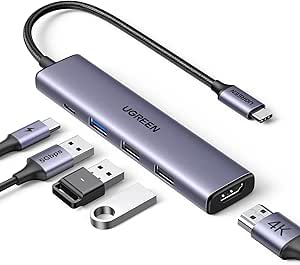 | Best Compact HDMI-and-Charging Pick | Hardware interface: HDMI, USB 2.0, USB 3.0, USB Type-C | Total ports: 5 | Video output: 4K HDMI | VIEW ON AMAZON | See Our Full Breakdown |
| Anker USB C Hub, 5-in-1 USB-C to HDMI Splitter with 4K Display | 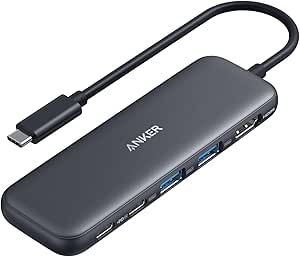 | Best for Broad Laptop Compatibility | Number of ports: 5 | Hardware interface: HDMI, USB 3.0, USB Type-C | Video output: 4K HDMI | VIEW ON AMAZON | See Our Full Breakdown |
| Acer 10 Gbps USB C Hub with 4 USB-C 3.2 Ports and 100W Power Delivery |  | Best for USB-C-Only Peripherals | USB ports: 4 USB-C 3.2 data ports | Power-delivery port: 100W | Data transfer rate: Up to 10Gbps shared | VIEW ON AMAZON | See Our Full Breakdown |
| Acer 5-in-1 USB-C Hub with 4K@60Hz HDMI, 100W PD, and USB 3.0 Ports |  | Best for 4K-at-60Hz Laptop Setups | Ports: 1× HDMI 2.0, 1× USB-C 3.0, 1× USB-A 3.0, 1× USB-A 2.0, 1× USB-C PD | Video output: 4K at 60Hz | Power delivery: 100W input, up to 90W output | VIEW ON AMAZON | See Our Full Breakdown |
| USB C Hub 10-in-1 with 4K HDMI, SD/TF Card Reader, 100W PD Charging, and Multiple USB Ports for Laptops |  | Best for Card Readers and Port Variety | Number of ports: 10 | Hardware interface: HDMI, MicroSD, USB 2.0, USB 3.0 | USB ports: 5 | VIEW ON AMAZON | See Our Full Breakdown |
| usbc hub | Data transfer rate | Power Delivery | Weight | Enclosure |
|---|---|---|---|---|
| Anker USB-C Hub 4-in-1 USB Spl | 5 Gbps | — | 1.12 oz | Plastic |
| Acer USB C Hub | 5 Gbps | Up to 100W | 68 g | Aluminum |
| BENFEI USB C Hub 5-in-1 with 4 | 10 Gbps | Up to 100W | — | Aluminum |
| UGREEN Revodok Pro USB-C Hub 6 | Up to 10 Gbps | Up to 100W | 180 g | — |
| Anker USB C Hub | 5 Gbps | Up to 85W | 67 g | Metal |
| UGREEN USB C Hub 5-in-1 Multip | Up to 5Gbps | Up to 100W | 91 g | Aluminum, grey |
| Anker USB C Hub | 5Gbps | — | — | — |
| Acer 10 Gbps USB C Hub with 4 | Up to 10Gbps shared | — | 0.06 kg | Aluminum, grey |
| Acer 5-in-1 USB-C Hub with 4K@ | — | 100W input, up to 90W output | — | — |
| USB C Hub 10-in-1 with 4K HDMI | Up to 5Gbps | 100W listed | — | — |
More Details on Our Top Picks
Anker USB-C Hub 4-in-1 USB Splitter
I’d choose this four-port Anker when the main job is adding USB connections without carrying a full docking adapter. Its 5 Gbps data rate suits everyday peripherals and file transfers, while the included 2-foot cable gives more placement flexibility than a short, rigid plug-in design. It’s also the lightest, simplest choice here for a small bag or crowded desk.
That simplicity is its limit: unlike the Acer 7-in-1 and BENFEI 5-in-1, it has no HDMI, card readers, or power-delivery input. It also can’t charge a connected laptop, and its plastic enclosure feels less substantial than the metal-bodied alternatives. I’d favor it for USB-A accessories, not as a one-hub solution for displays, charging, and media cards.
Pros:- Four USB ports add straightforward peripheral connectivity.
- 5 Gbps data transfer supports quick transfers with compatible devices.
- Two-foot cable allows flexible placement beside a laptop or monitor.
- Compact, lightweight design is easy to carry.
Cons:- No charging or Power Delivery support through the hub.
- No HDMI output or card reader for display and media workflows.
- Plastic enclosure feels less substantial than the aluminum Acer and BENFEI hubs.
Best for: Laptop users who need several USB connections for a mouse, keyboard, flash drive, or other peripherals and value a lightweight hub with a longer cable.
Not ideal for: Travelers or desk users who need HDMI, SD or microSD access, or laptop charging through the hub.
- USB ports:4
- Data transfer rate:5 Gbps
- Cable length:2 ft
- Dimensions:4.2 × 1.2 × 0.4 in
- Weight:1.12 oz
- Enclosure:Plastic
- Compatible devices:USB-C laptops, desktops, smartphones, and tablets
- Warranty:18 months
Our verdict“Choose this Anker for portable, no-fuss USB expansion, but pick a multiport hub if you also need charging, video, or card access.”
Acer USB C Hub, 7-in-1 Multi-Port Adapter for Laptop/Mac Type-C Devices
The Acer 7-in-1 is a practical all-rounder for someone replacing several small adapters with one compact hub. It combines HDMI, USB-A, USB-C data, SD, and microSD, and its PD input supports up to 100W charging when paired with a suitable charger. The aluminum shell gives it a sturdier feel than the plastic Anker 4-in-1, while covering more everyday connection needs.
The main compromise is the display output: 4K at 30Hz is adequate for many office tasks, but less fluid than the 4K at 60Hz HDMI on the UGREEN Revodok Pro or the Anker 7-in-1. Its USB-A ports are for data rather than video, and full charging depends on an external PD charger. I’d pick it for general laptop work, not refresh-rate-sensitive displays.
Pros:- Combines HDMI, USB-A, USB-C data, SD, and microSD connections.
- Supports up to 100W Power Delivery with a compatible charger.
- Aluminum enclosure offers a durable, compact build.
- Works with a broad range of laptop operating systems and select Android devices.
Cons:- HDMI is limited to 4K at 30Hz, below the 60Hz output of the UGREEN Revodok Pro.
- USB-A ports do not support video or audio pass-through.
- Full Power Delivery performance requires a separate compatible charger.
Best for: MacBook, Windows, or ChromeOS laptop owners who want one hub for a standard monitor, USB accessories, memory cards, and pass-through charging.
Not ideal for: Users who need smooth 4K at 60Hz output or expect USB-A ports to carry video or audio.
- Total ports:7
- HDMI output:4K at 30Hz
- Power Delivery:Up to 100W
- Data transfer rate:5 Gbps
- Card readers:SD and microSD
- Enclosure:Aluminum
- Dimensions:5.1 × 1.4 × 0.7 in
- Weight:68 g
- Compatibility:macOS, Windows, ChromeOS, Linux, and select Android devices
Our verdict“Pick the Acer for a useful mix of daily laptop ports and charging, unless 4K at 60Hz is a requirement.”
BENFEI USB C Hub 5-in-1 with 4K HDMI, 100W Power Delivery, 3 USB-A Ports, Aluminum Case
For a laptop owner whose accessories are mostly USB-A, the BENFEI 5-in-1 gives three such ports alongside 4K HDMI and up to 100W Power Delivery. That layout is more focused than the Acer 7-in-1: it skips card readers and a broader mix of connections in favor of extra USB-A access. Its aluminum body and woven cable also suit a mobile-work setup where the hub will be packed and unpacked regularly.
There are tradeoffs. HDMI tops out at 4K at 30Hz, while the UGREEN Revodok Pro offers 4K at 60Hz. The USB-C port is not for data or video, so the five-in-one count does not mean a flexible USB-C expansion path. I’d choose it for legacy peripherals and charging, but not for fast-refresh displays or card-based media work.
Pros:- Three USB-A ports support multiple existing peripherals.
- HDMI provides an external display connection.
- Supports up to 100W Power Delivery.
- Aluminum housing and woven cable are suited to portable use.
Cons:- HDMI output is limited to 4K at 30Hz, unlike the UGREEN Revodok Pro’s 60Hz output.
- USB-C port does not support data or video transfer.
- No SD or microSD card reader.
Best for: Mobile workers with several USB-A accessories who also need an external display connection and laptop charging from one compact hub.
Not ideal for: Creators who rely on SD or microSD cards, buyers needing USB-C data expansion, or users who want 4K at 60Hz.
- Total ports:5
- USB-A ports:3
- HDMI:4K output; up to 30Hz
- Power Delivery:Up to 100W
- Data transfer rate:10 Gbps
- Enclosure:Aluminum
- Cable:Silicone and woven design
- Compatible devices:Selected MacBook, iPad Pro, Surface, XPS, Chromebook, and other listed USB-C devices
Our verdict“Choose the BENFEI if three USB-A ports matter more than card readers, USB-C data, or 4K at 60Hz.”
UGREEN Revodok Pro USB-C Hub 6-in-1 (10Gbps, 4K 60Hz HDMI, 100W PD)
I’d rank the UGREEN Revodok Pro highest for buyers who value speed across both USB-A and USB-C. Its four data ports support 10 Gbps, twice the stated rate of the Acer and the Anker 7-in-1, while HDMI handles 4K at 60Hz for smoother desktop motion than the Acer 7-in-1’s 30Hz output. Add up to 100W Power Delivery, and it makes a strong fit for a laptop desk or a compatible gaming handheld.
Its focus is throughput, not maximum variety. Unlike the Acer and Anker 7-in-1 hubs, it has no SD or microSD reader, and there’s no Ethernet port for a wired network. The 180 g weight is also greater than the lighter Acer and Anker adapters. I’d choose it when fast storage and a fluid external display matter more than card slots or network connections.
Pros:- Four USB data ports support transfer speeds up to 10 Gbps.
- 4K at 60Hz HDMI offers smoother output than the Acer 7-in-1’s 30Hz limit.
- Up to 100W Power Delivery supports charging while using other ports.
- Compatibility includes Mac, Windows, iPad, Steam Deck, and ROG Ally devices.
Cons:- No SD or microSD card reader, unlike the Acer and Anker 7-in-1 hubs.
- No Ethernet port for wired networking.
- At 180 g, it is heavier than several compact alternatives in this lineup.
Best for: Laptop and gaming-handheld users who connect fast USB drives, need 4K at 60Hz, and want pass-through charging.
Not ideal for: Photographers who need built-in SD or microSD access, or users who require Ethernet from their hub.
- Ports:2× USB-C 3.2 Gen 2, 2× USB-A 3.2 Gen 2, HDMI, USB-C PD
- Data transfer rate:Up to 10 Gbps
- Video output:4K at 60Hz
- Power Delivery:Up to 100W
- Materials:Aluminum and plastic
- Weight:180 g
- Color:Silver
- Warranty:2 years
Our verdict“Choose the UGREEN when fast USB transfers and 4K at 60Hz matter more than card readers or Ethernet.”
Anker USB C Hub, 7-in-1 Multi-Port USB Adapter, 4K@60Hz USBC to HDMI Splitter
The Anker 7-in-1 makes more sense than the UGREEN Revodok Pro for a workflow that moves files from memory cards as well as USB devices. It combines SD and TF card slots with HDMI rated for 4K at 60Hz, two USB-A ports, a USB-C data port, and an input for up to 85W pass-through charging. Its metal body stays relatively light at 67 g, giving it a portable profile for laptop users who regularly handle camera or media-card files.
The UGREEN is the stronger choice for raw USB throughput: it offers 10 Gbps on its USB data ports, compared with this Anker’s 5 Gbps. This hub also requires a laptop with USB-C DP Alt Mode for video and Power Delivery support for charging, and its USB-C data port does not output video. I’d favor it for card access and display flexibility, not maximum transfer speed.
Pros:- SD and TF slots provide direct access to common memory cards.
- HDMI supports 4K at 60Hz.
- PD input supports up to 85W charging.
- Metal enclosure weighs 67 g and measures 5.17 × 1.46 × 0.47 in.
Cons:- 5 Gbps data transfer is slower than the UGREEN Revodok Pro’s 10 Gbps ports.
- USB-C data port does not support video output.
- Video and charging depend on compatible laptop features, including DP Alt Mode and Power Delivery.
Best for: Laptop users, including photographers and media workers, who need SD and TF card access alongside an external 4K display.
Not ideal for: Users transferring large files who want 10 Gbps USB ports, or owners of USB-C devices without DP Alt Mode and Power Delivery support.
- Total ports:7
- Data transfer rate:5 Gbps
- HDMI output:4K at 60Hz
- Power Delivery:Up to 85W
- Card readers:SD and TF
- USB-A ports:2
- Dimensions:5.17 × 1.46 × 0.47 in
- Weight:67 g
- Enclosure:Metal
Our verdict“Pick this Anker for card-reader convenience and 4K at 60Hz, but choose the UGREEN for faster USB data transfers.”
UGREEN USB C Hub 5-in-1 Multiport USB Adapter with 4K HDMI and 100W Power Delivery
I’d choose this UGREEN when the everyday job is adding a display, charging, and a few USB connections without carrying a larger dock. Its 4K HDMI and 100W power-delivery input cover two common laptop needs, while the 4.79-inch aluminum body stays compact. Compared with the Acer 5-in-1 USB-C Hub, UGREEN lists a mix of USB 2.0 and USB 3.0 rather than specifying 4K at 60Hz, so buyers focused on smoother high-resolution video should check the Acer’s display specification first. UGREEN’s 5Gbps data rate is suitable for routine peripherals, not the fastest external-drive workflows. The tradeoff is a lean port selection: there’s no Ethernet or card reader, and the listed 100W figure is a charging pass-through capability, not a promise of that much power reaching the laptop.
Pros:- Combines HDMI, USB-A connections, and USB-C power delivery in a compact adapter.
- Supports 4K HDMI output for connecting a compatible external display.
- Up to 100W power-delivery input can keep a compatible host charging while the hub is connected.
- Aluminum enclosure and 91 g weight suit a portable laptop setup.
Cons:- Five-port layout omits Ethernet and SD or microSD card readers.
- 5Gbps data rate is slower than the Acer 10 Gbps hub for compatible fast storage.
- The listing does not specify 4K refresh rate, and the aluminum finish may show scratches.
Best for: MacBook or iPad users who want a compact hub for an HDMI display, pass-through charging, and a small set of USB accessories.
Not ideal for: Photographers needing SD or microSD slots, wired-network users, and buyers who need more than five ports or specified 4K-at-60Hz output.
- Hardware interface:HDMI, USB 2.0, USB 3.0, USB Type-C
- Total ports:5
- Video output:4K HDMI
- Power delivery:Up to 100W
- Data transfer rate:Up to 5Gbps
- Enclosure:Aluminum, grey
- Dimensions:4.79 × 1.09 × 0.47 in
- Weight:91 g
Our verdict“Pick the UGREEN for a compact HDMI-and-charging setup, but choose a hub with more ports or a stated 4K-at-60Hz mode if those matter more.”
Anker USB C Hub, 5-in-1 USB-C to HDMI Splitter with 4K Display
This Anker is a sensible match for laptop owners who want HDMI, USB data ports, and pass-through charging in one small adapter. Its stated compatibility covers Windows and Mac computers with USB-C DisplayPort Alt Mode and Power Delivery, and it also lists USB4 and Thunderbolt support. That makes it a more clearly specified cross-platform choice than the UGREEN hub, whose supplied compatibility details focus on Apple devices. The tradeoff is that Anker’s charging pass-through tops out at 85W, below the 100W input figures listed for UGREEN and the Acer 5-in-1. Its USB-C port is for data, not video, and the host must support display output; this is not a way to add HDMI to every USB-C laptop. The charger is not included, and the listing excludes Linux support.
Pros:- Supports 4K HDMI output on compatible hosts.
- Up to 85W pass-through charging allows a laptop to remain powered while connected.
- Works with compatible USB-C, USB4, and Thunderbolt laptops.
- 5Gbps data transfer supports everyday file transfers and peripherals.
Cons:- The USB-C port does not support video output.
- Power adapter for pass-through charging is not included.
- The listing states that Linux is unsupported and charging is limited to 85W.
Best for: Windows or Mac laptop owners with USB-C DisplayPort Alt Mode who need an external display, accessory ports, and charging pass-through.
Not ideal for: Linux users, buyers seeking a video-capable downstream USB-C port, or laptop owners who need the hub to supply more than 85W pass-through.
- Number of ports:5
- Hardware interface:HDMI, USB 3.0, USB Type-C
- Video output:4K HDMI
- Pass-through charging:Up to 85W
- Data transfer rate:5Gbps
- Host compatibility:USB-C with DisplayPort Alt Mode and Power Delivery; USB4 and Thunderbolt listed
- Operating system:Windows 7 or later listed; Linux not supported
- Enclosure and weight:ABS plastic; 1.44 oz
Our verdict“Choose Anker for a clearly defined Windows-or-Mac laptop setup, and skip it if you need Linux support or higher-wattage pass-through.”
Acer 10 Gbps USB C Hub with 4 USB-C 3.2 Ports and 100W Power Delivery
Unlike the HDMI-equipped adapters here, this Acer focuses on adding USB-C data connections. Four USB-C 3.2 ports provide room for modern peripherals, while the shared 10Gbps bandwidth can move files faster than the 5Gbps UGREEN and Anker hubs when the host, cable, and device also support that speed. A separate 100W power-delivery port adds charging, but the product description does not list video output, so it cannot replace an HDMI hub for an external monitor. That makes its role unusually specific: it suits a laptop owner whose accessories are already USB-C and who wants faster transfers, not a mixed collection of older USB-A devices. The aluminum shell is portable, though the shared bandwidth means four connected devices do not each get a dedicated 10Gbps link.
Pros:- Four USB-C 3.2 data ports suit newer accessories and storage devices.
- Shared data bandwidth is rated up to 10Gbps, faster than the 5Gbps hubs in this batch.
- Separate 100W power-delivery port supports pass-through charging.
- Aluminum enclosure and 60 g weight make it suitable for mobile use.
Cons:- No video output is listed, so it cannot serve as an HDMI display adapter.
- No USB-A ports are included for older peripherals.
- The 10Gbps bandwidth is shared across data ports rather than stated per port.
Best for: Laptop users with several USB-C peripherals or external drives who prioritize faster shared data transfer and pass-through charging over display output.
Not ideal for: Anyone connecting an HDMI monitor, USB-A accessories, or a device that needs a dedicated 10Gbps connection while others are active.
- USB ports:4 USB-C 3.2 data ports
- Power-delivery port:100W
- Data transfer rate:Up to 10Gbps shared
- Video output:Not listed
- Operating systems:Chrome OS, Linux, macOS, Windows
- Enclosure:Aluminum, grey
- Weight:0.06 kg
- Additional features:Portable, plug and play
Our verdict“Pick this Acer when your setup is USB-C-heavy and data-focused; choose the Acer 5-in-1 instead if you need HDMI and USB-A.”
Acer 5-in-1 USB-C Hub with 4K@60Hz HDMI, 100W PD, and USB 3.0 Ports
The Acer 5-in-1 stands out for buyers who want a stated 4K at 60Hz output alongside charging and a mix of USB-A and USB-C. That refresh-rate detail gives it a clearer display use case than the UGREEN hub, which lists 4K HDMI without specifying a refresh rate. Its five-port mix includes USB-A 3.0, USB-A 2.0, USB-C 3.0, HDMI, and a dedicated power-delivery input, making it more practical for mixed-generation accessories than the Acer 10Gbps model, which only adds USB-C data ports. The compromise is a 5Gbps data rate, so this is not the fastest pick for large transfers. It also does not support ultrawide monitors, and the required power adapter and cable are not included.
Pros:- Specifies 4K HDMI output at 60Hz for compatible displays and hosts.
- Up to 100W input and 90W output support laptop pass-through charging.
- Mixes USB-A 3.0, USB-A 2.0, and USB-C 3.0 connections.
- Aluminum construction is designed to help with heat dissipation.
Cons:- Does not support ultrawide monitors.
- Data transfer is limited to 5Gbps, below the Acer 10Gbps hub.
- The 100W power adapter and cable are not included.
Best for: MacBook, Windows, or ChromeOS laptop users who need a compatible 4K-at-60Hz monitor, pass-through charging, and both USB-A and USB-C connections.
Not ideal for: Ultrawide-monitor users, buyers prioritizing 10Gbps storage transfers, or anyone expecting the hub to include its power adapter and cable.
- Ports:1× HDMI 2.0, 1× USB-C 3.0, 1× USB-A 3.0, 1× USB-A 2.0, 1× USB-C PD
- Video output:4K at 60Hz
- Power delivery:100W input, up to 90W output
- Data transfer speed:Up to 5Gbps
- Material:Aluminum
- Compatibility:Windows, macOS, ChromeOS, Linux
- Supported devices:MacBook, iPad Pro, iPhone 16/17 Pro Max, Surface, Dell XPS, ThinkPad
- Ultrawide support:Not supported
Our verdict“Choose this Acer for its specified 4K-at-60Hz output and mixed USB ports, but look elsewhere for ultrawide support or faster data transfers.”
USB C Hub 10-in-1 with 4K HDMI, SD/TF Card Reader, 100W PD Charging, and Multiple USB Ports for Laptops
This 10-in-1 hub is the most connection-focused option in this group. Its listed HDMI, SD and TF card readers, and multiple USB ports make it a better fit for a desk or travel kit with cameras, storage, and assorted peripherals than the five-port UGREEN or either Acer model. It also lists 100W power delivery, though the supplied specs do not clarify the delivered output, so I would not assume the full input rating reaches the laptop. The description claims 4K at 60Hz, but the specs do not give a resolution or refresh-rate detail; buyers who need a verified display mode may prefer the Acer 5-in-1, which states 4K at 60Hz explicitly. The plastic enclosure keeps it light at 98 g, but this is not a premium aluminum build, and the listing notes limits around connecting storage drives.
Pros:- Ten listed ports provide more connection variety than the five-port hubs in this batch.
- Includes both SD and TF card readers for camera and media-card workflows.
- Lists HDMI output and 100W power delivery for display and charging needs.
- At 98 g, it remains relatively light for a multiport adapter.
Cons:- The specs do not confirm the described 4K-at-60Hz output.
- Plastic enclosure is less robust in feel than the aluminum UGREEN and Acer hubs.
- The listing limits HDD or SSD connections and says the USB-C port is data-only.
Best for: Laptop users who regularly connect SD or microSD cards, several peripherals, and an HDMI display through one adapter.
Not ideal for: Buyers who need confirmed 4K-at-60Hz specifications, an aluminum enclosure, Linux compatibility, or support for multiple HDD or SSD connections.
- Number of ports:10
- Hardware interface:HDMI, MicroSD, USB 2.0, USB 3.0
- USB ports:5
- Data transfer rate:Up to 5Gbps
- Power delivery:100W listed
- Operating systems:Windows, macOS
- Enclosure and color:Plastic, gray/black
- Weight and warranty:98 g; 16 months
Our verdict“Choose this hub for card-reader and port variety, but pick the Acer 5-in-1 if a clearly specified 4K-at-60Hz mode matters more.”

How We Picked
I compared the ten USB-C hubs by the jobs buyers commonly need them to do: connect peripherals, drive an external display, pass power to a laptop, and reduce the need for separate adapters. I gave more weight to clearly stated details such as 10Gbps data, 4K 60Hz HDMI, and named SD or TF card slots than to a large headline port count with less detail about what each connection supports. I also looked at how each layout suits different setups, from USB-A-heavy accessories to newer USB-C devices.
The ranking favors balance and clearly described capabilities rather than the most ports or the largest power figure alone. The UGREEN Revodok Pro ranks first because its stated speed, display, and charging features form a strong all-round combination. The Anker 7-in-1 and Acer 10Gbps four-USB-C hub follow for different priorities: broad connections and USB-C data expansion. Simpler five-in-one hubs rank as practical picks for focused needs, while the 10-in-1 option fits buyers who value connection variety but should verify its port-level specifications before relying on every feature.
| usbc hub | Enclosure |
|---|---|
| Anker USB-C Hub 4-in-1 USB Spl | Plastic |
| Acer USB C Hub | Aluminum |
| BENFEI USB C Hub 5-in-1 with 4 | Aluminum |
| UGREEN Revodok Pro USB-C Hub 6 | — |
| Anker USB C Hub | Metal |
| UGREEN USB C Hub 5-in-1 Multip | Aluminum, grey |
| Anker USB C Hub | — |
| Acer 10 Gbps USB C Hub with 4 | Aluminum, grey |
| Acer 5-in-1 USB-C Hub with 4K@ | — |
| USB C Hub 10-in-1 with 4K HDMI | — |
Factors to Consider When Choosing Usbc Hubs
Before choosing among USB-C hubs, start with the devices you plan to connect and the work you expect them to do together. A hub can have the right connector and still fall short if its ports share bandwidth, its HDMI output does not match your display, or its power arrangement does not meet your laptop’s needs.
Match the ports to your actual devices
List the peripherals you use at the same time, not just the ones you own: a mouse receiver, external drive, card reader, monitor, and charger can quickly use a small hub’s connections. Check whether your devices use USB-A, USB-C, HDMI, SD, or microSD, then compare that list with the hub’s actual port layout. A larger port count can be less useful than a smaller hub with the exact connections you need. Also check whether a USB-C port is for data, power input, or display output; the shape alone does not tell you its job. Leave room for likely additions if you plan to keep the hub for several laptop upgrades.
Read data-speed claims port by port
A hub advertised with 10Gbps data does not always deliver that speed through every port at once. Manufacturers may specify a maximum for particular ports, while several connected devices share the hub’s upstream connection to the laptop. This matters most when moving large video files or working from fast external storage; a keyboard and mouse rarely need the same bandwidth. Check the detailed port specifications rather than inferring speed from USB-C connector shape or a headline number. If your work is mostly routine peripherals, a simpler hub may serve you just as well.
Check display resolution and refresh rate
“4K HDMI” does not tell you every detail of the display experience. Look for the stated refresh rate, such as 4K at 60Hz, and confirm it matches your monitor and the laptop’s video output capabilities. A higher refresh rate can make pointer movement and scrolling feel smoother, while a lower one may be acceptable for static office work. If you want multiple external displays, verify that the hub explicitly supports your laptop’s operating system and display arrangement; a single HDMI port does not imply multi-monitor support. Cables and monitor inputs also affect the result.
Treat 100W power delivery as a ceiling
A 100W PD label describes a maximum supported power input or pass-through figure, not necessarily the wattage reaching the laptop. The hub may reserve some power for itself, and the charger, cable, and laptop all affect charging. Compare the laptop maker’s recommended adapter output with the hub’s documented pass-through behavior before relying on one charger for your full setup. If you use a power-hungry laptop, leave a margin rather than choosing solely by the largest printed number. A hub without power pass-through may still be fine for light tasks if you are comfortable charging directly from the laptop’s other port.
Choose between a focused hub and a port-rich dock
A compact five-in-one hub can be easier to carry and simpler to use when you only need a display, charging, and a few accessories. A 7-in-1 or 10-in-1 design can reduce desk clutter, especially when card readers and several peripheral types are part of your routine. More connections can also mean more compromises: some may share bandwidth, occupy space, or require you to check compatibility more carefully. Think about whether the hub will live in a laptop bag or stay connected to a desk. Paying for ports you will not use rarely improves the everyday setup.
Verify compatibility before buying
USB-C describes a connector, not a guarantee that every laptop supports the same data, charging, or display functions through it. Check your computer’s USB-C or Thunderbolt specifications and compare them with the hub’s requirements. This is especially relevant for video output, where the laptop port must support display signals, and for charging, where the port must accept power delivery. Operating-system and device limits can also affect external display count or resolution. If you rely on a specific monitor, card format, or storage device, verify that exact use case rather than assuming general compatibility claims cover it.
Frequently Asked Questions
Will a USB-C hub charge my laptop at the same speed as its original charger?
Not always. A hub’s stated 100W PD figure is a maximum, and some of that capacity may be used by the hub or limited by its design. The charger and cable also need to support the required power, while the laptop sets its own charging limits. Check the hub’s pass-through specifications and compare them with your laptop’s supplied adapter. If charging speed matters during demanding work, avoid assuming that a 100W label means 100W reaches the computer.
Can I use a hub’s HDMI port for 4K at 60Hz?
Only if the hub specifically supports that resolution and refresh rate, and the laptop’s USB-C connection can output the required video signal. In this roundup, some product listings name 4K 60Hz, while others only say 4K HDMI; those descriptions are not interchangeable. Your HDMI cable and monitor must also support the target mode. Check all three parts of the setup before buying if smooth 4K output is a requirement. A hub’s connector presence alone does not guarantee a particular display mode.
Is a 10Gbps hub meaningfully faster for everyday laptop use?
It can matter when you regularly transfer large files or connect fast external storage, but it may make little difference for a keyboard, mouse, or basic office accessories. The advertised speed may apply only to certain ports, and connected devices can share bandwidth through the laptop connection. The UGREEN Revodok Pro and Acer four-USB-C option list 10Gbps, making them more relevant to speed-conscious setups than hubs without that claim. Check the speed of the specific port you plan to use, not just the hub’s headline specification.
Should I choose a hub with more ports or one with faster ports?
Choose based on the devices you need to connect simultaneously. A card reader and several accessory types may make the 10-in-1 layout more useful, while fast storage makes a clearly specified 10Gbps port a better priority. More ports do not guarantee that all of them can operate at full speed together. For a compact travel setup, fewer well-matched connections can be easier to manage than a large hub with unused ports. Write down your regular connections first, then compare their functions and speeds.
Will any USB-C hub work with my laptop and phone?
No. A USB-C connector does not guarantee that a device supports video output, power delivery, or every hub function. Some laptops can use HDMI through USB-C while others cannot, and phone support for external displays or connected accessories varies by model. Review the specifications for the laptop or phone’s USB-C port, then check the hub’s requirements for the feature you need. If compatibility information is unclear, avoid relying on an unqualified claim that the hub works with all USB-C devices.
Conclusion
For the best overall balance, I recommend the UGREEN Revodok Pro 6-in-1 because its listed 10Gbps data, 4K 60Hz HDMI, and 100W PD cover several common laptop needs. For best value in function rather than price, the BENFEI 5-in-1 is a focused option when you need HDMI, power pass-through, and three USB-A ports without a larger port collection. For a premium-style, higher-capability setup, the Anker 7-in-1 stands out for buyers who want a wider range of connections and specified 4K 60Hz output. Beginners can start with the Anker 4-in-1 if they need only a straightforward USB-A expansion hub. For specific needs, pick Acer’s four-USB-C model for a USB-C-heavy, speed-focused setup, or the 10-in-1 hub if card readers and broad port variety matter most—after checking the details for each port. Match the hub to your laptop’s capabilities and the accessories you use together, rather than choosing by port count alone.