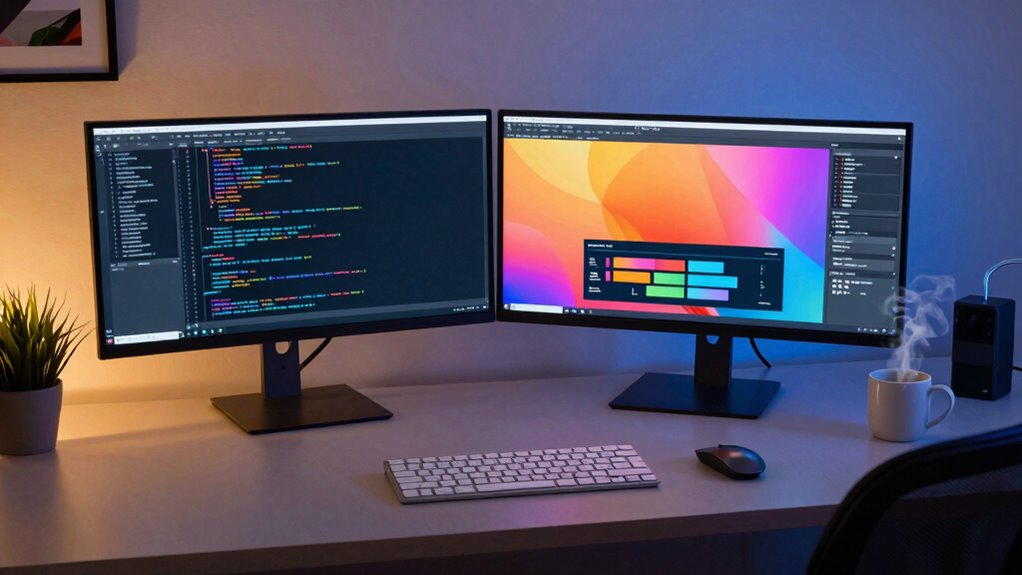

Looking for the best dual monitor desk solutions in 2026? The right setup can boost productivity and reduce clutter, but choosing between stands, arms, or mounts involves tradeoffs. The VIVO Freestanding Dual Monitor Stand offers a sleek glass base and versatile adjustments, making it ideal for flexible workspaces. Meanwhile, the MOUNT PRO Dual Monitor Stand provides full motion for those who need maximum adjustability. For budget-conscious buyers, the VIVO Dual Monitor Desk Stand offers reliable performance without breaking the bank. Continue reading for a detailed breakdown of each option, so you can find the perfect fit for your desk and workflow.

Get audio and creator gear delivered free — and shop member deals
- Fast, free delivery on millions of items
- Access to Prime Big Deal Days deals on October 6–7
- Prime Video, Amazon Music and more included
Complete the kit



Key Takeaways
- Full-motion mounts like the MOUNT PRO provide the most flexibility but tend to be more expensive and take up more space.
- Freestanding stands offer simplicity and stability, especially with glass bases, but may lack the full adjustability of clamp-on options.
- VESA compatibility is essential for versatility; nearly all top picks support common VESA sizes, but check weight limits carefully.
- Adjustability features such as tilt, swivel, and height are key to ergonomic comfort and should match your specific workspace needs.
- Price often correlates with features: more adjustable models tend to cost more, but budget options still deliver solid performance for basic setups.
| VIVO Freestanding Dual Monitor Stand with Glass Base and Adjustable Arms | 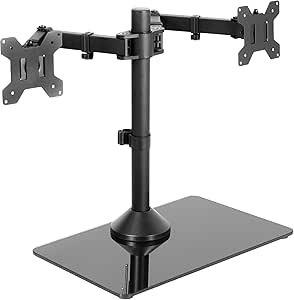 | Best Overall Dual Monitor Stand for Stability and Flexibility | Compatibility: 13″ to 32″ monitors, up to 22 lbs each | Base Material: Tempered glass | Base Dimensions: 42.5 cm x 26 cm | VIEW ON AMAZON | See Our Full Breakdown |
| ErGear Dual Monitor Arm for 13–32″ Screens, Fully Adjustable with Tool-Free VESA Mount |  | Best for Easy, Tool-Free Installation and Cable Management | Compatibility: 13–32 inches | VESA Pattern: 75x75mm, 100x100mm | Max Load: 19.8 lbs | VIEW ON AMAZON | See Our Full Breakdown |
| MOUNT PRO Dual Monitor Stand, Full Motion Desk Mount for 2 Monitors up to 27 inches, 17.6 lbs, Height Adjustable, Swivel, Tilt, Rotation, VESA 75×75/100×100, Black |  | Best for Compact, Heavy-Duty Dual Monitor Setup | Compatibility: Up to 27 inches | Maximum weight: 17.6 lbs | VESA Pattern: 75x75mm, 100x100mm | VIEW ON AMAZON | See Our Full Breakdown |
| HUANUO FlowLift™ Dual Monitor Stand, Fully Adjustable Gaming Monitor Desk Mount for 13–32″ Screens |  | Best for Space-Saving, Gaming-Oriented Setups | Compatibility: 13–32 inches | VESA Pattern: 75x75mm, 100x100mm | Max Load: 19.8 lbs | VIEW ON AMAZON | See Our Full Breakdown |
| ErGear Dual Monitor Stand, Heavy Duty Adjustable Desk Mount for 2 Screens up to 32 Inches |  | Best for Large Monitors and Heavy Weight Support | Monitor Size Range: 13 to 32 inches | Weight Limit: 17.6 lbs per monitor | VESA Compatibility: 75×75 mm or 100×100 mm | VIEW ON AMAZON | See Our Full Breakdown |
| MOUNTUP Dual Monitor Stand for Desk, Adjustable Dual Monitor Mount for 17-32 inch Screens, VESA Compatible, with C-Clamp & Grommet Base |  | Best for Versatile Mounting and Adjustability | Compatible Screen Size: 17-32 inches | Weight Capacity: 4.4-17.6 lbs | VESA Patterns: 75×75 mm, 100×100 mm | VIEW ON AMAZON | See Our Full Breakdown |
| HUANUO Vertical Dual Monitor Mount for 17-32 Inch Screens |  | Best for Space-Saving Vertical Design and Ergonomics | Monitor Size Range: 17-32 inches | Weight Capacity: 17.6 lbs per monitor | VESA Compatibility: 75x75mm, 100x100mm | VIEW ON AMAZON | See Our Full Breakdown |
| VIVO Dual Monitor Desk Stand for 2 Screens up to 27 Inches |  | Best for Heavy-Duty Stability and Full Articulation | Screen Size Compatibility: 13″ to 27″ | Maximum Weight: 22 lbs per monitor | VESA Compatibility: 75x75mm, 100x100mm | VIEW ON AMAZON | See Our Full Breakdown |
| VIVO Dual Monitor Desk Mount for 13-30 inch Screens, Holds Up to 22 lbs Each, Fully Adjustable Steel Stand with C-Clamp and Grommet, Black |  | Best for Steel Construction and Versatile Mounting | Screen Size Range: 13-30 inches | Weight Capacity: 22 lbs per monitor | VESA Compatibility: 75x75mm, 100x100mm | VIEW ON AMAZON | See Our Full Breakdown |
| dual monitor desk guide | VESA Compatibility |
|---|---|
| VIVO Freestanding Dual Monitor | 75x75mm or 100x100mm |
| ErGear Dual Monitor Arm for 13 | — |
| MOUNT PRO Dual Monitor Stand | — |
| HUANUO FlowLift™ Dual Monitor | — |
| ErGear Dual Monitor Stand | 75×75 mm or 100×100 mm |
| MOUNTUP Dual Monitor Stand for | — |
| HUANUO Vertical Dual Monitor M | 75x75mm, 100x100mm |
| VIVO Dual Monitor Desk Stand f | 75x75mm, 100x100mm |
| VIVO Dual Monitor Desk Mount f | 75x75mm, 100x100mm |
More Details on Our Top Picks
VIVO Freestanding Dual Monitor Stand with Glass Base and Adjustable Arms
This stand stands out for its ability to support larger monitors up to 32 inches and 22 lbs each, making it ideal for multi-screen setups that require robust support. The tempered glass base offers superior stability, especially compared to the VIVO Dual Monitor Desk Stand, which relies on a clamp and may feel less anchored. Its adjustable arms provide a broad range of tilt, swivel, and rotation, allowing for truly ergonomic positioning. However, the glass base, while stable, can be cumbersome to move and may pose a tipping risk if monitors are pulled forward or backward without proper bolting. This setup is perfect for users prioritizing stability and flexibility, but it requires careful handling during setup and repositioning.
Pros:- Supports large monitors up to 32 inches and 22 lbs each
- Tempered glass base offers high stability
- Flexible adjustments for ergonomic positioning
- Removable VESA plates for easy mounting
Cons:- Monitor stability may be compromised if pulled without bolting
- Requires careful handling to avoid tipping
Best for: Professionals with large, heavy monitors seeking a stable and adaptable workspace solution
Not ideal for: Casual users or those with limited desk space, due to its weight and glass base handling requirements
- Compatibility:13″ to 32″ monitors, up to 22 lbs each
- Base Material:Tempered glass
- Base Dimensions:42.5 cm x 26 cm
- VESA Compatibility:75x75mm or 100x100mm
- Adjustments:Tilt +90° to -90°, 360° swivel, 360° rotation, height adjustment
Our verdict“This stand is best suited for users needing maximum support and adjustability for large monitors, accepting some handling care.”
ErGear Dual Monitor Arm for 13–32″ Screens, Fully Adjustable with Tool-Free VESA Mount
This arm offers excellent value for users seeking a straightforward, tool-free setup that supports a wide array of monitors up to 32 inches. Its height, tilt, swivel, and rotation adjustments rival pricier options like the MOUNT PRO but with a simpler, tool-free VESA mounting process. The cable management system keeps clutter to a minimum, making it well-suited for tidy workspaces. A notable limitation is its suitability primarily for wooden desks without crossbeams, unlike the HUANUO FlowLift, which may struggle with non-standard desk setups. The weight limit per monitor might be restrictive for very heavy screens, but for most standard monitors, it delivers flexible ergonomics with minimal fuss.
Pros:- Quick, tool-free VESA mounting
- Supports a wide range of monitor sizes and weights
- Cable management included for a tidy workspace
- Full adjustability for ergonomic comfort
Cons:- Best suited for wooden desks without crossbeams
- Maximum weight limit may restrict very heavy monitors
- Installation instructions can be complex for some users
Best for: Home office users or gamers seeking easy setup and cable tidiness
Not ideal for: Users with desks featuring crossbeams or thick panels, or those with heavy, professional-grade monitors
- Compatibility:13–32 inches
- VESA Pattern:75x75mm, 100x100mm
- Max Load:19.8 lbs
- Tilt:+80°/-50°
- Swivel:±90°
- Rotation:360°
- Height Adjustment:Up to 17.5 inches
Our verdict“This arm is ideal for users wanting quick, tool-free setup with comprehensive adjustability on compatible desks.”
MOUNT PRO Dual Monitor Stand, Full Motion Desk Mount for 2 Monitors up to 27 inches, 17.6 lbs, Height Adjustable, Swivel, Tilt, Rotation, VESA 75×75/100×100, Black
The MOUNT PRO stand is tailored for users with smaller screens up to 27 inches, offering full motion adjustments including tilt, swivel, and rotation. Its sturdy V-shaped base provides excellent stability, especially compared to the HUANUO FlowLift, which may feel less grounded. The height adjustment up to 18.1 inches allows for ergonomic placement, but its limited size range makes it less suitable for larger monitors or ultrawide screens. Assembly can be somewhat complex, and balancing two monitors of different weights might be tricky. This stand is perfect for space-conscious setups where durability and stability are priorities, but it’s less adaptable for larger or heavier displays.
Pros:- Supports monitors up to 27 inches and 17.6 lbs
- Full motion adjustments for ergonomic positioning
- Stable V-shaped base for heavy-duty support
- Height, tilt, swivel, and rotation features
Cons:- Limited to monitors up to 27 inches
- Assembly can be tricky for some users
- Best suited for monitors with similar weights
Best for: Users with smaller, heavier monitors needing maximum stability and full motion control
Not ideal for: Those with larger monitors or ultrawide screens exceeding 27 inches
- Compatibility:Up to 27 inches
- Maximum weight:17.6 lbs
- VESA Pattern:75x75mm, 100x100mm
- Tilt:-90° to +70°
- Swivel:-90° to +90°
- Rotation:360°
- Base Type:V-shaped, heavy and stable
Our verdict“This stand excels for smaller, heavier monitors requiring stable, full-motion support in a compact form.”
HUANUO FlowLift™ Dual Monitor Stand, Fully Adjustable Gaming Monitor Desk Mount for 13–32″ Screens
The HUANUO FlowLift™ stands out for its space-saving design and versatility tailored to gaming or casual setups, supporting monitors between 13 to 32 inches with a maximum weight of 19.8 lbs. Its ergonomic adjustments—height, tilt, swivel, and rotation—are comparable to premium models like the ErGear Dual Monitor Arm but with a focus on minimal desk footprint. The cable management system keeps clutter to a minimum, and the mounting options (C-clamp and grommet) provide flexibility. However, it performs best on wooden desks without crossbeams, similar to the ErGear. Its limited compatibility with non-standard desks and the need for VESA mounting holes on monitors are key considerations. Overall, it’s a space-efficient choice for gamers or general users seeking flexible positioning.
Pros:- Supports a wide range of monitor sizes and weights
- Easy, tool-free VESA mounting
- Space-saving with a slim profile
- Effective cable management
Cons:- Requires a wooden desk for maximum stability
- Limited to monitors with VESA mounting holes
- May not fit desks with crossbeams or uneven surfaces
Best for: Gamers or home users with limited desk space wanting full adjustability and cable management
Not ideal for: Users with desks that have crossbeams or panels, or monitors without VESA mounting holes
- Compatibility:13–32 inches
- VESA Pattern:75x75mm, 100x100mm
- Max Load:19.8 lbs
- Tilt:+85°/-50°
- Swivel:±90°
- Rotation:360°
- Material:Metal with cable management
Our verdict“Ideal for space-conscious users seeking flexible, ergonomic monitor placement for gaming or everyday use, with some desk compatibility considerations.”
ErGear Dual Monitor Stand, Heavy Duty Adjustable Desk Mount for 2 Screens up to 32 Inches
This stand stands out for its ability to support two large monitors up to 32 inches and 17.6 lbs each, surpassing many competitors like the VIVO Desk Stand, which has a lower weight limit. Its full range of adjustments—tilt, swivel, rotation, and height—ensures ergonomic comfort, though the setup can be tricky on non-wooden desks or with thicker surfaces. Unlike the MountUp model, which also offers versatile mounting options, the ErGear is more robust for heavier, larger screens, but only if your monitors have compatible VESA holes and your desk supports its mounting requirements. The sturdy metal construction and cable management are notable strengths, but installation complexity and limited compatibility mean it’s best suited for dedicated workspace setups.
Pros:- Supports large monitors up to 32 inches and 17.6 lbs each
- Fully adjustable with tilt, swivel, and rotation for ergonomic positioning
- Helps free up desk space and includes cable management clips
Cons:- Requires monitors with compatible VESA mounting holes
- Installation can be complicated on certain desk types or thicknesses
Best for: Buyers with large, heavy monitors up to 32 inches seeking maximum stability and adjustability.
Not ideal for: Users with lightweight or smaller monitors, or desks with non-standard thickness or material that complicates mounting.
- Monitor Size Range:13 to 32 inches
- Weight Limit:17.6 lbs per monitor
- VESA Compatibility:75×75 mm or 100×100 mm
- Material:Metal and plastic
- Maximum Reach:31.22 inches wide arm span
- Height Adjustment:Yes
Our verdict“This stand makes the most sense for users with large, heavy monitors and dedicated workspaces where stability is paramount.”
MOUNTUP Dual Monitor Stand for Desk, Adjustable Dual Monitor Mount for 17-32 inch Screens, VESA Compatible, with C-Clamp & Grommet Base
Compared to the ErGear stand, the MOUNTUP model offers excellent flexibility with its C-clamp and grommet mounting options, making it suitable for a variety of desk types and thicknesses. It supports a broad range of monitor sizes from 17 to 32 inches and weights up to 17.6 lbs, with full motion capabilities—tilt, swivel, and rotation—that rival the VIVO Dual Desk Stand. However, it requires careful tension adjustment for smooth movement, and its bulkiness could be a concern for small desks. While the MountUp excels in ease of installation and adaptability, it doesn’t match the heavy-duty capacity of the ErGear for larger monitors, making it ideal for users balancing flexibility with moderate weight support.
Pros:- Supports 17-32 inch monitors with full motion adjustments
- Multiple mounting options with C-clamp and grommet compatibility
- Space-saving with cable management and easy setup
Cons:- Requires proper tension adjustment for smooth movement
- Bulky design may be unsuitable for small desks
Best for: Users needing adaptable mounting options and a broad size range, especially on desks with varied thicknesses.
Not ideal for: Heavy monitor setups or users seeking maximum load support, as it caps at 17.6 lbs per monitor and can feel bulky on compact desks.
- Compatible Screen Size:17-32 inches
- Weight Capacity:4.4-17.6 lbs
- VESA Patterns:75×75 mm, 100×100 mm
- Arm Extension:17.3 inches
- Height Adjustment Range:9.4 inches
- Desk Thickness:0.39-4.53 inches (C-Clamp), 0.39-3.15 inches (Grommet)
Our verdict“This model is best for those who value flexible mounting and size compatibility over maximum weight capacity.”
HUANUO Vertical Dual Monitor Mount for 17-32 Inch Screens
This mount excels in reducing desk clutter by orienting monitors vertically, making it a smart choice for limited spaces. Supporting two screens from 17 to 32 inches and up to 17.6 lbs each, it offers full tilt, swivel, and rotation, with height adjustment to optimize ergonomics. Unlike the horizontal stands like VIVO, the vertical orientation minimizes footprint, ideal for users who need to maximize desk real estate. However, its compatibility is limited to monitors with VESA mounting holes, and it’s constrained by a maximum desk thickness of 3.14 inches, which could pose issues on very thick desks. The sturdy clamp or grommet base enhances stability, but the vertical setup might not suit everyone’s viewing preferences.
Pros:- Ergonomic height adjustment reduces neck and back strain
- Full tilt, swivel, and rotation for customization
- Vertical design conserves desk space and reduces clutter
Cons:- Limited to monitors with VESA mounting holes
- Cannot fit very thick desks beyond 3.14 inches
Best for: Professionals who prioritize space efficiency and ergonomic flexibility in compact or cluttered work areas.
Not ideal for: Users with very thick desks or monitors lacking VESA compatibility, as these limitations restrict usability.
- Monitor Size Range:17-32 inches
- Weight Capacity:17.6 lbs per monitor
- VESA Compatibility:75x75mm, 100x100mm
- Maximum Desk Thickness:3.14 inches
Our verdict“This mount is especially suited for space-conscious users who want ergonomic, vertical monitor setups.”
VIVO Dual Monitor Desk Stand for 2 Screens up to 27 Inches
Compared with the VIVO Dual Stand, which offers a sturdy base and full articulation, this model supports larger monitors up to 27 inches and a hefty 22 lbs each, making it ideal for heavier setups. Its heavy-duty base ensures excellent stability, even with extended reach, but the large footprint may not fit smaller desks or cluttered spaces. It provides full tilt, swivel, and rotation, similar to the MountPro, but with a more robust stand designed to hold heavier monitors securely. The easy VESA mounting and cable management are definite advantages, although pulling monitors too far forward can affect stability. This stand makes the most sense for users with mid-sized monitors who need maximum stability and articulation.
Pros:- Supports monitors up to 27 inches and 22 lbs each
- Heavy-duty base provides excellent stability
- Full articulation for ergonomic positioning
Cons:- Monitor stability may decrease if pulled too far
- Large base size may not fit all desk configurations
Best for: Users with heavier monitors up to 27 inches seeking a stable, fully articulating mount.
Not ideal for: Those with limited desk space or smaller monitors, as the large base may be cumbersome.
- Screen Size Compatibility:13″ to 27″
- Maximum Weight:22 lbs per monitor
- VESA Compatibility:75x75mm, 100x100mm
- Base Dimensions:13″ x 10.5″
- Tilt Range:+90° to -90°
- Swivel:180°
Our verdict“This stand is perfect for users with mid-sized, heavy monitors who prioritize stability and full articulation.”
VIVO Dual Monitor Desk Mount for 13-30 inch Screens, Holds Up to 22 lbs Each, Fully Adjustable Steel Stand with C-Clamp and Grommet, Black
Compared to the more specialized mounts like the HUANUO Vertical or ErGear models, this VIVO stand emphasizes durability with its steel construction and broad compatibility. Supporting monitors from 13 to 30 inches and up to 22 lbs, it offers full articulation—tilt, swivel, and rotation—plus height adjustment, making it a flexible choice for most standard setups. Its easy installation via C-clamp or grommet mount makes it accessible for various desk types, though the clamp may struggle with very thick desks, unlike the MountPro’s more robust options. For those who want a sturdy, reliable dual mount with extensive adjustability, this model fits well, especially with a three-year warranty backing its build quality.
Pros:- Supports monitors up to 30 inches and 22 lbs
- Full articulation for ergonomic customization
- Heavy-duty steel construction with a 3-year warranty
Cons:- Clamp may not fit very thick desks
- Initial setup can require effort for tension adjustment
Best for: Professional users who need a durable, fully adjustable steel mount with broad monitor size support.
Not ideal for: Users with very thick desks or monitors over 30 inches, due to mounting limitations and size constraints.
- Screen Size Range:13-30 inches
- Weight Capacity:22 lbs per monitor
- VESA Compatibility:75x75mm, 100x100mm
- Mounting Options:C-Clamp, Grommet
- Material:Steel
- Tilt Range:+90° to -90°
Our verdict“This stand offers a sturdy, reliable option for professional environments needing flexible, heavy-duty dual monitor support.”

How We Picked
To determine the best dual monitor desk options, I focused on criteria that matter most to users: build quality, adjustability, ease of installation, compatibility with different monitor sizes, and overall value. I compared products based on their stability, range of motion, and durability, prioritizing models that balance features with price. The rankings reflect how well each product meets these needs while offering versatility and long-term usability. I also considered user reviews and common pain points, ensuring the selected options cater to different types of buyers—from casual users to professionals needing full customization.Factors to Consider When Choosing Dual Monitor Desk Guide
Choosing the right dual monitor desk setup requires considering several factors beyond just price. Your workspace, monitor size, and ergonomic needs influence what will work best. Making the wrong choice can lead to discomfort or frequent adjustments, so understanding these key considerations is vital for a satisfying setup.Monitor Size and Weight Capacity
Before selecting a mount or stand, verify your monitors’ sizes and weights. Most products specify compatibility with screens up to 27 or 32 inches and weight limits—often around 17 to 19 pounds per arm. Choosing a product with a higher weight capacity than your monitors ensures stability and reduces the risk of slipping or sagging over time. Failing to match size and weight can lead to security issues and the need for frequent readjustments.
Adjustability and Ergonomics
Maximizing comfort depends on how well a mount or stand can be adjusted. Look for features like tilt, swivel, height adjustment, and rotation. Full-motion arms provide the greatest flexibility, allowing you to position monitors at eye level and reduce neck strain. However, more adjustable models tend to be pricier and may require more space. Consider your work habits and desk layout to strike the right balance between flexibility and simplicity.
Clamping vs. Freestanding Bases
Clamping mounts attach securely to the edge of your desk, saving space and offering a cleaner look, but they require a sturdy desk edge for installation. Freestanding stands, often with glass or weighted bases, are easier to set up and move but may take up more room. Evaluate your desk’s design and your preference for permanence versus flexibility when choosing between these options. Remember that a clamp’s stability depends on your desk material and thickness.
Ease of Installation and Maintenance
Simplicity matters, especially if you frequently change setups or upgrade monitors. Look for models with tool-free adjustments or quick-release VESA mounts. Some stands require assembly that can be complex, while others are straightforward. Also consider how easy it is to clean and maintain, especially for models with exposed moving parts or cable management features. A hassle-free setup encourages regular adjustments and keeps your workspace tidy.
Price and Long-term Value
While budget options can serve basic needs, investing in a more durable and adjustable mount or stand pays off over time through better ergonomics and fewer replacements. Higher-priced models often include premium materials and advanced features like cable management, integrated USB hubs, or gas spring arms. Balance your budget with your anticipated usage—if you expect frequent reconfigurations or longer work hours, spending more upfront can be cost-effective in the long run.
Frequently Asked Questions
Can I use a dual monitor mount with ultrawide screens?
Most dual monitor mounts are designed for standard-sized monitors, typically up to 32 inches. Ultrawide screens, which are often larger and heavier, may require specialized mounts with higher weight capacities and wider VESA compatibility. Always check the mount’s specifications for maximum size and weight limits before purchasing. If you have a very large ultrawide, consider a dedicated stand or a mount specifically rated for larger screens to ensure stability and safety.
Is it better to choose a freestanding or clamp mount for my desk?
The choice depends on your workspace and preferences. Clamp mounts save desk space and are generally more discreet, ideal if you want a clean look or cannot drill into your desk. Freestanding stands are easier to move and set up without tools, making them suitable for renters or flexible workspaces. However, they may occupy more space and be less stable if not weighted properly. Consider your desk material, space constraints, and whether you value ease of relocation or a fixed setup.
How important is cable management in these mounts?
Cable management helps keep your workspace tidy and prevents accidental disconnections or damage. Many high-quality mounts include clips or channels to route cables neatly along arms or stands. While not critical for basic setups, cable management becomes more valuable in busy or cluttered environments. It also simplifies cleaning and reduces the risk of cables snagging or pulling on the monitors, which can cause instability or damage over time.
Can I adjust the height of my monitors easily after setup?
Adjusting height varies between mounts. Gas spring arms and full-motion mounts typically allow quick, tool-free height adjustments, offering ergonomic benefits. Fixed stands or less flexible arms may require disassembly or may not support height changes at all. When choosing a product, consider how often you plan to reconfigure your setup and whether easy height adjustment is a priority, especially for ergonomic comfort during long work sessions.
Is it worth investing in a premium dual monitor mount?
Higher-end mounts usually provide superior durability, full adjustability, and features like cable management and integrated USB hubs. If you spend many hours at your desk or need precise positioning, investing in a premium model can improve comfort and productivity, reducing strain and fatigue. Conversely, casual users or those with simple setups might find mid-range options sufficient. Consider your usage frequency and ergonomic needs when deciding whether the extra cost is justified.
Conclusion
For most users, the VIVO Freestanding Dual Monitor Stand strikes a good balance of affordability, stability, and adjustability, making it a strong pick for general use. Those seeking maximum flexibility and ergonomic customization should consider the MOUNT PRO Dual Monitor Stand or similar full-motion options. Beginners or casual users will appreciate straightforward, easy-to-assemble models like the VIVO Dual Monitor Desk Stand. Professionals with large or ultrawide monitors should prioritize mounts with higher weight capacities and wider VESA compatibility to ensure safety and stability. Ultimately, your choice depends on your workspace size, monitor specs, and how much flexibility you need for long-term comfort.
As an affiliate, we earn on qualifying purchases.Fall Picks
fall essentials