
If you’re a budding musician, podcaster, or content creator, staying equipped with the right gear is essential for elevating your craft. This checklist is designed to guide you through the must-have music and creator tech essentials for 2026, ensuring you make informed choices without the overwhelm. Whether you’re setting up a home studio or upgrading your current setup, you’ll find curated picks that balance quality and user-friendliness.

Get audio and creator gear delivered free — and shop member deals
- Fast, free delivery on millions of items
- Access to Prime Big Deal Days deals on October 6–7
- Prime Video, Amazon Music and more included
Organized by category, this guide breaks down each piece of equipment, explaining why it matters and what features to prioritize. Use this as a quick reference when shopping or as a comprehensive overview to understand the key differences between options. Remember, choosing the right gear depends on your specific needs—consider your space, workflow, and budget to select the best fit for you.
Ready to get started? Dive into each section, check the recommended features, and get inspired to build or upgrade your creative toolkit with confidence.
Microphones
Microphones are the cornerstone of any recording setup, whether you’re capturing vocals, instruments, or podcasts. The Phenyx Pro Wireless Microphone System offers flexibility with its wireless design, making it ideal for live performances or dynamic studio sessions. When shopping for microphones, focus on sound clarity, connectivity options, and durability. Wireless systems can introduce interference, so look for models with multiple frequency options to avoid signal dropouts. Consider your environment—if you record in a noisy space, a cardioid or dynamic microphone might be better than condenser options that pick up more ambient sound.
Size, compatibility, and ease of use are also key. Ensure your microphone system integrates smoothly with your existing equipment, and check if additional accessories like stands or mounts are included or available separately. Proper placement and settings will maximize your sound quality and reduce feedback or background noise.
What to look for:
- Wireless connectivity with multiple frequency options
- Robust build quality for durability
- Clear sound reproduction with minimal interference
- Compatibility with your existing audio gear
- Ease of use and setup
Phenyx Pro Wireless Microphone System, Dual UHF Handheld Microphones with Auto S
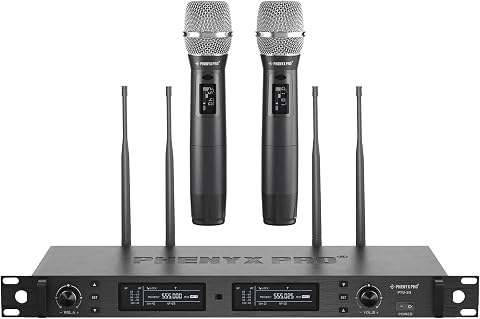
The Phenyx Pro wireless microphone system features dual UHF channels with true diversity circuitry for stable, interference-free performance. It includes two handheld microphones with high-quality sound, auto scan, and long-range operation suitable for live performances, events, and studio use.
Pros:
- Stable, interference-free UHF performance with true diversity circuitry
- Long-range operation up to 328 feet for versatile use
- High-quality sound with noise reduction features
- Durable all-metal construction suitable for professional use
Cons:
- Requires 4 AA batteries for operation
- May be complex for beginners to set up
- Limited to UHF frequency range, may need frequency management in crowded environments
Best for: Dynamic performances and versatile recording
Not ideal for: For those on a tight budget or wired setup
Bottom line: A reliable wireless mic system enhances mobility and sound quality.
Audio Interfaces
An audio interface is vital for translating your analog performances into digital recordings. The book Music Production: A Manual for Producers, Composers, Arrangers, and St offers insights into selecting interfaces that suit both beginners and seasoned professionals. When choosing an interface, consider number of inputs and outputs to match your setup—more inputs allow for recording multiple sources simultaneously. Look for compatibility with your computer and DAW, and prioritize models with high-resolution audio support for better sound fidelity.
Size and portability matter if you plan to record on the go. Some interfaces come with built-in preamps and phantom power, essential for condenser microphones. Also, check for ease of installation and driver support to avoid setup headaches. Remember, investing in a quality interface can greatly improve your recording clarity and reduce latency, which is crucial during editing and mixing.
What to look for:
- Multiple inputs and outputs
- Compatibility with major DAWs
- High-resolution audio support
- Built-in preamps and phantom power
- Compact and portable design
Music Production: A Manual for Producers, Composers, Arrangers, and Students

This book offers comprehensive guidance on music production, suitable for producers, composers, arrangers, and students. It covers essential techniques and concepts to enhance music creation skills.
Pros:
- Provides detailed guidance on music production techniques
- Suitable for a wide range of users from students to professionals
Cons:
- No specific features or editions mentioned
- Lacks user reviews or ratings
Best for: Home recording enthusiasts and semi-professionals
Not ideal for: For those needing ultra-high-end professional gear
Bottom line: A solid audio interface is the backbone of great recordings.
Headphones
The Beats Studio Pro Wireless Over-Ear Headphones are designed for both comfort and high-quality sound. When shopping for headphones, prioritize sound accuracy, especially if you’re mixing or editing. Wireless models offer freedom of movement, but always check for long battery life and quick charging features. Comfort is equally important—look for adjustable headbands and plush ear cups, especially if you’ll wear them for extended periods.
Compatibility with your devices is key; ensure they connect seamlessly via Bluetooth or wired options if needed. Noise cancellation can enhance focus during critical listening, but verify if the model offers adjustable settings. For creators, durability and portability are also considerations—if you travel frequently or commute to your studio, a foldable design can be a bonus. Properly calibrated headphones can make a significant difference in your mix accuracy and overall listening experience.
What to look for:
- Clear and accurate sound reproduction
- Comfortable fit for extended wear
- Long battery life and fast charging
- Good connectivity options
- Durability for daily use
Beats Studio Pro Wireless Over-Ear Headphones
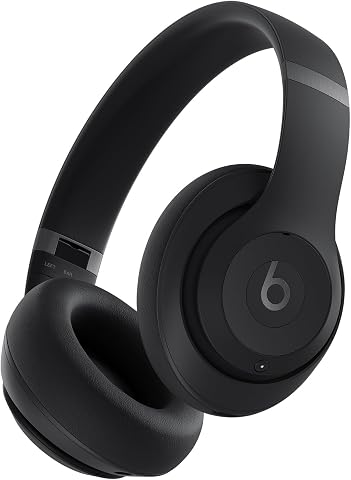
These Beats Studio Pro headphones offer rich, balanced sound with active noise cancelling and spatial audio for an immersive listening experience. They feature up to 40 hours of battery life, seamless device switching, and all-day comfort, making them ideal for travel, work, and everyday use.
Pros:
- Long-lasting 40-hour battery life with fast charging
- Effective active noise cancelling and transparency mode
- Seamless switching between Apple and Android devices
- Comfortable over-ear design for extended wear
Cons:
- Weight not specified, may be heavy for some users
- Price not provided, could be expensive
Best for: Mixing, editing, and casual listening
Not ideal for: For those requiring studio-grade monitoring accuracy
Bottom line: Comfortable, high-quality headphones elevate your listening experience.
MIDI Controllers
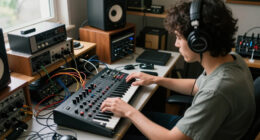
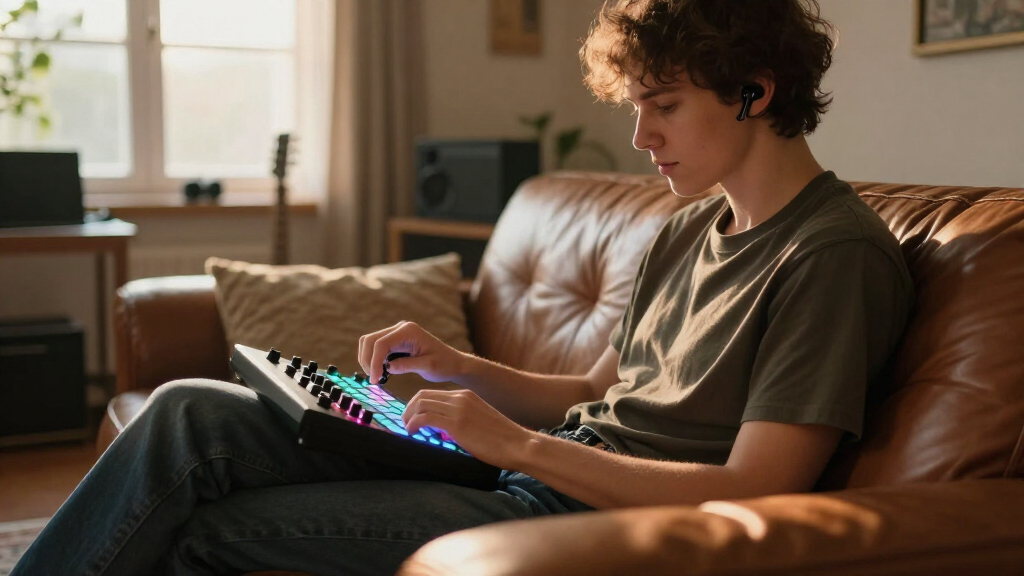
A MIDI controller is an essential tool for producers and composers, enabling hands-on control over virtual instruments and DAW functions. The book Music Production: A Manual for Producers, Composers, Arrangers, and St discusses selecting controllers that match your workflow. When choosing a MIDI controller, consider number of pads, knobs, and keys—more controls allow for greater expressive capability. Compatibility with your DAW and software is crucial, so verify supported platforms before purchasing. Additionally, size and portability matter: a compact controller is perfect for limited space or mobile setups, while larger models suit studio environments.
Look for features like aftertouch, velocity sensitivity, and touch strips to enhance your creative options. Ensure the controller’s build quality is solid, as durability impacts long-term use. Also, check if it includes software bundles or integration features to get the most out of your investment. Proper mapping and configuration will ensure you can access controls intuitively, streamlining your production process.
What to look for:
- Compatibility with your DAW and software
- Number of control elements (pads, knobs, keys)
- Build quality and durability
- Size suitable for your workspace
- Additional features like aftertouch or touch strips
Studio Monitors
The PreSonus Eris E7 XT studio monitors are designed to deliver accurate sound reproduction, making them a favorite among producers and mixing engineers. When shopping for studio monitors, focus on frequency response, clarity, and size of the driver. Larger drivers generally produce deeper bass, but also consider your room size and placement. Proper positioning and acoustic treatment can significantly improve your listening environment, so plan for setup space accordingly.
Connectivity options like balanced TRS or XLR inputs are essential for integrating with your audio interface. Look for monitors with adjustable controls for volume and high/low frequencies to tailor your sound. Sound quality should be your primary concern, so listen to a variety of tracks on different monitors before making a decision. Remember, accurate monitors help you make better mixing choices, leading to a more professional final product.
What to look for:
- Flat frequency response
- Adjustable volume and tone controls
- Balanced input options
- Room compatibility and size
- Reliable build quality
PreSonus Eris E7 XT 2-Way Active Studio Monitor

The PreSonus Eris E7 XT is a 2-way active studio monitor featuring a 6.55-inch low-frequency transducer and a 1.25-inch silk-dome high-frequency driver for clear, accurate sound. It includes acoustic tuning controls and an EBM waveguide for wide imaging, making it ideal for professional mixing and production.
Pros:
- Wide sweet spot with solid imaging
- Accurate sound reproduction for mixing
- Includes professional music production software
Cons:
- May require space for optimal placement
- Price not specified in description
Best for: Home studios and professional setups
Not ideal for: For casual listening or portable use
Bottom line: Accurate studio monitors are key to professional mixes.
Podcast Equipment
The Shure MV7+ Podcast Dynamic Microphone is a versatile choice for podcasters, streamers, and content creators. Its OBS certification ensures seamless integration with broadcasting software, while the USB and XLR options provide flexibility for different setups. When selecting podcast gear, consider sound clarity, background noise rejection, and ease of use. A good microphone should capture your voice clearly without requiring extensive editing. The included stand and accessories simplify setup, helping you get started quickly.
Additional features like built-in monitoring and gain controls give you more control over your sound. If you’re recording in a noisy environment, look for models with noise suppression features. Compatibility with streaming platforms and editing software is also important. Investing in reliable podcast equipment can significantly improve your audio quality and listener engagement, making your content stand out.
What to look for:
- USB and XLR connectivity options
- Built-in monitoring and gain controls
- Background noise rejection
- Compatibility with streaming platforms
- Ease of setup and use
Shure MV7+ Podcast Dynamic Microphone with Stand – OBS Certified, USB-C & XLR, L

The Shure MV7+ is a versatile podcast microphone featuring OBS certification, advanced DSP noise reduction, and a customizable LED touch panel. It offers seamless connectivity via USB-C and XLR, with app control for fine-tuning sound and appearance, ideal for streaming, podcasting, and recording.
Pros:
- High-quality audio with advanced noise reduction features
- Customizable LED touch panel for visual feedback and mute control
- Flexible connectivity options suitable for various setups
- App control for detailed sound customization
Cons:
- May be complex for beginners to fully utilize all features
- Requires additional stand or mount for optimal use
- Premium price point
Best for: Podcasters and streamers
Not ideal for: For those seeking ultra-budget options
Bottom line: A quality microphone elevates your podcast’s professionalism.
When building your music or creator setup, start with your budget in mind and prioritize equipment that offers the best value for your needs. Remember, the right gear can inspire your creativity and improve your output significantly. Take your time to research, compare features, and read user reviews to make confident decisions.
With this checklist as your guide, you’re well on your way to assembling a professional-grade setup that supports your artistic growth. Happy creating, and enjoy turning your ideas into reality with the right tech gear by your side!
Fall Picks
fall essentials
As an affiliate, we earn on qualifying purchases.