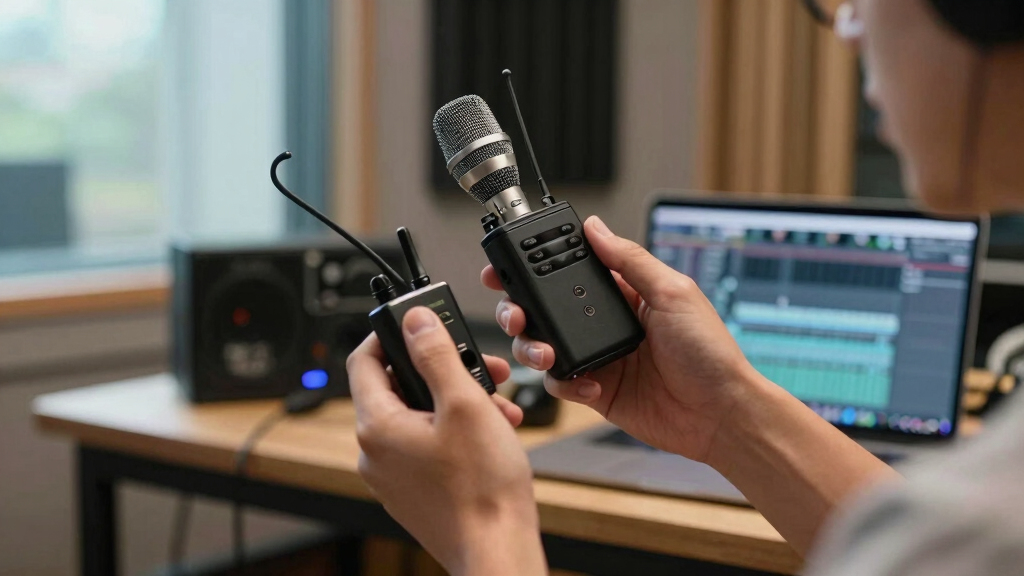

This guide helps content creators set up a wireless microphone system to improve audio quality in videos, podcasts, or live streams. It covers choosing the right system, physical setup, and testing. Designed for those with basic audio or video experience, expect to spend around 30 to 60 minutes completing the setup and initial test.
Get ready for Prime Big Deal Days — try Prime free
Exclusive member deals on October 6–7, plus fast free delivery. Cancel anytime.
Start your free trialAs an affiliate, we earn on qualifying purchases.

DJI Mic Mini (2 TX + 1 RX) Wireless Lavalier Microphone for iPhone, Camera, Android
- ✔ Weight: 10 g
- ✔ Transmission Range: 400 m
- ✔ Sampling Rate: 48 kHz

Mini Mic Pro (Latest Model) Wireless Microphone for iPhone & Android
- ✔ Compatibility: iPhone, Android, tablet, laptop
- ✔ Connectivity: USB-C, Lightning adapters included
- ✔ Battery Life: Up to 6 hours

Hollyland Lark M2 Wireless Microphone for iPhone, Camera, Android, and PC
- ✔ Weight: 9 g
- ✔ Audio Format: 48kHz/24-bit
- ✔ Range: 300 m
Difficulty: Intermediate | Time: 30-60 minutes
What You’ll Need
Tools & Materials:
- Wireless microphone system kit (microphone(s) and receiver)
- Batteries or charged batteries
- Audio cable(s) (if needed)
- Device to record audio (camera, smartphone, audio interface)
Knowledge:
- Basic understanding of audio equipment
- Familiarity with connecting devices via cables and power sources
Read the wireless system’s manual for specific details. Ensure your recording device has compatible audio inputs.
DJI Mic Mini (2 TX + 1 RX) Wireless Lavalier Microphone for iPhone, Camera, Android
<p>The <strong>DJI Mic Mini</strong> stands out for its exceptional <strong>400-meter transmission range</strong> and extensive <strong>48-hour battery life</strong>, making it ideal for outdoor shoots or long interviews without constant recharging. Its compact design ensures discreet use, and the noise cancellation technology delivers clear audio even in noisy environments. Compared to smaller options, its longer range and battery longevity provide more flexibility, but it’s less suited for wet conditions due to lack of waterproofing. The small size and magnetic components, while advantageous for discreetness, can pose risks in certain environments or interfere with some devices.</p>
Pros:
- Extensive 400-meter transmission range
- Long-lasting 48-hour battery with charging case
- Compact, lightweight design for discreet use
- High-quality audio with noise cancellation
Cons:
- Not waterproof, caution needed in rain or humidity
- Small parts may pose a choking hazard or interfere with some devices
- Magnetic components can cause interference in certain setups
Best for: Creators who prioritize long-range recording and extended battery life, such as outdoor vloggers or documentary makers.
Not ideal for: Creators in wet environments or who need a waterproof system, and those concerned about small parts or magnetic interference.
Bottom line: The DJI Mic Mini is perfect for creators needing long-range, high-quality audio in a portable package, but less suited for wet environments.
“The DJI Mic Mini is perfect for creators needing long-range, high-quality audio in a portable package, but less suited for wet environments.”
Mini Mic Pro (Latest Model) Wireless Microphone for iPhone & Android
<p>The <strong>Mini Mic Pro</strong> excels in simplicity, offering a truly plug-and-play experience for creators working with smartphones, tablets, and laptops. Its <strong>compact, under 1 ounce</strong> build makes it perfect for quick interviews, TikTok videos, or voiceovers on the go. Though its <strong>6-hour battery life</strong> is shorter than others, the included adapters make it compatible with a wide range of devices, and the noise cancellation ensures clear audio in dynamic environments. The main tradeoff is its limited battery life and the need for adapters for some devices, which can complicate quick setups or professional workflows.</p>
Pros:
- Plug-and-play connection with multiple devices
- Lightweight and highly portable
- Includes wind protection accessories
- High-quality noise cancellation
Cons:
- Limited to 6 hours of battery life
- Requires adapters for some devices
- Not suitable for studio-level recording or extended shoots
Best for: Casual creators or social media influencers who need quick, reliable audio with minimal fuss.
Not ideal for: Professionals requiring all-day recording or those working in wet or demanding outdoor conditions.
Bottom line: The Mini Mic Pro offers unmatched convenience for creators needing quick, quality audio on mobile devices, but its shorter battery life limits all-day use.
“The Mini Mic Pro offers unmatched convenience for creators needing quick, quality audio on mobile devices, but its shorter battery life limits all-day use.”
Hollyland Lark M2 Wireless Microphone for iPhone, Camera, Android, and PC
<p>The <strong>Hollyland Lark M2</strong> targets creators demanding <strong>professional-grade audio</strong> with its 48kHz/24-bit recording quality and impressive <strong>40-hour battery life</strong>. Its lightweight design at just 9g makes it ideal for extended shoots or multi-day projects. The system provides a <strong>300-meter transmission range</strong> and noise cancellation, making it suitable for filmmakers and vloggers who need reliable performance in diverse environments. However, it requires connection to a camera’s 3.5mm jack for stereo operation, which can add setup complexity, and some features are device-specific, limiting universal compatibility.</p>
Pros:
- High-quality 48kHz/24-bit audio
- Long battery life of 40 hours with charging case
- Lightweight and portable at only 9g
- Stable wireless transmission up to 300 meters
Cons:
- Requires connection to camera’s 3.5mm jack for stereo mode
- Setup can be complex for beginners
- Limited device compatibility for some features
Best for: Serious content creators, filmmakers, and podcasters seeking high-fidelity sound and long operational hours.
Not ideal for: Casual users or those unfamiliar with wireless audio setups, especially if their equipment lacks a 3.5mm jack or they prefer simple plug-and-play.
Bottom line: The Hollyland Lark M2 is a top-tier choice for creators prioritizing professional audio quality and endurance, but it demands a more involved setup process.
“The Hollyland Lark M2 is a top-tier choice for creators prioritizing professional audio quality and endurance, but it demands a more involved setup process.”
As an Amazon Associate we earn from qualifying purchases.
Before You Start
Confirm your wireless microphone system is compatible with your recording device. Check battery levels and ensure the environment is free of major radio interference. Have all equipment ready nearby to streamline the setup process.
Step-by-Step Instructions
Step 1: Choose the appropriate wireless microphone system
Select a system that suits your recording needs, considering range, number of microphones, and compatibility with your device. Research brands and read reviews to verify reliability.
Tip: Opt for a system with at least twice the range of your typical recording distance to avoid signal drops.
Check: You have a wireless microphone kit compatible with your device, with batteries ready for use.
Step 2: Insert batteries and power on the microphone and receiver
Insert fresh batteries into the microphone(s) and receiver, then turn on both units. Verify they power on correctly, indicated by LED lights or display screens.
Tip: Use high-quality batteries to prevent power loss during recording.
Check: Both units are powered on, with indicator lights showing they are ready for pairing.
Step 3: Pair the microphone with the receiver
Follow the manufacturer’s instructions to sync the microphone with the receiver, typically by selecting the same channel or pressing a pairing button. Wait for confirmation lights or messages.
Tip: Ensure no other wireless devices are transmitting on the same frequency to avoid interference.
Check: The receiver indicates a successful connection, usually through a steady LED light or a confirmation message.
Step 4: Connect the receiver to your recording device
Use the appropriate audio cable to connect the receiver’s output to your camera, smartphone, or audio interface. Ensure the connection is secure.
Tip: Set the input level on your device to avoid clipping or low volume. Use a cable with the correct connectors (e.g., 3.5mm, XLR).
Check: Your device shows an incoming audio signal, and the audio levels are responsive when speaking into the microphone.
Step 5: Test the audio setup
Speak into the microphone at normal volume and monitor the audio levels on your recording device. Make adjustments to input levels if necessary.
Tip: Perform a short test recording or listen through headphones if available to check sound clarity and absence of interference.
Check: Audio levels are clear, consistent, and free of unwanted noise or dropout.
Common Mistakes to Avoid
- Using incompatible or low-quality batteries — Use fresh, high-quality batteries recommended by the manufacturer to prevent power loss during recording.
- Incorrect channel or frequency settings — Double-check channel or frequency pairing to ensure the microphone and receiver are on the same settings and free of interference.
- Poor cable connections or loose fittings — Secure all cables firmly and verify connections before recording to prevent audio dropouts.
- Ignoring environmental interference — Test the system in your recording environment beforehand to identify and minimize radio or Wi-Fi interference.
Troubleshooting
Problem: No audio signal from the microphone
Solution: Check power and battery status, ensure the microphone and receiver are properly paired, and verify cable connections.
Problem: Audible interference or static
Solution: Reduce nearby wireless devices, change the channel or frequency if possible, and ensure the environment is free from sources of radio noise.
Problem: Audio levels are too low or distorted
Solution: Adjust input levels on your recording device, and check microphone gain settings if available.
What Success Looks Like
The microphone transmits a clear, consistent audio signal to your recording device. The audio levels are responsive and free of interference or noise, and a test recording captures high-quality sound with minimal effort.
Next Steps
Regularly test your wireless microphone system before each recording session. Keep batteries charged or fresh. Store equipment properly and update firmware if applicable. For longer recordings, monitor audio levels periodically.
Frequently Asked Questions
How far can I use a wireless microphone from the receiver?
The effective range depends on the system; most consumer models work reliably up to 100 meters (330 feet), but always test in your environment to confirm performance.
Can I use multiple microphones with one receiver?
Some systems support multiple microphones on different channels; check your model’s specifications. Using multiple microphones may require a mixer or multiple receivers.
What should I do if I experience interference during recording?
Try changing the channel or frequency, moving to a less congested environment, or reducing other wireless device usage nearby.
Fall yard work Picks
leaf blowers
As an affiliate, we earn on qualifying purchases.