
If you teach online classes, a wireless microphone for online classes is one of the cheapest upgrades that instantly improves how professional you sound. My top pick is the Hollyland Lark A1, which pairs two transmitters with a USB-C receiver and delivers the cleanest, most reliable audio of the group — a real advantage if teaching is your income. For tighter budgets, the MAYBESTA 2 Pack and the Occiam Mini Lavalier cover the basics at a fraction of the price, while the lavalier with charging case (80h battery) wins on marathon-session stamina. The main tradeoff in this category is price versus audio consistency: cheap plug-and-play mics are convenient but pick up room echo and background noise, while premium systems cost more and add setup steps. Read on for the full breakdown of all nine.

Get audio and creator gear delivered free with Prime
- Fast, free delivery on millions of items
- Prime Video, Amazon Music and more included
- Member-only deals all year
Complete the kit


Key Takeaways
- The Hollyland Lark A1 separated itself from every budget option through noise handling and connection stability — the two areas where cheap wireless mics fail during live lessons.
- Battery life varied enormously: most budget clip-ons last 4–7 hours per charge, but the charging-case lavalier stretches to a claimed 80 hours, making it the only pick that survives a full teaching week without recharging.
- Reverb and voice effects (like those on the Mini Mic with Reverb) may seem appealing for streaming, but for live classes they can make speech harder to understand — I’d only recommend that pick for pre-recorded content.
- The 2.4G dual headset system is the only option built for two speakers at once, which matters for co-taught classes but is overkill and less comfortable for a solo teacher on camera.
- Device compatibility is the most common mistake: several picks work with either Lightning, USB-C, or 3.5mm but not all three, so matching the mic to your actual teaching device matters more than any audio spec.
| Wireless Lavalier Microphone for iPhone, iPad, Android, and Computers |  | Best Overall | Transmission Technology: Series V 2.4GHz digital | Wireless Range: 20 meters | Battery Life: 6 hours per charge | VIEW LATEST PRICE | See Our Full Breakdown |
| Mini Wireless Microphone with Reverb Effect for Streaming and Online Classes |  | Best for Live Interaction | Color: Satin Black | Key Feature: Built-in reverb effect | Connectivity: Wireless | VIEW LATEST PRICE | See Our Full Breakdown |
| Occiam Mini Lavalier Microphone for iPhone & Android |  | Best Battery and Range | Noise Reduction: -21dB to -40dB adjustable | Wireless Range: 328ft (100m) | Battery Life: 10 hours per mic, 54 hours with case | VIEW LATEST PRICE | See Our Full Breakdown |
| USB C Wireless Lavalier Microphone for Android, PC, and iPhone |  | Best Value Dual-Pack | Connectivity: USB-C, USB, Lightning adapter | Battery: 60mAh per transmitter, 6–12 hours usage | Wireless Range: 30 meters | VIEW LATEST PRICE | See Our Full Breakdown |
| Mini Mic Pro – Wireless Lavalier Microphone for iPhone & Android | 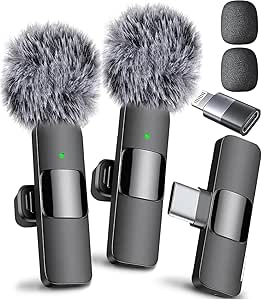 | Best for Beginners | Compatibility: iPhone, Android, tablet, laptop | Connection: USB-C and Lightning adapters included | Battery Life: Up to 6 hours | VIEW LATEST PRICE | See Our Full Breakdown |
| Hollyland Lark A1 (2 Transmitters + USB-C Receiver) Wireless Microphone |  | Best Premium | Audio Quality: 48kHz/24-bit | Wireless Range: 200 meters (650 feet) | Noise Cancellation: 3-level adjustable | VIEW LATEST PRICE | See Our Full Breakdown |
| MAYBESTA Wireless Mini Microphone 2-Pack Lavalier Lapel Mic |  | Best for Co-Teaching on a Budget | Compatibility: iPhone, Android phones, laptops, tablets | Wireless Range: 70 feet | Battery Life: 16 hours per microphone | VIEW LATEST PRICE | See Our Full Breakdown |
| Wireless Microphone System for 2 People, 2.4G Dual Wireless Headset Mics |  | Best for Hybrid Classrooms and Presenting | Transmission Technology: 2.4G wireless | Microphones Included: 2 headset mics | Transmission Range: 50 meters (160 feet) | VIEW LATEST PRICE | See Our Full Breakdown |
| Wireless Lavalier Microphone for iPhone, iPad, Android with Charging Case |  | Best Battery Life | Battery Life: Up to 80 hours (with case) | Working Time: Up to 10 hours per charge | Charging Time: 2 hours | VIEW LATEST PRICE | See Our Full Breakdown |
| wireless microphone for online classe | Battery Life | Wireless Range | Compatibility |
|---|---|---|---|
| Wireless Lavalier Microphone f | 6 hours per charge | 20 meters | iPhone, iPad, Android, Windows, Mac |
| Mini Wireless Microphone with | — | — | — |
| Occiam Mini Lavalier Microphon | 10 hours per mic, 54 hours with case | 328ft (100m) | iOS, Android, laptops, tablets (USB-C/Lightning) |
| USB C Wireless Lavalier Microp | — | 30 meters | — |
| Mini Mic Pro | Up to 6 hours | — | iPhone, Android, tablet, laptop |
| Hollyland Lark A1 | Up to 18 hours (transmitters), 54 hours with charging case | 200 meters (650 feet) | — |
| MAYBESTA Wireless Mini Microph | 16 hours per microphone | 70 feet | iPhone, Android phones, laptops, tablets |
| Wireless Microphone System for | — | — | — |
| Wireless Lavalier Microphone f | Up to 80 hours (with case) | — | iPhone, iPad, Android, Windows, Mac |
More Details on Our Top Picks
Wireless Lavalier Microphone for iPhone, iPad, Android, and Computers
For teachers who bounce between a laptop for Zoom classes and a phone for recorded lessons, this dual-transmitter kit covers the most ground of anything in this lineup. The 20-meter range is enough to pace around a whiteboard without audio dropouts, and the 6-hour battery comfortably outlasts a full day of teaching blocks. Where the Mini Mic Pro leans minimalist with a single mic and adapters, this option includes two transmitters plus a Lightning adapter, USB-A adaptor, and wind protection out of the box — handy if a guest speaker ever joins your session. The tradeoff is setup friction: some Android phones demand you manually enable OTG before the receiver works, which is frustrating mid-lesson if you forget. Compared to the Occiam, its range and battery are shorter, but its cross-platform flexibility is broader.
Pros:- Two transmitters included for interviews or co-teaching
- Works across iOS, Android, Windows, and Mac
- Stable 2.4GHz digital connection with 20m range
- Automatic pairing keeps setup simple on most devices
Cons:- Some Android phones require manual OTG activation
- No published charging time
- Battery life trails the Occiam by four hours per charge
Best for: Educators who teach across multiple devices — phone, tablet, and computer — and want two mics included
Not ideal for: Android users who want zero-setup gear, since OTG toggling can be a recurring annoyance
- Transmission Technology:Series V 2.4GHz digital
- Wireless Range:20 meters
- Battery Life:6 hours per charge
- Compatibility:iPhone, iPad, Android, Windows, Mac
- Included Microphones:2 wireless transmitters
- Accessories:Receiver, USB-C cable, Lightning adapter, USB-A adaptor, windshields, sponge heads
Our verdict“The safest all-around pick for teachers who need reliable audio on whatever device their class platform runs on.”
Mini Wireless Microphone with Reverb Effect for Streaming and Online Classes
Most mics in this roundup aim for clean, neutral capture — this one does something different. The built-in reverb effect adds warmth and presence to your voice, which genuinely changes how you sound during live Q&A sessions or language tutoring where vocal tone carries meaning. For educators who sing, tutor music, or host interactive classes, that real-time adjustment is something the Occiam and the USB C Lavalier simply can’t replicate. The compact satin-black body clips on invisibly on camera, too. But this is the thinnest spec sheet in the batch: no stated battery life, no range figure, and no accessory list, which makes it hard to trust for a full teaching day. If your classes are strictly lecture-format recordings, the noise reduction on pricier options here will serve you better than reverb ever will.
Pros:- Unique reverb effect enhances vocal presence in live sessions
- Very compact and camera-discreet
- Simple real-time controls during class
- Versatile across streaming, gaming, and teaching scenarios
Cons:- No published battery life or wireless range
- Device compatibility details are vague
- Reverb is a gimmick for pure lecture recording
Best for: Tutors, streamers, and music educators who talk live and want a warmer, more engaging vocal presence
Not ideal for: Lecture recorders who need long guaranteed battery life and predictable range for hour-long sessions
- Color:Satin Black
- Key Feature:Built-in reverb effect
- Connectivity:Wireless
- Form Factor:Compact mini body
- Controls:Easy real-time adjustments
- Suitable For:Streaming, online classes, live interaction, gaming, singing, education
Our verdict“A niche pick for live, interactive teaching where voice character matters more than raw spec credibility.”
Occiam Mini Lavalier Microphone for iPhone & Android
This is the endurance play of the roundup. With 10 hours per charge and 54 hours total from the charging case, the Occiam outlasts the Mini Mic Pro by a multiple of nine — a real advantage if you teach back-to-back sessions and forget to charge things. Its 328-foot range also dwarfs the 20–30 meter figures on the USB C Lavalier, so you can roam a room, demonstrations and all, without hugging your laptop. The -21dB to -40dB noise reduction and 48kHz/24-bit audio make it the technically strongest capture here. The catch is compatibility rigidity: it talks only through USB-C or Lightning receivers — no Bluetooth fallback — and explicitly refuses GoPro, Insta360, and OnePlus gear. At 7 grams it’s barely there on a collar, but plan your device pairing before buying.
Pros:- 54 hours total battery with the charging case
- 328ft range allows full-room movement
- Adjustable noise reduction down to -40dB
- 48kHz/24-bit audio with 80dB signal-to-noise ratio
Cons:- Wired receiver only — no Bluetooth option
- Incompatible with GoPro, Insta360, and OnePlus
- Charging case adds bulk compared to bare clip-on mics
Best for: Teachers with long teaching days or noisy home environments who need serious battery and noise reduction
Not ideal for: Anyone hoping to pair with GoPro, Insta360, or OnePlus devices — it won’t connect
- Noise Reduction:-21dB to -40dB adjustable
- Wireless Range:328ft (100m)
- Battery Life:10 hours per mic, 54 hours with case
- Weight:7 grams
- Audio Resolution:48kHz/24-bit
- Signal-to-Noise Ratio:80dB
- Maximum SPL:120dB
- Charging:USB-C fast charge
- Compatibility:iOS, Android, laptops, tablets (USB-C/Lightning)
Our verdict“The endurance and range champion for educators who teach all day and move around while doing it.”
USB C Wireless Lavalier Microphone for Android, PC, and iPhone
Sitting between the budget single-mic options and the pricier Occiam, this kit strikes a value balance: two transmitters, a receiver, foam covers, windscreen muffs, and adapters for roughly what others charge for less hardware. The active denoise technology is its standout — where the Mini Mic Pro uses basic noise cancellation, this actively cleans the signal, which shows in clearer voice separation when a fan or household noise competes with your lesson. Battery spans 6–12 hours depending on usage, putting it ahead of the 20-meter iPhone/Android lavalier on the top end. The weaknesses are familiar ones at this price: OTG activation on some Android phones remains a gotcha, and the 60mAh transmitters mean the upper battery figure only holds under light use. You’ll want to test your specific phone before a real class.
Pros:- Active denoise delivers clearer voice separation than basic cancellation
- Two transmitters included at a mid-range price
- Broad compatibility via USB-C, USB, and Lightning adapters
- Up to 12 hours of usable battery
Cons:- Some Android devices require OTG activation
- Real-world battery often lands closer to 6 hours
- Needs careful setup for best sound quality
Best for: Budget-conscious educators who want a two-mic kit with strong denoising for under the price of premium options
Not ideal for: GoPro or camera-based setups, and Android users unwilling to fiddle with OTG settings
- Connectivity:USB-C, USB, Lightning adapter
- Battery:60mAh per transmitter, 6–12 hours usage
- Wireless Range:30 meters
- Noise Technology:Active denoise
- Transmitters Included:2
- Accessories:Receiver, charging cable, foam covers, windscreen muffs, adapters, manual
Our verdict“The most hardware per dollar here, provided your Android phone cooperates with setup.”
Mini Mic Pro – Wireless Lavalier Microphone for iPhone & Android
If you’re new to teaching online and intimidated by receivers, cases, and sound modes, this is the least complicated entry point in the lineup. True plug-and-play via USB-C or the included Lightning adapter means you clip it on, plug it in, and talk — no pairing menus, no OTG toggling like the USB C Lavalier demands. At under an ounce, it’s the lightest option here, and the bundled dead cat cover handles windy balcony or outdoor lessons better than the bare foam on cheaper kits. The compromises are real, though: 6 hours of recording is half the Occiam’s per-charge figure with no charging case to extend it, and adapter-juggling between devices gets old if your setup changes week to week. Think of it as the mic that gets a beginner recording today, with an upgrade path later.
Pros:- Genuine plug-and-play with no pairing or OTG steps
- Under 1 oz — lightest clip in the roundup
- Includes both wind protection and dead cat cover
- Noise cancellation keeps voice clean for beginners’ setups
Cons:- 6-hour battery ceiling with no charging case option
- Adapters required when switching device types
- No weather resistance rating for outdoor use
Best for: First-time online instructors who want a clip-on, plug-in, start-talking mic with zero learning curve
Not ideal for: All-day educators or anyone teaching more than 6 hours without a charging break
- Compatibility:iPhone, Android, tablet, laptop
- Connection:USB-C and Lightning adapters included
- Battery Life:Up to 6 hours
- Weight:Under 1 oz
- Noise Handling:Noise cancellation
- Accessories:Wind protection, dead cat cover
Our verdict“The easiest first wireless mic for new online teachers, as long as your teaching day fits inside six hours.”
Hollyland Lark A1 (2 Transmitters + USB-C Receiver) Wireless Microphone
If you teach online classes professionally and audio quality is your calling card, the Hollyland Lark A1 justifies its premium price with 48kHz/24-bit recording — a step above the standard 16-bit audio you get from budget picks like the MAYBESTA 2-pack. The 200-meter wireless range is frankly overkill for teaching from a desk, but it means zero dropouts even if you move around a room full of Wi-Fi traffic. Its 3-level noise cancellation adapts to your space rather than applying one blunt filter. The tradeoff: this level of performance only matters if your audience notices audio fidelity. Compared with the 80-hour budget lavalier later in this list, the Lark A1 wins on sound refinement but costs considerably more for battery life you may not need.
Pros:- 48kHz/24-bit audio quality that noticeably exceeds budget competitors
- 200m range eliminates dropout worries in busy wireless environments
- Adjustable 3-level noise cancellation suits varied teaching spaces
- 54 hours of total battery life with the charging case
Cons:- Premium price far above basic lavalier options
- Requires USB-C or Lightning-compatible phones — no computer support out of the box
- Potential interference in extremely crowded RF environments
Best for: Professional educators and course creators who sell premium content and need broadcast-grade audio
Not ideal for: Casual tutors on a budget — its strengths are wasted on occasional Zoom sessions where a $30 clip-on mic sounds nearly identical
- Audio Quality:48kHz/24-bit
- Wireless Range:200 meters (650 feet)
- Noise Cancellation:3-level adjustable
- Battery Life:Up to 18 hours (transmitters), 54 hours with charging case
- Weight:8 grams per microphone
- Transmitters Included:2
- Connection:USB-C receiver, plug-and-play
Our verdict“Buy this if polished, professional course audio directly affects your income; skip it if you just need to be heard clearly.”
MAYBESTA Wireless Mini Microphone 2-Pack Lavalier Lapel Mic
What separates the MAYBESTA 2-pack from most budget wireless mics is that it includes two complete microphone-and-receiver pairs, so two people can be mic’d independently on separate devices — useful for co-taught classes or recording a lesson and a student response simultaneously. Pairing is fully automatic with no apps or adapters, which makes it friendlier for tech-averse teachers than adapter-dependent options like the 80-hour lavalier with charging case. The tradeoff is range: 70 feet is fine for a classroom or home office but falls well short of the Hollyland Lark A1’s 200 meters, and there’s no charging case, so each unit must be charged individually. Sound quality is solid for the price thanks to noise reduction and included windscreens, though it lacks the refined audio processing of pricier models.
Pros:- Two independent mic/receiver pairs at a single-pair price
- Automatic pairing with no apps, adapters, or setup friction
- Works across phones, tablets, and laptops
- 16 hours of recording time per microphone
Cons:- 70-foot range is the shortest in this lineup
- No charging case — each unit charges separately
- Audio quality trails premium options like the Hollyland Lark A1
Best for: Co-teachers, tutors working with student pairs, or two-person content teams who need separate mics without doubling the budget
Not ideal for: Anyone recording while moving across large spaces — the 70-foot range and lack of a charging case limit mobility
- Compatibility:iPhone, Android phones, laptops, tablets
- Wireless Range:70 feet
- Battery Life:16 hours per microphone
- Microphones Included:2 (with 2 receivers)
- Connection:Wireless, automatic pairing
- Pickup Pattern:Omnidirectional
- Extras:Windscreens, noise reduction
Our verdict“The smartest pick when two people need to be mic’d at once without paying twice.”
Wireless Microphone System for 2 People, 2.4G Dual Wireless Headset Mics
This one breaks from the phone-mic mold, and that’s exactly its value. The dual headset system connects through standard 3.5mm and 6.35mm jacks, plugging into voice amplifiers, PA systems, and powered speakers rather than phones — so a teacher addressing both a physical room and a livestream can feed one audio chain. Unlike the MAYBESTA or the Hollyland Lark A1, you get headset mics that sit right at the mouth, keeping volume consistent even when you turn your head or demonstrate something hands-on, which matters for fitness instructors and lab demonstrations. The catch is significant for online-only teachers: it cannot connect to smartphones or computers directly, so pure Zoom teaching requires an audio interface. Its 50-meter range is adequate but the shortest capability-to-price ratio here if you never present in person.
Pros:- Headset design keeps consistent volume during movement and demonstrations
- Dual 3.5mm/6.35mm jacks fit most amplifiers and PA systems
- Two users supported simultaneously with simple pairing
- FCC certified with stable 2.4G transmission
Cons:- No direct smartphone or computer compatibility
- Only useful for voice amplification and public speaking applications
- Range and battery specs trail phone-first competitors
Best for: Teachers and instructors who run hybrid sessions — presenting to a live room through a PA while remaining clearly audible
Not ideal for: Fully online teachers — without a smartphone or computer connection, it can’t join a Zoom or Teams class on its own
- Transmission Technology:2.4G wireless
- Microphones Included:2 headset mics
- Transmission Range:50 meters (160 feet)
- Audio Jack Support:3.5mm and 6.35mm
- FCC Certification:Yes
- Setup:Plug-and-play pairing
Our verdict“The right tool only if your classes involve a physical audience; online-only teachers should choose a phone-native lavalier instead.”
Wireless Lavalier Microphone for iPhone, iPad, Android with Charging Case
80 hours of total battery life is the headline here, and for teachers recording back-to-back lessons or running long live sessions, it means charging anxiety basically disappears — a real advantage over the MAYBESTA, which tops out at 16 hours with no case to top it up. The 1200mAh charging case keeps two transmitters ready between classes, and the 164-foot range comfortably covers a full classroom or home studio. Compatibility is the broadest in this batch, spanning iPhone, iPad, Android, Windows, and Mac, so the same mic serves your phone-based livestreams and desktop recording setup. The compromises are familiar budget territory: some devices still need adapters, sound quality is clear but not at the Hollyland Lark A1’s 24-bit level, and walls will eat into that stated range.
Pros:- 80 hours of total battery life — the longest in this roundup
- Works across iPhone, iPad, Android, Windows, and Mac
- 1200mAh charging case keeps both mics powered between sessions
- True plug-and-play with no app or pairing setup
Cons:- Adapters needed for some devices despite broad compatibility claims
- Real-world range shrinks around walls and obstructions
- Audio quality is serviceable rather than professional-grade
Best for: Full-time online educators with heavy teaching schedules who can’t afford mid-week charging interruptions
Not ideal for: Audiophiles and course creators selling high-production content — its clarity is good, but it lacks the fidelity of premium models
- Battery Life:Up to 80 hours (with case)
- Working Time:Up to 10 hours per charge
- Charging Time:2 hours
- Charging Case Capacity:1200mAh
- Range:164 feet
- Microphones Included:2
- Compatibility:iPhone, iPad, Android, Windows, Mac
- Setup:Plug-and-play
Our verdict“The pick for teaching volume over audio refinement — it simply outlasts everything else here.”

How We Picked
I judged every mic against the realities of online teaching: long uninterrupted sessions, unpredictable home environments, and the need for plug-and-play simplicity between classes. The weighted criteria were speech clarity (does your voice stay intelligible through a video call codec), connection reliability (dropouts mid-lesson are unacceptable), battery endurance across a typical teaching day, comfort and wearability for hour-long sessions, and value relative to what a teacher actually gains.
The ranking logic favors consistency over feature count. A mic with 90% of the audio quality but zero setup friction ranks above a feature-packed option that needs troubleshooting before every class. That’s why the Hollyland Lark A1 leads despite its higher price, and why budget picks like the MAYBESTA and Occiam rank above more gimmicky alternatives — for online classes, boring reliability beats flashy effects.
| wireless microphone for online classe | Compatibility |
|---|---|
| Wireless Lavalier Microphone f | iPhone, iPad, Android, Windows, Mac |
| Mini Wireless Microphone with | — |
| Occiam Mini Lavalier Microphon | iOS, Android, laptops, tablets (USB-C/Lightning) |
| USB C Wireless Lavalier Microp | — |
| Mini Mic Pro | iPhone, Android, tablet, laptop |
| Hollyland Lark A1 | — |
| MAYBESTA Wireless Mini Microph | iPhone, Android phones, laptops, tablets |
| Wireless Microphone System for | — |
| Wireless Lavalier Microphone f | iPhone, iPad, Android, Windows, Mac |
Factors to Consider When Choosing Wireless Microphone For Online Classes
Before clicking buy on any of these mics, it helps to understand what actually drives audio quality in an online class — because the answer is rarely the spec sheet. These are the factors I’d weigh, plus the mistakes that send teachers back for refunds.Match the Connector to Your Actual Teaching Device
The single most common buying mistake in this category is grabbing a mic that doesn’t fit the device you teach from. Most budget wireless lavaliers ship in three variants — Lightning, USB-C, or 3.5mm TRS — and they are not interchangeable without adapters, which often introduce their own audio problems. If you teach from a phone, check the port before ordering; if you switch between a phone and a laptop, look for kits that include multiple receivers or a USB-C receiver with a dongle. The Hollyland Lark A1 earns points here for its flexible receiver ecosystem, whereas several budget picks lock you into one connector. Buying the wrong variant means return shipping and a week without the upgrade you needed.
Wireless Range in Real Homes, Not Marketing Numbers
Manufacturers quote ranges like 65ft or 164ft, but those figures come from open-air line-of-sight testing. Inside a home, walls, refrigerators, Wi-Fi routers, and even your own body between transmitter and receiver can cut effective range by half or more. For online classes this matters less than you’d think — most teachers sit within six feet of their device — but it becomes decisive if you teach while standing, moving to a whiteboard, or demonstrating fitness routines. If your lessons involve movement, prioritize 2.4GHz digital systems with strong penetration rather than raw distance claims. A stable connection at 15 feet beats a dropout-prone one at 100.
Battery Strategy for Full Teaching Days
Battery specs hide a practical question: can the mic survive your schedule without becoming another thing to charge? A mic rated for 5 hours handles a single class easily but dies mid-afternoon if you teach back-to-back sessions. Charging cases change the math entirely — the 80-hour lavalier pick survives a full week on one case, which is why it ranks so highly for heavy schedulers. Also check whether the mic works while charging, because some cheap models don’t. Teachers who only teach an hour a day can safely save money here; anyone running four or more sessions daily should treat battery capacity as a primary filter, not a bonus.
Noise Cancellation Versus Natural Voice
Aggressive noise cancellation sounds great on paper but can make a teacher’s voice sound processed, thin, or robotic — and some algorithms clip the first syllable of each sentence, which is maddering during fast-paced instruction. What actually matters for online classes is capturing a close, clean signal: a mic clipped 6–8 inches from your mouth naturally rejects most room noise without any processing. Systems like the Hollyland Lark A1 handle background hiss gracefully, while cheaper mics with ‘noise cancellation’ labels often just apply a heavy gate that chops speech. If you teach in a noisy household, a closer mic position plus a soft surface behind you (curtains, a rug, a bookshelf) will outperform any budget noise-cancellation feature.
One Mic or Two? Teaching Style Decides
Several picks in this roundup include two transmitters, and that’s either smart future-proofing or wasted money depending on how you teach. Dual mics earn their cost if you co-teach, host guest speakers, or run interview-style classes — the Hollyland Lark A1 and the dual headset system handle two voices cleanly. But if you always teach solo, a second transmitter is hardware you’ll never power on, and a single-mic kit at a lower price is the smarter buy. There’s also a hybrid use: some teachers clip the second mic near a piano or demonstration station for clearer secondary audio. Decide based on your actual lesson format, not the bigger number on the box.
Latency and Sync for Recorded Content
If your classes are live, a small audio delay is invisible — video call software buffers everything anyway. But if you record lessons for replay or produce edited course content, latency becomes the hidden dealbreaker. Cheap analog wireless systems can drift 30–80ms out of sync, forcing you to manually align audio in editing on every single video. Digital 2.4GHz systems like the Hollyland keep sync tight enough to drop straight into an editor. Be honest about your workflow before buying: live-only teachers can ignore this spec entirely, while recorded-course creators should treat low latency as non-negotiable and be willing to pay for it.
Frequently Asked Questions
Will a cheap wireless lavalier actually sound better than my laptop’s built-in mic?
Almost always, yes — even the budget picks in this roundup outperform built-in laptop mics, and the reason is distance. A laptop mic sits two to three feet from your mouth and captures the entire room along with your voice, including echo, keyboard clatter, and fan noise. A lavalier clipped near your collar captures a strong direct signal that naturally drowns out room noise before any processing happens. That said, the gap between a $25 budget mic and a $100+ system is real: the cheap mic will still sound thin and may hiss, while the premium option sounds closer to a studio recording. My advice is that any lavalier beats your built-in mic, but don’t expect a budget unit to match the Hollyland’s clarity.
Do these wireless mics work with Zoom, Google Meet, and Microsoft Teams?
Yes, because all of these mics present themselves to your device as a standard USB or analog audio input, and every major video platform simply uses whatever input your operating system selects. The mic itself has no idea whether Zoom or Teams is running, so platform compatibility is never the issue — device compatibility is. The real setup step is selecting the mic as your input in your computer’s sound settings (and double-checking the audio settings within the app itself, since Zoom sometimes overrides system defaults). One gotcha: some phones restrict external USB audio inputs when the camera app isn’t active, so if you teach from a phone, verify the mic appears in your call app’s settings before your first paid class.
Is Bluetooth better than these 2.4GHz wireless systems for teaching?
For online classes, generally no, and the difference comes down to latency and compression. Bluetooth mics route audio through a compression codec designed for music and calls, which adds delay and can thin out your voice — some platforms also struggle with Bluetooth mic input entirely. The 2.4GHz systems in this roundup use dedicated receivers that maintain a near-instant, uncompressed signal, which is why nearly every teaching-focused mic uses this approach. Bluetooth’s only advantage is that it needs no receiver dongle, which keeps your ports free. If you teach purely live sessions and hate dongles, Bluetooth is workable; if you record anything or care about voice fidelity, a 2.4GHz system with a receiver is the better choice.
What battery life do I really need for online teaching?
Work backward from your actual schedule rather than chasing the biggest number. Most budget wireless mics run 4–7 hours per charge, which covers one to three classes comfortably but forces daily charging if you teach more. The pick with a charging case pushes total endurance toward 80 hours, meaning you top it up weekly instead of nightly — a genuine quality-of-life difference for full-time teachers. Two practical checks matter more than the headline figure: whether the mic works while plugged into power, and how long the case itself takes to recharge the transmitters between sessions. If you teach fewer than two hours a day, battery specs almost shouldn’t influence your decision at all — prioritize audio quality instead.
Should I get a lavalier or a headset mic for teaching online?
It depends on how much you move and how the mic looks on camera. A lavalier clips to your shirt and is nearly invisible on screen, but if you turn your head while writing on a whiteboard or demonstrating something, your volume dips noticeably because you’re no longer facing the mic. A headset mic sits a fixed two inches from your mouth, so your volume stays perfectly constant no matter how you move — that’s why fitness instructors and tour guides overwhelmingly choose headsets, including the dual headset system in this roundup. For seated, face-the-camera teaching, a lavalier looks more professional and is more comfortable for long sessions. Choose a headset only if your lessons involve constant movement or demonstration.
Conclusion
The right pick depends less on specs and more on how you teach. For the best overall choice, the Hollyland Lark A1 is the clear winner — its noise handling, dual transmitters, and reliable USB-C receiver make it the safest investment for anyone whose income depends on sounding professional. For best value, the MAYBESTA 2 Pack delivers dependable plug-and-play audio at a budget price, with the Occiam Mini as a close alternative if you only need one mic. On the premium end, the Hollyland again justifies its cost through consistency, and it’s the pick I’d point full-time course creators toward.
For beginners who just want to try better audio without commitment, the basic Wireless Lavalier for iPhone, iPad, and Android is the gentlest entry point. For specific needs: the 80-hour charging-case lavalier suits teachers with marathon schedules, the dual headset system fits co-teachers and fitness instructors, the USB-C lavalier is the right match for laptop-first teachers, and the reverb-effect mini mic belongs only with creators producing entertainment-style recorded content. Whichever you choose, match the connector to your device first — that single check prevents more returns than any other decision in this guide.
Halloween Picks
halloween
As an affiliate, we earn on qualifying purchases.