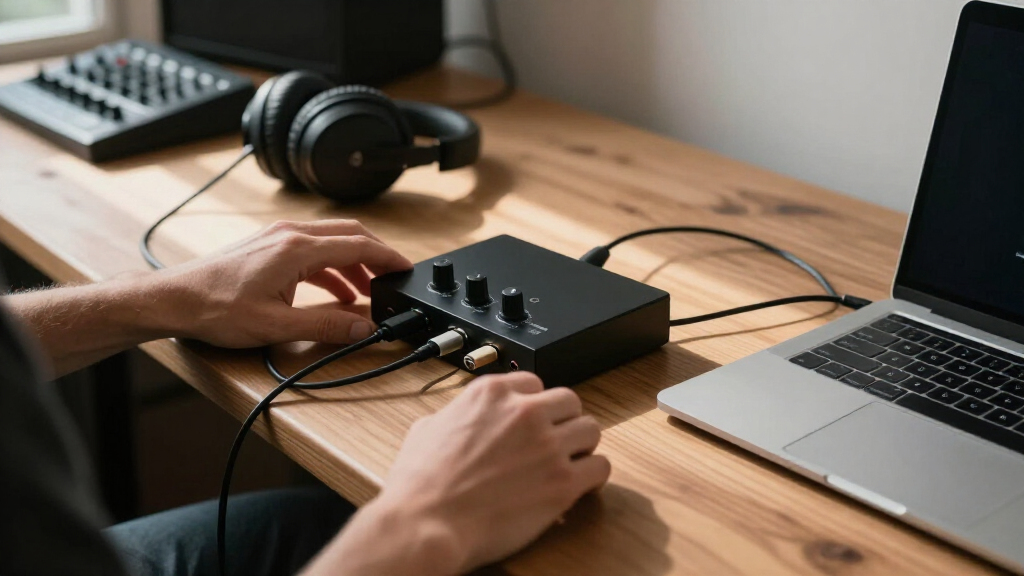
The Focusrite Scarlett 2i2 4th Gen is my best overall USB-C audio interface because its two-input layout, recording safeguards, and approachable controls suit the widest range of home studios. The M-AUDIO M-Track Duo HD is the stronger value choice for buyers who need two inputs without paying for advanced workflow tools, while the SSL 2+ MKII earns the premium spot through its expanded monitoring connections and studio-focused design. The main tradeoffs are input capacity, preamp gain, monitoring flexibility, driver support, and whether features such as loopback or automatic level setting justify a higher price. Solo creators can save money with a one-input model, but musicians recording stereo sources or two people at once should start with a true two-input interface. Continue reading for the full breakdown of all 13 USB-C audio interfaces and the buyer types each one serves best.

Get audio and creator gear delivered free — and shop member deals
- Fast, free delivery on millions of items
- Access to Prime Big Deal Days deals on October 6–7
- Prime Video, Amazon Music and more included
Complete the kit


Key Takeaways
- The Scarlett 2i2 4th Gen offers the best balance in this group: two flexible inputs, beginner-friendly level tools, and enough room for a home setup to grow.
- The SSL 2+ MKII earns its premium ranking through workflow, especially its extra outputs and monitoring flexibility, rather than through headline resolution figures alone.
- MOTU’s M2 has the clearest visual feedback among the leading options, making it a strong choice for buyers who want detailed meters instead of relying on simple signal LEDs.
- One-input models create the biggest savings, but the Scarlett Solo 4th Gen is easier to recommend than the older Solo 3rd Gen when their prices are close.
- The generic 2×2 interfaces rank below established-brand alternatives because similar specification lists do not address long-term driver updates, documentation, warranty handling, or reliable device identification.
| Focusrite Scarlett Solo 4th Gen USB-C Audio Interface |  | Best for Solo Musicians | Dynamic Range: 120dB | Connectivity: USB-C | Input Focus: Microphone and guitar | VIEW LATEST PRICE | See Our Full Breakdown |
| Solid State Logic 2 MKII Plus USB-C Audio Interface 2×4 |  | Best for Flexible Routing | Microphone Inputs: 2 XLR mic preamps | Instrument/Line Inputs: 2 1/4-inch line/Hi-Z inputs | Line Outputs: 4 | VIEW LATEST PRICE | See Our Full Breakdown |
| Rockville R-Track Solo Recording USB-C Audio Interface | 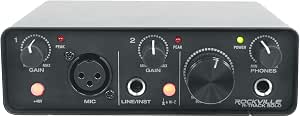 | Best Budget Basics | Bit Depth: 24-bit | Maximum Sample Rate: 192 kHz | Connectivity: USB-C | VIEW LATEST PRICE | See Our Full Breakdown |
| M-AUDIO M-Track Duo HD USB-C Audio Interface |  | Best for Beginners | Input Configuration: 2 combo inputs | Supported Input Types: Microphone, guitar, bass, and line level | Output Configuration: 2-out with headphone output | VIEW LATEST PRICE | See Our Full Breakdown |
| MOTU M2 USB-C Audio Interface |  | Best Overall | Connectivity: USB-C | Input/Output Configuration: 2-in/2-out | Preamps: 2 | VIEW LATEST PRICE | See Our Full Breakdown |
| 2×2 USB-C Audio Interface for PC/Mac Recording |  | Best for Gain-Hungry Microphones | Audio resolution: 24-bit/192kHz | Inputs: Dual XLR/TS plus 1/4-inch connectivity | Outputs: Dual stereo outputs | VIEW LATEST PRICE | See Our Full Breakdown |
| M-AUDIO M-Track Solo USB Audio Interface |  | Best Budget Starter | Maximum sample rate: 48kHz | Microphone input: 1 combo XLR/line input | Instrument input: 1 line/instrument input | VIEW LATEST PRICE | See Our Full Breakdown |
| Focusrite Scarlett 2i2 4th Gen USB-C Audio Interface |  | Best Overall | Generation: 4th generation | Connectivity: USB-C | Inputs: 2 combo microphone/line inputs | VIEW LATEST PRICE | See Our Full Breakdown |
| Universal Audio Volt 2 USB Audio Interface |  | Best for Vintage Tone | Bit depth: 24-bit | Maximum sample rate: 192kHz | Desktop compatibility: macOS and Windows | VIEW LATEST PRICE | See Our Full Breakdown |
| Focusrite Scarlett Solo 3rd Gen USB-C Audio Interface |  | Best for Solo Musicians | Connectivity: USB-C | Bit depth: 24-bit | Maximum sample rate: 192kHz | VIEW LATEST PRICE | See Our Full Breakdown |
| PIYONE 2X2 USB-C Audio Interface |  | Best for Mobile Recording | Resolution: 24-bit/192kHz | Inputs: 2 XLR/TRS combo inputs | Phantom Power: 48V | VIEW LATEST PRICE | See Our Full Breakdown |
| 2×2 USB-C Audio Interface for PC/Mac Recording |  | Best for DAW Flexibility | Maximum Resolution: 24-bit/192kHz | Channels: 2 | Audio Inputs: 2 XLR/TRS combo jacks | VIEW LATEST PRICE | See Our Full Breakdown |
| USB-C Audio Interface for Recording, Streaming, and Podcasting |  | Best Compact Pick for Podcasters | Bit Depth: 24-bit | Sampling Rate: 48kHz | Input Interfaces: XLR and 6.35mm | VIEW LATEST PRICE | See Our Full Breakdown |
| USB-C audio interface | Connectivity | Phantom Power |
|---|---|---|
| Focusrite Scarlett Solo 4th Ge | USB-C | — |
| Solid State Logic 2 MKII Plus | — | — |
| Rockville R-Track Solo Recordi | USB-C | 48V |
| M-AUDIO M-Track Duo HD USB-C A | USB-C | +48V switchable |
| MOTU M2 USB-C Audio Interface | USB-C | — |
| 2×2 USB-C Audio Interface for | — | +48V |
| M-AUDIO M-Track Solo USB Audio | — | Supported |
| Focusrite Scarlett 2i2 4th Gen | USB-C | — |
| Universal Audio Volt 2 USB Aud | — | — |
| Focusrite Scarlett Solo 3rd Ge | USB-C | — |
| PIYONE 2X2 USB-C Audio Interfa | USB-C | 48V |
| 2×2 USB-C Audio Interface for | — | +48V |
| USB-C Audio Interface for Reco | USB-C to USB-A | 48V |
More Details on Our Top Picks
Focusrite Scarlett Solo 4th Gen USB-C Audio Interface
I rank the Focusrite Scarlett Solo 4th Gen as the strongest choice for singer-songwriters who record one voice and one instrument at a time. Its 120dB dynamic range gives quiet passages and louder performances more room than the budget-focused Rockville R-Track Solo, while the improved Air mode adds presence to vocals and guitars without extra hardware. The included DAWs and Hitmaker Expansion also provide a broader starting toolkit than the MOTU M2 listing promises. That focused design is also its main limitation: compared with the M-AUDIO M-Track Duo HD, its microphone-and-guitar layout offers less flexibility for two-microphone sessions. I would choose it for polished solo production, but podcasters recording two speakers or musicians building a larger setup should move to a dual-input model.
Pros:- 120dB dynamic range preserves detail across quiet and loud performances
- Improved Air mode can add clarity and presence to vocals or guitars
- Included DAWs and Hitmaker Expansion provide a strong production starting point
- Compact format suits portable solo-recording setups
Cons:- Microphone-and-guitar input layout is restrictive for two-microphone sessions
- USB-C connectivity may require an adapter with older computers
- Software bundle and recording quality may exceed the needs of occasional voice recording
Best for: Singer-songwriters recording one vocal and one guitar who want polished sound and a substantial production-software bundle
Not ideal for: Two-person podcast teams or stereo-recording users who need two equivalent microphone inputs
- Dynamic Range:120dB
- Connectivity:USB-C
- Input Focus:Microphone and guitar
- Sound Mode:Improved Air mode
- Included DAWs:Pro Tools Intro+, Ableton Live Lite, Cubase LE
- Plugin Bundle:Hitmaker Expansion
- Form Factor:Compact and portable
Our verdict“I recommend this model to solo musicians who value recording quality and bundled creative tools more than dual-microphone flexibility.”
Solid State Logic 2 MKII Plus USB-C Audio Interface 2×4
The Solid State Logic 2 MKII Plus takes the routing-focused spot because its four line outputs, two headphone outputs, stereo loopback, and MIDI connections serve more involved production setups. Compared with the MOTU M2, its 2×4 configuration is better suited to separate monitor feeds, external hardware, or two listeners who need individual headphone connections. The 32-bit/192 kHz conversion and switchable Legacy 4K enhancement also give producers a choice between clean capture and added analog-style character. I place it below simpler models for buyers who only need basic recording: the extra routing adds complexity and still does not support a full band simultaneously. It is bus-powered, but its USB-C dependency may mean carrying an adapter when working with older computers.
Pros:- Four line outputs support more flexible monitor and external-hardware routing
- Two headphone outputs suit collaborative recording and podcast sessions
- Stereo loopback simplifies capturing computer audio for streams
- Legacy 4K enhancement offers an alternate tonal character during recording
Cons:- Two simultaneous inputs remain insufficient for drum kits or full-band sessions
- Broader routing and controls may be excessive for a first-time solo user
- Older computers may need an adapter for USB-C connectivity
Best for: Producers, two-host podcasters, and hardware-based musicians who need dual headphones, extra line outputs, loopback, and MIDI
Not ideal for: Bands recording several performers simultaneously, since the two-input design cannot accommodate a larger live session
- Microphone Inputs:2 XLR mic preamps
- Instrument/Line Inputs:2 1/4-inch line/Hi-Z inputs
- Line Outputs:4
- Headphone Outputs:2
- Conversion:32-bit/192 kHz AD/DA
- Monitoring:Zero-latency monitoring and stereo loopback
- MIDI:5-pin DIN MIDI I/O
- Power:USB bus-powered
- Included Software:SSL Production Pack
Our verdict“I would pick the SSL for two-channel recording that needs unusually capable monitoring, output routing, and hardware integration.”
Rockville R-Track Solo Recording USB-C Audio Interface
I give the Rockville R-Track Solo the budget-basics role because it covers high-resolution vocal, instrument, and podcast recording without the broader production extras of the Focusrite Scarlett Solo 4th Gen. Its 24-bit/192 kHz recording, 48V phantom power, and low-latency ASIO support provide the core tools needed for a condenser microphone and a Windows-based DAW. At 5.65 by 4 by 2 inches, it is also easy to fit into a small mobile rig. Compared with the M-AUDIO M-Track Duo HD, though, this model offers fewer advanced setup options and less input versatility. Buyers should also budget for a microphone, headphones or speakers, and any other required recording gear. I see it as an affordable entry point, not a foundation for a growing multi-source studio.
Pros:- 24-bit/192 kHz support provides high-resolution recording at an entry-level position
- 48V phantom power accommodates condenser microphones
- Low-latency ASIO support benefits Windows recording workflows
- Small enclosure is convenient for limited desks and mobile kits
Cons:- Basic feature set leaves little room for advanced routing or processing
- No built-in microphone or speakers means a usable setup requires extra equipment
- Less versatile than the M-AUDIO M-Track Duo HD for multiple source types
Best for: Budget-conscious solo vocalists, instrumentalists, or podcasters assembling a simple computer-based recording station
Not ideal for: Creators planning multi-person sessions or advanced routing, because its feature set is centered on basic single-user recording
- Bit Depth:24-bit
- Maximum Sample Rate:192 kHz
- Connectivity:USB-C
- Phantom Power:48V
- Driver Support:Low-latency ASIO
- Recording Sources:Vocals and instruments
- Dimensions:5.65 x 4 x 2 inches
Our verdict“I see this as a sensible low-cost interface for one-person recording, provided future expansion is not a priority.”
M-AUDIO M-Track Duo HD USB-C Audio Interface
The M-AUDIO M-Track Duo HD is my beginner pick because its two combo inputs accept microphones, guitars, basses, and line-level equipment without forcing a new user into a narrow recording setup. Compared with the Focusrite Scarlett Solo 4th Gen, it is better prepared for two-source sessions, while its direct/USB monitor switch makes latency management easier to understand. The bundled Ableton Live Lite, MPC Beats, and Splice access supply several ways to start creating immediately. Its 55dB preamp gain and 24-bit/192 kHz resolution are capable, but buyers seeking the SSL 2 MKII Plus model’s extra outputs, MIDI ports, and loopback will find this more restrictive. I favor it for learning and content creation; no onboard effects and a 2-in/2-out ceiling limit its appeal for expanding studios.
Pros:- Two combo inputs accommodate microphones, instruments, and line-level sources
- Direct/USB monitor switch provides straightforward control over monitoring
- 24-bit/192 kHz recording supports detailed music and spoken-word capture
- Ableton Live Lite, MPC Beats, and Splice access help beginners start producing
Cons:- Two-input and two-output layout limits expansion
- No built-in effects or advanced signal processing
- Offers fewer routing tools than the SSL 2 MKII Plus
Best for: New musicians and content creators who want two versatile inputs, simple monitoring controls, and starter production software
Not ideal for: Hardware-heavy producers who need MIDI, multiple monitor feeds, loopback, or more than two simultaneous channels
- Input Configuration:2 combo inputs
- Supported Input Types:Microphone, guitar, bass, and line level
- Output Configuration:2-out with headphone output
- Audio Resolution:24-bit/192 kHz
- Phantom Power:+48V switchable
- Preamp Gain:55dB
- Monitoring:Direct/USB monitor switch
- Connectivity:USB-C
- Included Software:Ableton Live Lite, Akai MPC Beats, 2 months of Splice
Our verdict“I recommend the M-Track Duo HD as an approachable first interface for creators who need two flexible inputs without advanced routing.”
MOTU M2 USB-C Audio Interface
I rank the MOTU M2 as the best overall choice for buyers who want a balanced two-channel interface across computers and mobile devices. Its two preamps, hardware monitoring, and 24-bit/192 kHz support cover serious music, voice, and streaming work without the more involved routing of the Solid State Logic 2 MKII Plus. Compatibility with macOS, Windows, and iOS also makes it more adaptable than a desktop-only purchase. The tradeoff is scope: its 2-in/2-out design cannot handle a full band or several external processors, and the supplied data does not promise the starter software offered with the Focusrite Scarlett Solo 4th Gen. That makes the MOTU less attractive to buyers building a studio from nothing, but its cross-platform flexibility gives it the broadest appeal here.
Pros:- 24-bit/192 kHz support suits detailed music and voice recording
- Two preamps accommodate common two-source sessions
- Hardware monitoring helps avoid distracting software-monitoring delay
- macOS, Windows, and iOS compatibility supports flexible recording locations
Cons:- Two-in/two-out capacity is restrictive for larger sessions and hardware chains
- Fewer routing options than the Solid State Logic 2 MKII Plus
- No software bundle is specified in the supplied product data
Best for: Musicians, streamers, and mobile creators who want two preamps plus dependable macOS, Windows, and iOS compatibility
Not ideal for: Large ensembles or first-time buyers who need several inputs and an included library of recording software
- Connectivity:USB-C
- Input/Output Configuration:2-in/2-out
- Preamps:2
- Audio Quality:24-bit/192 kHz
- Monitoring:Hardware monitoring
- Desktop Compatibility:macOS and Windows
- Mobile Compatibility:iOS
Our verdict“I would choose the MOTU M2 for a versatile two-channel setup that needs to move easily between desktop and iOS recording.”
2×2 USB-C Audio Interface for PC/Mac Recording
I rank the 2×2 USB-C Audio Interface as the specialist choice for microphones that need more amplification. Its gain range of up to 80 dB exceeds what many entry-level interfaces advertise, giving podcasters and vocalists more room to raise quieter mic signals without adding an external booster. Compared with the Focusrite Scarlett 2i2 4th Gen, it offers broader USB adapter support and similarly capable 24-bit/192kHz recording, but Focusrite provides smarter gain controls and a stronger software package. Dual XLR/TS connectivity and stereo outputs make this model flexible for a two-person desk setup. The compromise is confidence and expandability: the less-established platform lacks the Scarlett’s mature ecosystem, while its two-channel ceiling rules out drum kits, full bands, and other input-heavy sessions.
Pros:- Up to 80 dB of gain accommodates demanding microphones
- 24-bit/192kHz recording supports detailed capture
- USB-C, USB-A, and USB-B adapters broaden device compatibility
- Dual inputs and stereo outputs suit compact two-person setups
Cons:- Two-channel design cannot handle larger recording sessions
- Controls may feel complicated to buyers new to gain staging
- Included software ecosystem is less established than Focusrite’s
Best for: Podcasters, streamers, and home vocalists using low-output or condenser microphones that benefit from abundant preamp gain
Not ideal for: Bands and multi-microphone productions that need more than two simultaneous recording channels
- Audio resolution:24-bit/192kHz
- Inputs:Dual XLR/TS plus 1/4-inch connectivity
- Outputs:Dual stereo outputs
- USB connectivity:USB-C, USB-A, and USB-B
- Phantom power:+48V
- Maximum input gain:Up to 80 dB
- Instrument mode:Hi-Z switch
- Warranty:2 years
Our verdict“This is my pick for buyers who value unusually generous microphone gain and connection flexibility over bundled software and extra channels.”
M-AUDIO M-Track Solo USB Audio Interface
I place the M-AUDIO M-Track Solo here for buyers who want the least complicated route into recording vocals, guitar, or a podcast. Its combo microphone input, separate instrument input, and zero-latency direct monitoring cover basic solo production without charging for controls a newcomer may never use. Compared with the Focusrite Scarlett Solo 3rd Gen, however, its 48kHz ceiling leaves less flexibility for high-resolution production, and its computer connection is less convenient for a USB-C-first desk unless the correct cable or adapter is available. RCA monitor outputs also fit consumer speakers better than balanced studio wiring. The included MPC Beats software adds immediate creative value, but this remains an entry-level tool: limited recording resolution and basic monitoring controls make an eventual upgrade likely for advancing musicians.
Pros:- Simple controls keep first recording sessions approachable
- Combo microphone input includes phantom power for condenser mics
- Direct-monitor switch provides latency-free input monitoring
- MPC Beats supplies a usable starting production package
Cons:- 48kHz maximum sample rate trails the 192kHz alternatives in this lineup
- USB-C computers may require a different cable or adapter
- RCA outputs are less suitable for balanced professional monitor setups
Best for: First-time podcasters, voice-over beginners, and solo musicians building a low-cost Mac or PC recording desk
Not ideal for: Producers seeking native USB-C convenience, high-resolution capture, or balanced monitor connections
- Maximum sample rate:48kHz
- Microphone input:1 combo XLR/line input
- Instrument input:1 line/instrument input
- Microphone preamp:Crystal Preamp
- Phantom power:Supported
- Monitor outputs:Stereo RCA
- Headphone output:1/8-inch
- Included software:MPC Beats
Our verdict“I recommend this for cost-conscious beginners who need basic recording and direct monitoring without paying for studio-oriented extras.”
Focusrite Scarlett 2i2 4th Gen USB-C Audio Interface
The Focusrite Scarlett 2i2 4th Gen takes my highest rank because it balances polished audio, approachable controls, and room for two-source recording better than the other models here. Its Auto Gain and Clip Safe functions reduce ruined takes by setting levels and reacting when signals become too hot, a practical advantage over the manually controlled Universal Audio Volt 2. A 120dB dynamic range and low-noise preamps also give quiet details more space above background noise. The Volt 2 offers more tonal character through its vintage mode, while the cheaper M-AUDIO M-Track Solo handles basic speech for less. Yet the 2i2 is the stronger middle ground for musicians who want clean capture and useful software. Its main limits are the two-input format and added complexity for users who only need one microphone.
Pros:- Auto Gain speeds up accurate input-level setup
- Clip Safe helps protect unpredictable performances from overload
- 120dB dynamic range supports clean, detailed recordings
- Substantial software bundle covers recording, production, and effects
Cons:- Two inputs are insufficient for drum kits and full-band tracking
- Costs more than basic interfaces aimed at single-source recording
- Software and automated controls introduce a learning curve
Best for: Singer-songwriters, two-person podcasters, and home producers wanting guided gain control with studio-ready sound
Not ideal for: Bands recording several performers at once or beginners who only need one microphone input
- Generation:4th generation
- Connectivity:USB-C
- Inputs:2 combo microphone/line inputs
- Outputs:2 balanced line outputs
- Dynamic range:120dB
- Preamps:Ultra-low-noise microphone preamps
- Gain assistance:Auto Gain and Clip Safe
- Tone mode:Air mode
- Included software:Pro Tools Intro+, Ableton Live Lite, and Hitmaker Expansion
Our verdict“This is my default recommendation for buyers who want two excellent inputs, protective gain tools, and a capable software bundle in one USB-C interface.”
Universal Audio Volt 2 USB Audio Interface
I favor the Universal Audio Volt 2 for musicians who want character at the recording stage instead of an entirely neutral signal. Its Vintage preamp mode adds classic UA-inspired color to vocals and instruments, giving it a more distinctive purpose than the clean, utility-focused Focusrite Scarlett 2i2 4th Gen. Recording reaches 24-bit/192kHz, and compatibility with Mac, Windows, iPad, and iPhone makes the interface adaptable across desktop and mobile workflows. Support for UAD plug-ins and LUNA also suits creators already invested in Universal Audio’s production environment. Portability comes with caveats: mobile setups may need external power, Lightning-equipped iPads require a separate camera adapter, and there is no internal battery. Buyers wanting automated level protection will find the Scarlett’s Auto Gain and Clip Safe more forgiving.
Pros:- Vintage preamp mode adds tonal character during capture
- 24-bit/192kHz resolution supports high-detail recording
- Works across Mac, Windows, iPad, and iPhone environments
- Fits workflows built around UAD plug-ins and LUNA
Cons:- Mobile use may require external power and extra adapters
- No built-in battery for cable-light portable recording
- Lacks the automated gain safeguards offered by the Scarlett 2i2 4th Gen
Best for: Vocalists, guitarists, and producers who want vintage-style input color and use Universal Audio software workflows
Not ideal for: Travel recordists who need battery operation or beginners who want automatic gain and clipping protection
- Bit depth:24-bit
- Maximum sample rate:192kHz
- Desktop compatibility:macOS and Windows
- Mobile compatibility:iPad and iPhone
- Minimum mobile platform:iOS 14 or later
- Preamp character:Vintage preamp mode
- Plug-in support:UAD plug-ins
- DAW support:LUNA
Our verdict“I would choose the Volt 2 for two-channel recording when vintage-flavored input tone matters more than automated setup or battery-powered mobility.”
Focusrite Scarlett Solo 3rd Gen USB-C Audio Interface
The Focusrite Scarlett Solo 3rd Gen remains a focused choice for a singer-songwriter recording one microphone and one instrument. Its high-headroom instrument input helps keep guitar or bass transients clean, while Air mode can add presence to vocals without requiring an immediate plug-in decision. Compared with the M-AUDIO M-Track Solo, it raises the recording ceiling to 24-bit/192kHz, adds balanced outputs, and includes a broader production bundle. The Focusrite Scarlett 2i2 4th Gen is better for two-microphone sessions and supplies Auto Gain and Clip Safe, but the Solo’s simpler layout is easier to justify when that second preamp would sit unused. The fixed one-microphone configuration is also its biggest weakness: duets, stereo microphone techniques, and two-host podcasts quickly exceed its limited input arrangement.
Pros:- 24-bit/192kHz conversion supports high-resolution projects
- High-headroom instrument input handles guitar and bass cleanly
- Air mode offers a brighter vocal and instrument character
- Balanced outputs and bundled software support a proper home studio
Cons:- Only one microphone input limits collaborative recording
- Lacks Auto Gain and Clip Safe from the newer Scarlett generation
- USB-C setups may need an appropriate cable or adapter
Best for: Singer-songwriters and bedroom producers who record one vocal microphone alongside guitar or bass
Not ideal for: Two-host podcasters, stereo-recording enthusiasts, and musicians planning simultaneous multi-microphone sessions
- Connectivity:USB-C
- Bit depth:24-bit
- Maximum sample rate:192kHz
- Inputs:1 microphone and 1 instrument input
- Outputs:2 balanced outputs
- Tone option:Switchable Air mode
- Included software:Pro Tools Intro+, Ableton Live Lite, Cubase LE, and Hitmaker Expansion
- Warranty:3 years
Our verdict“I recommend the Scarlett Solo 3rd Gen to one-person music setups that want strong recording quality without paying for a second microphone preamp.”
PIYONE 2X2 USB-C Audio Interface
I rank the PIYONE 2X2 as the strongest mobile-recording choice here because its bus-powered USB-C connection, compact body, and stated iOS support suit creators moving between a desk and a portable setup. Its two XLR/TRS combo inputs can handle a vocal microphone and instrument together, while zero-latency monitoring helps performers hear themselves without distracting software delay. Compared with the Focusrite Scarlett Solo 4th Gen, PIYONE provides a more flexible two-input layout and adds loopback for streaming. The tradeoff is a less established product ecosystem than Focusrite offers, plus a 3.5mm headphone output rather than a larger studio-style jack. It is also limited to two channels, and bus power means it cannot operate independently of a connected host.
Pros:- Two XLR/TRS combo inputs accommodate microphones, instruments, and line-level sources
- 24-bit/192kHz recording provides ample resolution for music production
- Loopback simplifies routing computer audio into streams and recordings
- Zero-latency monitoring supports comfortable real-time tracking
Cons:- Two-channel limit is restrictive for drums, ensembles, or multi-microphone sessions
- Bus-powered design offers no stated standalone or external-power mode
- 3.5mm headphone jack is less convenient with studio headphones that use a 6.35mm plug
Best for: Mobile musicians and streaming creators who want to record two microphones or instruments through one bus-powered USB-C interface
Not ideal for: Bands recording several performers at once or studios that need standalone operation without a computer or mobile device
- Resolution:24-bit/192kHz
- Inputs:2 XLR/TRS combo inputs
- Phantom Power:48V
- Connectivity:USB-C
- Loopback:Yes
- Headphone Output:3.5mm
- Power Supply:USB bus power
Our verdict“Choose the PIYONE 2X2 for portable two-source recording and loopback, but skip it if expandability or an established support ecosystem matters more.”
2×2 USB-C Audio Interface for PC/Mac Recording
This 2×2 USB-C interface earns its place for buyers who switch among several recording applications. Its listed support spans Pro Tools, Ableton Live, Logic Pro, GarageBand, Cubase, Reaper, FL Studio, and Studio One, making broad DAW compatibility its clearest advantage. Two XLR/TRS inputs and 48V phantom power also make it better suited to recording two microphones than the M-AUDIO M-Track Solo. I would still place the Focusrite Scarlett 2i2 4th Gen ahead for buyers who value a mature software bundle, extensive documentation, and a widely established support network. This model includes no software or detailed manual, so beginners may face more setup work despite the plug-and-play claim. Its 1.5-pound chassis is reasonably portable, though less travel-friendly than the 300-gram B0DR2SHSD3 interface.
Pros:- Listed compatibility covers eight widely used recording applications
- Two XLR/TRS combo inputs support dual-microphone or microphone-and-instrument sessions
- 24-bit/192kHz capability offers more recording headroom than 48kHz entry-level models
- 48V phantom power supports condenser microphones
Cons:- No bundled recording software or detailed user manual is listed
- Two-channel design cannot accommodate larger live sessions
- Some computers and mobile devices may require a USB adapter
Best for: Home-studio users who work across several major DAWs and need two microphone or instrument inputs at 24-bit/192kHz
Not ideal for: First-time recordists who want bundled software, detailed setup guidance, or more than two simultaneous input channels
- Maximum Resolution:24-bit/192kHz
- Channels:2
- Audio Inputs:2 XLR/TRS combo jacks
- Phantom Power:+48V
- Supported Software:Pro Tools, Ableton Live, Logic Pro, GarageBand, Cubase, Reaper, FL Studio, Studio One
- Listed Operating System:Windows 10
- Dimensions:6 x 6.5 x 1.75 inches
- Weight:1.5 pounds
Our verdict“This is a practical choice for DAW-hopping home studios, provided the lack of bundled software and detailed guidance is not a problem.”
USB-C Audio Interface for Recording, Streaming, and Podcasting
I see this 300-gram USB-C interface as the most practical choice for podcasters and streamers who value portability over maximum sample rate. Its three monitoring modes offer more listening flexibility than a basic direct-monitor switch, while XLR and 6.35mm inputs cover common microphones and instruments. Compared with the PIYONE 2X2, however, its 24-bit/48kHz ceiling gives music producers less sample-rate flexibility, even though 48kHz is well suited to spoken-word and video work. The supplied USB-C-to-USB-A connection also favors computers with legacy USB ports rather than USB-C-only laptops. A third-party driver may be needed for the best compatibility, which weakens its beginner appeal beside the Focusrite Scarlett Solo 4th Gen. Still, 48V phantom power and the small footprint create a useful travel setup for condenser-mic recording.
Pros:- 300-gram body is easy to carry between recording locations
- Three monitoring modes support varied recording and streaming workflows
- 48V phantom power accommodates professional condenser microphones
- 24-bit/48kHz format is appropriate for podcasts, streams, and video audio
Cons:- 48kHz maximum sample rate trails the 192kHz alternatives in this batch
- Third-party driver requirement may complicate setup and future compatibility
- Included USB-C-to-USB-A connection may require another cable or adapter for USB-C-only computers
Best for: Traveling podcasters and solo streamers who need a lightweight interface for one microphone or instrument at 24-bit/48kHz
Not ideal for: Music producers seeking 96kHz or 192kHz sessions, or beginners who want a fully driver-free setup
- Bit Depth:24-bit
- Sampling Rate:48kHz
- Input Interfaces:XLR and 6.35mm
- Phantom Power:48V
- Monitoring Modes:3
- Connectivity:USB-C to USB-A
- Dimensions:14 x 11.5 x 4.5 cm
- Weight:300g
Our verdict“Pick this compact model for portable spoken-word production, but choose PIYONE or another 192kHz interface for higher-rate music sessions.”
How We Picked
I ranked these interfaces by how well they convert a USB-C connection into a dependable recording workflow, rather than treating the connector itself as proof of quality. My main criteria were input flexibility, gain and monitoring control, driver and platform support, build quality, bundled tools, and price. I gave added credit to features that prevent ruined takes or simplify repeatable setup, including clear meters, loopback, automatic gain setting, and direct monitoring. Published sample-rate figures carried less weight because nearly every buyer can make professional-sounding recordings at common studio settings.
The highest positions went to models that serve more than one creator type without introducing awkward compromises. Specialized products moved upward when they offered a clear advantage, such as the MOTU M2’s detailed metering, the SSL 2+ MKII’s broader output section, or the Universal Audio Volt 2’s character option. Affordable models were judged by usable connections and support quality, not price alone. Generic interfaces fell lower because unclear driver history, inconsistent documentation, and limited after-sales support can erase an upfront saving.
Factors to Consider When Choosing USB-C Audio Interfaces
I would choose a USB-C audio interface by working backward from the sources, monitoring setup, and software a buyer plans to use. The right connection count matters more than the largest specification number, and a modest interface with dependable drivers can be a better purchase than a feature-heavy model with uncertain support.
Match the Input Layout to Real Recording Sessions
I recommend counting how many sources must be recorded at the same time, not how many instruments or microphones someone owns. A vocalist recording one part at a time can work comfortably with the Scarlett Solo, while interviews, stereo keyboards, and two-microphone sessions call for a true two-input design such as the Scarlett 2i2, MOTU M2, or Volt 2. Combo sockets accept different plug types, but their microphone, instrument, and line modes may behave differently, so the labels and controls deserve attention. Buyers often mistake two advertised channels for two equally flexible microphone inputs. Separate gain controls also make two-person sessions far easier than designs that share key settings. I would pay for extra inputs only when simultaneous recording is realistic, since unused sockets add cost without improving a single-source track.
Prioritize Gain Range and Preamp Behavior Over Resolution Claims
Microphone sensitivity has more impact on setup than a 192kHz badge. Low-output dynamic microphones need more clean gain than many condenser microphones, and an underpowered preamp may require an inline booster that adds expense and cabling. I favor interfaces with smooth gain control and useful level feedback because they make quiet sources easier to capture without clipping. Most buyers will get strong results at 24-bit depth and 48kHz, leaving plenty of recording headroom without creating oversized sessions. The Volt 2’s character circuit is appealing when a warmer sound is wanted during capture, while the Scarlett, SSL, and MOTU options make more sense when flexibility and a cleaner starting point take priority. I would not pay more for sample rate alone unless a specific production or post-production workflow requires it.
Check Drivers, Devices, and USB Power Requirements
USB-C describes the plug, not guaranteed latency, power delivery, or software compatibility. On Windows, a manufacturer’s dedicated driver can shape buffer stability and round-trip latency more than the cable format does. Mac and mobile devices may support class-compliant operation, yet app compatibility, available power, and adapter choice can still limit a setup. I recommend checking the maker’s current operating-system support and firmware history before buying, especially for an older model such as the Scarlett Solo 3rd Gen. Phones and tablets may need a powered hub when an interface and microphone draw more energy than the mobile port can supply. A dependable data-rated USB cable also avoids the common mistake of using a charge-only cable that cannot carry audio.
Choose Monitoring Tools That Fit the Workflow
Direct monitoring lets a performer hear the input before computer processing adds delay, but implementations range from a simple on-off switch to a controllable input-and-playback blend. I prefer a blend control for overdubbing because it lets the performer balance the live signal against the existing track without changing recording levels. The MOTU M2’s full-color meters provide more detailed level information than basic halo or signal lights, while the SSL 2+ MKII’s added outputs better serve alternate speakers or external routing. Streamers should look for loopback, which sends computer audio back into recording software without a physical cable. Separate headphone and speaker controls become valuable when creators switch frequently between private monitoring and room playback. Automatic gain and clipping protection on the Scarlett 2i2 reduce setup friction, though confident users may prefer manual control and put their budget elsewhere.
Judge Total Value Beyond the Purchase Price
I treat software bundles as useful only when they replace tools a buyer would otherwise purchase. Plug-ins do not compensate for missing inputs, noisy operation, or controls that slow down every session. Established brands tend to offer clearer documentation, longer driver histories, and easier warranty service, which can make a modest price premium sensible. The M-Track Duo HD occupies a persuasive value position because it keeps a two-input layout while trimming higher-end workflow extras. The cheapest generic 2×2 models may suit an occasional backup rig, but vague branding can make future driver downloads and support requests difficult. I would spend more on reliability and usable routing before paying for decorative controls or inflated accessory bundles.
Frequently Asked Questions
Does USB-C Automatically Mean Lower Recording Latency?
No, USB-C is a connector shape rather than a promise of faster audio performance. Driver quality, buffer size, computer workload, and the interface’s internal design all affect latency. Even an interface using an older USB data standard can record many channels comfortably because audio requires far less bandwidth than modern USB connections provide. I would compare driver reputation and direct-monitoring options before focusing on connector speed. Direct monitoring is the simplest way to hear a live source without distracting software delay.
Should a Solo Musician Buy a One-Input or Two-Input Interface?
A one-input model works when vocals and instruments are always recorded separately, making the Scarlett Solo 4th Gen a sensible beginner choice. Two inputs become useful for singing while playing an instrument, capturing a stereo keyboard, recording acoustic guitar with two microphones, or inviting a second speaker. That flexibility often costs less now than replacing a one-input interface later. I would choose the Scarlett 2i2, MOTU M2, or Volt 2 when any two-source session seems likely. Buyers with a fixed voice-only workflow can keep the smaller interface and spend the difference on a better microphone or headphones.
Is 24-Bit/192kHz Recording Worth Paying Extra For?
Twenty-four-bit recording is useful because it allows comfortable headroom while keeping the noise floor low. A 192kHz ceiling has much less practical value for typical music, podcast, and streaming projects, where 44.1kHz or 48kHz is usually sufficient. Higher sample rates consume more storage and processing power while reducing the number of plug-ins a computer can run smoothly. Converter implementation and stable drivers matter more than the largest number printed on the product page. I would treat 192kHz support as a secondary feature, not the reason to select one interface over another.
Can These USB-C Interfaces Work With an iPad or Phone?
Many can, but a matching USB-C port does not guarantee full compatibility. The interface must support the mobile operating system, and the device must supply enough power for the interface and any connected condenser microphone. A powered USB hub can solve power shortages, while some older phones or tablets require a separate camera-style adapter. Recording apps also vary in how they handle multiple inputs, loopback, and monitoring. I recommend confirming the exact phone or tablet model on the manufacturer’s compatibility page and budgeting for the correct data-and-power adapter.
Are Generic 2×2 USB-C Interfaces a Safe Alternative to Established Brands?
A generic interface can capture usable audio, but the lower price carries support risk. Two products with nearly identical titles may come from different factories, making reliable manuals, firmware, and replacement service harder to find. Established models from Focusrite, MOTU, SSL, M-Audio, and Universal Audio have clearer product identities and broader user communities when setup problems appear. I would reserve an unbranded 2×2 model for a tight budget, occasional use, or a secondary rig. For frequent recording, driver continuity and warranty access usually justify paying more.
Conclusion
For most home studios, I recommend the Focusrite Scarlett 2i2 4th Gen as the best overall pick because it combines two flexible inputs with level-setting tools that help both new and experienced creators. The M-AUDIO M-Track Duo HD is my best-value choice, while the Scarlett Solo 4th Gen is the better beginner option for recording one source at a time. Buyers building a more elaborate monitoring setup should choose the SSL 2+ MKII as the premium pick, and those who rely on precise visual levels should favor the MOTU M2. The Universal Audio Volt 2 makes the most sense for musicians who want an optional colored character during recording. I would choose the older Scarlett Solo 3rd Gen only at a clear discount and approach the generic 2×2 models as budget or backup solutions rather than long-term studio purchases.
Fall Picks
fall essentials
As an affiliate, we earn on qualifying purchases.