
Editorial update log
November 21, 2026:
Deal update: RoundupForge price history now flags ASIN B00N1YPXW2 on amazon.com as below its typical tracked range. RF labels the deal as all_time_low.
Exact pricing remains intentionally gated through the live Grimfaste price module in the article.
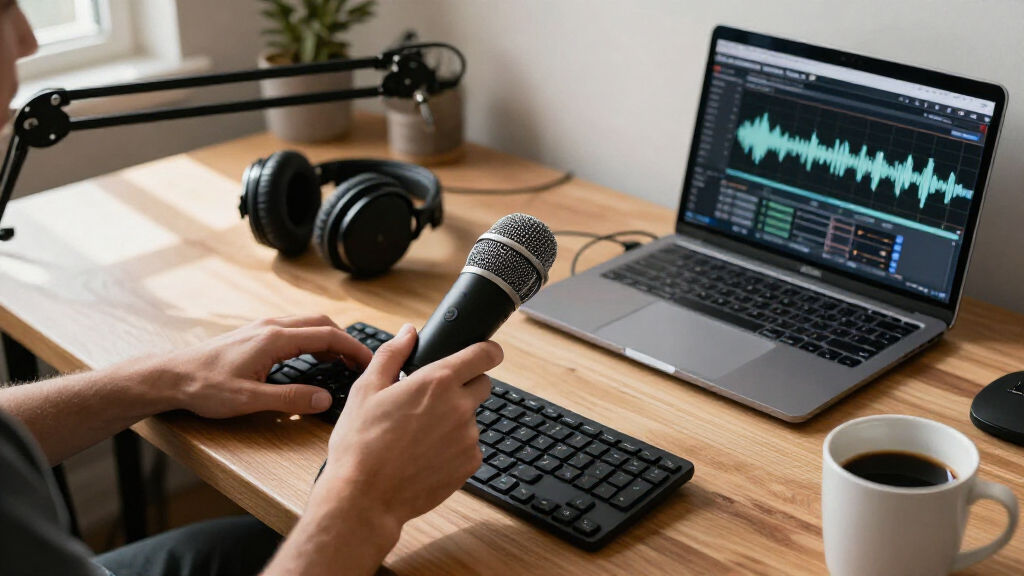
For most solo podcasters, I’d start with the Logitech Blue Yeti: its selectable pickup patterns make it more adaptable than a basic single-pattern desktop mic. The RØDE NT-USB Mini is a strong alternative for a compact, focused setup, while the FIFINE AmpliTank K688CT suits speakers who want a dynamic mic with both USB and XLR connections. The main tradeoff is convenience versus room control: condenser mics are easy to use but can pick up more background sound, while dynamic models usually call for closer mic placement. Kit contents, monitoring controls, and future XLR options also separate these choices. Read on for the full comparison and recommendations by podcasting setup.

Get audio and creator gear delivered free with Prime
- Fast, free delivery on millions of items
- Prime Video, Amazon Music and more included
- Member-only deals all year
Complete the kit

Key Takeaways
The Blue Yeti models stand out for flexibility: their multiple pickup patterns can suit solo recording, interviews, and group conversations, but that versatility may be unnecessary for a one-person show.
Dynamic USB/XLR models offer a clearer upgrade path: the FIFINE AM8, K688CT, and MAONO PD200W can connect to a computer now and compatible audio gear later.
A boom arm can matter as much as the microphone: the FIFINE T669 and AM8T bundles address desk placement and positioning, while standalone desktop mics may need extra accessories.
Small condensers favor tidy setups, not every room: the RØDE NT-USB Mini saves space, but a quiet, controlled recording area still matters when choosing a condenser.
Budget-oriented models trade refinement for straightforward use: options such as the FIFINE K669B, TONOR, and CMTECK can cover basic recording needs, though their simpler feature sets offer less flexibility.
| FIFINE AmpliGame A6V USB Gaming Microphone with RGB Lighting |  | Best for Gaming-and-Podcast Setups | Connectivity: USB | Polar pattern: Cardioid | Sampling rate: 192 kHz | VIEW LATEST PRICE | See Our Full Breakdown |
| FIFINE AmpliGame AM8 USB/XLR Dynamic Microphone |  | Best for an XLR Upgrade Path | Microphone type: Dynamic | Connectivity: USB, XLR | Polar pattern: Unidirectional cardioid | VIEW LATEST PRICE | See Our Full Breakdown |
| FIFINE T669 Studio Condenser USB Microphone Kit with Boom Arm |  | Best Complete Boom-Arm Kit | Connectivity: USB Type-A / Type-C | Polar pattern: Cardioid (unidirectional) | Frequency response: 20 Hz–20 kHz | VIEW LATEST PRICE | See Our Full Breakdown |
| FIFINE AmpliTank K688CT Podcast Microphone Kit (USB/XLR Dynamic Vocal Mic) | 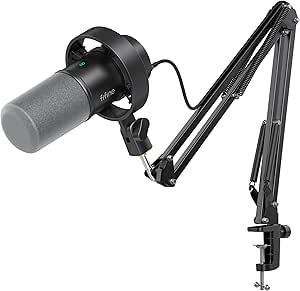 | Best USB/XLR Kit with Boom Arm | Connectivity: USB, XLR | Microphone type: Dynamic vocal microphone | Polar pattern: Cardioid (unidirectional) | VIEW LATEST PRICE | See Our Full Breakdown |
| Logitech Blue Yeti USB Microphone – Blackout |  | Best for Multiple Recording Patterns | Connectivity: USB | Microphone type: Condenser | Capsule array: Tri-capsule | VIEW LATEST PRICE | See Our Full Breakdown |
| FIFINE K669B USB Condenser Microphone |  | Best Value for Solo Podcasting | Connectivity: USB | Connector types: USB Type-A, USB Type-C | Polar pattern: Cardioid (unidirectional) | VIEW LATEST PRICE | See Our Full Breakdown |
| FIFINE AmpliGame AM8W XLR/USB Gaming Microphone |  | Best for a Podcast Setup That May Grow to XLR | Connectivity: USB and XLR | Polar pattern: Cardioid (unidirectional) | Frequency response: 20 Hz–20 kHz | VIEW LATEST PRICE | See Our Full Breakdown |
| RØDE NT-USB Mini Studio-Quality USB Condenser Microphone |  | Best Compact Podcast Mic | Connectivity: USB | Connector: USB-C | Polar pattern: Unidirectional | VIEW LATEST PRICE | See Our Full Breakdown |
| ZealSound K66 USB Podcast Microphone with Noise Cancellation, Gain Control, and Zero-Latency Monitoring |  | Best for Mobile Podcasting | Microphone type: USB condenser | Pickup pattern: Cardioid | Connectivity: USB-C and Lightning; adapters included | VIEW LATEST PRICE | See Our Full Breakdown |
| Logitech Blue Yeti USB Microphone with Blue VO!CE, Four Pickup Patterns, and Desktop Stand – Midnight Blue |  | Best for Flexible Recording Setups | Connectivity: USB | Connector: USB Type-A | Microphone type: Condenser with tri-capsule array | VIEW LATEST PRICE | See Our Full Breakdown |
| Logitech Blue Yeti USB Condenser Microphone – Silver |  | Best for Multi-Format Podcasting | Microphone type: Condenser | Connectivity: USB Type-A | Pickup patterns: Cardioid, omnidirectional, bidirectional, stereo | VIEW LATEST PRICE | See Our Full Breakdown |
| TONOR Podcast Microphone, USB Computer Mic, Cardioid Condenser PC Mic | 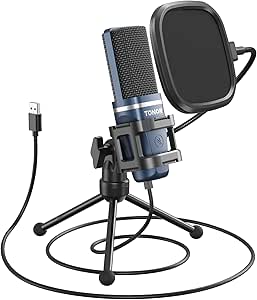 | Best Beginner Podcast Kit | Model: TC-777 | Microphone type: Condenser | Connectivity: USB Type-A, USB 2.0 | VIEW LATEST PRICE | See Our Full Breakdown |
| CMTECK G009 USB Desktop Microphone with Noise-Cancelling and Mute Function |  | Best Compact Voice-Capture Option | Model: G009 | Microphone type: Condenser | Connectivity: USB | VIEW LATEST PRICE | See Our Full Breakdown |
| FIFINE AmpliGame AM8T Dynamic Gaming Microphone Kit with Boom Arm |  | Best Boom-Arm Dynamic Mic | Microphone type: Dynamic | Connectivity: USB, XLR | Polar pattern: Cardioid (unidirectional) | VIEW LATEST PRICE | See Our Full Breakdown |
| MAONO PD200W Hybrid Wireless Podcast Microphone (Dynamic, XLR/USB) |  | Best for Wireless Interviews | Microphone type: Dynamic | Connectivity: Wireless, USB Type-C, XLR | Polar pattern: Cardioid (unidirectional) | VIEW LATEST PRICE | See Our Full Breakdown |
| USB microphones for podcasting | Connectivity | Signal-to-noise ratio | Frequency response | Polar pattern |
|---|---|---|---|---|
| FIFINE AmpliGame A6V USB Gamin | USB | 70 dB | 60 Hz–18 kHz | Cardioid |
| FIFINE AmpliGame AM8 USB/XLR D | USB, XLR | 80 dB | 50 Hz–16 kHz | Unidirectional cardioid |
| FIFINE T669 Studio Condenser U | USB Type-A / Type-C | 78 dB | 20 Hz–20 kHz | Cardioid (unidirectional) |
| FIFINE AmpliTank K688CT Podcas | USB, XLR | 80 dB | 50 Hz–16 kHz | Cardioid (unidirectional) |
| Logitech Blue Yeti USB Microph | USB | — | 20 Hz–20 kHz | — |
| FIFINE K669B USB Condenser Mic | USB | 78 dB | 20 Hz–20 kHz | Cardioid (unidirectional) |
| FIFINE AmpliGame AM8W XLR/USB | USB and XLR | 80 dB | 20 Hz–20 kHz | Cardioid (unidirectional) |
| RØDE NT-USB Mini Studio-Qualit | USB | 82 dB | 20 Hz–20 kHz | Unidirectional |
| ZealSound K66 USB Podcast Micr | USB-C and Lightning; adapters included | — | 40 Hz–18 kHz | — |
| Logitech Blue Yeti USB Microph | USB | 70 dB | 20 Hz–20 kHz | — |
| Logitech Blue Yeti USB Condens | USB Type-A | 100 dB | 20 Hz–20 kHz | — |
| TONOR Podcast Microphone | USB Type-A, USB 2.0 | 80 dB | 20 kHz | Cardioid (unidirectional) |
| CMTECK G009 USB Desktop Microp | USB | 76 dB | — | Omnidirectional |
| FIFINE AmpliGame AM8T Dynamic | USB, XLR | 80 dB | 50 Hz–16 kHz | Cardioid (unidirectional) |
| MAONO PD200W Hybrid Wireless P | Wireless, USB Type-C, XLR | 82 dB | — | Cardioid (unidirectional) |
More Details on Our Top Picks
FIFINE AmpliGame A6V USB Gaming Microphone with RGB Lighting
The A6V suits a podcaster who also streams or plays on console and wants a simple USB setup with easy access to mute and gain. Its cardioid pattern focuses on the speaker, while the included shock mount and pop filter help limit desk vibration and plosive sounds without a separate accessory search. Compared with the FIFINE T669, the A6V has a smaller, tripod-based desktop setup rather than a boom arm, so it is easier to place but less useful for clearing desk space. Its 192kHz sampling specification is generous, though the practical podcasting difference will depend more on placement and room acoustics. Tradeoffs include fixed RGB modes, a plastic enclosure, and a specific detachable USB-C connection to account for when replacing a cable.
Pros:- Plug-and-play USB compatibility with PC, Mac, PS4, and PS5
- Tap-to-mute button and gain knob are accessible on the microphone
- Includes a shock mount, pop filter, and tripod stand
- Cardioid pickup pattern is suited to focusing on one speaker
Cons:- No XLR connection for an audio-interface-based setup
- RGB lighting modes are fixed rather than broadly customizable
- Plastic enclosure feels less premium than the metal FIFINE K688CT
Best for: New podcasters who record at a desk, also stream or game on PC or PlayStation, and want mute and gain controls on the mic.
Not ideal for: Podcasters who need an XLR upgrade path, a boom arm to free desk space, or a more premium all-metal microphone body.
- Connectivity:USB
- Polar pattern:Cardioid
- Sampling rate:192 kHz
- Signal-to-noise ratio:70 dB
- Frequency response:60 Hz–18 kHz
- Compatibility:PC, Mac, PS4, PS5
- Cable length:6.6 ft (2 m)
Our verdict“Choose the A6V for a straightforward desk mic with useful controls and included accessories, but pick the T669 if a boom arm matters more than a compact stand.”
FIFINE AmpliGame AM8 USB/XLR Dynamic Microphone
The AM8 makes sense for podcasters who want to start with USB and keep the option of moving to an audio interface later. Its dynamic, cardioid design and recommended close speaking distance suit a single host recording at a desk, especially when keeping the mic near the mouth is practical. In USB mode, headphone monitoring, gain adjustment, and tap-to-mute make it more self-contained than the FIFINE A6V. The A6V includes a shock mount and pop filter, while the AM8 instead offers USB and XLR connectivity and built-in threads for common stand sizes. That flexibility has limits: XLR mode disables the onboard controls and lighting, and an XLR cable is not included. It is a better fit for a staged upgrade than for someone who wants all features active through an interface.
Pros:- USB and XLR connections support different recording setups
- USB mode includes headphone monitoring, gain, and monitoring-volume controls
- Tap-to-mute includes an LED mute reminder in USB mode
- Built-in 3/8-inch and 5/8-inch threads fit common microphone stands
Cons:- XLR cable is not included
- RGB lighting and onboard controls do not work in XLR mode
- Best results call for a close 2–6-inch speaking distance
Best for: Solo podcasters who want USB recording now and a route to XLR equipment later, and can speak close to the microphone.
Not ideal for: People who need onboard mute and gain controls while using XLR, or who expect a complete boom-arm kit in the box.
- Microphone type:Dynamic
- Connectivity:USB, XLR
- Polar pattern:Unidirectional cardioid
- Frequency response:50 Hz–16 kHz
- Signal-to-noise ratio:80 dB
- Channels:1
- Stand threads:3/8 inch and 5/8 inch
Our verdict“Pick the AM8 if USB convenience and a future XLR setup matter more than included mounting accessories or controls that work in every mode.”
FIFINE T669 Studio Condenser USB Microphone Kit with Boom Arm
The T669 is the strongest choice here for a podcaster who wants a boom arm and vocal accessories in one USB kit. Its cardioid condenser capsule is paired with a shock mount and double pop filter, while the steel arm lets the microphone sit closer to the speaker without taking up the same tabletop area as a tripod. Compared with the FIFINE A6V, it is less focused on gaming-style controls and lighting, but better suited to a fixed recording position and a tidier desk. Plug-and-play USB avoids the extra interface required by an XLR-first setup. The main tradeoff is installation: the clamp needs a table or desk edge, and this model is listed as incompatible with Xbox. Its condenser design also makes room noise and microphone placement worth attention.
Pros:- Includes a steel boom arm, shock mount, and double pop filter
- USB Type-A and Type-C connectivity supports compatible devices
- Cardioid pickup is aimed at capturing a single speaker
- Long 8.2-foot USB cable gives room to position the microphone
Cons:- Clamp installation requires a compatible desktop or table surface
- Listed compatibility excludes Xbox consoles
- USB-only connection does not provide an XLR upgrade path
Best for: PC or laptop podcasters who record from a desk and want a boom arm, shock mount, and pop filtering included.
Not ideal for: Xbox users, people without a suitable desk edge for the clamp, or podcasters seeking a dynamic mic with an XLR connection.
- Connectivity:USB Type-A / Type-C
- Polar pattern:Cardioid (unidirectional)
- Frequency response:20 Hz–20 kHz
- Signal-to-noise ratio:78 dB
- Included accessories:Boom arm, shock mount, double pop filter, 8.2 ft USB cable
- Compatibility:PC, laptop, PS4, PS5
Our verdict“Choose the T669 if a ready-to-mount boom-arm kit is your priority; choose the AM8 instead if you want dynamic USB/XLR flexibility.”
FIFINE AmpliTank K688CT Podcast Microphone Kit (USB/XLR Dynamic Vocal Mic)
The K688CT combines the practical upgrade path of a USB/XLR mic with the included mounting gear many podcast desks need. Its dynamic cardioid design is intended for close, single-speaker recording, and the metal boom arm, shock mount, and windscreen help manage placement, vibration, and plosives. Compared with the FIFINE AM8, this kit includes a boom arm and shock mount, making it a more complete desk setup; the AM8 has built-in stand threads that may suit someone bringing their own mount. The K688CT also offers tap-to-mute, gain control, and headphone monitoring over USB, but these mic controls are disabled in XLR mode. The clamp only fits desks under two inches thick, and the recommended 2–6-inch distance means it is not a hands-off mic for speakers who move around.
Pros:- USB and XLR connectivity allow different recording workflows
- Includes a metal boom arm, shock mount, and windscreen
- USB mode provides tap-to-mute, gain control, and headphone monitoring
- Cardioid pattern and dynamic capsule suit close single-speaker recording
Cons:- Microphone mute and gain controls are disabled when connected by XLR
- Desk clamp is limited to surfaces under two inches thick
- Best volume requires a close 2–6-inch speaking distance
Best for: Podcasters who want a dynamic mic, included boom-arm hardware, and the choice of USB now or XLR with compatible gear later.
Not ideal for: Users with desks at least two inches thick, speakers who cannot stay close to the mic, or buyers who need onboard controls in XLR mode.
- Connectivity:USB, XLR
- Microphone type:Dynamic vocal microphone
- Polar pattern:Cardioid (unidirectional)
- Frequency response:50 Hz–16 kHz
- Signal-to-noise ratio:80 dB
- Maximum SPL:120 dB
- Included accessories:Boom arm, shock mount, windscreen
Our verdict“Choose the K688CT over the AM8 if you want the boom arm and shock mount included, provided your desk fits the clamp and you can record close to the mic.”
Logitech Blue Yeti USB Microphone – Blackout
The Blue Yeti is the most versatile pick here for a podcaster who records more than one kind of conversation. Its four selectable pickup patterns include cardioid for solo hosting, bidirectional for two people facing each other, and omnidirectional or stereo options for other setups. That range sets it apart from the FIFINE T669, which focuses on a single cardioid pattern and includes a boom arm and pop filters. The Yeti instead brings an adjustable desktop stand, onboard controls, headphone monitoring, and Blue VO!CE software for additional vocal processing. The tradeoff is a larger desktop footprint and a USB-only connection; it does not offer the AM8 or K688CT’s XLR path. Advanced software features also require Logitech G HUB, so it is not the most minimal setup.
Pros:- Four pickup patterns cover solo, two-person, and broader recording setups
- Onboard controls include gain, mute, pattern selection, and headphone volume
- Built-in headphone jack supports no-latency monitoring
- Blue VO!CE software offers additional vocal effects
Cons:- Large desktop footprint can crowd a compact recording space
- USB-only connectivity lacks the XLR option offered by the AM8 and K688CT
- Advanced software features require Logitech G HUB
Best for: Solo hosts who also record interviews or small-group sessions and want to switch pickup patterns without changing microphones.
Not ideal for: Podcasters with limited desk space, anyone seeking an XLR upgrade path, or users who want to avoid companion software for advanced processing.
- Connectivity:USB
- Microphone type:Condenser
- Capsule array:Tri-capsule
- Pickup patterns:Cardioid, omnidirectional, bidirectional, stereo
- Frequency response:20 Hz–20 kHz
- Impedance:16 ohms
- Compatible platforms:PC, Mac
Our verdict“Choose the Blue Yeti if changing pickup patterns for different podcast formats matters more than a compact footprint or XLR flexibility.”
FIFINE K669B USB Condenser Microphone
The FIFINE K669B keeps solo recording simple: its USB connection needs no external interface, and the cardioid pickup pattern favors the speaker in front of it. A metal body and included tripod make it a straightforward desktop choice, while the onboard volume knob gives you a quick way to adjust input. Compared with the more feature-rich ZealSound K66, the K669B has fewer dedicated controls and no listed headphone monitoring, but its uncomplicated setup suits a host who just needs a mic for a computer. The tradeoffs are its limited device compatibility—it does not support phones or Xbox—and a need to check recording software settings, since automatic level adjustment can cause volume fluctuations. I’d choose it for basic, single-voice sessions rather than a flexible multi-device studio.
Pros:- Plug-and-play USB setup needs no external drivers or phantom power.
- Cardioid pickup focuses on the main speaker for solo recordings.
- Metal construction and included tripod provide a stable desktop setup.
- Onboard volume control allows quick input adjustment.
Cons:- Not compatible with mobile phones or Xbox consoles.
- Some recording software may need automatic volume adjustment disabled to prevent level changes.
- The listed setup does not include dedicated headphone monitoring.
Best for: First-time solo podcasters recording at a PC or Mac who want a simple USB setup and an included desktop stand.
Not ideal for: Mobile podcasters, Xbox users, and hosts who need built-in headphone monitoring or convenient multi-device compatibility.
- Connectivity:USB
- Connector types:USB Type-A, USB Type-C
- Polar pattern:Cardioid (unidirectional)
- Frequency response:20 Hz–20 kHz
- Signal-to-noise ratio:78 dB
- Enclosure material:Metal
- Power source:USB-powered
- Cable length:5.9 ft
Our verdict“Choose the K669B for uncomplicated solo podcast recording at a computer, but skip it if you need mobile support or monitoring controls.”
FIFINE AmpliGame AM8W XLR/USB Gaming Microphone
The FIFINE AmpliGame AM8W suits a podcaster who wants to start with USB and keep the option of moving to an XLR mixer or interface later. Its dual USB/XLR connectivity gives it a clearer upgrade path than the USB-only RØDE NT-USB Mini, while the gain control, tap-to-mute button, and headphone jack offer useful access during a recording. The dynamic design and cardioid pattern favor a close, single-speaker setup; the guidance to position it 2–6 inches from the voice means it takes more deliberate placement than a casual desktop mic. Its white finish and customizable RGB lighting lean toward gaming aesthetics, and the lighting and onboard controls work only over USB. I’d also budget for an XLR cable if you plan to use an interface, since one is not included.
Pros:- USB and XLR connections support both direct computer recording and later interface-based setups.
- Gain control, tap-to-mute, and headphone monitoring are accessible on the microphone.
- Dynamic cardioid design is suited to close-mic, single-speaker podcasting.
- Compact white design and customizable RGB lighting fit a gaming-oriented desk.
Cons:- Best results call for close placement, about 2–6 inches from the speaker.
- RGB lighting and onboard controls are available only over USB.
- An XLR cable is not included for interface-based recording.
Best for: New podcasters who want USB operation now, headphone monitoring, and the option to connect to an XLR interface later.
Not ideal for: Hosts who prefer a mic farther from their mouth, want RGB and onboard controls over XLR, or need an included XLR cable.
- Connectivity:USB and XLR
- Polar pattern:Cardioid (unidirectional)
- Frequency response:20 Hz–20 kHz
- Signal-to-noise ratio:80 dB
- Impedance:32 ohms
- Weight:1.3 lb
- Included accessories:USB-C to USB cable, windscreen, mic base stand, user manual
- Material:ABS plastic and metal
Our verdict“Pick the AM8W if you want a close-mic USB podcast setup with an XLR upgrade path, and can accept its positioning and cable requirements.”
RØDE NT-USB Mini Studio-Quality USB Condenser Microphone
The RØDE NT-USB Mini makes a strong case for a compact podcast desk: it combines a small footprint with zero-latency headphone monitoring, a built-in pop filter, and a magnetic stand that detaches for mounting on a mic arm. That last detail offers more placement flexibility than the included tabletop tripod on the FIFINE K669B, while the Mini’s pop filter helps tame plosives without requiring a separate accessory. Its USB-C plug-and-play setup is aimed at computer and tablet recording, not a full XLR studio path. The main limitation is its fixed unidirectional pickup pattern, which is less adaptable than the four patterns on the Blue Yeti for interviews around a table or other multi-source formats. I’d shortlist it for a tidy, single-host setup where compact size and monitoring matter more than pattern choice.
Pros:- Compact form takes up little desk space.
- Zero-latency headphone monitoring supports real-time audio checks.
- Built-in pop filter helps reduce plosive sounds.
- Magnetic stand detaches for mounting on a standard mic arm or stand.
Cons:- Fixed unidirectional pickup pattern offers less flexibility for multiple speakers than the Blue Yeti.
- USB connection may require an adapter for devices without a compatible USB port.
- USB-only connectivity does not offer an XLR upgrade path.
Best for: Solo podcasters with limited desk space who want headphone monitoring, a built-in pop filter, and the option to mount the mic on an arm.
Not ideal for: Roundtable hosts who need multiple pickup patterns or buyers whose recording device lacks a compatible USB port and adapter.
- Connectivity:USB
- Connector:USB-C
- Polar pattern:Unidirectional
- Frequency response:20 Hz–20 kHz
- Signal-to-noise ratio:82 dB
- Weight:585 g
- Dimensions:7.28 × 2.36 × 1.97 in
- Compatible devices:Mac, PC, iPad, tablet
Our verdict“Choose the NT-USB Mini for compact solo podcasting with monitoring and arm-mount flexibility, not for recording several speakers with different pickup patterns.”
ZealSound K66 USB Podcast Microphone with Noise Cancellation, Gain Control, and Zero-Latency Monitoring
The ZealSound K66 is the most travel-friendly choice here for podcasters recording across a computer, phone, or tablet: it includes USB-C and Lightning adapters and adds physical controls for gain, monitoring volume, and echo. That makes it more adaptable to mobile recording than the computer-focused RØDE NT-USB Mini, though the RØDE is the more compact option and includes a built-in pop filter. The K66 also offers zero-latency monitoring through its 3.5 mm jack and a noise-reduction mode for voice-focused sessions. Its cardioid pickup pattern remains aimed at one speaker, so it is not a strong fit for several people gathered around one mic. Noise reduction is activated by holding the mute button rather than a dedicated switch, which can be less obvious during a session. I’d favor it when device compatibility and hands-on adjustments outweigh a simpler control layout.
Pros:- Included USB-C and Lightning adapters support a broad range of computers and mobile devices.
- Physical gain, monitoring-volume, and echo controls allow adjustments without software.
- Zero-latency monitoring uses a 3.5 mm headphone jack.
- Noise-reduction mode adds an option for voice-focused recording.
Cons:- Cardioid pickup is best suited to one speaker rather than multiple voices around the microphone.
- Noise reduction is activated by holding the mute button, which may be less intuitive than a dedicated control.
- The listed frequency response tops out at 18 kHz, below the 20 kHz range listed for the RØDE NT-USB Mini.
Best for: Mobile-first podcasters who record solo on a mix of iPhone, iPad, Android, Mac, or Windows devices and want physical audio controls.
Not ideal for: Interview hosts who need one microphone to capture multiple speakers, or users who want a dedicated, clearly marked noise-reduction switch.
- Microphone type:USB condenser
- Pickup pattern:Cardioid
- Connectivity:USB-C and Lightning; adapters included
- Frequency response:40 Hz–18 kHz
- Sampling rate:46 kHz
- Sensitivity:-45 dB ±3 dB
- Monitoring:Zero-latency monitoring
- Controls and features:Gain, volume, echo adjustment, mute button, noise-reduction mode
Our verdict“Pick the K66 if you record solo across phones and computers and value onboard controls, but choose another format for multi-speaker sessions.”
Logitech Blue Yeti USB Microphone with Blue VO!CE, Four Pickup Patterns, and Desktop Stand – Midnight Blue
The Blue Yeti stands apart from the single-pattern microphones in this group with its four pickup patterns: cardioid for solo narration, bidirectional for two people facing each other, omnidirectional for voices around the mic, and stereo for spatial recording. That range makes it more adaptable than the cardioid-only FIFINE K669B when a podcast format changes, though a multi-capsule mic also calls for more care in choosing the pattern and placement. Onboard gain, mute, pattern, and headphone-volume controls make adjustments accessible, and zero-latency monitoring helps catch problems while recording. The tradeoffs are that full Blue VO!CE functionality requires Logitech G HUB, and its USB Type-A connection may need an adapter for some devices. I’d choose it for varied recording formats, not for someone who wants the simplest possible single-voice USB setup.
Pros:- Four pickup patterns support solo, two-person, group, and stereo recording setups.
- Onboard controls include gain, mute, pattern selection, and headphone volume.
- Zero-latency monitoring supports real-time listening during recording.
- Adjustable desktop stand helps aim the microphone toward the sound source.
Cons:- Full Blue VO!CE functionality requires Logitech G HUB software.
- USB Type-A connectivity may require an adapter for devices without a compatible port.
- More pickup-pattern choices require careful setup compared with the single-pattern K669B.
Best for: Podcasters who alternate between solo narration, face-to-face interviews, and group conversations and want pickup-pattern options on one USB mic.
Not ideal for: Buyers who want a minimal setup without companion software or who need a USB-C connection without an adapter.
- Connectivity:USB
- Connector:USB Type-A
- Microphone type:Condenser with tri-capsule array
- Pickup patterns:Cardioid, omnidirectional, bidirectional, stereo
- Frequency response:20 Hz–20 kHz
- Signal-to-noise ratio:70 dB
- Channels:2
- Software:Logitech G HUB required for full functionality
Our verdict“Choose the Blue Yeti if your podcast format varies and you’ll use its pattern choices, but skip it if simplicity matters more than flexibility.”
Logitech Blue Yeti USB Condenser Microphone – Silver
The Blue Yeti earns this spot for podcasters who need one desktop mic to handle more than a solo voice track. Its four pickup patterns let you switch from cardioid for one speaker to bidirectional for a face-to-face interview, while stereo and omnidirectional modes cover other recording setups. That flexibility sets it apart from the cardioid-only FIFINE AM8T, which is better suited to a single speaker in a treated or noisy room. Onboard gain, mute, pattern, and headphone-volume controls make changes easy during a session, and USB power keeps setup simple. The tradeoff is its large desktop footprint and condenser design, which can pick up more room sound than a dynamic mic. Full software features also depend on Logitech G HUB, and newer USB-C-only laptops may need an adapter.
Pros:- Four pickup patterns suit solo recording, interviews, and other recording arrangements.
- Onboard gain, mute, pattern, and headphone-volume controls support quick adjustments.
- USB-powered plug-and-play setup includes a desktop stand.
- Metal enclosure and three-capsule design offer a flexible desktop recording setup.
Cons:- Bulky body and included stand take up substantial desk space.
- Condenser design may capture more room noise than the dynamic FIFINE AM8T.
- Some features require Logitech G HUB, and USB Type-A may need an adapter for newer laptops.
Best for: Solo podcasters and interview hosts who want multiple recording patterns and hands-on controls in a USB desktop mic.
Not ideal for: Podcasters with limited desk space, noisy untreated rooms, or laptops without USB-A ports who prefer not to use an adapter.
- Microphone type:Condenser
- Connectivity:USB Type-A
- Pickup patterns:Cardioid, omnidirectional, bidirectional, stereo
- Frequency response:20 Hz–20 kHz
- Signal-to-noise ratio:100 dB
- Enclosure material:Metal
- Compatibility:PC, Mac
Our verdict“Choose the Blue Yeti if you want pattern flexibility for different podcast formats and can spare the desk space.”
TONOR Podcast Microphone, USB Computer Mic, Cardioid Condenser PC Mic
The TONOR TC-777 is a straightforward starter kit for a first podcast setup: the box includes a tripod, shock mount, and pop filter, so a beginner has basic tools for positioning the mic and reducing plosives and desk vibration. Its cardioid pickup favors the voice in front, unlike the omnidirectional CMTECK G009, which is less targeted for a solo speaker. A one-click mute and volume control keep common adjustments within reach, and the USB connection is designed for plug-and-play use with computers and supported PlayStation consoles. The compromises are its plastic construction and modest 80 dB signal-to-noise specification; it is a practical entry point, not the more adaptable or higher-end choice beside the Blue Yeti. Skip it if you need XLR expansion, multiple pickup patterns, or a setup built for regular multi-person recording.
Pros:- Includes a foldable tripod, shock mount, and pop filter for a ready-to-start setup.
- Cardioid pickup focuses on a solo speaker in front of the mic.
- One-click mute and volume controls are easy to access.
- USB plug-and-play compatibility includes Windows, Mac, PS4, and PS5.
Cons:- Plastic enclosure is less substantial than the metal Blue Yeti.
- Single pickup pattern offers little flexibility for interviews or group recording.
- 80 dB signal-to-noise specification is modest compared with the Blue Yeti’s 100 dB figure.
Best for: New solo podcasters who want a simple USB mic with a stand, shock mount, and pop filter included.
Not ideal for: Experienced hosts seeking XLR connectivity, multiple pickup patterns, or a more expandable recording setup.
- Model:TC-777
- Microphone type:Condenser
- Connectivity:USB Type-A, USB 2.0
- Polar pattern:Cardioid (unidirectional)
- Signal-to-noise ratio:80 dB
- Frequency response:20 kHz
- Enclosure material:PVC
- Compatible devices:Windows, Mac, PS4, PS5
Our verdict“Pick the TC-777 for an uncomplicated first solo-podcast setup with useful accessories in the box.”
CMTECK G009 USB Desktop Microphone with Noise-Cancelling and Mute Function
The CMTECK G009 is a compact choice for podcasters who prioritize a small footprint and quick voice capture over studio-style control. Its adjustable 360-degree gooseneck makes it easy to position near a speaker, while the mute button and LED indicators show when the mic is active. The listed active noise-cancelling feature aims to reduce background interference, but its omnidirectional pattern differs from the TONOR TC-777’s cardioid design: it is less focused on a single voice and may suit desk communication better than a carefully framed solo podcast. It also lacks the included pop filter and shock mount found with the TONOR. Plug-and-play USB operation keeps setup simple for supported Windows, Mac, and PS4 systems, but Linux, Android, and Raspberry Pi users should look elsewhere.
Pros:- Compact gooseneck design can be aimed toward the speaker without a boom arm.
- Mute button and LED indicators provide clear recording status.
- Plug-and-play USB setup requires no external power supply.
- Active noise-cancelling technology is designed to reduce background interference.
Cons:- Omnidirectional pickup is less targeted for solo podcasting than the TONOR TC-777’s cardioid pattern.
- No pop filter or shock mount is listed among the included accessories.
- Not compatible with Linux, Android, or Raspberry Pi systems.
Best for: Podcasters recording short voice segments at a compact desk who want a flexible neck and visible mute status.
Not ideal for: Solo hosts seeking strongly directional pickup, included plosive protection, or compatibility with Linux, Android, or Raspberry Pi.
- Model:G009
- Microphone type:Condenser
- Connectivity:USB
- Polar pattern:Omnidirectional
- Signal-to-noise ratio:76 dB
- Form factor:Adjustable gooseneck
- Enclosure material:Metal
- Compatible systems:Windows 7/8/10, Mac OS, PS4
Our verdict“Choose the G009 for compact, simple voice capture on supported systems, but favor a cardioid mic for a focused solo podcast.”
FIFINE AmpliGame AM8T Dynamic Gaming Microphone Kit with Boom Arm
The FIFINE AmpliGame AM8T makes sense for podcasters who want a dynamic mic mounted off the desk, with the boom arm included rather than purchased separately. Its cardioid pattern is aimed at the speaker in front, making it a more focused fit for a solo voice than the omnidirectional CMTECK G009. USB provides a direct computer connection, while XLR gives the mic a route into a mixer or audio interface as a setup grows. A headphone jack supports real-time monitoring, and the gain and mute controls are within reach. Compared with the Blue Yeti, it trades multiple pickup patterns for a dynamic, single-pattern approach and a supplied arm. The XLR cable is not included, the clamp only suits desks under two inches thick, and RGB lighting may not suit a restrained studio.
Pros:- Dynamic cardioid design focuses on the speaker rather than using an omnidirectional pickup like the CMTECK G009.
- Includes a metal boom arm and desk clamp for flexible mic placement.
- USB and XLR connections support both direct computer use and later integration with audio gear.
- Headphone jack enables real-time monitoring, with gain and mute controls on the mic.
Cons:- XLR cable is not included for mixer or interface use.
- Desk clamp is limited to surfaces less than two inches thick.
- RGB lighting may be unnecessary for podcast setups seeking a minimal look.
Best for: Solo podcasters who want a dynamic cardioid mic, desk-mounted boom arm, and the option to move from USB to XLR.
Not ideal for: Hosts who need multiple pickup patterns, have a desk thicker than the clamp limit, or want an XLR cable included.
- Microphone type:Dynamic
- Connectivity:USB, XLR
- Polar pattern:Cardioid (unidirectional)
- Frequency response:50 Hz–16 kHz
- Signal-to-noise ratio:80 dB
- Included accessories:Boom arm stand, C-clamp, USB-to-USB-C cable, windscreen
- Compatible devices:PC, Mac, mixer, audio interface
- Weight:1 kg
Our verdict“Choose the AM8T if you want a dynamic USB mic on an included boom arm with an XLR upgrade path.”
MAONO PD200W Hybrid Wireless Podcast Microphone (Dynamic, XLR/USB)
The MAONO PD200W is the most flexible choice here for hosts who record away from a fixed desk or want to add a second mic for interviews. It combines wireless, USB-C, and XLR connections, and its receiver supports two microphones with separate tracks—useful when editing each speaker independently. A dynamic cardioid capsule and three-stage noise cancellation are aimed at keeping attention on the speaker, unlike the multi-pattern condenser Blue Yeti, which is more adaptable to different room arrangements but less portable. The claimed wireless range is 60 m, and battery life reaches up to 60 hours with RGB off. This flexibility adds weight and setup complexity, and advanced EQ and reverb adjustments require the MaonoLink app. Camera and Lightning accessories are sold separately, so check your recording devices before choosing it.
Pros:- Wireless, USB-C, and XLR connectivity support varied podcast recording setups.
- Receiver can record two mics to separate tracks for easier speaker-by-speaker editing.
- Dynamic cardioid capsule and three-stage noise cancellation target voice-focused capture.
- Listed wireless range is 60 m, with battery life up to 60 hours when RGB is off.
Cons:- At 1.32 kg, it is heavier than a compact desktop option such as the CMTECK G009.
- Advanced EQ and reverb customization requires the MaonoLink app.
- Camera and Lightning accessories are sold separately.
Best for: Interview podcasters who need wireless mobility, separate tracks for two speakers, and USB or XLR options for other setups.
Not ideal for: Hosts who want a lightweight, uncomplicated desktop mic or need camera and Lightning accessories included.
- Microphone type:Dynamic
- Connectivity:Wireless, USB Type-C, XLR
- Polar pattern:Cardioid (unidirectional)
- Signal-to-noise ratio:82 dB
- Maximum SPL:128 dB
- Wireless range:60 m
- Battery life:Up to 60 hours with RGB off
- Compatibility:PC, Mac, smartphone, camera, audio interface
Our verdict“Pick the PD200W for mobile interviews and multi-connection flexibility, especially if separate speaker tracks matter to your editing workflow.”
How We Picked
I compared these microphones as tools for podcast recording, prioritizing vocal pickup style, practical controls, monitoring, connection options, and what comes in the box. A mic that is easy to position and monitor can be more useful for a regular show than one with extra features that do not match the host’s format. I also considered how well each option suits common environments, from a quiet home office to a desk with more room noise.
The ranking favors versatility and podcast-specific usefulness, not the longest feature list. The Blue Yeti models rank highly for pickup-pattern choice, while dynamic USB/XLR models earn a place for closer-mic use and future connection flexibility. Compact and entry-level picks remain relevant when their simplicity, size, or included accessories fit a particular buyer, but they rank below models that serve a wider range of podcast setups. Since product names and bundles do not establish exact performance, buyers should confirm current specifications and included accessories before ordering.
| USB microphones for podcasting | Polar pattern | Microphone type |
|---|---|---|
| FIFINE AmpliGame A6V USB Gamin | Cardioid | — |
| FIFINE AmpliGame AM8 USB/XLR D | Unidirectional cardioid | Dynamic |
| FIFINE T669 Studio Condenser U | Cardioid (unidirectional) | — |
| FIFINE AmpliTank K688CT Podcas | Cardioid (unidirectional) | Dynamic vocal microphone |
| Logitech Blue Yeti USB Microph | — | Condenser |
| FIFINE K669B USB Condenser Mic | Cardioid (unidirectional) | — |
| FIFINE AmpliGame AM8W XLR/USB | Cardioid (unidirectional) | — |
| RØDE NT-USB Mini Studio-Qualit | Unidirectional | — |
| ZealSound K66 USB Podcast Micr | — | USB condenser |
| Logitech Blue Yeti USB Microph | — | Condenser with tri-capsule array |
| Logitech Blue Yeti USB Condens | — | Condenser |
| TONOR Podcast Microphone | Cardioid (unidirectional) | Condenser |
| CMTECK G009 USB Desktop Microp | Omnidirectional | Condenser |
| FIFINE AmpliGame AM8T Dynamic | Cardioid (unidirectional) | Dynamic |
| MAONO PD200W Hybrid Wireless P | Cardioid (unidirectional) | Dynamic |
Factors to Consider When Choosing USB Microphones For Podcasting
Before choosing a mic, decide how and where you record. A product with more controls is not automatically better for a solo show, and a USB connection does not remove room noise or poor mic placement. These factors can help narrow the field by recording format, space, and plans for future gear.
Match the pickup pattern to your show
Pickup patterns describe which directions a microphone is designed to capture, and they affect how forgiving a setup feels. A single-host show usually benefits from recording one speaker in front of the mic rather than capturing the whole room. Multiple patterns can help when the same microphone must handle solo commentary and face-to-face conversations, but extra options add controls you may never use. Do not choose a multi-pattern model just because the feature sounds advanced; first picture where each person will sit and how the mic will be placed. If guests are spread around a table, one desktop mic may not capture everyone evenly. Separate microphones often give each voice more control, even if that means a more involved setup.
Choose for the room you actually have
Microphone type cannot fix a noisy or echo-prone room by itself. Condenser options can be convenient for clear, close speech, but may also capture keyboard sounds, fans, and reflections from hard surfaces. Dynamic models are often a practical choice when a speaker can stay close to the mic and reduce the amount of surrounding sound in the recording. That does not make them immune to noise, and speaking too far away can leave a voice sounding thin or distant. Before buying, test your room by recording a short sample from the intended desk position. Soft furnishings and a quieter recording time may improve results more than paying for additional microphone features.
Think beyond the USB connection
USB makes it possible to connect directly to a computer, which is convenient for a new podcast setup. Check that the microphone’s controls, monitoring connection, and operating-system support suit your recording workflow rather than assuming every USB model behaves the same way. Some options also offer XLR, giving you a possible route to an audio interface or mixer later. That connection is useful only if you expect to add compatible equipment; it does not automatically improve a recording made over USB. A hybrid mic can add flexibility, but it may also bring extra setup decisions. Choose the simplest connection that supports both your current recording plan and any realistic next step.
Budget for positioning and accessories
A microphone that sits in the wrong place can be harder to use than a simpler model mounted well. Boom arms help free desk space and bring a mic closer to the speaker, while desktop stands are quicker to set up and easier to move. Bundled kits can reduce the need to source accessories separately, but check what the package actually includes and whether its arm fits your desk. A shock mount or pop filter may also matter depending on the mic and speaking style. Avoid paying for a bundle full of pieces you will not use, but do not overlook the cost and hassle of buying missing parts later. Your goal is a stable position that keeps the mic at a consistent distance without obstructing your workspace.
Prioritize controls that solve real recording problems
Gain control, mute access, and zero-latency monitoring can make recording sessions easier to manage. A physical mute button is useful when you need to cough or pause without reaching for software, while headphone monitoring can help you catch issues as you speak. These conveniences do not replace a good recording level or careful mic placement. Before choosing based on a feature list, ask whether you will adjust levels during a session, monitor with headphones, or record in a format that needs quick muting. If you set up once and record short solo segments, fewer controls may be perfectly adequate. A more control-heavy mic makes more sense when it directly supports your routine.
Plan for the podcast you want to make next
It is easy to buy for a future studio that may never happen, or to choose a minimal setup that becomes limiting as soon as a co-host joins. Consider whether you expect to add speakers, record in another room, or connect an interface in the near future. USB/XLR models can keep those options open, while a simple USB condenser may be a better fit for a stable one-person workflow. Wireless operation can help with movement, but it adds battery and connection considerations that a fixed desk recording avoids. A podcast with remote guests usually relies on separate recording software and reliable internet audio, not on a more elaborate local microphone alone. Pay for flexibility when you have a concrete use for it, not just because it is available.
Frequently Asked Questions
Should I choose a condenser or dynamic USB microphone for a home podcast?
Start with your room and mic technique rather than assuming one type is always better. A condenser can suit a quiet space and a host who wants a straightforward desktop setup, while a dynamic model can be a more forgiving fit when you record close to the mic in a room with some background noise. Neither type removes echo, traffic, or computer fan sounds automatically. Record a short test in your actual space before deciding, if possible. If you cannot control the noise, prioritize placement and room treatment along with microphone choice.
Is a USB/XLR microphone worth choosing if I only record over USB now?
It can be worthwhile if you have a plausible plan to add an audio interface or mixer, or if you want the flexibility to connect the microphone to different equipment later. XLR does not improve sound by itself; it is a connection option that requires compatible gear. If your podcast will remain a simple computer-based solo show, a dedicated USB model may be easier to set up and use. Compare the extra flexibility against the controls and accessories you will actually use. A future upgrade path is useful only when it matches a real plan.
Can one desktop USB microphone record two podcast hosts well?
It depends on the microphone’s pickup patterns, the hosts’ positions, and the room. A model with multiple patterns may support a face-to-face conversation, but both speakers need to stay at a suitable distance and speak consistently. One mic also gives you less control over each voice during editing than separate microphones. In a noisy or reflective room, capturing a wider area can bring more unwanted sound into the recording. For a regular two-host show, separate mics are often easier to manage even if they require more equipment.
Do I need a boom arm or is the included desktop stand enough?
A desktop stand is a sensible starting point when your mic can sit close to you without blocking your screen or picking up desk movement. A boom arm helps when you need more freedom to position the mic near your mouth or want to clear desk space. It can also make placement easier to repeat from one episode to the next. Check whether a bundled arm fits your desk and whether it holds the microphone securely before relying on it. If your current stand works comfortably, an arm is an upgrade in convenience rather than a requirement for podcasting.
Will noise cancellation on a USB microphone remove room noise from my podcast?
Noise-reduction features may help with some background sound, but they are not a substitute for a quiet recording position or sensible mic technique. Processing can also affect the voice if it is too aggressive, so listen to a test recording before using it for a full episode. Keep the microphone close enough to capture your speech clearly, reduce nearby noise sources, and use headphones to monitor the result. Room echo is a different problem from steady background noise and may need changes to the space. Treat noise control as one tool, not a guarantee of a clean recording.
Conclusion
For the broadest mix of podcast formats, I recommend the Logitech Blue Yeti as the best overall pick, especially if selectable pickup patterns are useful to your show. The FIFINE K669B is a straightforward best-value direction for buyers who need a basic USB mic and do not need a large feature set, while the RØDE NT-USB Mini is my compact pick for a tidy desk setup. For a beginner who wants a more complete starting kit, the FIFINE T669 bundle is worth considering for its included boom arm. Buyers prioritizing dynamic pickup and future connections should compare the FIFINE K688CT, FIFINE AM8, and MAONO PD200W; the wireless MAONO is the most specialized option of that group. Choose based on room, recording format, and accessories you will use—not on the longest feature list.