
TL;DR

Get audio and creator gear delivered free with Prime
- Fast, free delivery on millions of items
- Prime Video, Amazon Music and more included
- Member-only deals all year
A wireless microphone for streaming improves audio far more than any software fix, but only if you match the mic type to your format: lavaliers for talking-head and IRL streams, wireless handheld systems for interviews, shotgun wireless systems mounted near camera for stationary setups. 2.4GHz digital systems add just 5–30ms of latency (negligible), while Bluetooth can add 100–300ms and causes lip-sync problems — so avoid Bluetooth for anything viewers watch.
Your viewers will forgive a slightly blurry webcam. They will click away from bad audio in seconds. That’s the uncomfortable truth every streamer learns eventually — and it’s why a wireless microphone for streaming is usually the single highest-impact upgrade you can buy.
But the market is crowded and confusing. Coin-sized clip-on mics cost $30. Professional UHF rigs cost $1,000+. Bluetooth earbuds sit in your drawer promising to work. Which one actually fits your stream?
Here’s the practical breakdown: the four mic types, the specs that matter (and the ones that don’t), what to buy at each budget, and how to set it up so you don’t get dropouts mid-broadcast.
Match mic type to format: lavalier for talking-head and IRL, headset for fitness and high-mobility, wireless handheld for interviews, shotgun mounted near came…
Avoid Bluetooth for streaming — its 100–300ms latency causes visible lip-sync drift versus 5–30ms on 2.4GHz digital systems.
Buy the cheapest system that includes onboard recording and USB-C charging while in use; those two features are your mid-stream safety net.
2.4GHz rated range is line-of-sight only — walls and even your own body cut it drastically, so keep transmitter and receiver in clear sight of each other.
Fix your physical setup before blaming the mic: mic within 12 inches of your mouth, gain peaking near -12dB, receiver away from USB 3.0 ports and WiFi routers.
Why Your Built-In Mic Is Killing Your Stream (And Wireless Fixes It)
A wireless microphone solves one problem your laptop or camera mic never can: distance. Every doubling of the distance between your mouth and the mic drops the direct signal while room echo stays constant. That’s why your laptop audio sounds like you’re talking from inside a cardboard box — because acoustically, you kind of are. Software like NVIDIA Broadcast or Krisp helps, but no algorithm can remove reverb that’s baked into the recording.
Get the mic within 12 inches of your mouth and everything changes. Your voice arrives before the room reflections do, so you sound close, warm, and clear — like a podcaster instead of a Zoom caller.
I watched a friend switch from her MacBook mic to a $60 clip-on wireless system last year. Same room, same voice, same lighting. The chat’s first comment: “wait, you got a new camera?” She didn’t. She just stopped sounding far away.
Wireless specifically — rather than a USB desk mic — matters if you move. IRL streamers, fitness coaches, cooking channels, anyone who gestures or walks: a cable ties you to a desk, and a static mic can’t follow you. Wireless gives you the close-mic sound with full mobility.
4 Mic Types — Match the Mic to Your Stream Format
The best wireless microphones for streaming fall into four types, and the right choice depends entirely on what your stream looks like. Here’s how they compare:
| Type | Best for | Typical cost | Tradeoff |
|---|---|---|---|
| Lavalier / clip-on (2.4GHz) | Talking-head, tutorials, IRL, vlogging | $30–300 | Captures some room sound; small transmitters |
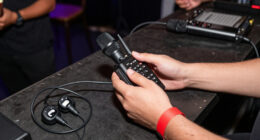
| Wireless handheld systems | Interviews, audience interaction, entertainment streams | $80–400 | Occupies one hand; very forgiving of technique |
| Shotgun wireless systems | Stationary setups, mounted near camera | $150–500 | Fixed position; needs good aim |
| Headset mics | Fitness, gaming, high-mobility streams | $50–250 | Visible on camera; super consistent distance |
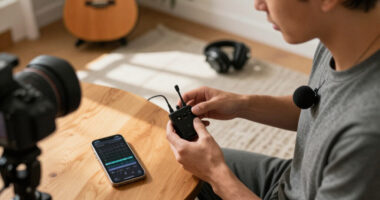
The category that’s exploded recently is true wireless lavalier kits — two coin-sized transmitters plus one receiver, DJI Mic and Rode Wireless GO style. You clip one on your shirt, hand the second to a guest, and the receiver merges both channels. Multi-person streaming used to require a mixer; now it ships in a charging case.
A fitness streamer I know switched from a lavalier to a headset for exactly one reason: burpees. The lavalier flopped around and rubbed against her shirt on every rep. The headset mic stays a fixed two inches from her mouth no matter what she’s doing. Format dictates hardware — always.
The Specs That Actually Matter (Skip the Marketing Ones)
Four key aspects determine whether a wireless mic system works for streaming: latency, transmission band, battery life, and onboard recording. Megapixel-style spec wars mostly don’t apply here — these four do.
1. Latency. 2.4GHz digital systems add 5–30ms — your viewers can’t perceive that. Bluetooth adds 100–300ms, which means your lips move noticeably before your voice arrives. Great for phone calls. Ruinous for streaming.
2. Transmission band. 2.4GHz digital is the consumer standard: encrypted, roughly 100–200m line of sight, no license needed. The catch? It shares spectrum with WiFi routers and Bluetooth. In a dense apartment building, that’s a real interference risk. UHF systems (Sennheiser, Shure, Sony) resist interference better and punch through walls, but cost more and may require licensing depending on your country.
3. Battery life. Expect 5–10 hours per charge on transmitters. Look for USB-C charging while in use — that single feature has saved more long streams than any other, because you can plug into a power bank at hour six without going silent.
4. Onboard recording. Many systems record backup audio on the transmitter itself or a microSD card. Newer models add 32-bit float recording, which means clipping is physically impossible — you can recover audio that would’ve been destroyed on a traditional recorder. If your wireless link drops mid-stream, the clean file was still capturing on your shirt the whole time.
Audio quality itself is largely solved: modern digital systems record at 24-bit/48kHz, which is broadcast standard. Stop worrying about it.
What to Buy at Every Budget — Real Numbers
You can spend $30 or $3,000, and both ends of that range have legitimate use cases. Here’s the honest tier breakdown:
- Budget ($30–80): Boya, Maono, and generic 2.4GHz mini mics. Yes, they actually work — casual streamers and beginners get genuinely usable audio. Expect ~5 hour batteries, no onboard recording, and occasional dropouts in WiFi-dense areas.
- Mid-range ($100–300): Rode Wireless GO II/PRO, DJI Mic and Mic 2, Hollyland Lark series. This is the sweet spot. You get onboard recording, charging cases, AI noise cancellation, and often two transmitters included. This is where 90% of streamers should shop.
- Professional ($300+): Sennheiser, Shure, Sony UHF systems. Longer range, superior interference resistance, built for venues and multi-mic setups. Overkill unless you stream from crowded events or need rock-solid reliability on a paid production.
Prices and models in this market move fast — DJI, Rode, and Hollyland refresh their lineups roughly annually, so check current offerings before you buy. The feature floor keeps rising: two-transmitter kits, 32-bit float, and direct USB-C phone connection all trickled down from pro gear to $150 kits within a couple of years.
Buy the cheapest system that has onboard recording and USB-C charging while in use. Everything else is negotiable; those two features are your insurance policy.
Set It Up Right: 5 Steps to Clean Audio With No Dropouts
Even a great wireless mic sounds mediocre with a bad setup. Follow this sequence and you’ll avoid the most common failures:
- Place the mic 6–12 inches from your mouth. Clip lavaliers at chest height, centered, with the capsule facing up. Headset mics: two finger-widths from the corner of your mouth, off-axis so plosives don’t pop.
- Set gain before you go live. Speak at your actual streaming volume — louder than you think — and aim for peaks around -12dB. If your system supports 32-bit float, you’re protected anyway, but don’t rely on rescue in post for a live stream.
- Keep line of sight between transmitter and receiver. Your body is mostly water, and water absorbs 2.4GHz signal. Receiver on the camera, transmitter on your front, no walls or bodies between them.
- Move your WiFi router off channel overlap. If dropouts persist in an apartment, put your router on 5GHz for other devices, and keep the receiver away from USB 3.0 ports (they radiate interference — a known quirk).
- Start onboard recording every stream. It’s one button. If the wireless link hiccups, you sync the backup file in editing and nobody ever knows.
That USB 3.0 detail surprises people. A streamer spent weeks blaming his “cheap” mic for static bursts before moving the receiver from his monitor’s USB 3.0 hub to a USB 2.0 extension cable. Silence. Problem solved for $8.
Bluetooth, Noise-Cancelling Software, and Other Trap Questions
The most common trap is assuming convenience equals quality. Your AirPods are extraordinary engineering — for phone calls. For streaming, that 100–300ms Bluetooth latency means your mouth and audio drift apart, and compression flattens your voice into telephone quality. Dedicated wireless systems exist precisely because Bluetooth can’t do both low latency and high fidelity at once.
Second trap: relying on AI noise cancellation to fix a distant mic. Software like NVIDIA Broadcast genuinely works — on steady, predictable noise like fan hum. It cannot remove room echo, and aggressive noise suppression often artifacts on speech, leaving you sounding slightly underwater. Clean signal in beats clean-up later, every time.
Third trap: range numbers on the box. That “200m” rating is line of sight, outdoors, on a good day. Indoors, each wall can cut effective range dramatically — expect a fraction of the rated distance through two interior walls. If you stream across rooms, you need UHF or a wired fallback plan, not hope.
Frequently Asked Questions
Is Bluetooth good enough for streaming?
Usually no. Bluetooth adds 100–300ms of latency, which causes visible lip-sync drift, and its compression degrades voice quality. It’s fine for casual voice chat where sync doesn’t matter. Dedicated 2.4GHz wireless systems add only 5–30ms, which is imperceptible.
Will a 2.4GHz wireless mic interfere with my WiFi?
Possibly, since both share the 2.4GHz band — especially in apartments with many routers. Mitigate it by putting your router’s devices on 5GHz, keeping the receiver away from the router, and avoiding USB 3.0 ports near the receiver, which radiate interference in the same range.
Do cheap wireless mics under $80 actually work?
Yes, for casual streaming. Budget 2.4GHz systems from Boya and Maono deliver genuinely usable audio with ~5 hour batteries. The tradeoffs are occasional dropouts in WiFi-dense areas, no onboard recording, and weaker build quality. If a dropout would cost you money or reputation, step up to mid-range.
What’s my backup plan if the battery dies mid-stream?
Two layers: buy a system with USB-C charging while in use (plug into a power bank on the fly), and enable onboard recording on the transmitter so a clean backup file exists even if the wireless link drops. Transmitters typically run 5–10 hours per charge.
2.4GHz vs. UHF — which should I buy?
2.4GHz for most streamers: it’s license-free, encrypted, and cheaper. Choose UHF if you stream in interference-heavy venues, need to transmit through multiple walls, or run several mics simultaneously — just check licensing rules in your country, since some UHF bands are regulated.
Conclusion
Here’s the whole decision in one sentence: pick the mic type that matches how you move on stream, buy a 2.4GHz digital system with onboard recording in the $100–300 range, and place it close to your mouth. Do that, and you’ve solved 90% of streaming audio for under a mid-range GPU upgrade.
Your viewers can’t see microphone latency or sample rates. They just know whether they want to keep listening. Give them a reason to stay.
Fall Picks
fall essentials
As an affiliate, we earn on qualifying purchases.