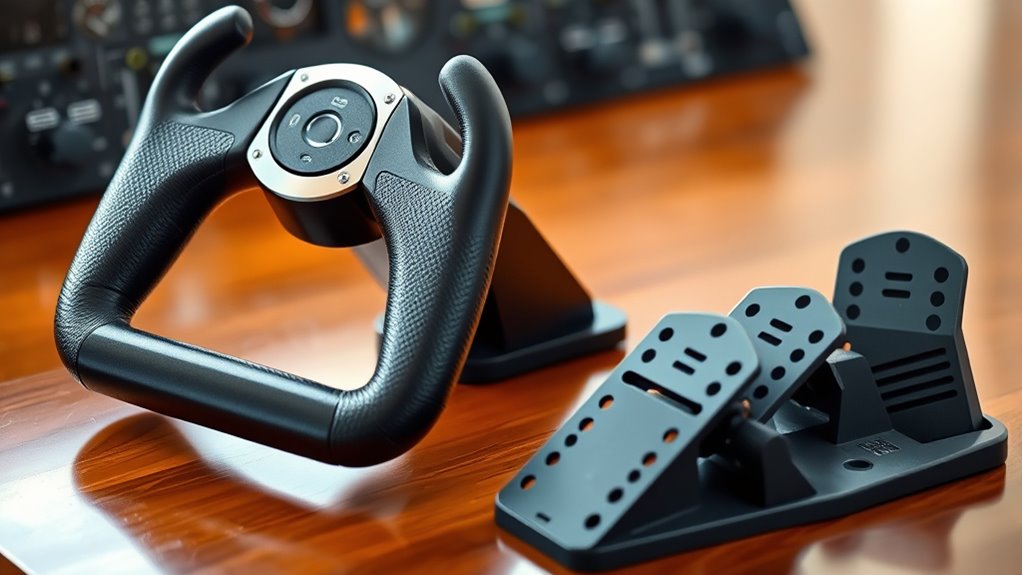

If you’re after the most realistic flying experience, I recommend checking out the top flight simulator yokes and pedals like the Turtle Beach VelocityOne Rudder Pedals, CH Products Throttle Quadrant, Thrustmaster Fighter Bundle, and high-end options like the Honeycomb Alpha Yoke or Logitech PRO System. Each of these offers great control, durability, and customization. If you’re curious about more detailed features and how they compare, keep going to find the perfect setup for you.
Key Takeaways
- The list includes a variety of high-quality yokes, pedals, and control bundles for immersive flight simulation.
- Features like adjustable controls, realistic build, and compatibility with major flight sim software are highlighted.
- Options range from budget-friendly joysticks to professional-grade, fully customizable control systems.
- Compatibility with Windows, Mac, Xbox, and other platforms ensures broad usability.
- The guide emphasizes durability, precision, and realistic features to enhance the flying experience.
Turtle Beach VelocityOne Universal Rudder Pedals
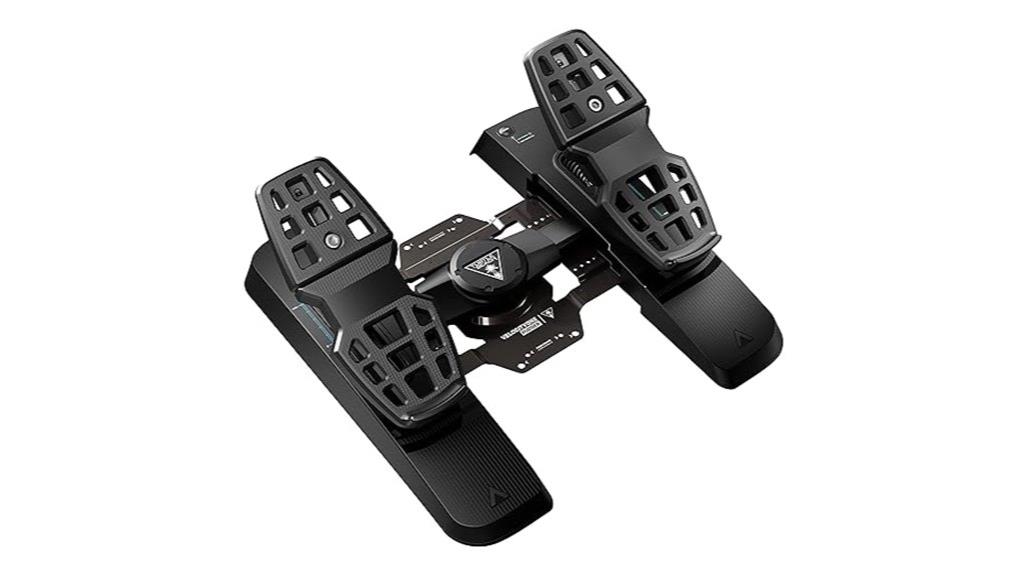
Are you looking for pedals that deliver precise, realistic control for serious flight simulation? The Turtle Beach VelocityOne Universal Rudder Pedals are a fantastic choice. Compatible with Windows 10 & 11, Xbox Series X/S, and Xbox One, they seamlessly integrate with VelocityOne systems or existing setups. Built with hall-effect sensors and linear bearings, they provide smooth, high-resolution rudder control. The adjustable pedal width, tension springs, and sturdy metal base assure a customizable and stable experience. Despite some connectivity quirks, users praise their durability and realism, making these pedals an excellent upgrade for dedicated flight sim enthusiasts seeking accurate, immersive control.
Best For: serious flight simulation enthusiasts and professional pilots seeking highly realistic, customizable rudder control on PC and Xbox systems.
Pros:
- High-resolution hall-effect sensors and linear bearings provide smooth, precise rudder control.
- Fully adjustable pedal width, tension springs, and customizable height enhance comfort and realism.
- Durable metal construction with non-slip base ensures stability during intense flying maneuvers.
Cons:
- Some users experience connectivity issues when connecting via hubs or after system reboots.
- Tall pedal height and stiffness may cause foot fatigue without modifications or cushioning.
- Firmware updates can be problematic, often stalling at 0%, complicating maintenance.
CH Products Throttle Quadrant USB (300-133)
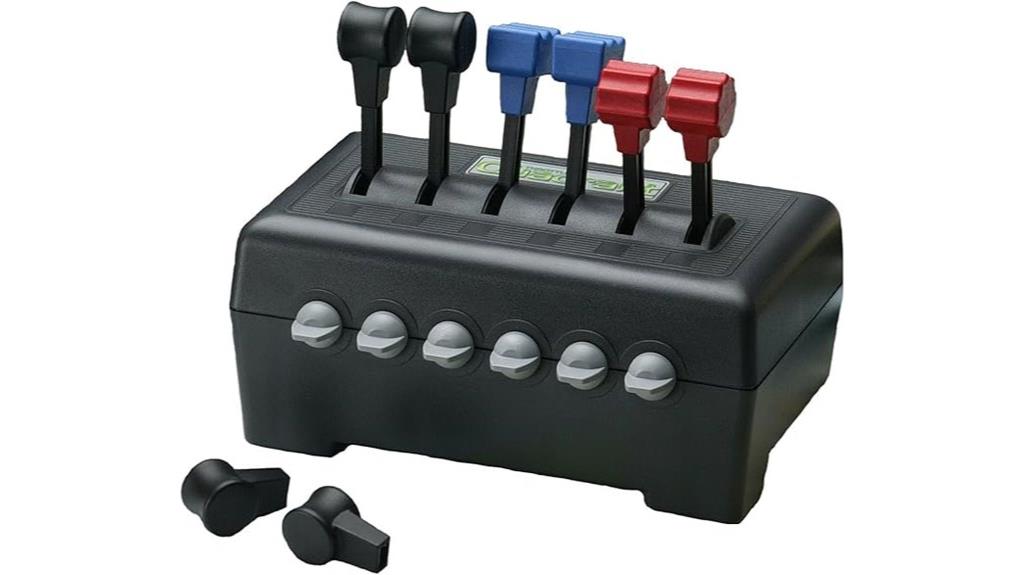
The CH Products Throttle Quadrant USB (300-133) stands out as a top choice for serious flight sim enthusiasts who want authentic engine control. It features six axes and 12 programmable switch buttons, offering extensive customization through Control Manager software. Designed to resemble real aircraft panels, it’s perfect for managing engines, flaps, and other systems with realistic fingertip control. Built in the USA with durable materials, it’s plug-and-play and compatible with multiple OS. While some users find the throttle movement stiff and controls less precise, its durability and realistic design make it a solid investment for those seeking an immersive flying experience.
Best For: serious flight simulation enthusiasts and professional pilots seeking authentic, customizable engine and system controls with realistic design.
Pros:
- Durable build quality and realistic aircraft panel design
- Extensive customization options with up to 350 programmable functions
- Plug-and-play compatibility across multiple operating systems
Cons:
- Throttle levers can feel stiff and lack precision for fine adjustments
- Limited effectiveness of the two detents for engine management
- Clamps may be less stable on thinner desks, requiring modifications
THRUSTMASTER Fighter Bundle – HOTAS Warthog Flight Stick & TPR Pedals
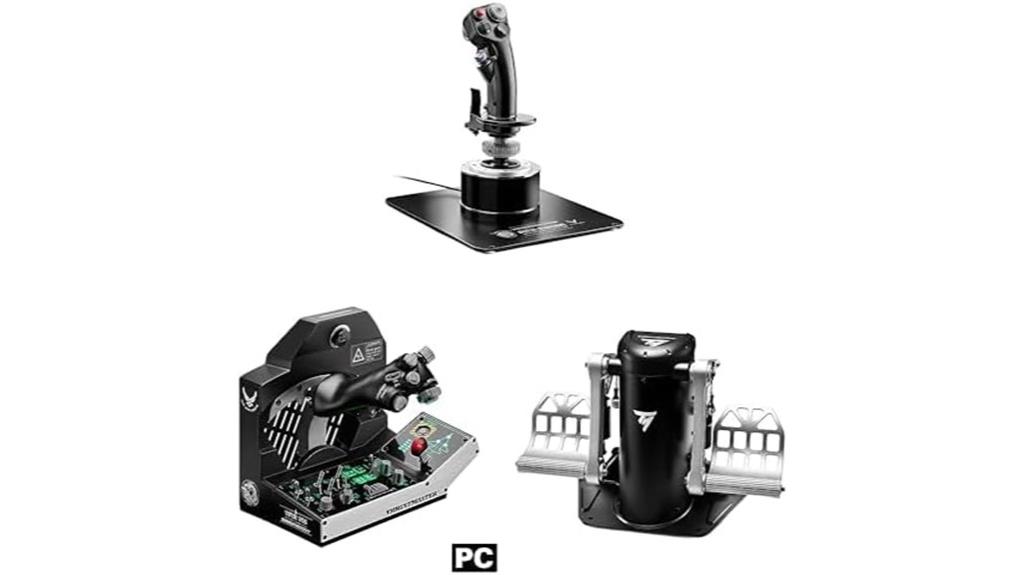
For serious flight sim enthusiasts seeking top-tier realism and durability, the Thrustmaster Fighter Bundle – HOTAS Warthog Flight Stick & TPR Pedals stands out as an exceptional choice. This bundle features a replica of the U.S. Air Force A-10C flight stick with a heavy, all-metal construction for stability and longevity. The TPR Pedals utilize Pendular Technology for smooth, fluid movement, enhancing control precision. With over 51 customizable buttons, toggle switches, and mini joysticks, it offers extensive control options. While the joystick lacks yaw control, the setup’s modular design, realistic feel, and sturdy build make it ideal for immersive flight simulation on PC.
Best For: serious flight simulation enthusiasts who prioritize high realism, durability, and extensive control options for PC.
Pros:
- Heavy all-metal construction provides excellent stability and long-term durability
- Over 51 customizable buttons, switches, and mini joysticks for extensive control
- Realistic replica of the U.S. Air Force A-10C flight stick with precise feel and modular design
Cons:
- Lacks yaw (Z-axis) control on the joystick, requiring pedals or throttle slider for rudder input
- High weight and size can make repositioning difficult on casual setups or beds
- High price point may be a barrier for some users seeking more affordable options
CH PRODUCTS Eclipse Yoke Discover Bundle (200616DIS)

If you’re seeking a high-end flight yoke that delivers exceptional realism and extensive customization, the CH PRODUCTS Eclipse Yoke Discover Bundle (200616DIS) stands out as an excellent choice. It features six 10-bit axes controlling essential flight functions like ailerons, elevator, throttle, and more, plus programmable paddles, toggles, and backlit buttons for tailored setups. Built with durable plastic and a sturdy mounting base, it offers smooth, precise control and realistic resistance. Compatibility is straightforward with plug-and-play USB connectivity for Windows and Mac, and the free CH Control Manager software enables advanced programming. Overall, it’s a reliable, feature-rich yoke perfect for serious flight sim enthusiasts.
Best For: serious flight simulation enthusiasts seeking a high-fidelity, customizable yoke with realistic controls and extensive features.
Pros:
- Highly realistic feel with smooth pitch and roll actions and resistance similar to real aircraft controls
- Extensive customization options with programmable buttons, paddles, and macro support via free software
- Durable construction with a sturdy mounting base and ergonomic design for comfortable extended use
Cons:
- Customer reviews mention clamp stability issues and mounting screw concerns
- Some reports of hardware problems like cracked control boards due to design flaws
- Higher price point may be prohibitive for casual users or beginners
Honeycomb Alpha Flight Controls XPC Flight Simulator Yoke

Designed for serious flight sim enthusiasts, the Honeycomb Alpha Flight Controls XPC Flight Simulator Yoke offers professional-grade realism with its 180° aileron rotation and upgraded Hall Effect sensors. Its sturdy build and responsive controls deliver smooth, precise handling, enhancing immersion during critical maneuvers. The yoke features multi-function handles, switches, and LED-lit controls that mimic real cockpit panels. Compatibility spans PC, Mac, and Xbox, and it integrates seamlessly with other Honeycomb products like the Bravo Throttle Quadrant and Charlie Rudder Pedals. Overall, it’s a reliable, high-quality choice for anyone seeking an authentic flight simulation experience at an accessible price point.
Best For: serious flight simulator enthusiasts seeking a professional-grade, immersive yoke experience compatible with multiple platforms.
Pros:
- High-resolution Hall Effect sensors for precise, noise-free control
- 180° aileron rotation for realistic maneuverability
- Built-in cockpit-style switches and LED controls for authentic simulation
Cons:
- Some users report stiffness in pitch control and limited elevator travel
- Mounting solution may be less secure, requiring additional securing methods
- Occasional issues with defective cables or customer service responses
Saitek PRO Flight Switch Panel (PZ55)

The Saitek PRO Flight Switch Panel (PZ55) stands out as an excellent choice for flight sim enthusiasts seeking realistic aircraft controls, especially those who want to enhance cockpit immersion. It offers functions like landing gear control with LED indicators, engine start switches, and cockpit access buttons. The panel attaches to the Saitek Pro Flight Yoke System or can be mounted independently, with options for Velcro or screws. Compatibility with Windows and USB ports is seamless, and using third-party software like SPAD and FSUIPC allows full reprogramming and customization. This setup considerably boosts realism, making cockpit management more intuitive and immersive.
Best For: flight sim enthusiasts seeking realistic aircraft controls and enhanced cockpit immersion through customizable hardware.
Pros:
- Realistic control features like landing gear LEDs, engine switches, and cockpit access buttons
- Compatible with multiple Windows versions and easy USB connectivity
- Highly customizable via third-party software such as SPAD and FSUIPC for tailored controls
Cons:
- Requires third-party software for full reprogramming; no native reprogramming options provided by Saitek
- Potential hardware recognition issues or failures that may require troubleshooting or replacement
- Mounting options are limited to screws or Velcro, with no integrated switch spring return mechanism
Logitech Attack 3 Eight Button Joystick

The Logitech Attack 3 Eight Button Joystick stands out as an excellent choice for beginner and casual flight simulator enthusiasts seeking a budget-friendly option. It offers 11 programmable buttons, a comfortable handle, and smooth, realistic movement, making it suitable for flight and combat games like Microsoft Flight Simulator X. Its plug-and-play setup works seamlessly on Windows and Mac systems, with no extra drivers needed. While it lacks advanced features like a hat switch or rudder control, its solid build, responsive controls, and affordability—often under $40—make it a great starter joystick. Keep in mind, software support can be limited, but it’s a reliable, straightforward device for casual flying.
Best For: casual flight simulator players and beginners seeking an affordable, reliable joystick with basic controls.
Pros:
- Solid build quality with comfortable grip for extended gameplay
- Easy plug-and-play setup on Windows and Mac without needing additional drivers
- 11 programmable buttons enhance customization for various games
Cons:
- Lacks advanced features like a hat switch or rudder control for complex flight sims
- Limited software support and customization options for button mapping
- No included drivers or software CD, requiring users to download from Logitech’s website
Universal Simulation Cockpit Chassis with Triple Monitor Mounts
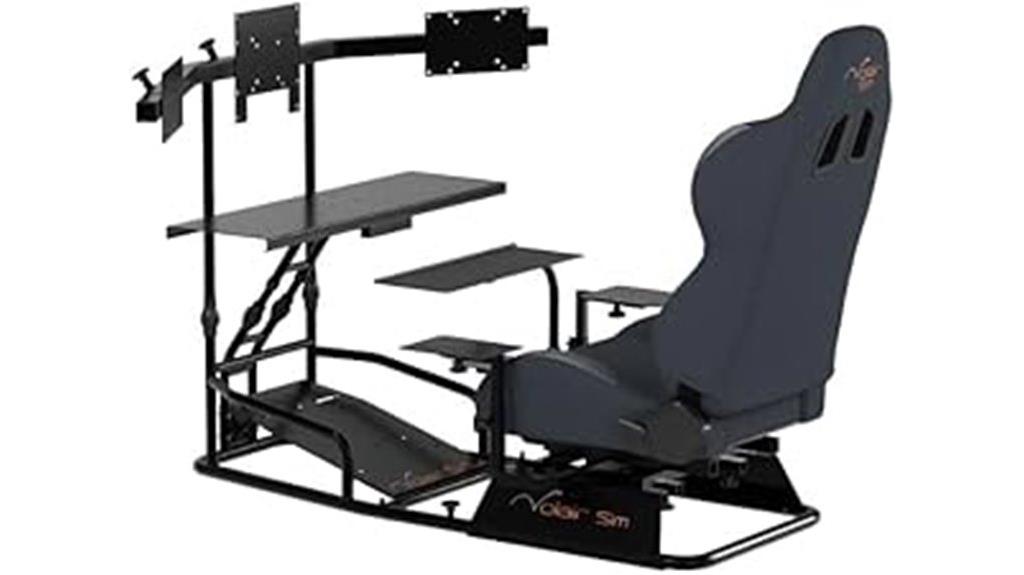
If you’re serious about immersive flight or racing simulations, the Universal Simulation Cockpit Chassis with Triple Monitor Mounts offers a versatile platform that adapts to a wide range of controllers and setups. Its fully adjustable, powder-coated steel frame supports monitors from 19″ to 32″ (or a single up to 50″), ensuring maximum immersion. It features pre-drilled mounting points for popular controllers like Logitech, Thrustmaster, Fanatec, and Winwing. The adjustable seat, articulating keyboard tray, and customizable configurations make it suitable for flight, racing, or rail sims. Built for stability and durability, this cockpit is a flexible, high-quality choice for serious sim enthusiasts.
Best For: serious flight and racing sim enthusiasts seeking a highly adjustable, durable, and versatile cockpit platform with support for multiple monitors and controllers.
Pros:
- Fully adjustable, customizable setup suitable for flight, racing, and rail simulations
- Durable construction with alloy steel, powder coating, and thick-walled tubing for stability
- Supports a wide range of popular controllers and accessories with pre-drilled mounting points
Cons:
- Assembly can be complex and time-consuming, often requiring 5-8 hours and tools like a rubber mallet
- Limited adjustability for wheel placement, which may affect fit for some users
- Potential flexing under force feedback during intense racing sessions
Logitech G Saitek PRO USB Flight Yoke System (Renewed)

For serious flight sim enthusiasts seeking a highly realistic experience, the Logitech G Saitek PRO USB Flight Yoke System (Renewed) delivers with its authentic controls and customizable features. It features a stainless steel shaft with ultra-precise bearings for smooth pitch and roll. The dedicated control quadrant includes throttle, prop, and mixture controls, plus 14 buttons, a mode switch, and a POV hat. Compatible with Windows and Mac, it integrates seamlessly with popular simulators like Microsoft Flight Simulator 2020. While some users note plastic feel or minor durability issues, overall, it offers responsive, immersive control at an affordable price, making it a solid choice for avid flight sim enthusiasts.
Best For: serious flight sim enthusiasts seeking a highly realistic and customizable control system for immersive aviation experiences.
Pros:
- Authentic controls with stainless steel shaft and ultra-precise bearings for smooth pitch and roll.
- Customizable via Saitek’s SST software, supporting various flight setups and preferences.
- Compatible with multiple platforms including Windows and Mac, and integrates seamlessly with popular simulators like Microsoft Flight Simulator 2020.
Cons:
- Some users report plastic feel and minor durability issues under pressure.
- Missing parts like screws can occur, requiring customer service support.
- Slightly bulky design and potential calibration or configuration challenges for new users.
Next Level Racing Flight Simulator Cockpit: Boeing Commercial Edition
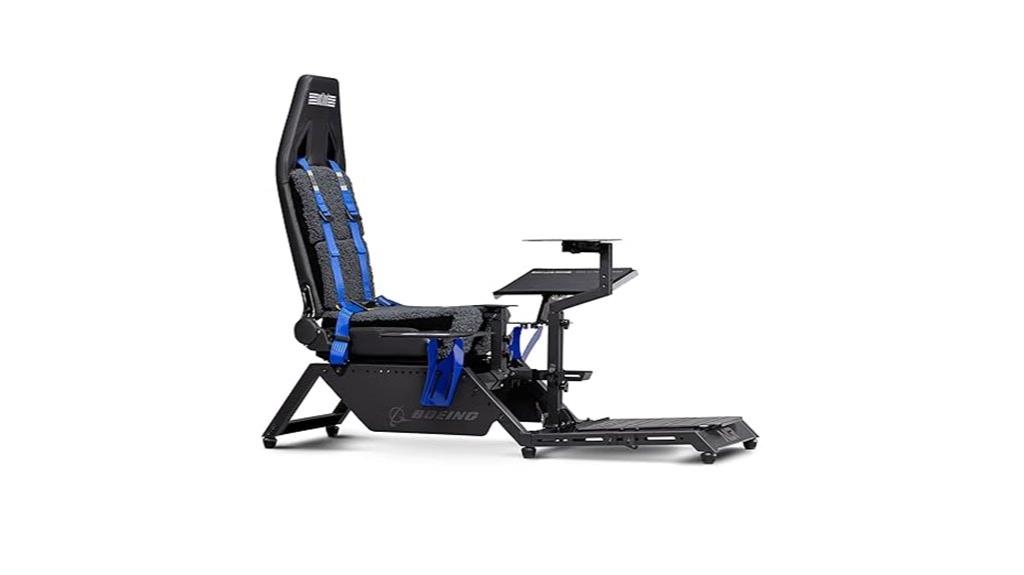
Designed for serious flight sim enthusiasts, the Next Level Racing Boeing Commercial Edition cockpit offers an ultra-realistic experience with its Boeing-inspired components and sturdy build. Officially licensed by Boeing, it features authentic design elements like faux wool seat covering and blue highlights, enhancing immersion. Built with high-quality materials, it supports users up to 230 lbs and resists flex during vigorous control use. The cockpit is adjustable for comfort and compatible with major flight electronics, including yokes, throttles, and pedals. While assembly is straightforward and the structure highly durable, some users face challenges mounting certain peripherals. Overall, it provides a premium, immersive platform for dedicated flight simmers.
Best For: serious flight sim enthusiasts seeking an ultra-realistic, durable, and customizable cockpit experience with authentic Boeing design elements.
Pros:
- Officially licensed by Boeing with authentic design features for maximum immersion
- High-quality, sturdy construction supports up to 230 lbs without flexing or creaking
- Adjustable seat and control placements enhance comfort and customization options
Cons:
- Limited peripheral mounting options due to size constraints, especially for certain peripherals like rudders and throttles
- Assembly can be complex and time-consuming, requiring some tools and careful setup
- The high price point may be a barrier for casual users or those on a budget
CH Products USB Combatstick

The CH Products USB Combatstick stands out as an excellent choice for serious flight sim enthusiasts seeking a durable and highly customizable joystick. It features three axes for aileron, elevator, and throttle, plus 18 buttons, including a 4-way hat switch, an 8-way POV hat, and dual rotary trim wheels for fine control. Its plug-and-play design works seamlessly with Windows and Mac systems, and the Control Manager software allows extensive customization. Built from high-quality plastic, it offers smooth, precise movement and a stable weight. Although its appearance is dated, its reliability, accuracy, and professional-grade features make it a top option for realistic flight simulation.
Best For: Flight simulation enthusiasts and professional pilots seeking a durable, highly customizable joystick with professional-grade controls and reliable performance.
Pros:
- High precision with smooth, responsive movement and adjustable sensitivity
- Extensive customization options via Control Manager software, including scripting and programmable buttons
- Durable construction with high-quality plastic and a stable weight for intense use
Cons:
- Outdated appearance reminiscent of 1980s gaming design
- Software support issues on Windows 10, which may lead to functionality problems
- Large size and weight may be less suitable for users with smaller hands or limited space
Factors to Consider When Choosing Flight Simulator Yokes and Pedals

When selecting flight simulator yokes and pedals, I look at several key factors to guarantee I get the best experience. Compatibility with my system, how realistic they feel, and their build quality are top priorities. I also consider customization options and how well they fit my space and mounting needs.
Compatibility With Systems
Ensuring your flight simulator yoke and pedals are compatible with your system is essential for smooth operation and an immersive experience. First, check that the hardware supports your computer’s operating system, whether it’s Windows 10, Windows 11, or macOS, to avoid compatibility issues. Make sure the devices work with your preferred flight simulator software, like Microsoft Flight Simulator or X-Plane, for ideal control integration. Verify connectivity options such as USB 2.0, USB-C, or proprietary ports, ensuring they match your system’s available inputs for easy setup. Additionally, confirm that the hardware is compatible with your other peripherals, like throttle quadrants or rudder pedals, for a seamless cockpit experience. IN THE END, consider mounting options and size to fit your setup space, especially in dedicated cockpits or limited areas.
Realism and Feel
Choosing a flight simulator yoke or pedal set that offers realistic feel and motion is essential for immersing yourself in the simulation. A good setup replicates the full range of aircraft controls, often 180° or more for yokes and 45° or greater for pedals, providing authentic movement. Feel and resistance are key; high-quality controls use hall-effect sensors or dampers to deliver tactile feedback that mimics real controls. A centering mechanism that replicates the neutral position enhances precision and immersion. Adjustable resistance, like springs or tension controls, lets you tailor the feel to specific aircraft or personal preferences. Smooth axes and reliable return-to-center behavior further contribute to an authentic flying experience, making your simulation feel more real and engaging.
Build Quality Durability
Building a durable flight simulator yoke or pedal set is vital for long-term enjoyment, as high-quality materials and construction directly impact their lifespan. I look for yokes made with sturdy metals or reinforced plastics that can handle intense use without cracking or warping. Reinforced mounting points and non-slip bases are essential to prevent movement during vigorous control inputs. The internal sensors also matter—hall-effect sensors tend to last longer and wear less than potentiometers, ensuring consistent performance over time. Well-constructed pedals feature robust linear bearings and spring mechanisms that resist wear and keep tension steady, even after extensive use. Overall, solid craftsmanship—like welds, reinforced joints, and corrosion-resistant finishes—adds to durability, making sure my investment lasts and performs reliably over the years.
Customization Options
When selecting flight simulator yokes and pedals, I prioritize models with extensive programmable controls like customizable buttons, switches, and axes, so I can tailor my setup to match my flying style. Software customization is also key, allowing me to remap controls and create profiles for different aircraft or scenarios. I look for adjustable features such as tension, resistance, and pedal width, which help me achieve a comfortable and realistic feel during long sessions. Easy attachment or integration with other cockpit components enhances my overall experience, making it more seamless. Ultimately, I favor products with durable build quality and high-resolution sensors, ensuring precise control and long-term reliability. These customization options let me craft a setup that’s perfectly suited to my flying preferences.
Mounting and Space
Selecting the right flight simulator yokes and pedals means considering how they’ll fit into my available space and how I can securely mount them. I always check if the yoke has adjustable clamps or bolt holes so I can attach it firmly to my desk or cockpit. Measuring my space beforehand helps guarantee the controls won’t overcrowd my setup. I also look for options that can be easily repositioned or stored when I’m done flying, saving space. For pedals, I verify if they need a flat, stable surface or specific hardware to prevent slipping during intense maneuvers. Larger or more complex cockpits may require dedicated mounting structures, which could limit flexibility in smaller or shared spaces. Planning ahead makes setup easier and ensures a stable, immersive flying experience.
Price and Value
Ever wondered how to get the best bang for your buck when choosing flight simulator yokes and pedals? Higher-priced options usually provide better build quality, a more realistic feel, and advanced features, offering better long-term value for serious enthusiasts. Budget models might seem attractive but often lack durability and precision, which could lead to costly repairs or upgrades later. Investing in a well-reviewed, mid-range or high-end setup can considerably improve immersion and control accuracy, making the upfront expense worthwhile. It’s important to take into account the total cost, including software compatibility, mounting hardware, and customization options, as these affect overall value. Striking a balance between features and price helps you avoid overspending on unnecessary extras or sacrificing quality, ensuring you get the best experience for your investment.
Additional Control Features
Additional control features like toggle switches, rotary dials, and programmable paddles can substantially boost the realism and versatility of your flight setup. These extras allow for quick access to essential functions, making your experience more immersive. Many advanced yokes include multi-function handles with integrated switches and buttons that mimic actual aircraft controls, giving you exhaustive management options. Pedals equipped with differential braking and toe switches enable precise ground handling and aircraft steering, closely replicating real cockpit controls. Programmable controls and custom mapping options let you tailor functions to specific aircraft or scenarios, enhancing immersion. Features like backlit buttons, LED indicators, and tactile feedback improve usability in low-light conditions and boost control accuracy, ensuring you can focus on flying without distractions.
Frequently Asked Questions
Which Yoke and Pedal Setups Are Best for VR Flight Simulation?
For VR flight simulations, I recommend the Logitech G Pro Flight Yoke and Saitek Pro Flight Pedals. They offer smooth, precise control and feel very realistic, which is essential when wearing a headset. The yoke’s sturdy build and the pedals’ sensitivity make flying more immersive and accurate. Plus, they’re compatible with most flight simulators, giving you a seamless experience that truly enhances your VR flying sessions.
How Do Different Materials Impact Durability and Realism of Flight Controls?
Ever wondered how materials affect your flight controls? I can tell you, they make a huge difference. Metal components boost durability and give a realistic weight feel, making each control more authentic. Plastic parts, while lighter and cheaper, tend to wear faster and feel less solid. Leather or rubber accents add comfort and grip, enhancing realism. Choosing the right materials guarantees your controls last longer and truly mimic real aircraft, elevating your flying experience.
Are There Compatibility Issues With Specific Flight Simulator Software?
Yes, compatibility can be an issue with certain flight simulator software. I’ve found that some yokes and pedals work seamlessly with popular platforms like Microsoft Flight Simulator and X-Plane, but others may require specific drivers or firmware updates. To avoid problems, I recommend checking the manufacturer’s compatibility list before buying. Ensuring your hardware matches your software’s requirements helps create a smooth, realistic flying experience without technical hiccups.
What Maintenance Is Required for Long-Term Performance of Yokes and Pedals?
Ever wonder how to keep your yoke and pedals in top shape for years of flying? I recommend regularly cleaning your equipment with a soft cloth and avoiding harsh chemicals. Check for loose screws and tightness, and lubricate moving parts if needed. When not in use, store them properly to prevent dust buildup. These simple steps make sure your gear stays responsive and enhances your realistic flying experience.
Can Adjustable Tension and Feedback Enhance the Flying Experience?
Absolutely, adjustable tension and feedback can substantially enhance your flying experience. They allow you to customize the feel of your controls, making simulation more realistic and immersive. I find that fine-tuning these settings helps mimic real aircraft responses, improving control precision and overall enjoyment. When I adjust tension and feedback to my preference, it feels like I’m truly in the cockpit, which makes flying more engaging and authentic.
Conclusion
Choosing the right flight simulator yoke and pedals is like finding your wings — they turn dreams of flying into reality. Whether you’re after immersive realism or smooth control, these options set you up for takeoff. Just remember, the perfect setup is like a well-tuned engine: it runs best when tailored to your style. So, pick your gear wisely and prepare for a journey that’s as close to the real thing as possible.