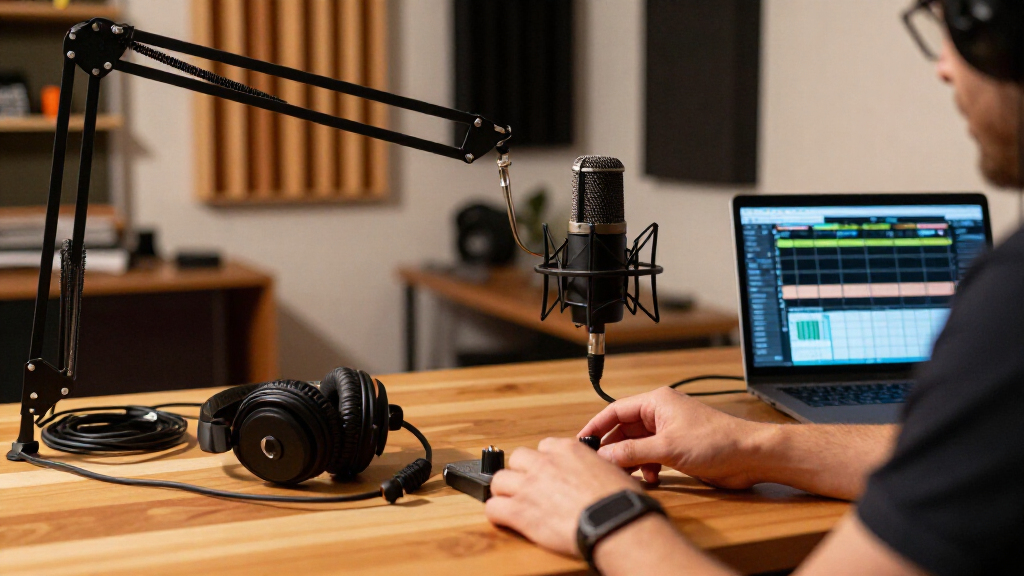
This checklist is for podcasters building a recording setup or improving the gear they already use. It covers microphones, headphones, mixing and recording tools, a boom arm, and acoustic treatment, with a specific pick for each slot. Choose around your recording needs rather than assuming every studio needs every item.

Get audio and creator gear delivered free with Prime
- Fast, free delivery on millions of items
- Prime Video, Amazon Music and more included
- Member-only deals all year
The sections follow the path from capturing a voice to monitoring, mixing, and improving the room. Each one explains why the category matters, what to check before buying, and where the named pick may fit. Compatibility and fit matter across the whole setup, especially when connecting multiple pieces of equipment.
Use the look-for bullets to compare options, then read the verdict and fit notes to decide whether the pick suits your setup. Check the product details for connections, dimensions, mounting requirements, and included accessories before ordering. Confirm your existing gear can work with the new item, and add pieces in the order that addresses your biggest recording challenge.
USB Podcast Microphone
A dedicated microphone is the starting point for capturing a host’s voice. The Shure MV7+ is a dynamic microphone with USB-C and XLR connections, giving you two connection types to consider as you build a setup. Before choosing any microphone, think through where it will connect and how you plan to record: a computer-based setup and one built around an audio mixer may call for different cabling or configuration. Connection planning helps avoid buying a microphone that does not fit the rest of your signal path.
A common mistake is to focus on the microphone name while overlooking what else is needed to position and connect it. Check which cables and mounting accessories are included, and confirm the stand or arm you intend to use can accommodate the microphone. Also consider desk space and how close you want the mic positioned during a recording. The named pick includes a stand, but verify its footprint and whether its placement works with your desk. Check the included accessories against your recording plan before you commit.
For a simple desk setup, make sure the USB-C connection suits your computer and available ports. If using XLR, confirm the rest of your equipment supports that connection. Avoid assuming the product will include every cable or accessory your setup requires; check the listing details. Match the connection to your gear and leave room to position the mic comfortably.
What to look for:
- USB-C or XLR connection that matches your recording setup
- Included stand, cable, and mounting accessories
- Microphone dimensions and placement clearance
- Compatibility with your computer or mixer
- A practical way to keep the mic at a consistent speaking distance
Shure MV7+ USB-C & XLR Podcast Dynamic Microphone with Stand – Black

The Shure MV7+ is a versatile dynamic microphone designed for podcasting, streaming, and content creation. It features OBS certification, advanced DSP noise reduction, customizable LED touch controls, and flexible connectivity options via USB-C and XLR.
Pros:
- High-quality sound with noise reduction and voice isolation
- Flexible connectivity options for various setups
- Customizable LED touch controls and app integration
Cons:
- May be complex for beginners due to advanced features
- Requires software for full customization
- Potentially higher price point
Best for: podcasters who want USB-C and XLR connection options
Not ideal for: buyers who need a setup with all accessories confirmed in advance
Bottom line: Choose the Shure MV7+ if its connection options and included stand suit your recording chain and desk.
Closed-Back Studio Headphones
Headphones let you monitor a recording and review playback without relying only on speakers. A closed-back design is the category named for this checklist, and the Focal Lensys Professional Closed-Back Headphones are the selected pick. Consider how you will use them: live monitoring, editing, or both. Comfort during longer sessions matters, so check the product details for fit information and think about whether you can try them on or return them if the fit is wrong.
One buying mistake is choosing headphones without checking how they connect to the rest of the setup. Review the connector type, cable length, and any adapter requirements against your computer, mixer, or recorder. Also check whether the headphones can be worn comfortably with glasses or other items you use during sessions. Closed-back headphones are often selected for monitoring near a microphone, but do not assume a particular level of isolation from the category label alone; consult product details and user needs. Confirm fit and connection before making them part of your daily workflow.
For shared or mobile use, consider cable handling, storage, and how easily the headphones pack away. If several people will use them, personal comfort and adjustability become especially important. Verify that any included cable reaches your usual listening position without putting strain on a jack. Check the listening setup from the seat where you record and edit.
What to look for:
- Connector type that works with your mixer, recorder, or computer
- Cable length suited to your desk or recording position
- Fit and comfort for your expected session length
- Adjustability and compatibility with glasses if relevant
- Storage and cable handling for shared or mobile use
Focal Lensys Professional Closed-Back Headphones

Focal’s Lensys Professional headphones feature dual aluminum/magnesium drivers and sound isolation design, providing detailed monitoring and authentic playback. They are designed for studio use, monitoring, and casual listening, with soft memory foam earpads and a sturdy headband for comfort.
Pros:
- High-quality aluminum/magnesium drivers deliver detailed sound
- Effective sound isolation for studio and casual use
- Comfortable soft memory foam earpads and sturdy headband
- Suitable for monitoring, recording, and playback
Cons:
- Wired connection may limit mobility
- Lack of foldable design for portability
- No water resistance for outdoor use
Best for: podcasters who want closed-back headphones for monitoring and editing
Not ideal for: buyers who cannot confirm the fit or connector suits their setup
Bottom line: Consider the Focal Lensys if its fit, cable, and connection match your recording routine.
Compact Audio Mixer
A compact mixer can bring multiple audio sources together and provide hands-on control during a recording. The Zoom LiveTrak L6 is identified as a mixer/recorder for musicians and podcasters, making it a candidate for a setup that needs both roles. Start by listing every source you expect to connect, such as microphones and other audio devices, then compare that list with the product’s inputs and controls. Count your sources first so the mixer fits the sessions you actually plan to record.
A common mistake is buying a mixer based on its compact form without checking whether its connections and workflow cover the whole session. Review input types, output options, headphone monitoring, recording format, and how recordings move to your editing device. Confirm whether the mixer can accommodate your microphone connection plan, including XLR if that is how you intend to connect the Shure MV7+. Trace the full signal path from each source through monitoring and recording before deciding.
Consider where the mixer will sit and whether its physical controls are accessible while you host or perform. If you plan to record away from a desk, verify power requirements and how files are saved or transferred. Do not assume that a product described as a recorder includes every feature or cable needed for your workflow. Verify the recording workflow and the connections you will use most often.
What to look for:
- Enough inputs for all planned microphones and audio sources
- Input and output types that match existing equipment
- Headphone monitoring and accessible controls
- Recording format and file transfer process
- Power and placement requirements for your intended location
Zoom LiveTrak L6 Mixer/Recorder for Musicians & Podcasters

The Zoom LiveTrak L6 is a versatile mixer and recorder designed for musicians and podcasters. It records 10 tracks plus a stereo mix to SD cards up to 1TB, offers clip-free audio without gain adjustments, and functions as a multi-platform audio interface and control surface with onboard effects and MIDI connectivity.
Pros:
- Records multiple tracks simultaneously with high-quality audio
- No gain setting needed, prevents clipping
- Includes onboard effects and full channel control
- Functions as an audio interface and control surface
Cons:
- Complex for beginners to fully utilize all features
- Requires SD card for recording, which may need additional purchase
Best for: podcasters who want to consider a mixer/recorder for sessions with multiple sources
Not ideal for: buyers who have not confirmed input count and recording workflow
Bottom line: Choose the Zoom LiveTrak L6 only after its inputs, monitoring, and file workflow match your sessions.
Desktop Microphone Boom Arm
A boom arm helps position a microphone relative to your desk and speaking position. The RØDE PSA1+ is the selected professional studio boom arm. Before buying any arm, check that your desk can accept its mounting method and has enough clear space for the arm to move. Also verify the microphone’s mounting thread or adapter needs against the arm’s compatibility details. Desk and mount compatibility should be settled before you plan the rest of the layout.
A frequent mistake is assuming every microphone mount will attach directly to every boom arm. Confirm the microphone’s weight and mounting arrangement are within the arm’s stated requirements, and check whether an adapter is needed. Think about how the arm will move around a monitor, keyboard, and other equipment. If the arm’s reach does not cover your preferred speaking position, you may end up with awkward placement. Check reach and clearance using the actual desk arrangement, not just an empty surface.
Consider whether you want to fold the arm away between sessions and how the cable will be routed. Keep the cable path free from snags as the arm moves, and confirm the desk edge or mounting surface is suitable. Product listings can vary in included hardware, so check what comes with the arm. Plan the cable route and make sure the mount can be secured where you need it.
What to look for:
- Desk clamp or mounting method suited to your desk
- Reach that places the microphone comfortably
- Weight and thread compatibility with your microphone
- Clearance around monitors, keyboard, and other desk gear
- Cable routing and included mounting hardware
RØDE PSA1+ Professional Studio Boom Arm

The RØDE PSA1+ is a professional studio boom arm designed for podcasters, streamers, and broadcasters. It features fully damped internal springs and a neoprene cover to ensure silent operation, along with integrated cable management and full 360-degree rotation for precise microphone placement.
Pros:
- Silent operation due to internal spring damping and neoprene cover
- Integrated cable management keeps setup tidy
- Full 360-degree rotation and extended reach for flexible positioning
- Highly rated by users for professional quality
Cons:
- Limited weight capacity (max 1.2kg) may not support heavier microphone setups
Best for: podcasters who want to reposition a microphone around a desk
Not ideal for: buyers with limited desk clearance or an incompatible mounting surface
Bottom line: Consider the RØDE PSA1+ after confirming your desk, microphone mount, and reach requirements.
Portable Audio Recorder
A portable recorder can support recording away from a fixed computer setup or provide another way to capture a session. The Zoom H6essential is listed as a six-track portable recorder with 32-bit float. Check whether its track count and input configuration fit the number and types of sources you intend to record. Match the recorder to your source list before relying on it for a field session or backup.
A common mistake is treating a recorder’s headline features as a substitute for checking the entire workflow. Confirm which microphones or line sources can connect, what monitoring options are available, and how recordings are stored and transferred for editing. If you plan to use it with the Shure MV7+, verify the connection path and any required cables or adapters. Also check what is included for power and storage instead of assuming those items are bundled. Check connections and file handling before taking the recorder on location.
For portable use, consider the recorder’s size, controls, and how you will carry and operate it during a session. Think through the recording environment and whether you can monitor each source as needed. Confirm the product details for power options and storage media, then plan spares if your sessions depend on them. Prepare the full field kit so the recorder can be used where you intend to work.
What to look for:
- Track count and inputs for the planned sources
- Connection compatibility with microphones and line sources
- Monitoring options during recording
- Storage media, power, and included accessories
- File transfer steps for the editing setup
Zoom H6essential 6-Track Portable Recorder with 32-Bit Float

The Zoom H6essential records up to six tracks with 32-bit float audio, built-in stereo X/Y microphones, and four XLR/TRS inputs. It can also function as a USB audio interface while recording to an SD card, and includes spoken audio guidance for menu navigation.
Pros:
- 32-bit float recording helps prevent clipping
- Four combo inputs plus built-in stereo microphones
- Can record to SD card while functioning as a USB audio interface
- Spoken menu guidance supports accessible operation
Cons:
- Interchangeable capsules beyond the included microphones are optional
- Requires four AAA batteries
Best for: podcasters who need a portable recorder for multiple sources
Not ideal for: buyers who have not checked storage, power, and connection needs
Bottom line: Consider the Zoom H6essential when its six-track capacity and workflow fit your recording plans.
Acoustic Foam Panels
Acoustic treatment is a room-planning decision: panels need to suit the space and the way you record in it. The named pick is an ATS Acoustics sound absorbing acoustic panel measuring 24 by 24 by 4 inches with a beveled edge. Before purchasing panels, measure the available wall area and decide where they could be placed without blocking doors, windows, or equipment. Measure the room first so the panel dimensions and quantity make sense for the space.
A common mistake is assuming that adding panels automatically solves every room sound issue. Consider the room layout, reflective surfaces, and the position of the microphone and speakers. Check the panel’s mounting method, weight, and included hardware, and make sure the wall surface can support it. One panel may not cover the area you have in mind, so plan the layout before ordering multiple units. Plan placement deliberately rather than buying panels without a clear installation location.
Verify the exact dimensions and finish details in the product listing, and account for the panel’s depth when positioning furniture or equipment nearby. If you rent or cannot modify walls, investigate mounting approaches that work for your space before purchasing. Avoid assuming the listing includes adhesive or mounting hardware. Confirm installation requirements and make sure the proposed layout fits your room.
What to look for:
- Panel dimensions and depth against the available wall area
- Quantity and layout for the intended treatment area
- Mounting method, hardware, and wall suitability
- Clearance from doors, windows, and equipment
- Placement relative to the microphone and recording position
ATS Acoustics Sound Absorbing Acoustic Panel 24" x 24" x 4" Beveled Edge (Ivory)

These acoustic panels are designed to improve sound clarity by effectively controlling reverb and echo. Made with a mineral wool core and wrapped in jute burlap fabric, they are suitable for various spaces like studios, offices, and home theaters, offering easy installation and durable construction.
Pros:
- Effective sound absorption with NRC rating of 1.15
- Easy to install with included hardware and template
- Durable, furniture-grade quality with attractive burlap fabric
- Suitable for various residential and commercial spaces
Cons:
- Limited color options (Ivory only)
- May require multiple panels for larger rooms
- Heavy weight (8 pounds) may need sturdy mounting
Best for: podcasters who have measured a suitable wall area for treatment
Not ideal for: buyers who need panels with confirmed mounting hardware included
Bottom line: Choose the ATS Acoustics panel after measuring the room and confirming its mounting requirements.
Buy in an order that addresses your biggest practical need: start with the microphone and a way to monitor recordings, then add a mixer or portable recorder if your source count and recording location call for one. Consider the boom arm when desk positioning is limiting, and plan acoustic panels after measuring the room and choosing placement. Prioritize the gear that solves your current bottleneck before expanding the setup.
A capable podcast rig can come together one well-matched piece at a time. Check connections, fit, dimensions, and included accessories before each purchase, then make sure the new item works with the gear you already own. Build around your recording routine, and you can keep the checklist focused on what helps you record comfortably and consistently.
Halloween Picks

Haunted Hill Farm 4.6-Foot Spinning Beatrix Halloween Animatronic

3 ft. Halloween Groundbreaker Skeleton for Outdoor Decoration

Star Wars Yoda and R2-D2 Inflatable Halloween Decor, 6 ft with LEDs, Indoor/Outdoor
As an affiliate, we earn on qualifying purchases.