Choosing the right bed cooling system can dramatically improve sleep comfort during hot nights. The best options balance effective cooling with ease of use, durability, and noise levels. The Omni Sleep Water Cooling Mattress Pad stands out as the overall top pick for its reliable temperature control, while the Chilipad Cube offers versatile heating and cooling in a compact design. However, tradeoffs like price, setup complexity, and noise levels can influence your choice. Continue reading for a detailed breakdown of the top models and what to consider before buying.

Get audio and creator gear delivered free — and shop member deals
- Fast, free delivery on millions of items
- Access to Prime Big Deal Days deals on October 6–7
- Prime Video, Amazon Music and more included
Complete the kit



Key Takeaways
- Top-performing systems combine water-based cooling with user-friendly controls for consistent comfort.
- Price often correlates with durability and advanced features like heating modes or app integration.
- Noise levels vary significantly; quieter models tend to use fan or water circulation systems designed for sleep.
- Ease of setup and maintenance is a key factor, especially for those unfamiliar with water or electrical systems.
- Size and compatibility with bed dimensions are essential to ensure proper fit and effective cooling.
| Omni Sleep Water Cooling Mattress Pad for Hot Sleepers, Bed Cooling System with Remote Control |  | Best Overall Bed Cooling System | Cooling fabric Q-Max rating: 0.46 | Water flow levels: 3 | Fan speeds: 3 | VIEW ON AMAZON | See Our Full Breakdown |
| B10 Cotton Bed Cooling System, Mattress Pad for Night Sweats, Single Size |  | Best Value Bed Cooling System | Size: Single (75″L x 39″W) | Material: 100% cotton | Cooling Effect: Drops mattress temp by 7-12°F | VIEW ON AMAZON | See Our Full Breakdown |
| Chilipad Cube Bed Cooling System – Cooling & Heating Mattress Topper, Half Queen Size (30″W x 80″L), Model: CP500 | 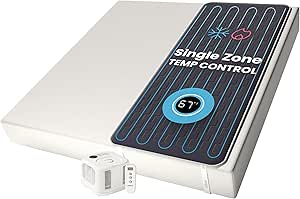 | Best for Temperature Regulation | Model: CP500 | Size: Half Queen (30″W x 80″L) | Temperature Range: 60-115°F | VIEW ON AMAZON | See Our Full Breakdown |
| Under Sheet Bed Cooling System with Adjustable Fan Speed for Bedroom |  | Best Under-Sheet Airflow System | Material: Plastic, Metal | Adjustable Fan Speed: Yes | Compatibility: Fits all mattress heights | VIEW ON AMAZON | See Our Full Breakdown |
| HydroSnooze Water Cooling & Heating Mattress Pad, King Size, Temperature Control Bed Cooling System |  | Best Reversible Cooling & Heating System | Size: King (71″ W x 79″ L) | Temperature Range: 59-131°F | Power Consumption: 300W for heating, 170W for cooling | VIEW ON AMAZON | See Our Full Breakdown |
| Professional Water-Cooled Bed Cooling System, 150x180cm, Double-Sided Temperature Control |  | Best Overall for Versatile Temperature Control | Size: 150 cm x 180 cm | Temperature Range: 60-131 °F (15-55 °C) | Voltage: 100-230VAC | VIEW ON AMAZON | See Our Full Breakdown |
| DREAMORA Luna Bed Cooling System for Hot Sleepers, Twin Size |  | Best for Direct Sleeper Cooling with Smart Features | Size: Twin (39in x 71in) | Water Tank Capacity: Large, refills twice a month | Cooling Method: Water circulation through silicone tubes | VIEW ON AMAZON | See Our Full Breakdown |
| SAITRIO Bed Cooling System Air1 (Full) – Cooling Mattress Pad |  | Best for Under-Sheet, Low-Profile Cooling | Mounting Type: Tabletop | Reservoir Capacity: 1.6 liters | Floor Area: 26.5 sq ft | VIEW ON AMAZON | See Our Full Breakdown |
| BedJet Cooling & Heating Climate Fan for Beds + Cloud Sheet (King/Cal King) |  | Best for Instant Climate Adjustment in Any Bed | Brand: BedJet | Age Range: Adult | Number of Items: 2 | VIEW ON AMAZON | See Our Full Breakdown |
| AquaPad Breeze Water Cooling Mattress Pad with Remote Control |  | Best Lightweight, Eco-Friendly Cooling Pad | Coverage: 5-year AquaCoverage | Technology: EvapoChill & SuperBlue | Material: Microfiber | VIEW ON AMAZON | See Our Full Breakdown |
| bed cooling system guide | Size |
|---|---|
| Omni Sleep Water Cooling Mattr | — |
| B10 Cotton Bed Cooling System | Single (75"L x 39"W) |
| Chilipad Cube Bed Cooling Syst | Half Queen (30"W x 80"L) |
| Under Sheet Bed Cooling System | — |
| HydroSnooze Water Cooling & He | King (71" W x 79" L) |
| Professional Water-Cooled Bed | 150 cm x 180 cm |
| DREAMORA Luna Bed Cooling Syst | Twin (39in x 71in) |
| SAITRIO Bed Cooling System Air | — |
| BedJet Cooling & Heating Clima | — |
| AquaPad Breeze Water Cooling M | — |
More Details on Our Top Picks
Omni Sleep Water Cooling Mattress Pad for Hot Sleepers, Bed Cooling System with Remote Control
This water-based mattress pad stands out for offering instant, customizable cooling with advanced fabric and quiet operation. Compared to the Chilipad Cube, it provides more precise remote control over temperature and fan settings, making it ideal for those who want quick adjustments without complex setups. However, it relies on water circulation, which could require maintenance and may be less effective for very thick or large mattresses. Its energy-efficient, zero-EMF design makes it a safe choice for sensitive sleepers. The built-in air ionizer enhances air quality, adding to its appeal.
Pros:- Instant cooling relief with advanced cooling fabric
- Remote-controlled temperature and fan settings
- Energy-efficient and zero-EMF design for safe cooling
- Secure fit with adjustable straps
Cons:- Requires setup of water circulation system
- May need maintenance over time
- Less effective for very large mattresses
Best for: Hot sleepers who want immediate, adjustable cooling with minimal noise and safety features
Not ideal for: People with very large or thick mattresses, or those seeking a completely wireless, maintenance-free solution
- Cooling fabric Q-Max rating:0.46
- Water flow levels:3
- Fan speeds:3
- Auto-off timer:1–8 hours
- Energy usage:up to 95% less than traditional AC
- Fit:Adjustable straps for most beds
Our verdict“This system is ideal for hot sleepers seeking customizable, quiet, and safe water cooling at home.”
B10 Cotton Bed Cooling System, Mattress Pad for Night Sweats, Single Size
The B10 Cotton Bed Cooling System provides effective cooling by circulating chilled water to lower the mattress temperature by up to 12°F. Made from breathable 100% cotton, it appeals to those who prefer natural materials over synthetic fabrics, unlike the HydroSnooze system which combines cooling with heating. Its wire-free design ensures safety without EMFs, making setup straightforward for single or twin beds. Still, it depends on a chilled water circulation system that requires initial setup and ongoing maintenance, limiting its convenience for some users.
Pros:- Effective cooling, reducing mattress temperature by up to 12°F
- Made from breathable, natural cotton for comfort
- Wire-free and safe, with no EMF exposure
- Easy to set up with adjustable fan speeds
Cons:- Requires setup of chilled water circulation system
- Limited to single/twin beds
- Cooling depends on water circulation, which may need maintenance
Best for: Individuals with small beds or limited space who want a natural, safe cooling method
Not ideal for: Users with larger beds or seeking a wireless, maintenance-free cooling solution
- Size:Single (75″L x 39″W)
- Material:100% cotton
- Cooling Effect:Drops mattress temp by 7-12°F
- Power:Wire-free, uses chilled water
- Configuration:Horizontal or vertical for twin/single beds
- Warranty:5-year
Our verdict“This pick makes sense for those seeking effective, natural cooling in a compact, safe system without complex features.”
Chilipad Cube Bed Cooling System – Cooling & Heating Mattress Topper, Half Queen Size (30″W x 80″L), Model: CP500
The Chilipad Cube excels at providing precise temperature control, from 60°F to 115°F, making it suitable for those who want customizable sleep environments. Its water circulation system ensures consistent comfort, unlike simpler pads that only offer basic cooling. While setup involves connecting to water and electricity, the system’s ease of installation and washable design make it user-friendly compared to older, more complex systems. For individuals wishing to fine-tune their sleep temperature, this unit offers a reliable, adjustable solution.
Pros:- Effective temperature regulation from 60-115°F
- Easy to install and clean
- Fits various mattress types and setups
- Water-based for consistent comfort
Cons:- Requires connection to water and power
- Setup may seem complex to some users
- Does not replace air conditioning for large room cooling
Best for: Sleepers who want precise control over both cooling and warming, and are comfortable with water-based systems
Not ideal for: Users seeking a completely wireless or ultra-simple setup, or those with larger beds needing full-size systems
- Model:CP500
- Size:Half Queen (30″W x 80″L)
- Temperature Range:60-115°F
- Weight:17 pounds
- UPC:814994020001
Our verdict“Ideal for those who want detailed, customizable temperature control directly on their mattress surface.”
Under Sheet Bed Cooling System with Adjustable Fan Speed for Bedroom
This system delivers continuous airflow beneath your sheets, helping hot sleepers and night sweat sufferers stay cooler and drier. Its adjustable fan speed allows tailored airflow, and its universal fit makes it suitable for all mattress heights. Compared to water-based systems like the HydroSnooze, it offers a simpler, tool-free installation that can be quickly set up for immediate relief. However, it may produce noise at higher speeds and might be less durable over time. It’s best suited for those who prefer a straightforward, under-sheet cooling solution.
Pros:- Effective in reducing heat and moisture
- Adjustable fan speeds for personalized comfort
- Universal fit for all mattress heights
- Quick, tool-free installation
Cons:- Potential noise at higher fan speeds
- May require frequent adjustments for optimal performance
- Durability over long-term use is uncertain
Best for: People seeking an easy-to-install, adjustable airflow solution to reduce heat and moisture during sleep
Not ideal for: Those who want a silent, long-term durable system or have very thick mattresses that might not fit well
- Material:Plastic, Metal
- Adjustable Fan Speed:Yes
- Compatibility:Fits all mattress heights
- Installation:Easy, tool-free
Our verdict“This is a practical choice for those who want immediate, customizable airflow under their sheets with minimal setup effort.”
HydroSnooze Water Cooling & Heating Mattress Pad, King Size, Temperature Control Bed Cooling System
The HydroSnooze offers both cooling and heating, making it versatile across seasons. Its water circulation provides consistent temperature control, with a range from 59°F to 131°F. Compared to the single-function Omni Sleep pad, it adds the benefit of heating, which can be a plus for cold sleepers or those who experience chilly nights. The system requires setup and connection to a water source, which might be complex for some users, and it’s limited to king size beds, making it less suitable for smaller setups. Its low noise operation enhances comfort without disturbance.
Pros:- Reversible design with cooling and heating
- Adjustable temperature from 59°F to 131°F
- Low noise operation and energy-efficient
- Ideal for all-season comfort
Cons:- Requires water source connection
- Potentially complex installation
- Limited to king-sized beds
Best for: Couples or individuals needing seasonal flexibility and temperature control for larger beds
Not ideal for: Users with smaller beds, or those seeking a wireless, plug-and-play system without setup complexities
- Size:King (71″ W x 79″ L)
- Temperature Range:59-131°F
- Power Consumption:300W for heating, 170W for cooling
Our verdict“Best suited for those who want versatile, reversible temperature control on a large bed with a more involved setup.”
Professional Water-Cooled Bed Cooling System, 150x180cm, Double-Sided Temperature Control
This system stands out for its ability to actively regulate both cooling and heating, making it a flexible choice for those who want a truly customizable sleep environment. Compared with the BedJet, it offers more precise temperature control and the option to switch between cooling and heating, though it requires more maintenance and water refilling. The remote control allows easy adjustments, and its compatibility with various mattress types broadens its appeal. However, its reliance on water refills and potential noise may bother some users, especially in quieter environments. For anyone seeking a comprehensive climate solution that combines cooling and heating, this model delivers strong performance with manageable tradeoffs.
Pros:- Effective cooling and heating for customizable comfort
- Easy to install and clean with remote control
- Compatible with various mattress types
- Precise temperature control within a broad range
Cons:- Requires regular water refilling and maintenance
- Noise levels may vary depending on setup
- Performance can be influenced by environmental conditions
Best for: Couples or individuals who need both cooling and heating options for year-round comfort
Not ideal for: Light sleepers sensitive to noise or those seeking a maintenance-free setup
- Size:150 cm x 180 cm
- Temperature Range:60-131 °F (15-55 °C)
- Voltage:100-230VAC
- Cooling Levels:3 levels (water-cooled, half power, full power)
Our verdict“This system is ideal for users wanting versatile climate control in a single, adjustable setup despite some maintenance needs.”
DREAMORA Luna Bed Cooling System for Hot Sleepers, Twin Size
The DREAMORA Luna offers targeted cooling directly at the sleeper, making it a strong choice for those who want to reduce room energy use while staying comfortable. Its water circulation through silicone tubes absorbs body heat efficiently, and the large water tank means less frequent refills—only twice a month. The quiet operation and remote control add to its convenience, while smart features like the wake-up light and sleep timer enhance the sleep experience. Compared to the BedJet, it focuses solely on cooling, lacking heating functions but excelling at energy-efficient, direct-to-sleeper cooling. Some users might find the setup complex or the water tank capacity limiting in very hot climates. It’s perfect for hot sleepers prioritizing direct cooling without fuss.
Pros:- Provides effective, direct cooling to the sleeper
- Quiet operation with remote control
- Large water tank reduces refilling frequency
- Smart features enhance sleep environment
Cons:- Requires periodic water refilling
- Limited effectiveness in extremely hot climates
- Setup complexity may challenge some users
Best for: Hot sleepers seeking an energy-efficient, direct cooling solution with smart features
Not ideal for: Users needing both heating and cooling or those preferring plug-and-play simplicity
- Size:Twin (39in x 71in)
- Water Tank Capacity:Large, refills twice a month
- Cooling Method:Water circulation through silicone tubes
- Noise Level:Low-noise pump
Our verdict“This pick makes the most sense for hot sleepers who want direct, energy-efficient cooling with smart convenience, accepting some setup effort.”
SAITRIO Bed Cooling System Air1 (Full) – Cooling Mattress Pad
The SAITRIO Air1 cooling pad offers a slim, under-sheet solution that is ideal for those who want cooling without bulky equipment. Its water-circulating design cools specific zones—mainly shoulders to legs—which makes it less comprehensive than the BedJet but more discreet. The removable water tank simplifies refills, and quiet operation ensures undisturbed sleep. Compared to the AquaPad Breeze, it stays under the sheet, providing a more integrated feel, though its cooling area is limited and it operates on a single speed. Its compact profile makes it suitable for shared beds where space and minimal disruption matter most. However, the semi-automatic operation and limited coverage could be drawbacks for some users.
Pros:- Slim profile fits under fitted sheets
- Removable water tank for easy refilling
- Quiet operation suitable for overnight use
- Eco-friendly and energy-efficient
Cons:- Limited cooling coverage, mainly shoulder-to-leg zone
- Single speed operation may limit cooling intensity
- Requires setup to optimize cooling
Best for: Hot sleepers who prefer under-sheet cooling with minimal bulk and easy maintenance
Not ideal for: People seeking full-mattress cooling or multi-speed operation
- Mounting Type:Tabletop
- Reservoir Capacity:1.6 liters
- Floor Area:26.5 sq ft
- Noise:38 db
Our verdict“This under-sheet pad suits those wanting discreet, zone-specific cooling without the bulk of traditional systems, despite its limited coverage.”
BedJet Cooling & Heating Climate Fan for Beds + Cloud Sheet (King/Cal King)
The BedJet Climate Fan stands out for delivering rapid, adjustable cooling and heating directly into the bed, making it highly suitable for users who want immediate temperature shifts. Its compatibility with any bed size—especially larger ones like King or Cal King—gives it an edge over smaller, zone-focused systems. The included Bluetooth app and wireless remote make control effortless, and the double-layer sheet distributes airflow evenly, reducing hot spots. Compared with water-based systems like the Professional Water-Cooled Bed Cooling System, the BedJet offers quick adjustments without maintenance, though it tends to be noisier and may require more space for setup. Its higher price point may deter budget-conscious buyers, but for instant, on-demand climate control, it offers unmatched convenience.
Pros:- Provides instant cooling and heating
- Compatible with any bed size, including adjustable beds
- Wireless control via Bluetooth app
- Effective moisture wicking for hot sleepers
Cons:- Requires setup and space for two boxes
- Higher cost compared to simple fans or blankets
- Potential noise level could disturb sensitive sleepers
Best for: Adults who want quick, adjustable cooling and heating with minimal setup effort
Not ideal for: Those seeking silent operation or a purely water-based cooling experience
- Brand:BedJet
- Age Range:Adult
- Number of Items:2
- Included Components:BedJet 3, wireless remote, King Cloud Sheet, Bluetooth app
- Best Sellers Rank:#41,259 in Home & Kitchen
- ASIN:B0GKB6825Z
Our verdict“This system excels for users requiring immediate, adjustable bed climate control, accepting its higher cost and noise for convenience and speed.”
AquaPad Breeze Water Cooling Mattress Pad with Remote Control
The AquaPad Breeze offers a portable, eco-conscious alternative to traditional cooling systems, suitable for users who prefer natural cooling methods. Its evapoChill and SuperBlue technologies provide effective cooling with minimal energy use—just 0.1 kWh per night—making it a practical choice for those concerned about energy consumption. The lightweight design and remote control enhance convenience, while its transformable feature into a fan adds versatility. Compared to larger, water-circulating systems like the Professional Water-Cooled Bed Cooling System, it emphasizes portability and eco-friendliness over extensive coverage. On the downside, it may require some setup to optimize cooling and is limited to certain bed sizes. It’s best for those seeking a simple, natural cooling solution that can also serve as a fan.
Pros:- Effective natural cooling technology
- Lightweight and portable design
- Low energy consumption
- Includes remote control and transformable fan
Cons:- Limited to cooling specific bed areas
- Requires setup for optimal cooling
- Suitable only for certain bed sizes
Best for: Eco-conscious sleepers who want a portable, effective cooling pad with minimal setup
Not ideal for: Users needing full-mattress cooling or larger coverage
- Coverage:5-year AquaCoverage
- Technology:EvapoChill & SuperBlue
- Material:Microfiber
- Voltage:USB-C 5V
- Energy Consumption:0.1 kWh per night
- Transformable:Yes (into a fan)
Our verdict“This pick appeals to eco-friendly users desiring a lightweight, versatile cooling solution with minimal energy use, despite coverage limitations.”

How We Picked
To determine the best bed cooling systems, I evaluated each product based on performance, ease of use, build quality, maintenance requirements, and overall value. I compared features like temperature control precision, noise levels, setup complexity, and durability. Products that offered reliable cooling without excessive noise or complicated operation ranked higher. Additionally, I considered customer reviews and brand reputation to gauge long-term satisfaction. The ranking reflects a balance between affordability and premium features, prioritizing models that deliver consistent comfort and ease of maintenance.Factors to Consider When Choosing Bed Cooling System Guide
Selecting the right bed cooling system involves weighing several key factors. While features like water cooling or fan-based designs are common, understanding your specific needs can help narrow options. Considering your budget, bed size, and preferred controls ensures you choose a system that offers both performance and convenience. It’s also important to recognize potential tradeoffs, such as noise or setup complexity, to avoid surprises. Below are the main factors to keep in mind when making your choice.Cooling Performance and Temperature Control
Effective cooling depends on how well the system can lower and maintain your desired temperature. Look for models with precise temperature controls, especially if you tend to wake up hot or cold. Water-based systems generally offer more consistent cooling compared to fan-only options, but they may require more maintenance. Understanding the maximum cooling capacity can help ensure the system meets your comfort needs without being overly disruptive or underperforming.
Ease of Use and Setup
Ease of setup varies significantly among models. Some systems require complex installation, plumbing, or electrical connections, while others are plug-and-play. Consider whether you prefer remote controls, smartphone apps, or manual adjustments. Also, think about how often you’ll need to refill water or perform maintenance, as complicated setups can be a hassle. For first-time buyers or those seeking simplicity, models with straightforward installation and controls are typically better suited.
Noise Levels
Many cooling systems incorporate fans or water circulation mechanisms that produce noise. If you’re sensitive to sound, look for models specifically rated as quiet or designed with noise-reduction features. Some systems operate almost silently, while others may be noticeable throughout the night. Keep in mind that noisier units might disturb light sleepers or those sharing a bed, while quieter options might come at a higher price or with limited features.
Durability and Maintenance
Durability depends on build quality and materials, especially for water-based models that require regular cleaning and water refills. Check the manufacturer’s recommendations for maintenance frequency and ease of access to components. Cheaper or poorly made units may develop leaks or fail prematurely, leading to higher long-term costs. Investing in a reputable brand with good customer support can prevent headaches down the line.
Size Compatibility and Fit
Ensuring the system fits your bed size is essential for effective cooling and comfort. Some models are designed for specific sizes like Twin, Queen, or King, while others are adjustable or come in multiple sizes. An ill-fitting system may not provide uniform cooling or could be cumbersome to install. Always double-check dimensions and compatibility before purchase to avoid disappointment or needing to return a product.
Frequently Asked Questions
Can I use a bed cooling system with any mattress?
Most bed cooling systems are designed to work with a variety of mattress types, but compatibility depends on the design. Water-based pads typically sit on top of the mattress and are compatible with most surfaces, while some systems may require specific bed dimensions or bed frames for proper installation. Always verify the product’s size and mounting requirements before purchasing to ensure a secure fit and effective cooling.
How loud are water cooling systems during operation?
Water cooling systems vary in noise output; some operate nearly silently, while others produce a gentle hum or water circulation sound. If noise is a concern, look for models explicitly rated as quiet or with sound-dampening features. Keep in mind that higher performance units with active water circulation might be louder, but many newer designs prioritize quiet operation to prevent sleep disturbances.
Are bed cooling systems safe to use every night?
Yes, most modern bed cooling systems are designed for nightly use, with safety features like automatic shutoff, leak detection, and temperature regulation. Water-based systems undergo testing to meet safety standards, but regular maintenance is recommended to prevent issues like leaks or mold. Choosing reputable brands with good customer reviews further ensures safe and reliable operation over time.
How often do I need to refill or clean these systems?
The frequency depends on the model and usage, but generally, water refills are needed every few days to a week. Regular cleaning, such as draining, disinfecting, and inspecting for leaks, is also recommended to maintain hygiene and performance. Some units include features for easy water refilling and cleaning, making maintenance straightforward. Following manufacturer instructions can help extend the lifespan of your system.
Is a bed cooling system worth the investment for hot sleepers?
For those who struggle with night sweats or consistently wake up hot, a bed cooling system can significantly improve sleep quality. While they involve an upfront cost and ongoing maintenance, the benefits of improved comfort and restful sleep often justify the investment. Evaluating your comfort needs and budget will help determine if a cooling system is a worthwhile addition to your sleep setup.
Conclusion
For the best overall performance, the Omni Sleep Water Cooling Mattress Pad offers reliable cooling with straightforward operation, making it ideal for most hot sleepers. Those seeking the best value might lean toward the B10 Cotton Bed Cooling System, which balances affordability with decent performance. If you prefer a premium experience with advanced features, the HydroSnooze Water Cooling & Heating Mattress Pad provides versatile temperature control. Beginners or those wary of complicated setups should consider models like the SAITRIO Bed Cooling System Air1 for simplicity. Ultimately, your choice depends on your specific comfort needs, budget, and willingness to handle maintenance.
As an affiliate, we earn on qualifying purchases.Evergreen bestsellers Picks
bestsellers