
A 4K projector for home theater should match your room, screen size, and viewing habits—not just promise a high resolution. My best overall pick is the Epson Home Cinema 3800, whose 3-chip 3LCD design and HDR support make it the most home-theater-focused choice in this lineup. The Epson Home Cinema 2350 is a smart-streaming alternative, while the GO2 Upgrade short-throw projector suits rooms where a large image has to sit close to the wall. Buyers trade dedicated cinema performance against built-in apps, portability, audio, and easier setup. Read on for the full breakdown and guidance on choosing the right fit.

Get audio and creator gear delivered free with Prime
- Fast, free delivery on millions of items
- Prime Video, Amazon Music and more included
- Member-only deals all year
Complete the kit


Key Takeaways
- The Epson Home Cinema 3800 leads for dedicated viewing: its 3-chip 3LCD approach and HDR features give it a stronger home-theater focus than the portable smart models.
- The Epson Home Cinema 2350 is the streaming-minded Epson option, with Android TV built in, while the 3800 is the more cinema-oriented pick.
- Short throw changes room planning: the GO2 Upgrade is the standout when the projector cannot sit far from the screen, but buyers should confirm the throw distance suits their exact setup.
- Smart features are common across the compact models: Google TV, VIDAA, licensed apps, Wi‑Fi, and autofocus can simplify casual use, but app support and image quality are not interchangeable.
- Advertised 4K support does not make every model a native 4K projector: the XuanPad specifies native 1080p with 4K support, so buyers should check how each projector produces and displays detail.



| 4k projector for home theater | Brightness | Native resolution | HDR | Audio |
|---|---|---|---|---|
| 4K Outdoor Projector with Goog | — | 1920 x 1080 | HDR10+ | 16W dual Dolby Audio with DSP |
| XuanPad White Smart Mini Proje | — | 1920 x 1080 | — | — |
| ONOAYO Outdoor Projector 4K wi | — | — | — | Dual 60W Dolby Audio |
| Smart Outdoor Projector with W | 600 ANSI lumens | 1080p | HDR10 | Dual 10W Hi-Fi speakers with Dolby audio |
| Smart 4K Projector with Google | 3000 ANSI lumens | 1920 x 1080 | — | — |
| Epson Home Cinema 3800 4K PRO- | 3,000 ANSI lumens | — | Full 10-bit HDR | — |
| GO2 Upgrade 4K Short Throw Pro | 5,000 ANSI lumens | — | — | 65 W Dolby Audio |
| Outdoor 4K Projector with VIDA | 920 ANSI lumens | 1920 × 1080 | HDR10 | 2 × 20 W Dolby Audio |
| Epson Home Cinema 2350 4K PRO- | 2,800 lumens | — | — | — |
| 4K Smart Projector with VIDAA | 550 ANSI lumens | 1920 × 1080 | HDR10+ | — |
More Details on Our Top Picks
4K Outdoor Projector with Google TV, WiFi and Bluetooth
The VOPLLS G7 suits a home theater where quick setup and direct access to streaming matter more than native 4K detail. Its native 1080p resolution accepts 4K input, while Google TV runs on the projector itself, so there is no separate stick to connect. The 1.24:1 throw ratio can produce a 100-inch image from about 9 feet, a practical advantage over the roomier setup this needs compared with the ultra-portable XuanPad. Auto focus and 6D keystone correction also help when the projector is moved between spaces. Its 16W Dolby audio is convenient, but it cannot match the ONOAYO’s much higher stated speaker power. The brightness claim is not expressed in ANSI lumens, so I would reserve it for dim rooms rather than assume it can overcome daylight.
Pros:- Google TV provides access to streaming apps without a separate streaming device.
- Short-throw lens can create a 100-inch image from about 9 feet.
- Auto focus, 6D keystone, obstacle avoidance, and screen fit simplify setup.
- 16W Dolby Audio provides built-in sound for casual viewing.
Cons:- Native resolution is 1920 x 1080, not 4K.
- Brightness is described with a comparative claim rather than an ANSI-lumen figure.
- Its 16W speakers are less powerful on paper than the ONOAYO’s dual 60W audio.
Best for: Home theater buyers in smaller rooms who want built-in streaming, a short setup distance, and automatic image adjustments.
Not ideal for: Viewers who need native 4K resolution, dependable daytime viewing, or powerful sound without an external audio system.
- Native resolution:1920 x 1080
- Maximum resolution:3840 x 2160 (4K)
- Throw ratio:1.24:1
- Image size and distance:100 inches at 9 feet
- HDR:HDR10+
- Audio:16W dual Dolby Audio with DSP
- Connectivity:Wi-Fi 6, Bluetooth 5.2, HDMI, USB-C, AirPlay, Miracast, Chromecast, 3.5 mm
- Automatic setup:Auto focus, 6D keystone correction, obstacle avoidance, screen fit
- Warranty:3-year limited warranty with lifetime support
Our verdict“Choose the VOPLLS G7 for a small, dim home theater where built-in Google TV and short-throw placement matter more than native 4K or high-output sound.”
XuanPad White Smart Mini Projector with WiFi, Bluetooth, Auto Focus, 4K Support, Native 1080p, Portable with 360° Stand
The XuanPad is the lineup’s clearest choice for buyers who move their projector from a living room to a bedroom or backyard. At 1.89 pounds, it is far easier to carry than the larger ONOAYO, and the detachable 360-degree stand gives it flexible placement without committing to a fixed mount. Its native 1080p image with 4K support is suitable for casual film nights, but it does not deliver native 4K detail. Three-second AI focus and 4P/6D keystone correction reduce fuss when the projection surface changes. Unlike the P62 Pro, the listing gives no brightness figure, making it harder to judge how it will perform in a living room with lights on. There is also no battery-life information, so portability should not be mistaken for cordless operation.
Pros:- Lightweight 1.89-pound body is easy to move and pack.
- Detachable 360-degree stand supports flexible placement.
- AI auto focus and 4P/6D keystone correction speed up setup.
- Dual-band Wi-Fi and Bluetooth 5.2 support wireless connections.
Cons:- Native resolution is 1080p rather than 4K.
- Brightness is not specified, limiting confidence for rooms with ambient light.
- Battery life is not provided, and a built-in battery is not listed.
Best for: Apartment dwellers, students, and frequent movie-night hosts who prioritize light weight and flexible placement over a fixed theater installation.
Not ideal for: Buyers seeking a bright, permanent home theater or anyone who needs verified brightness and battery-life figures before purchasing.
- Weight:1.89 lbs
- Native resolution:1920 x 1080
- Maximum resolution:3840 x 2160 (4K)
- Zoom range:50%–100%
- Focus and keystone:AI auto focus in 3 seconds; 4P/6D auto keystone
- Connectivity:HDMI, USB, dual-band Wi-Fi, Bluetooth 5.2, 3.5 mm audio
- Stand:Detachable 360-degree rotatable stand
- Display type:LCD
Our verdict“Pick the XuanPad if you want a lightweight projector for movable, mostly dim-room movie nights and can accept uncertainty about brightness.”
ONOAYO Outdoor Projector 4K with 60W Dolby Audio and Licensed Apps
The ONOAYO is the most sound-focused pick here, pairing a claimed 4K image with dual 60W Dolby Audio and a dedicated game mode rated at 18 ms latency. That combination makes it a stronger fit for a shared media room where movies, sports, and console play all matter than the VOPLLS G7, whose built-in audio is rated at 16W. HDMI 2.1 and Wi-Fi 6 add useful connection options, while automatic focus, keystone adjustment, and obstacle avoidance reduce setup work. The tradeoff is scale: its larger footprint and weight make it less convenient to move than the XuanPad mini. The listing also says picture quality works best in low ambient light, so its claimed brightness should not be treated as a guarantee of daylight performance.
Pros:- Dual 60W Dolby Audio offers much higher stated speaker power than the other reviewed models.
- 18 ms game mode latency is aimed at responsive console play.
- HDMI 2.1 and Wi-Fi 6 provide current wired and wireless connections.
- VisionIQ automatic focus, keystone correction, and obstacle avoidance streamline setup.
Cons:- Large footprint and weight make transport and mounting less convenient.
- Best picture is still described as requiring low ambient light.
- The product data does not specify native resolution or an ANSI-lumen figure.
Best for: Home theater households that want strong built-in sound, a large-screen movie setup, and a projector that can also handle console gaming.
Not ideal for: Small-room users who need a compact projector, or buyers planning daytime viewing in a bright room.
- Resolution:4K (native resolution not specified)
- Audio:Dual 60W Dolby Audio
- Color gamut:98% NTSC; 1.07 billion colors
- Game mode latency:18 ms
- HDMI:HDMI 2.1
- Wi-Fi:Wi-Fi 6
- Smart platform:Smart TV Pro OS 2.0 with built-in apps
- Automatic calibration:Auto focus, keystone correction, obstacle avoidance
Our verdict“Choose the ONOAYO for a dedicated, dim home theater where strong built-in sound and low-latency gaming outweigh portability.”
Smart Outdoor Projector with WiFi and Bluetooth, Dual Speakers, Auto Focus, YouTube & Prime Video Support – P62 Pro
The P62 Pro is a more measurable choice than the VOPLLS G7 for buyers comparing brightness: it specifies 600 ANSI lumens, while the VOPLLS uses a comparative brightness claim without an ANSI figure. That number gives a clearer basis for planning, though it does not make this a daylight-proof projector; a dim room remains the safer setting for home theater. The P62 Pro accepts 4K content but uses native 1080p resolution, so it is not the pick for viewers seeking true 4K pixel detail. Built-in app support, dual 10W speakers, auto focus, and auto keystone make it straightforward for casual movie nights. Compared with the ONOAYO, its sound system is much less powerful, but its brightness specification and connection layout are clearer.
Pros:- 600 ANSI lumens provides a stated brightness figure for planning.
- Built-in YouTube and Prime Video support reduces reliance on external streaming hardware.
- Two HDMI ports, including ARC and CEC support, offer flexible device connections.
- Auto focus and auto keystone help simplify placement.
Cons:- Native resolution is 1080p, so 4K sources are not shown at native 4K detail.
- Dual 10W speakers are less powerful than the ONOAYO’s stated dual 60W system.
- A carrying case is not included for portable use.
Best for: First-time projector buyers who want a stated ANSI brightness level, built-in streaming support, and simple automatic setup for a dim living room.
Not ideal for: Viewers seeking native 4K detail, a high-output built-in sound system, or a projector for bright daytime use.
- Native resolution:1080p
- 4K support:4K input support
- Brightness:600 ANSI lumens
- HDR:HDR10
- Audio:Dual 10W Hi-Fi speakers with Dolby audio
- Wireless connectivity:Wi-Fi 6 and Bluetooth 5.2
- HDMI ports:2; HDMI 1 with CEC, HDMI 2 with ARC and CEC
- Automatic setup:Auto focus and auto keystone correction
- Warranty coverage:2-year money-back period and 3-year repair coverage
Our verdict“Choose the P62 Pro if you want a clearly stated brightness rating and easy setup for dim-room viewing, not native 4K or room-filling sound.”
Smart 4K Projector with Google TV Stick, Wi‑Fi 6, Bluetooth 5.2, 3000 ANSI Lumens, Auto Lens Cover and Auto Focus
This projector stands apart from the other four by listing 3000 ANSI lumens, a concrete brightness figure that gives it the strongest stated case for rooms with some ambient light. It still uses native 1080p resolution, so the 4K claim refers to decoding rather than displaying 4K pixel detail. The included Google TV stick supplies streaming apps, though unlike the VOPLLS G7’s native Google TV setup, it is a separate component to connect. A 360-degree rotating stand and AI focus and keystone adjustment make placement flexible, while the magnetic lens cover is listed as blocking 98% of dust. I would favor it over the XuanPad for a brighter setting, but the listing does not provide a brightness measurement method beyond the ANSI claim or details on native 4K projection.
Pros:- 3000 ANSI lumens is the highest stated brightness figure among these five products.
- Bundled Google TV stick provides access to streaming apps.
- 360-degree stand supports ceiling, desktop, and outdoor placement.
- AI auto focus and keystone correction reduce manual setup.
Cons:- Native resolution is 1920 x 1080 despite 4K decoding support.
- Google TV is supplied as a separate stick rather than built into the projector.
- No native 4K projection capability is stated.
Best for: Movie watchers who need a portable setup for a living room with some ambient light and want a bundled Google TV streaming device.
Not ideal for: Buyers who require native 4K resolution or prefer a projector with streaming built directly into its operating system rather than a separate stick.
- Brightness:3000 ANSI lumens
- Native resolution:1920 x 1080
- 4K support:4K decoding support
- Display type:LED
- Included accessory:Google TV stick
- Wireless connectivity:Wi-Fi 6 and Bluetooth 5.2
- Automatic setup:AI auto focus and keystone correction
- Stand:360-degree rotating stand
- Lens cover:Magnetic auto cover; blocks 98% of dust
Our verdict“Pick this model for a flexible setup where its stated 3000 ANSI lumens and bundled streaming stick matter more than native 4K resolution.”
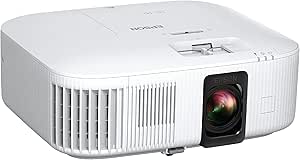
Epson Home Cinema 3800 4K PRO-UHD 3-Chip 3LCD Projector with HDR Technology
The Epson Home Cinema 3800 is the strongest fit here for a screen-focused home theater where color and placement flexibility matter more than built-in streaming. Its 3-chip 3LCD design avoids rainbow artifacts, while 3,000 lumens gives it more room to handle ambient light than the Home Cinema 2350. Lens shift on both vertical and horizontal axes also helps fit the image to a room without relying as heavily on digital correction. The tradeoff is its large tabletop footprint, and it does not include a smart TV platform, so streaming may require another device. Compared with the compact, app-ready Epson 2350, the 3800 better suits a fixed theater setup; buyers prioritizing a simpler all-in-one experience may prefer the 2350 instead.
Pros:- 3-chip 3LCD image avoids rainbow effect and supports vibrant color
- 3,000-lumen brightness is more adaptable to some ambient light than the Epson 2350
- Vertical and horizontal lens shift provide useful placement flexibility
- Full 10-bit HDR and 4K PRO-UHD processing support detailed picture quality
Cons:- Large tabletop footprint can be difficult to accommodate in a compact room
- No built-in streaming operating system is listed
- The stated throw-distance minimum and maximum appear reversed in the supplied specs
Best for: Home theater owners who want bright, color-rich 4K PRO-UHD projection, flexible lens placement, and already have a streaming device or AV receiver.
Not ideal for: Small rooms or buyers seeking a compact projector with built-in streaming apps and minimal setup hardware.
- Resolution:3840 × 2160
- Brightness:3,000 ANSI lumens
- Contrast ratio:100,000:1
- HDR:Full 10-bit HDR
- Lens shift:Vertical and horizontal adjustment
- Connectivity:HDMI 2.0 (18 Gbps), Bluetooth
- Built-in speakers:Dual 10 W rear-firing speakers
- Maximum image size:300 inches
Our verdict“Choose the Home Cinema 3800 for a dedicated theater that needs bright 3LCD performance and lens flexibility, but skip it if compact size or built-in streaming is a priority.”
GO2 Upgrade 4K Short Throw Projector with VIDAA OS, 5000 ANSI Lumens, 65W Dolby Audio, and WiFi/Bluetooth
The GO2 stands apart from the Epson Home Cinema 3800 by bundling VIDAA streaming and 65W Dolby audio with a short-throw design. That combination suits a flexible family room or outdoor setup where an external streaming box and speaker system would add clutter. Its 1:1 throw ratio is useful when the projector must sit near the screen, and the listed 5,000 ANSI lumens suggest more brightness headroom than the Epson 2350. Still, the product information cautions that it is not for brightly lit rooms despite the lumen claim, so I would not treat the number as a guarantee of daylight performance. VIDAA also differs from Android TV; buyers who specifically want Google’s app ecosystem may prefer the Epson 2350. The native-resolution details are limited, so confirm image requirements before choosing it as a true 4K theater projector.
Pros:- 1:1 short-throw ratio supports large images from a closer position
- VIDAA OS provides built-in apps, voice control, and parental controls
- 65W Dolby audio may reduce the need for separate speakers in casual setups
- Two HDMI 2.1 inputs support modern connected equipment
Cons:- Product data does not clarify native resolution, so true 4K display capability is uncertain
- The description warns that it is unsuitable for brightly lit rooms
- VIDAA may not suit buyers who want Android TV or Google TV
Best for: Households wanting a short-throw setup with built-in streaming and strong onboard audio for evening movies, gaming, or occasional outdoor screenings.
Not ideal for: Buyers who need dependable viewing in bright daylight, require a clearly specified native 4K panel, or prefer Android TV or Google TV.
- Resolution:Listed as 4K; native resolution not specified
- Brightness:5,000 ANSI lumens
- Contrast ratio:50,000:1
- Throw ratio:1:1 short throw
- Audio:65 W Dolby Audio
- Operating system:VIDAA
- Connectivity:Wi-Fi, Bluetooth, 2 × HDMI 2.1, 2 × USB, AV, 3.5 mm
- Image size range:50–500 inches
Our verdict“Pick the GO2 for a close-placement, app-and-audio-in-one setup, but choose the Epson 3800 if clearly specified 4K PRO-UHD performance is your priority.”
Outdoor 4K Projector with VIDAA Live TV, 40W Dolby Audio, 920 ANSI Brightness, WiFi 6, Bluetooth 5.4, Netflix Compatibility, AI Voice Control & Auto Focus
The X9 Pro is better understood as an outdoor-friendly 1080p projector with 4K decoding than as a true 4K home theater display. Its native 1080p resolution is a clear step below the Epson Home Cinema 3800’s 3840 × 2160 specification, but the X9 Pro counters with a convenient VIDAA streaming platform, built-in live channels, and dual 20W speakers. That makes it an easier self-contained choice for casual backyard viewing, especially when quick setup matters: AI focus, 6D keystone correction, and obstacle avoidance reduce manual adjustment. At 920 ANSI lumens, though, it is best reserved for dark conditions rather than a lit living room. Choose the Epson 2350 or 3800 for a more theater-oriented 4K image; choose this model when portability of the experience and onboard entertainment matter more than native resolution.
Pros:- VIDAA includes listed streaming apps and more than 1,000 live channels
- Two 20 W Dolby speakers provide substantial built-in audio for outdoor use
- AI focus, 6D keystone correction, and obstacle avoidance simplify setup
- Wi-Fi 6 and Bluetooth 5.4 offer modern wireless connectivity
Cons:- Native resolution is 1080p, not 4K
- 920 ANSI lumens is better suited to dark viewing than bright rooms
- Large-screen HDR performance may not match a dedicated 4K theater projector
Best for: Viewers who want a self-contained projector for dark backyard screenings, with streaming apps, live channels, and strong built-in sound.
Not ideal for: Home theater buyers who expect native 4K detail or need a bright image in a room with substantial ambient light.
- Native resolution:1920 × 1080
- 4K support:4K decoding
- Brightness:920 ANSI lumens
- HDR:HDR10
- Audio:2 × 20 W Dolby Audio
- Operating system:VIDAA OS
- Wireless:Wi-Fi 6, Bluetooth 5.4
- Image correction:AI 6D auto keystone and obstacle avoidance
Our verdict“Choose the X9 Pro for convenient outdoor movie nights in the dark, not for a home theater where native 4K resolution is the main goal.”
Epson Home Cinema 2350 4K PRO-UHD Smart Streaming Projector with Android TV
The Epson Home Cinema 2350 is the more convenient living-room pick compared with the Home Cinema 3800: it pairs Android TV and Google Assistant with 4K PRO-UHD projection, so fewer external devices are needed for streaming. Its under-20 ms input lag also makes it a more gaming-oriented choice than the X9 Pro, whose native resolution is only 1080p. Like the 3800, its 3-chip 3LCD design avoids rainbow artifacts, though its listed 2,800-lumen brightness is lower and its contrast figure is supplied simply as “35,” making direct contrast comparison difficult. The compact tabletop form and vertical lens shift help with everyday placement, but the single 10W speaker is modest for a theater room. Buyers who prioritize stronger brightness and two-axis lens shift should look at the 3800 instead.
Pros:- Android TV and Google Assistant simplify streaming and voice search
- Under-20 ms input lag supports responsive console gaming
- 3-chip 3LCD technology avoids rainbow effect and supports accurate color
- HDR10 and HLG support provide compatibility with common HDR formats
Cons:- 2,800-lumen brightness is below the Home Cinema 3800’s listed 3,000 lumens
- Built-in 10 W speaker is limited for a dedicated theater room
- Supplied contrast ratio value of 35 is too incomplete for a useful comparison
Best for: Console gamers and streaming-focused households who want 4K PRO-UHD projection with Android TV in a compact tabletop package.
Not ideal for: Dedicated theater owners who want stronger brightness, horizontal lens shift, or robust built-in audio without adding speakers.
- Resolution:3840 × 2160
- Brightness:2,800 lumens
- Display technology:3-chip LCD
- HDR formats:HDR10 and HLG
- Operating system:Android TV with Google Assistant
- Input lag:Under 20 ms
- Speaker power:10 W bass-reflex speaker
- Lens shift:Vertical
Our verdict“Choose the Home Cinema 2350 if built-in Android TV and responsive gaming matter more than the 3800’s higher brightness and broader lens shift.”
4K Smart Projector with VIDAA OS, WiFi 6, Bluetooth 5.4, Dolby Audio, and AI Auto Focus
This VIDAA projector prioritizes convenience and broad app access over the detail and brightness expected from a dedicated 4K theater model. Although it accepts 4K decoding and supports HDR10+, its native resolution is 1080p; that is a meaningful distinction beside either Epson, both of which list 3840 × 2160 resolution. The 550 ANSI lumens rating also makes it a dark-room option, not a strong choice for daytime viewing. Where it makes a case for itself is ease: VIDAA, AI autofocus, keystone correction, Wi-Fi 6, and Bluetooth 5.4 keep setup and playback simple, while HDMI 2.1 with ARC/CEC adds useful equipment support. Compared with the outdoor X9 Pro, it has lower listed brightness but adds a specified range of mounting styles and a 300-inch maximum image size.
Pros:- VIDAA OS provides access to listed apps and live TV channels
- AI autofocus and 6D keystone correction help simplify setup
- Wi-Fi 6, Bluetooth 5.4, and HDMI 2.1 support current connections
- Desktop, ceiling, and wall mounting options suit varied layouts
Cons:- Native resolution is 1080p despite 4K decoding support
- 550 ANSI lumens limits use in rooms with ambient light
- Large maximum image size does not overcome the limited brightness and native resolution
Best for: A buyer seeking an easy-to-set-up VIDAA projector for a dark bedroom, den, or occasional outdoor viewing, with streaming apps and flexible mounting.
Not ideal for: Viewers wanting native 4K detail, a large bright-room image, or a projector as the centerpiece of a dedicated home theater.
- Native resolution:1920 × 1080
- Maximum resolution:3840 × 2160 decoding
- Brightness:550 ANSI lumens
- HDR:HDR10+
- Operating system:VIDAA OS
- Connectivity:Wi-Fi 6, Bluetooth 5.4, HDMI 2.1, 3.5 mm
- Maximum image size:300 inches
- Throw distance:4.5–16.4 feet
Our verdict“Choose this model for simple smart projection in a dark, flexible setup, but choose an Epson if native 4K PRO-UHD image quality is your priority.”
How We Picked
I ranked these options for home-theater use, weighing image technology and stated resolution alongside HDR support, brightness claims, placement flexibility, sound, and streaming usability. I gave more weight to models with a clear fit for a fixed viewing room than to outdoor-oriented models whose bundled apps, speakers, or portability may be more useful for casual viewing. I also treated manufacturer brightness and resolution language as claims to verify against the room and screen rather than as guarantees of real-world performance.
The Epson Home Cinema 3800 ranks first because its 3-chip 3LCD design and HDR positioning align most directly with a dedicated theater. The Epson Home Cinema 2350 follows for buyers who value integrated Android TV, while the GO2 Upgrade earns a distinct place for short-throw placement. The remaining smart and outdoor models rank lower for this use because their listings emphasize convenience, audio, or flexible placement more than dedicated-room image performance; the XuanPad’s native 1080p specification also makes its 4K support a different proposition.
| 4k projector for home theater | HDR | Connectivity |
|---|---|---|
| 4K Outdoor Projector with Goog | HDR10+ | Wi-Fi 6, Bluetooth 5.2, HDMI, USB-C, AirPlay, Miracast, Chromecast, 3.5 mm |
| XuanPad White Smart Mini Proje | — | HDMI, USB, dual-band Wi-Fi, Bluetooth 5.2, 3.5 mm audio |
| ONOAYO Outdoor Projector 4K wi | — | — |
| Smart Outdoor Projector with W | HDR10 | — |
| Smart 4K Projector with Google | — | — |
| Epson Home Cinema 3800 4K PRO- | Full 10-bit HDR | HDMI 2.0 (18 Gbps), Bluetooth |
| GO2 Upgrade 4K Short Throw Pro | — | Wi-Fi, Bluetooth, 2 × HDMI 2.1, 2 × USB, AV, 3.5 mm |
| Outdoor 4K Projector with VIDA | HDR10 | — |
| Epson Home Cinema 2350 4K PRO- | — | — |
| 4K Smart Projector with VIDAA | HDR10+ | Wi-Fi 6, Bluetooth 5.4, HDMI 2.1, 3.5 mm |
Factors to Consider When Choosing 4k Projector For Home Theater
Before choosing a model, I would start with the room rather than the feature list. A projector that suits a dark, fixed theater may be a poor fit for a bright multipurpose room, and built-in streaming cannot compensate for an image that is too dim or incorrectly sized. These checks help separate genuine home-theater priorities from convenience features.
Check What “4K” Means on the Specification Sheet
Projector listings may use “4K” for native resolution, pixel-shifting methods, or the ability to accept a 4K signal. Those descriptions do not promise the same amount of fine detail. The XuanPad, for example, identifies itself as native 1080p with 4K support, making it a different choice from a projector marketed around 4K PRO-UHD imaging. Check the exact resolution terminology before comparing models, and look for clear manufacturer documentation if the wording is vague. If you sit close to a very large screen, resolution differences may be easier to notice. If you mostly stream compressed video from farther away, placement and contrast may matter more to your viewing experience.
Match Brightness to the Room, Not Just the Number
Brightness needs depend on how much light reaches the screen, the screen size, and whether you can darken the room. A bright living room usually needs more light output than a dedicated room with controlled lighting, but a headline lumen figure alone cannot settle the choice. Manufacturers may use different measurement methods, so compare stated figures cautiously and look for independent testing when available. A larger screen spreads the projector’s light over more area, which can make an image look less vivid. Avoid paying extra for a high brightness claim if your room is already dark and your main priority is controlled movie viewing.
Measure Throw Distance and Screen Size Before Buying
Throw distance determines how far the projector must sit from the screen to create the size you want. A short-throw option such as the GO2 Upgrade can help in a shallow room, but “short throw” still has limits and does not mean it can sit anywhere. Measure from the planned lens position to the screen and check the model’s throw calculator or manual before ordering. Also account for ceiling mounts, furniture, ventilation, and the path of people walking through the room. A common mistake is choosing a screen first and discovering the projector cannot fill it from the available position. Lens shift and zoom can ease installation, but they cannot replace a suitable throw ratio.
Decide Whether Built-In Streaming Is a Priority
Integrated platforms such as Google TV, Android TV, or VIDAA can reduce the number of devices and cables in a simple setup. Their usefulness depends on the apps you watch, how long the manufacturer provides software support, and whether the interface remains responsive. App licensing can vary between models, so confirm access to your specific services rather than assuming every smart projector includes them. An external streaming device can be replaced or upgraded separately, which may be preferable if the projector itself has stronger image features. Buyers who mostly watch from a console, disc player, or streaming box may have little reason to rank onboard apps highly. Treat smart features as a convenience, not a substitute for checking picture performance.
Plan for Sound and Room Acoustics
Built-in speakers can make setup easier, especially for occasional viewing or outdoor use, but they rarely give the placement freedom or spatial effect of a separate sound system. Projector speakers also sit near the projector, which may put dialogue off-center from the screen or leave sound behind the audience. Check whether the model offers the audio connections and wireless formats your system needs before relying on its advertised Dolby Audio support. A soundbar can be a practical step up, while a receiver and separate speakers suit buyers building a dedicated theater. Remember to budget physical space and cables alongside the projector. A quieter image in a dark room may matter more than large speaker wattage claims for movie-focused use.
Weigh Setup Convenience Against Long-Term Flexibility
Autofocus, automatic keystone correction, and lens covers make a projector easier to move and start, but automatic geometry correction can reduce usable image detail when pushed heavily. For a fixed theater, a carefully aligned mount and optical adjustment can be preferable to frequent digital correction. Portable smart models favor quick setup; a dedicated-room projector may reward more planning with a stable image and cleaner installation. Consider how often you will move the unit, whether you can mount it permanently, and how accessible its filters or other maintenance points are. Check lamp or light-source details, replacement availability, and warranty terms before committing. Paying more makes sense when it buys a feature your room will use, not just a longer spec list.
Frequently Asked Questions
Is the XuanPad a true 4K projector?
The XuanPad is described as native 1080p with 4K support, so it can accept a 4K source but that wording does not establish native 4K image resolution. Buyers should distinguish signal compatibility from the resolution the projector displays. If fine detail on a large screen is a priority, compare the display technology and exact resolution claims of the Epson models as well. If portability and autofocus matter more, the XuanPad may still suit casual viewing. Check the manufacturer’s documentation for the precise image-processing method before purchase.
Should I choose the Epson Home Cinema 3800 or the Home Cinema 2350?
I would favor the Home Cinema 3800 for a dedicated theater where its 3-chip 3LCD design and HDR positioning are the main draw. The Home Cinema 2350 makes more sense if integrated Android TV is high on your list and you want streaming built into the projector. These are different priorities, not simply a better-versus-worse decision. Compare the installation requirements, available connections, and screen distance in each model’s manual. Choose based on which features you will use regularly in your room.
Can I use an outdoor-oriented smart projector as my main home-theater projector?
You can, especially if easy setup, onboard apps, or built-in sound matter more to you than a fixed cinema installation. Still, outdoor positioning and convenience features do not by themselves establish how well a projector handles dark-room contrast, fine detail, or HDR. Check independent image measurements and confirm that the model’s placement range fits your screen. For a regular movie room, the Epson models are more clearly positioned around home viewing. A smart outdoor model is a better match when you also plan to move it between rooms or use it outside.
Do I need a short-throw projector for a small home theater?
Not always: a standard-throw projector can work in a small room if its throw range matches the screen size and available distance. Short throw is useful when the projector must sit close to the wall, but it can be sensitive to screen flatness and placement, so measure before choosing. Compare the model’s throw ratio with your room rather than relying on the label alone. A short-throw projector may also cast shadows differently if people pass between it and the screen. The GO2 Upgrade is the lineup’s clearest short-throw choice, but it still needs a suitable layout.
Are built-in projector speakers good enough, or should I add a soundbar?
Built-in speakers can be adequate for casual watching, smaller rooms, or a setup where you want fewer devices. For regular home-theater use, a soundbar or separate speakers usually offer better placement relative to the screen and more room-filling sound. Wattage and Dolby branding alone do not tell you how dialogue will sound from your seating position. Check which audio outputs and wireless connections are supported before choosing an external system. If you already own a receiver or soundbar, favor compatibility over the projector’s speaker claims.
Conclusion
For a dedicated movie room, I recommend the Epson Home Cinema 3800 as best overall in this group. The Epson Home Cinema 2350 is my pick for buyers who want Android TV built in, while the GO2 Upgrade is best for a shallow room that calls for short-throw placement. Buyers seeking a compact, quick-to-set-up option can look at the XuanPad, but should be comfortable with its native 1080p specification despite 4K support. For best value, compare the actual features you need—especially streaming and placement—rather than treating any single smart or brightness claim as proof of theater performance. The best choice is the one that fits your room, screen, and source devices without asking you to compromise on the features you use most.
Halloween Picks

Govee Outdoor Halloween Projector Light, 3D Dynamic Visual Holiday Decor

Thuodo 8 FT Tall Halloween Inflatable Three-Headed Dragon with Built-in LEDs

Panefright Halloween Window Projector – Scary Projector for Spooky Decor
As an affiliate, we earn on qualifying purchases.