
TL;DR

Get audio and creator gear delivered free with Prime
- Fast, free delivery on millions of items
- Prime Video, Amazon Music and more included
- Member-only deals all year
Buying an AI workstation is faster and often more reliable today due to component shortages and bulk pricing. Building offers customization and control but demands time, expertise, and long-term maintenance. Hybrid options are increasingly popular as a balanced approach.
Imagine you need to deploy an AI model in just a few weeks. Do you build your own machine, pulling every lever from cooling to power, or buy a prebuilt system ready to run? The debate has shifted. It’s no longer just about saving money but about speed, reliability, and control.
In this article, you’ll see why the choice between building and buying isn’t black and white anymore. You’ll learn how recent market shifts make prebuilt options more attractive, and how a hybrid approach might suit your unique needs. Whether you’re a hobbyist, a startup, or an enterprise, understanding this tradeoff can save you time, money, and headaches.
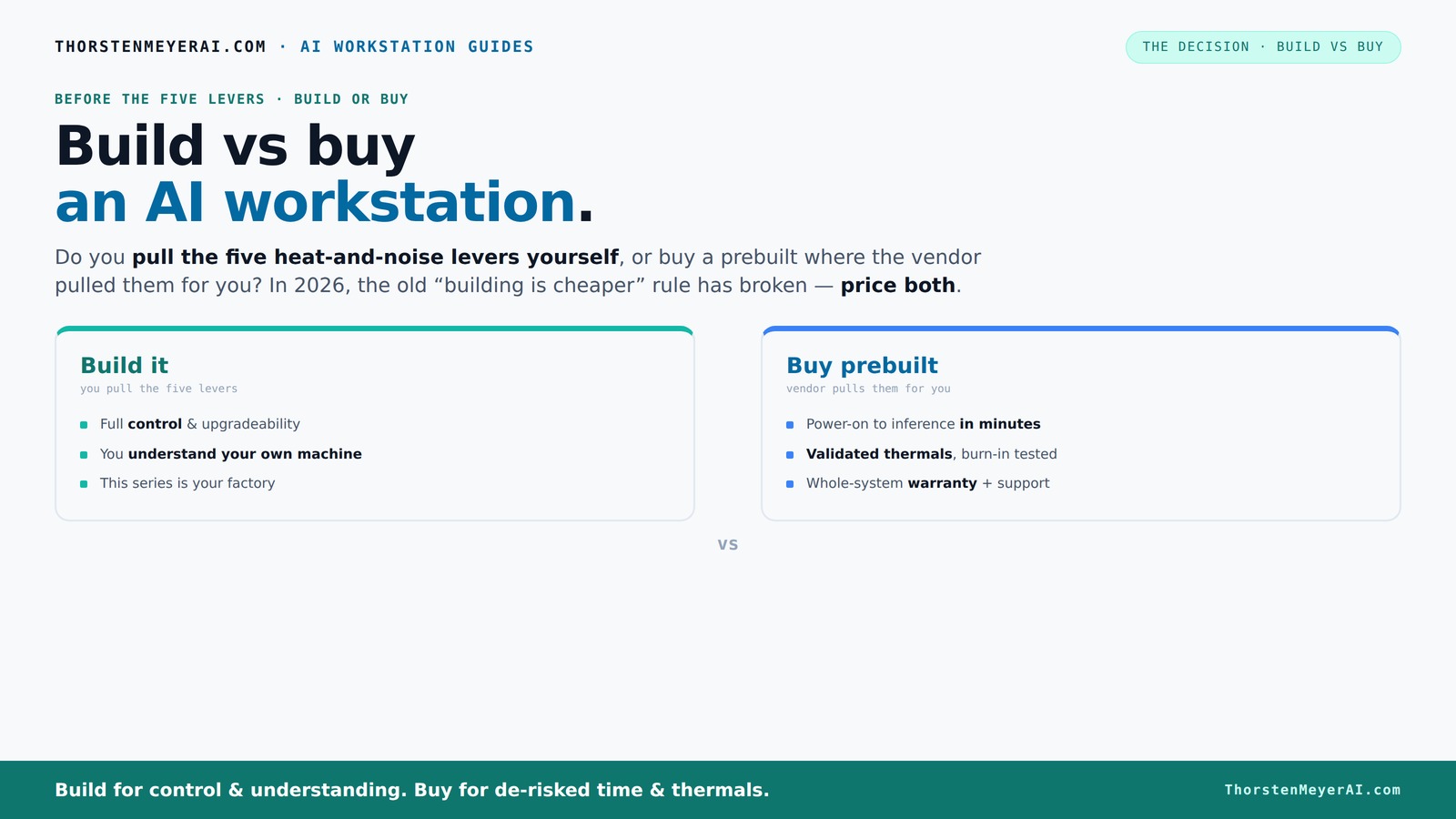
Build vs buy
an AI workstation.
The real question behind this whole series: do you pull the five heat-and-noise levers yourself, or buy a prebuilt where the vendor pulled them for you? And in 2026, the old “building is cheaper” rule has broken. Match your situation in Part 3.
Key Takeaways
- In 2026, component shortages have made prebuilt AI workstations often as affordable or cheaper than DIY builds, especially for high-end specs.
- Buying offers faster deployment—often within a few days—while building can stretch into months.
- Prebuilt vendors validate thermals, tune performance, and provide warranties—saving you time and risk.
- Building provides full control over hardware and security, ideal for sensitive or specialized workloads.
- Hybrid strategies are increasingly popular, combining quick deployment with tailored customization.
As an affiliate, we earn on qualifying purchases.
Why 2026 changes everything about build vs buy decisions
Building your own AI workstation used to be cheaper. Now, thanks to supply chain snarls and component shortages, prebuilt systems often cost the same or less. Major vendors bought bulk early, locking in prices before the spike. A high-end build that cost $1,000 in 2024 now easily hits $1,250 or more, while prebuilt options remain competitive.
For example, a top-tier GPU like the NVIDIA RTX 4090, which used to be a $1,600 component, now often costs over $2,000 in the DIY market due to shortages. Meanwhile, prebuilt systems from Lambda or Puget include these GPUs at a similar or lower price, with the added benefit of validated thermals and support.
As an affiliate, we earn on qualifying purchases.
The heat and noise: who really pulls the levers?
Managing heat and noise is the secret sauce of a high-performance AI workstation. It involves five levers: undervolting GPUs, matching coolers, optimizing airflow, tuning fans, and strategic placement. When you build, you control all these. When you buy, the vendor has already optimized them.
For instance, a prebuilt from BIZON undergoes 48 hours of burn-in testing, tuning fan curves to keep noise below 30 decibels during heavy loads. As a DIY builder, you can achieve this but only if you invest time and expertise. Sometimes, the factory-tuned solutions outperform DIY efforts, especially in multi-GPU setups.
Thermal management directly impacts performance longevity and energy efficiency. Poor cooling can cause thermal throttling, reducing GPU performance, and increasing energy costs. Noise levels influence workspace comfort and can be a critical factor in shared environments. Prebuilts often strike a balance optimized for most users, but building allows for tailored solutions that maximize performance and silence—if you have the skill and time to fine-tune.
As an affiliate, we earn on qualifying purchases.
Speed to deployment: why buying wins in 2026
If you need to get started yesterday, buying is the clear winner. A prebuilt AI workstation can be up and running in just a few days—sometimes less than a week. This rapid deployment allows for immediate testing, iteration, and scaling, which is crucial in competitive markets or urgent projects.
In contrast, building from scratch involves sourcing components, waiting for deliveries, assembling, testing, and tuning—all of which can stretch from several weeks to months. This delay can be costly, especially if your project timeline is tight or market conditions are volatile. The ability to quickly adapt and deploy can define your project's success, making prebuilt solutions more attractive in fast-paced environments.
Moreover, prebuilt systems often come with pre-installed software, optimized BIOS settings, and support, further reducing setup time and technical barriers. This rapid deployment not only saves time but also reduces the risk of configuration errors that could delay your project.
As an affiliate, we earn on qualifying purchases.
Cost analysis: is building still cheaper in 2026?
Traditionally, building your own AI workstation was viewed as a money-saver. Today, the math is different. Bulk buying and component shortages push prices upward. A DIY build with high-end GPUs, 128GB RAM, and fast NVMe storage now often costs just as much as, or more than, a prebuilt system that’s validated and comes with support.
Suppose you assemble a rig with two NVIDIA RTX 4090s, 256GB RAM, and a custom water-cooling loop. The total might reach over $5,000. Compare that to a prebuilt system from Puget, priced around $4,800, with a 3-year warranty and expert tuning. When you factor in the time spent sourcing parts, troubleshooting, and potential delays, the cost advantage of building diminishes significantly. Additionally, the added complexity and risk of compatibility issues can lead to unforeseen expenses and project delays, making prebuilt solutions more cost-effective in many cases.
Control and customization: why build still matters
Building your own machine means total control. You pick the exact CPU, GPU, memory, cooling, and even the case—matching your workflow perfectly. Want a super-quiet, water-cooled system with custom airflow? You do it.
This level of control allows for optimization tailored precisely to your workload, security standards, and future upgrade paths. For instance, a researcher working on sensitive data might design a system with hardware encryption modules, specific BIOS settings, or specialized cooling to meet strict security and operational standards. While prebuilt systems can be configured with some customization, they often lack the depth of control needed for highly specialized or sensitive tasks. This tradeoff between control and convenience is crucial in scenarios where compliance, security, and performance tuning are paramount.
Security, compliance, and long-term ownership
When your data or models are sensitive, building often wins. You keep everything on-premises, control updates, and avoid vendor dependencies. A startup developing proprietary AI algorithms might prefer to own every component to maintain strict security.
On the other hand, enterprises with compliance needs might rely on prebuilt vendors that meet standards like ISO, SOC, or GDPR, reducing their own workload. These vendors often provide audit trails, certifications, and support services that ease regulatory burdens. However, this reliance can introduce risks if vendor policies change or if hardware updates are delayed. Long-term ownership through building offers the advantage of full control over security protocols, hardware lifecycle, and data residency, which can be critical for sensitive applications. Conversely, prebuilt solutions often include built-in security features and certifications, but may limit customization or delay access to the latest security standards.
Operational complexity and support: who bears the burden?
Managing your own AI workstation means handling drivers, updates, cooling, and troubleshooting. You become the support team for your own hardware. This can be rewarding but demanding, especially if hardware issues arise or compatibility problems occur.
Prebuilt vendors take on that burden. They validate hardware, provide warranties, and often include support lines ready to troubleshoot issues. For example, Lambda’s systems come with 24/7 support and a dedicated team to handle failures, saving your team hours and headaches. This support reduces downtime and allows you to focus on your core work rather than hardware management, which can be a significant advantage for teams without deep hardware expertise or those seeking to minimize operational overhead.
Vendor lock-in vs. ownership: what’s your real risk?
Buying a prebuilt often means you depend on a vendor’s roadmap, firmware updates, and support policies. You’re locked into their ecosystem, which could limit flexibility down the line. If the vendor discontinues a product line or delays updates, your system might become outdated or unsupported.
Building gives you ownership. You control upgrades, hardware choices, and can adapt swiftly. But it also means long-term responsibility for maintenance, compatibility, and upgrades—potentially adding hidden costs. This risk requires careful planning and ongoing management but offers the flexibility to adapt to evolving needs and avoid vendor dependency.
Ultimately, the choice hinges on your capacity to manage long-term hardware and software lifecycle risks versus the convenience and potential limitations of vendor support and lock-in.
The hybrid approach: the best of both worlds?
More organizations are blending build and buy. They purchase a robust base system from a vendor, then customize storage, GPU configurations, or workflow tools. This approach offers quick deployment plus tailored performance.
For example, a company might buy a preconfigured system with high-quality cooling and then upgrade the GPU or add specialized drives to fit their workload. This strategy reduces initial setup time while allowing for future customization, balancing speed and control effectively. It also mitigates risks associated with fully custom builds or entirely off-the-shelf solutions. Hybrid approaches can be particularly advantageous for organizations seeking rapid deployment but with specific performance or security needs that require customization.
Frequently Asked Questions
Is it cheaper to build or buy a prebuilt AI workstation?
In 2026, component shortages have driven up DIY costs, making prebuilt systems often just as affordable or cheaper, especially when factoring in support and validation. Always compare specific configurations to make an informed choice.How much faster can I get started buying instead of building?
Buying a prebuilt can have you running within a week, whereas building from scratch might take 6 months or more, depending on sourcing and assembly time.What hidden costs come with building my own AI workstation?
Long-term costs include ongoing maintenance, troubleshooting, cooling, power management, and potential upgrades. Support and warranty costs can also add up if issues arise. These hidden costs can significantly impact total ownership and should be factored into your decision-making process.When does a prebuilt system make more sense than a custom build?
When speed, reliability, and support are critical—especially for production workloads or teams lacking deep hardware expertise—prebuilt options often provide the best balance. They reduce setup time, minimize compatibility issues, and come with vendor support, which can be crucial for maintaining uptime and meeting tight deadlines.How do I compare total cost of ownership over 3-5 years?
Factor in initial purchase price, support contracts, maintenance, upgrades, and downtime costs. Prebuilts with comprehensive support can reduce unexpected expenses and operational disruptions, but may have higher upfront costs. DIY builds might be cheaper initially but can incur significant hidden costs over time due to troubleshooting, parts replacement, and operational management. Analyzing these factors helps clarify which long-term approach offers the best value for your specific needs.Conclusion
Deciding whether to build or buy your AI workstation isn’t just about saving a few bucks anymore. It’s about matching speed, support, and control to your project’s needs. In 2026, most teams lean toward buying for quick wins, but those with unique requirements still find value in building.
Remember: your choice shapes your workflow, risk profile, and future scalability. The smart move? Weigh your priorities carefully, then choose what aligns best. Your next AI breakthrough might depend on it.
Halloween Picks
halloween
As an affiliate, we earn on qualifying purchases.